


















































Certification Courses
Hands-On Labs
Threat Intelligence
Latest Cyber News
MITRE ATT&CK Breakdown
All Cyber Keywords
Have you ever used the same password for your email, social media, and online banking? If your heart just skipped a beat, you're not alone. This single habit is the root cause of over 80% of data breaches. Welcome to the world of Credential Management – the most overlooked yet critical skill in your digital life.
Think of your online credentials (usernames and passwords) as the keys to your digital house. Poor credential management is like leaving a copy of your key under the doormat, in the flowerpot, and taped to the front door. In this guide, you'll learn: what credential management really means, why hackers target weak credentials, a step-by-step plan to lock down your accounts, and how to build habits that keep you safe forever.
Every day, you unlock your phone, log into email, check social media, and maybe do some online shopping. Each action requires credentials. These tiny pieces of data are the primary target for cybercriminals. According to Verizon's 2023 Data Breach Investigations Report, credentials are involved in nearly 50% of all breaches, often obtained through phishing or exploiting weak, reused passwords.
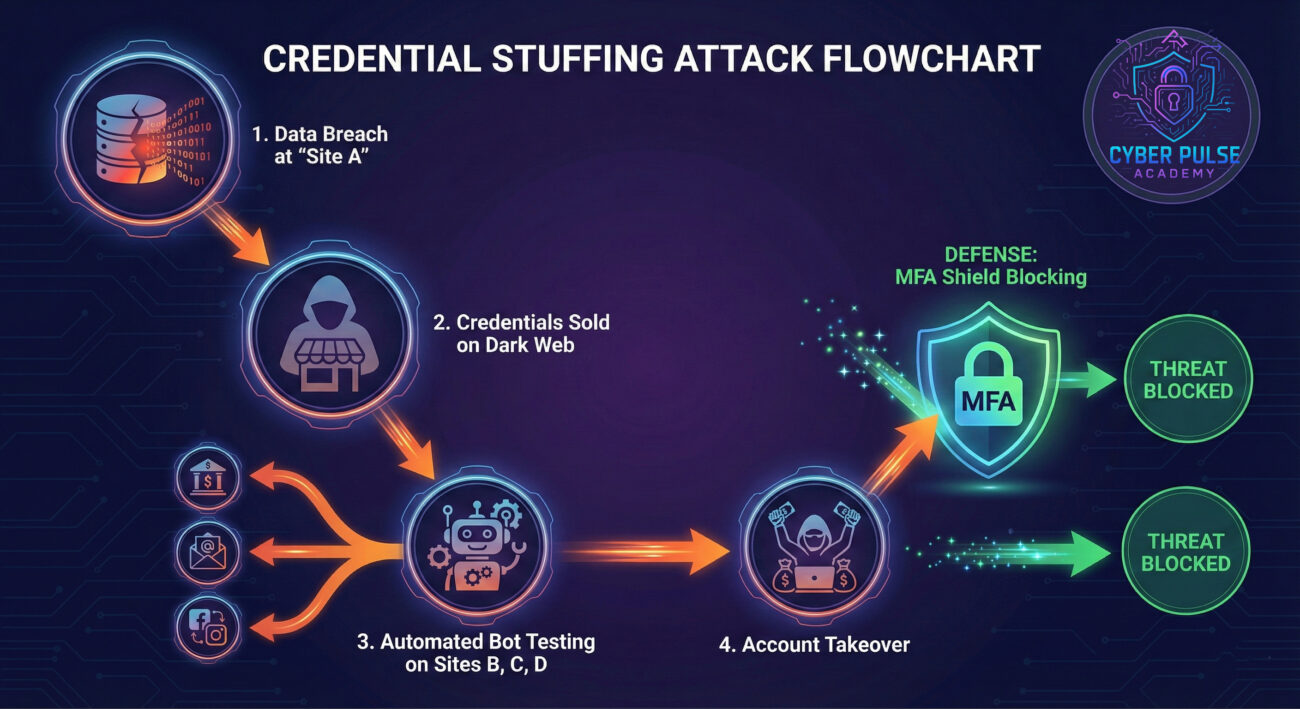
A major data breach at a popular website isn't just about that site. Hackers take the stolen emails and passwords and test them on hundreds of other sites – your bank, your email, your cloud storage. This is called credential stuffing. The Cybersecurity & Infrastructure Security Agency (CISA) calls strong credential hygiene the "first and most effective layer of defense." Proper Credential Management isn't just about creating one good password; it's the systematic, secure handling of all your digital keys throughout their entire lifecycle.
In your daily life, this means preventing unauthorized access to your photos, finances, and private messages. It stops a hacker from draining your bank account, impersonating you online, or locking you out of your own digital life. Mastering this skill is non-negotiable in today's connected world.
Let's break down the jargon into simple ideas you can grasp immediately.
| Term | Simple Definition | Everyday Analogy |
|---|---|---|
| Credential | A piece of information that proves your identity, like a username and password. | Your driver's license or house key. It says, "This is me, let me in." |
| Password Manager | A secure digital vault that generates, stores, and auto-fills strong, unique passwords for all your accounts. | A highly trusted, unbreakable safe where you keep all your unique keys, with one master key you memorize. |
| Multi-Factor Authentication (MFA) | A security process that requires two or more proofs of identity to log in (e.g., password + a code from your phone). | Needing both your bank card (something you have) AND your PIN (something you know) to withdraw cash. |
| Credential Stuffing | A hacker attack where stolen usernames/passwords from one site are automatically tried on many other websites. | A thief finds your house key, then tries it on every door in your neighborhood to see which ones it opens. |
| Encryption | The process of scrambling data so that only authorized parties with a "key" can read it. | Sending a letter in a locked, unbreakable box instead of on a postcard for anyone to read. |
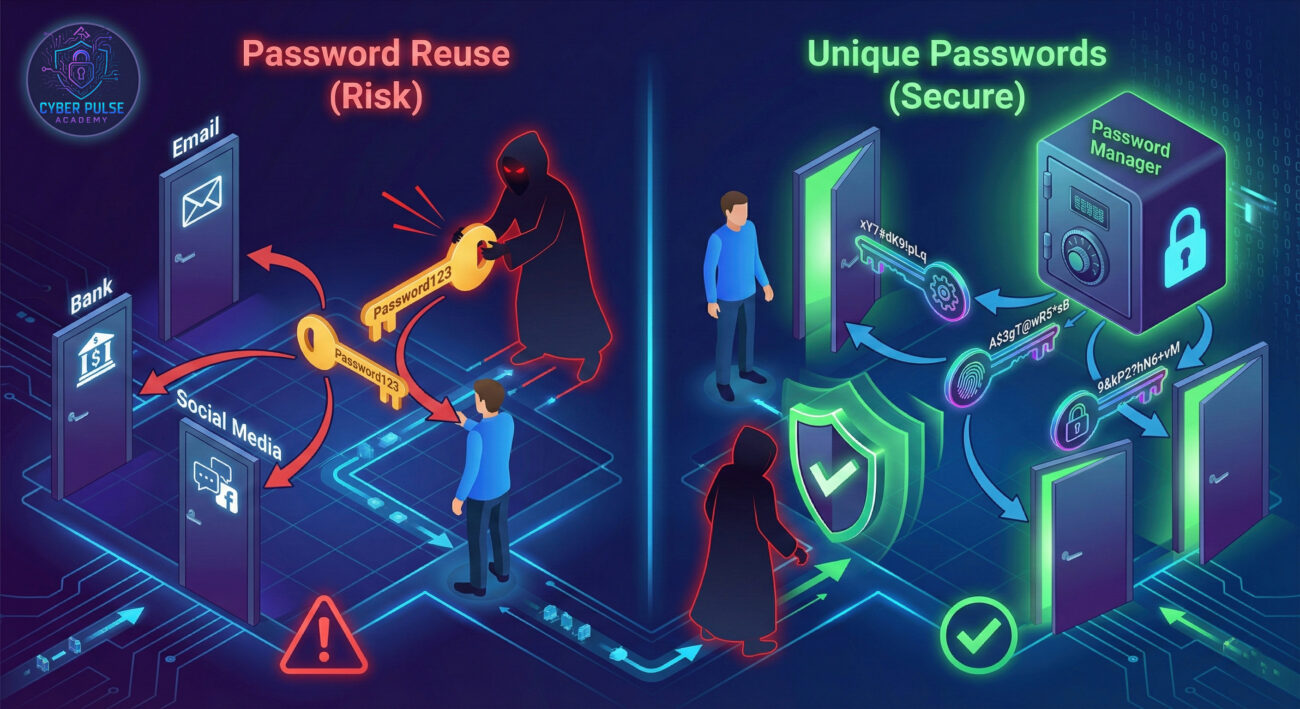
Sarah, a freelance graphic designer, loved convenience. She used the password "Sunflower!2021" for her email, Instagram, Adobe account, and even her online banking app. "It's easy to remember," she thought. One day, a phishing attack tricked her into logging into a fake Adobe portal. Hackers now had her email and password.
They didn't just stop at her Adobe account. Using automated tools, they tried that same email and password combination on dozens of other sites, a classic credential stuffing attack. Within hours:
| Time / Stage | What Happened | Impact |
|---|---|---|
| Hour 1 | Hackers accessed her primary email account (same password). | They could reset passwords for ANY other account linked to that email. |
| Hour 2 | They logged into her Instagram, posing as her to scam her followers. | Damaged reputation and lost trust with clients. |
| Hour 4 | They accessed her bank account (same password, no MFA). | $2,800 was transferred out before she noticed. |
| The Aftermath | Sarah had to spend weeks contacting banks, credit bureaus, and clients. She enabled MFA and got a password manager. | Financial loss, immense stress, and over 40 hours of recovery work. |
Sarah's story is not rare. It highlights how a single point of failure, password reuse, can cascade into a full-blown catastrophe. The solution wasn't just a new password; it was a new system for managing all of them.
Ready to build your digital fortress? Follow this actionable, step-by-step guide. You don't need to be tech-savvy, just committed to your safety.
This is the cornerstone of modern Credential Management. A password manager creates and remembers a unique, complex password for every single account you have. You only need to remember one strong master password.
MFA adds an extra layer of security. Even if your password is stolen, the hacker can't get in without the second factor (usually a code on your phone).
It's time to find and fix your weak spots. Your new password manager can help with this.
Xq8!$kL3*9pW@zN2).The strongest password is useless if you hand it to a hacker. Phishing is the #1 way credentials are stolen.
Credential Management is an ongoing habit, not a one-time task.
four-correct-horse-battery-staple).Understanding the attacker's mindset makes you a better defender. Let's look at one simple attack path and the counter-move.
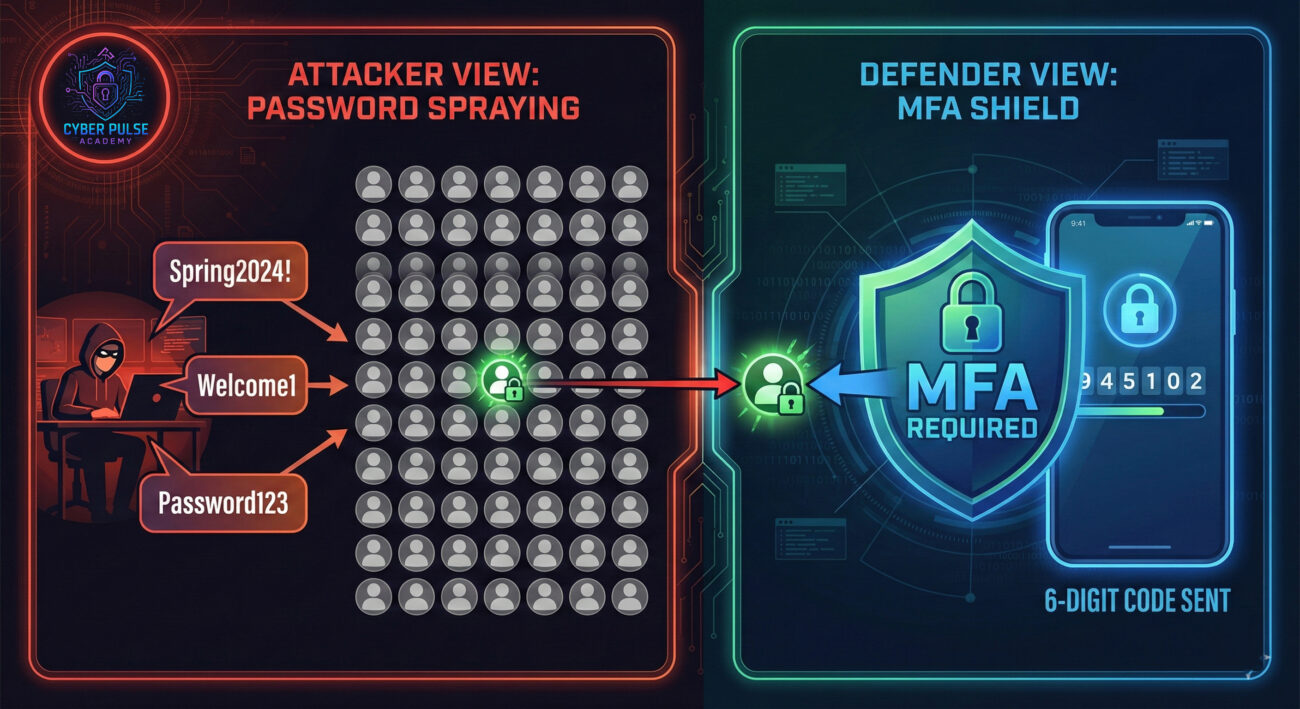
The Attack Path (Password Spraying): Instead of trying many passwords for one user (brute force), a hacker takes a few common passwords (like Spring2024! or Companyname123) and tries them against thousands of usernames/emails. They exploit the human tendency to use simple, predictable passwords. If just one person in a large organization used Spring2024!, the attacker gets in.
The Defender’s Counter-Move (Account Lockout & MFA): Defenders implement account lockout policies that temporarily disable an account after, say, 5 failed login attempts. This stops the automated "spraying." More importantly, they enforce MFA. Even if the attacker guesses a correct password, they are blocked without the second factor, turning their potential victory into a dead end and an alert for the security team.
Credentials are the easiest, most valuable target. We don't try to break down fortified walls (complex network security) if we can find a key under the mat. We look for low-hanging fruit: password reuse, weak default passwords, and users susceptible to phishing. A single set of valid credentials is a golden ticket, granting us the same access and trust as the real user. Our goal is to steal, buy, or trick our way into getting them, then move silently through a network.
Credentials are our primary vulnerability to manage and protect. We assume some will eventually be exposed (through breaches or phishing). Therefore, our strategy is layered defense: 1) Promote strong, unique passwords via managers, 2) Enforce MFA universally to neutralize stolen passwords, and 3) Monitor for anomalous login behavior (e.g., logging in from a foreign country at 3 AM). We aim to make each credential useless without additional, harder-to-steal factors.
You've now seen the full picture. Credential Management is not a technical chore; it's the fundamental practice of protecting your digital identity. By taking control, you shift from being an easy target to a resilient individual.
Your Action Plan Recap:
Remember, in cybersecurity, you are both the weakest link and the first line of defense. Good Credential Management empowers you to be the latter.
Don't let this be just another article you read. Take one action in the next 10 minutes. Download a password manager or enable MFA on your primary email. Have questions about getting started? Or a story about how managing your credentials saved you? Share your thoughts or questions in the comments below! Let's build a more secure community together.
Every contribution moves us closer to our goal: making world-class cybersecurity education accessible to ALL.
Choose the amount of donation by yourself.