


















































Certification Courses
Hands-On Labs
Threat Intelligence
Latest Cyber News
MITRE ATT&CK Breakdown
All Cyber Keywords
A Deep Dive into the Malicious npm Package that Targeted Workflow Automation Credentials and Cryptocurrency
In early 2026, cybersecurity researchers uncovered a sophisticated supply chain attack targeting users of n8n, a popular open-source workflow automation tool. This n8n supply chain attack exemplifies a modern threat actor's playbook: compromising a trusted component in the development ecosystem to steal sensitive data and cryptocurrency. The attackers published a malicious npm package named @n8n_io/n8n, impersonating the legitimate n8n software, to harvest credentials from developers' and organizations' environments.
The core of this attack was its clever abuse of trust. Developers relying on npm for dependencies might inadvertently install this malicious package, believing it to be a legitimate update or tool. Once executed, the package deployed obfuscated JavaScript that searched for and exfiltrated n8n configuration files, environment variables, and even targeted cryptocurrency wallets from the infected system. This incident is a stark reminder that our software supply chain is only as strong as its weakest link.
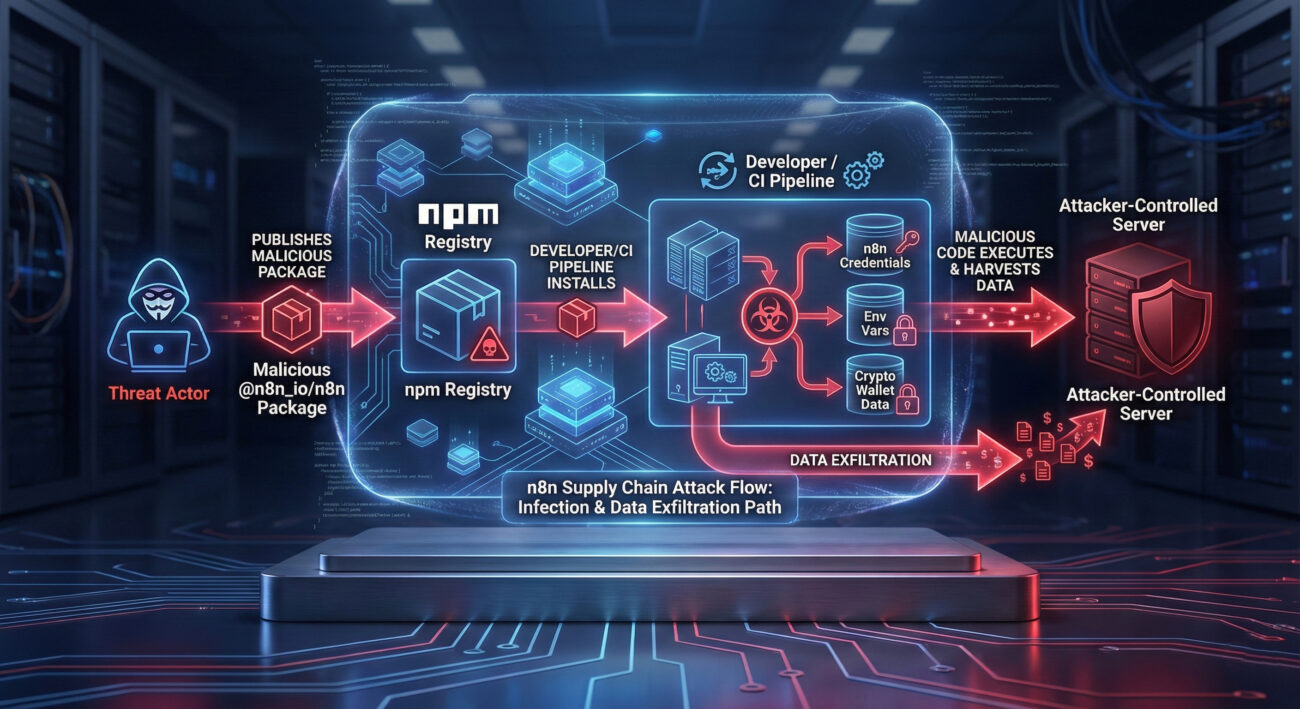
Let's break down the step-by-step attack sequence. Understanding this flow is crucial for both defenders to spot similar incidents and for security teams to build effective detections.
The threat actors created an npm package with a name deliberately chosen to confuse: @n8n_io/n8n. This mimics the legitimate n8n organization's scope (@n8n). They relied on "typosquatting" and brand impersonation, hoping developers would make a mistake in their package.json or run an incorrect install command.
Initial access was achieved when a developer or an automated Continuous Integration/Continuous Deployment (CI/CD) pipeline installed the malicious package. This could happen due to a typo, a malicious insider, or a compromised script. The package's postinstall script was the trigger, configured in package.json to execute immediately after installation.
The postinstall script executed a heavily obfuscated JavaScript file. This script began by conducting discovery on the host system. It specifically looked for:
~/.n8n).This was the core malware objective. The script parsed n8n's config files and stole database credentials, encryption keys, and API tokens. n8n often stores these in plain text or with basic encoding, making them a high-value target for attackers seeking to infiltrate the automation workflows, which may connect to countless other services.
The collected data, credentials, environment variables, and wallet info, was bundled and sent via an HTTP POST request to a hardcoded, attacker-controlled command and control (C2) server. The use of a simple HTTP request made it blend with normal network traffic, though the destination domain was often newly registered and suspicious.
Mapping this n8n supply chain attack to the MITRE ATT&CK framework helps standardize our understanding and align defenses with known adversary behaviors.
| MITRE ATT&CK Tactic | Technique (ID & Name) | How It Was Used in This Attack |
|---|---|---|
| Initial Access | T1195.002 - Supply Chain Compromise: Compromise Software Supply Chain | Attackers published a malicious package to the public npm registry, compromising the software supply chain for n8n users. |
| Execution | T1059.007 - Command and Scripting Interpreter: JavaScript | Malicious JavaScript code was executed via the npm package's postinstall script. |
| Discovery | T1083 - File and Directory Discovery | The script scanned the filesystem for n8n config directories, specific files, and cryptocurrency wallet data. |
| Credential Access | T1555 - Credentials from Password Stores | Targeted n8n configuration files and environment variables to harvest plaintext or encoded credentials. |
| Exfiltration | T1041 - Exfiltration Over C2 Channel | Collected data was sent over HTTP to an attacker-controlled server. |
To truly understand the threat, let's look at the technical mechanics. The malicious package's package.json defined a postinstall script that ran the attack.
The install.js file was heavily obfuscated, a common technique to evade static analysis. Deobfuscated, its core functions were:
fs module to search for specific paths.process.env to steal all environment variables.https or http module to POST stolen data to a remote server.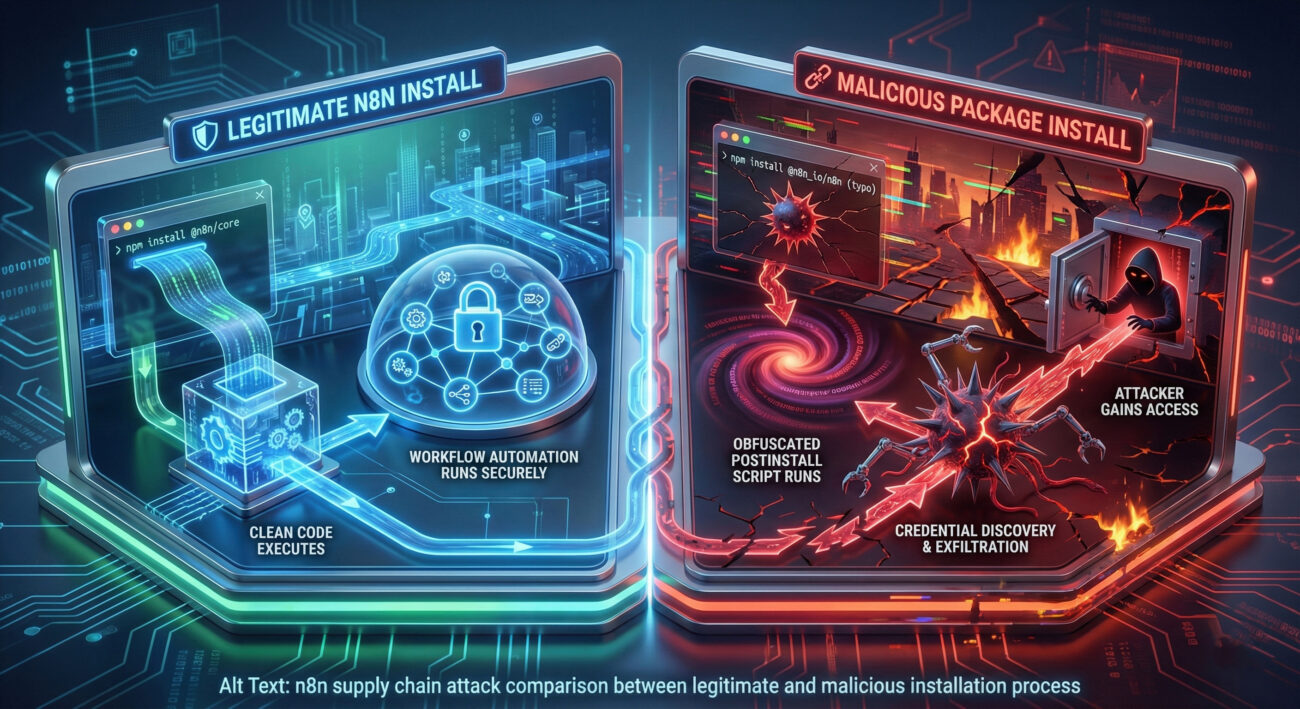
Understanding both sides of this n8n supply chain attack is key to building resilient systems.
Objective: Gain persistent access to automation workflows and sensitive data via credential theft.
Objective: Prevent installation of malicious packages and detect anomalous post-install behavior.
postinstall scripts making network calls.Here is a actionable, layered framework to defend against software supply chain attacks like this one.
Learn from the errors that make organizations vulnerable to such attacks.
A: Act swiftly. 1) Immediately disconnect the affected system from the network if possible. 2) Rotate all credentials that were stored on that system or accessible to n8n (database, APIs, cloud accounts). 3) Scan the system with updated antivirus/EDR tools. 4) Review your npm audit logs and CI/CD logs to understand the scope of installation. 5) Consider the system compromised and follow your incident response plan.
A: Verify the publisher and package name meticulously. The official n8n packages are scoped under @n8n (e.g., @n8n/core, @n8n/nodes-base). The malicious package used @n8n_io/n8n. Always check the "Publisher" information on npmjs.com, look for verification badges, and compare download counts and maintenance history with the official project page on GitHub.
A: Yes, the attack vector is generic. Any tool with a large user base, that stores sensitive credentials, and has components distributed via public package managers (npm, pip, etc.) is a potential target. The specific n8n supply chain attack exploited n8n's npm distribution, but the technique applies to any ecosystem. The defense principles (allow-listing, scanning, secrets management) are universal.
A: MITRE ATT&CK provides a common language and knowledge base. By mapping this incident to techniques like T1195.002, security teams can search for existing detections, threat intelligence, and mitigation advice related to those techniques. It helps move from a reactive stance ("we were hit by a malicious npm package") to a proactive one ("we need defenses against Software Supply Chain compromise").
1. The Supply Chain is a Prime Target: Attackers are increasingly shifting left, targeting the tools and dependencies developers trust. Your defenses must extend into your development and build pipelines.
2. Credentials in Automation are Crown Jewels: Workflow automation tools like n8n are entrusted with high-level access to numerous systems. Securing their configuration and secrets is not optional, it's critical infrastructure security.
3. Obfuscation is a Red Flag, Not a Defense: Legitimate open-source packages rarely use heavy code obfuscation. This is a major indicator of malicious intent and should be detected by SCA tools.
4. Defense is Multi-Layered: No single tool stops a sophisticated supply chain attack. Combine policy (allow-listing), prevention (secrets management), detection (SCA/SAST), and response (credential rotation) for resilience.
Don't wait for a breach to reveal your vulnerabilities. Take these concrete actions in the next 48 hours:
npm audit or use a free SCA tool on your most critical project.For continuous learning, follow reputable threat intelligence sources like The Hacker News, study the MITRE ATT&CK Framework, and review advisories from CISA.
© 2026 Cyber Pulse Academy. This content is provided for educational purposes only.
Always consult with security professionals for organization-specific guidance.
Every contribution moves us closer to our goal: making world-class cybersecurity education accessible to ALL.
Choose the amount of donation by yourself.