


















































Certification Courses
Hands-On Labs
Threat Intelligence
Latest Cyber News
MITRE ATT&CK Breakdown
All Cyber Keywords
Have you ever wondered how a simple click on a malicious link could drain your bank account without you entering any password? That's the terrifying reality of Cross-Site Request Forgery (CSRF), one of the most deceptive web attacks that exploits your browser's trust in websites.
In simple terms, CSRF tricks your browser into performing unwanted actions on websites where you're already logged in. Imagine your browser as a trusted assistant – CSRF is when a hacker forges your assistant's signature to make unauthorized requests.
In this essential guide, you'll learn: exactly what CSRF is through simple analogies, real-world examples of how it works, step-by-step protection methods, and best practices to keep your accounts safe. By the end, you'll understand this critical web vulnerability and how to defend against it.
What if I told you that right now, while reading this article, you could be just one click away from having your email, social media, or banking accounts compromised? This isn't science fiction – it's the reality of Cross-Site Request Forgery (CSRF), a web security vulnerability that allows attackers to perform actions on your behalf without your knowledge or consent.
CSRF works like this: when you're logged into a website (like your bank), your browser stores authentication cookies. If you visit a malicious site while still logged in, that site can secretly send requests to your bank using your stored credentials. Your bank sees the request as legitimate because it comes from your browser with your cookies. The result? Money transfers, password changes, or purchases you never authorized.
Think of it like this: You give your assistant (your browser) signed, blank checks (authentication cookies) to handle your banking. A malicious actor tricks your assistant into filling out and submitting those checks without your approval. By the time you notice, the damage is done.
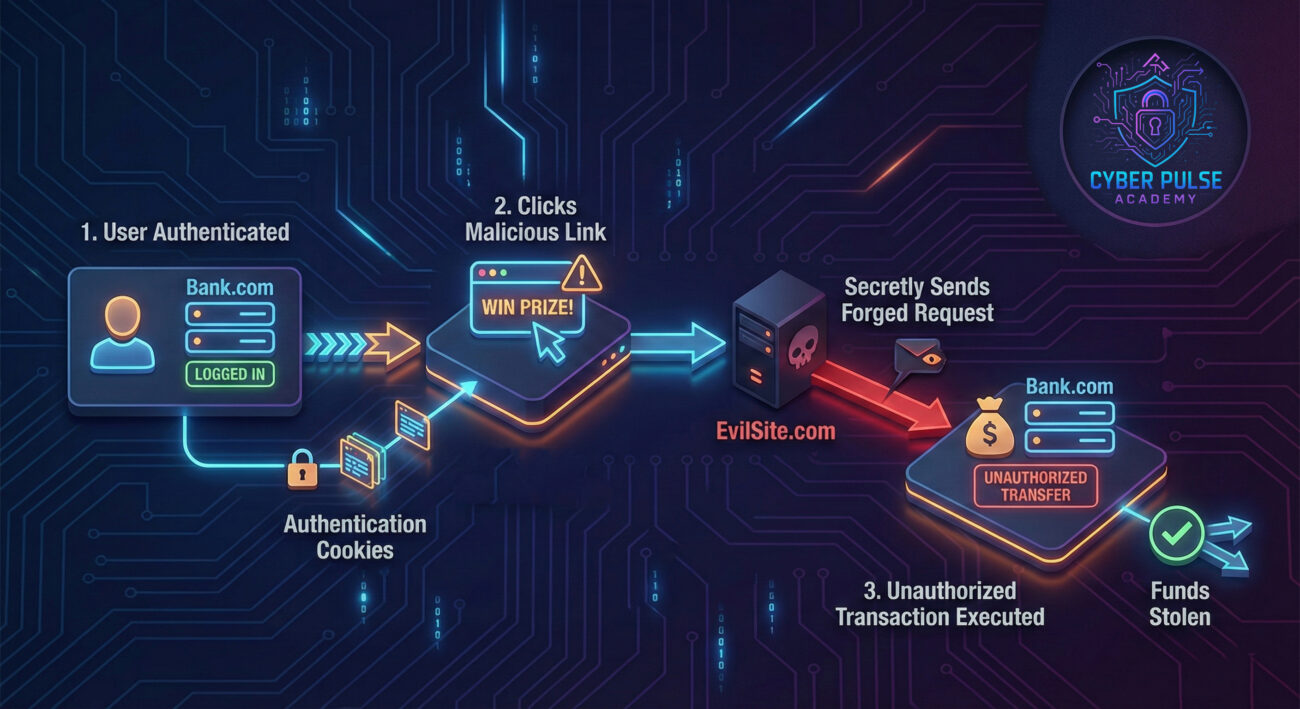
In our interconnected digital world, we're constantly logged into multiple services: email, social media, banking, shopping, and cloud storage. Each login creates an opportunity for CSRF attacks if those websites aren't properly protected. The risk is real and growing.
According to the OWASP Top Ten, CSRF has been a persistent web application security risk for over a decade. While modern frameworks include CSRF protection by default, countless legacy systems and improperly configured applications remain vulnerable. The Cybersecurity and Infrastructure Security Agency (CISA) regularly warns about web application vulnerabilities that can lead to account takeover and data breaches.
For everyday users, a successful CSRF attack could mean:
The scary part? You might not even know it happened until it's too late. Unlike phishing attacks that require you to enter information, CSRF works silently in the background, exploiting trust that's already established.
| Term | Simple Definition | Everyday Analogy |
|---|---|---|
| Cross-Site Request Forgery (CSRF) | An attack that tricks a web browser into executing unwanted actions on a trusted website where the user is authenticated. | A forger copying your signature on a check you already signed. |
| Authentication Cookie | A small piece of data stored by your browser that proves you're logged into a website. | A concert wristband that proves you paid for entry and can come/go. |
| Session Hijacking | When an attacker steals or uses your active session to impersonate you. | Someone finding your concert wristband and using it to get in. |
| CSRF Token | A unique, secret value that websites generate to verify that requests come from their own forms. | A one-time code texted to your phone to confirm a bank transfer. |
| Same-Origin Policy (SOP) | A browser security feature that restricts how documents or scripts from one origin can interact with resources from another origin. | A rule that only allows mail sent from your home address to access your mailbox. |
Let's meet Sarah, a freelance graphic designer who banks online with "SecureBank." One Tuesday morning, she checks her email while logged into her banking site in another tab. She receives what looks like a client inquiry with a link to view project details. Without thinking twice, she clicks it.
Unknown to Sarah, that link contained hidden code that silently sent a request to SecureBank's transfer endpoint. Because she was logged in, her browser automatically included her authentication cookies. The request transferred $2,500 from her savings to an overseas account. Sarah only discovered the breach two days later when checking her balance.
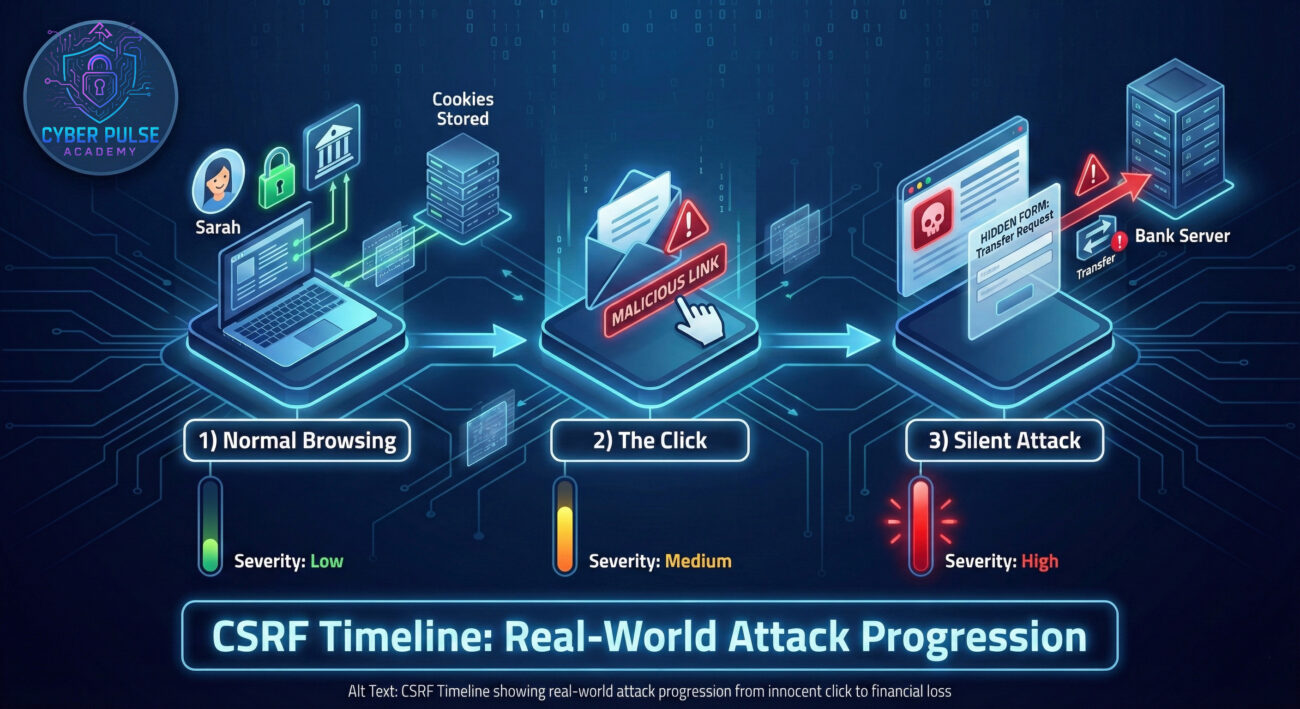
| Time/Stage | What Happened | Impact |
|---|---|---|
| 9:00 AM Normal Browsing |
Sarah logs into her SecureBank account to pay bills. Her browser stores authentication cookies. | She's vulnerable to CSRF while the session is active. |
| 10:30 AM The Trap |
Sarah checks email, finds a message from "potential client" with a link to view project details. | This is a malicious link disguised as legitimate business. |
| 10:31 AM The Click |
She clicks the link, which opens a harmless-looking page with hidden malicious code. | The page automatically submits a hidden form to SecureBank's transfer endpoint. |
| 10:31:05 AM Silent Attack |
Her browser sends the request with her authentication cookies. SecureBank processes it as legitimate. | $2,500 transfers to an overseas account without Sarah's knowledge. |
| 2 Days Later Discovery |
Sarah logs into SecureBank and notices the unauthorized transaction. | Financial loss, time spent resolving the issue, and loss of trust in online banking. |
This scenario shows how CSRF doesn't require stealing passwords – it exploits the trust between your browser and websites where you're already authenticated. The entire attack happened without Sarah entering any credentials or seeing anything suspicious.
Now that you understand the threat, let's build your defense. Whether you're a user wanting to stay safe or a developer building secure applications, these steps will help prevent CSRF attacks.
CSRF tokens are the most effective defense. They work by including a unique, unpredictable value with each form or request that must match what the server expects.
Modern frameworks like Django, Spring Security, and Laravel include built-in CSRF protection – enable it!
The SameSite cookie attribute tells browsers when to send cookies with cross-site requests, providing automatic CSRF protection.
SameSite=Strict for maximum security (cookies only sent in same-site requests)SameSite=Lax for a balance of security and usability (allows some safe cross-site requests)SameSite=None unless absolutely necessary for functionalityThis simple setting can block many CSRF attacks automatically. Check out our guide to cookie security for more details.
For additional protection, use both a cookie and request parameter that must match. This technique is especially useful for AJAX requests.
This approach ensures that only your actual site can generate valid request pairs.
For critical operations like money transfers or password changes, require users to re-enter their password or use multi-factor authentication (MFA).
This creates an additional layer that CSRF attacks cannot easily bypass.
Even with technical defenses, user awareness is crucial. Simple habits can prevent many CSRF attacks.
Remember: The shorter your login sessions, the smaller your CSRF attack window.
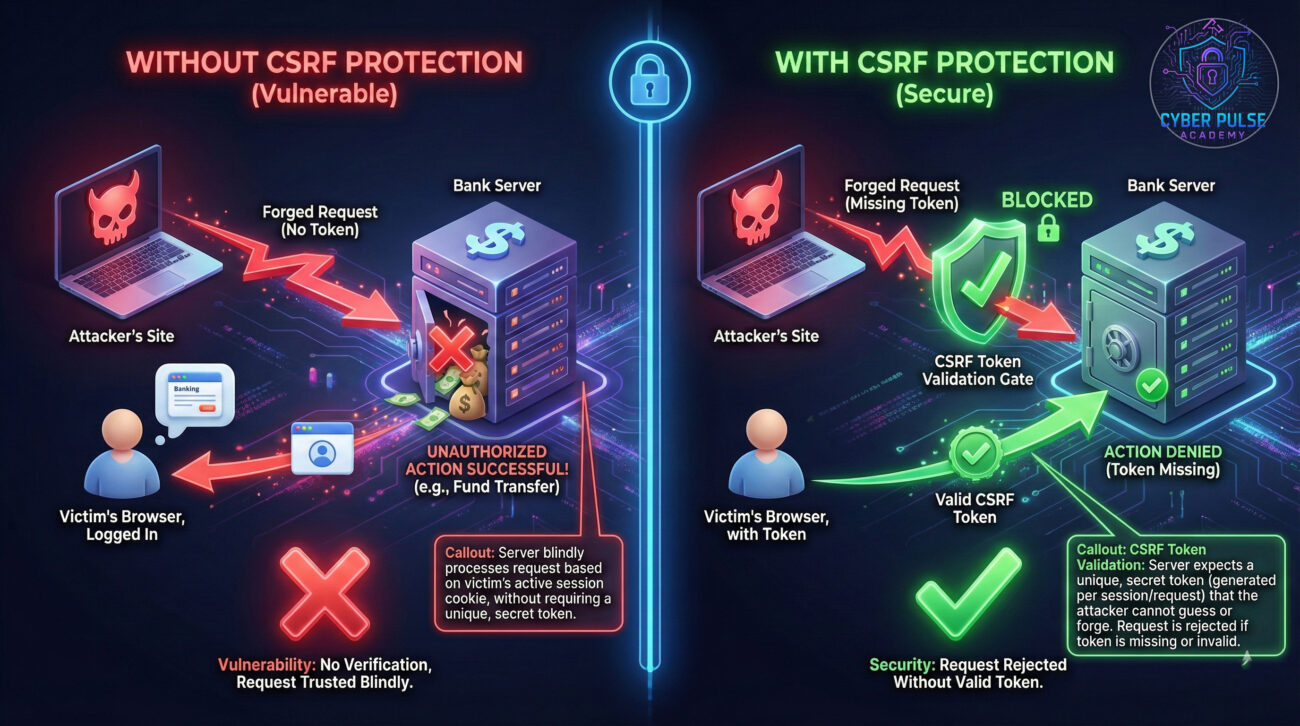
To defend against CSRF attacks, you need to think like an attacker. Let's walk through a simplified attack path a threat actor might take, and how defenders can counter it.
Attack Path: A threat actor identifies a banking application without CSRF protection on its money transfer function. They create a fake "investment opportunity" page that includes a hidden form targeting the bank's transfer endpoint. The form is pre-filled with the attacker's account details and a transfer amount. They then send phishing emails to bank customers, luring them to the investment page. When logged-in customers visit, the hidden form automatically submits, transferring money to the attacker.
Defender's Counter-Move: The bank's security team implements CSRF tokens on all transaction forms. Now, each form includes a unique, cryptographically random token that must be validated server-side. The attacker's hidden form lacks this token, so all forged requests are rejected. Additionally, they implement SameSite=Strict cookies and require re-authentication for transfers over $1,000, creating multiple defense layers.
For attackers, CSRF represents a golden opportunity: exploiting trust without needing to steal credentials. Red teams look for state-changing endpoints without CSRF protections – forms that process payments, change settings, or modify data. They craft malicious sites with hidden forms or automatic JavaScript requests, then lure victims via phishing or malvertising. The beauty (from their perspective) is the attack's stealth: victims might never know what happened. They particularly target applications that rely solely on cookie authentication without additional request verification.
Defenders see CSRF as a broken trust issue: the browser automatically sends credentials, but we can't trust that all requests are intentional. Blue teams implement multiple verification layers: CSRF tokens that prove requests came from our forms, SameSite cookies that restrict cross-origin requests, and re-authentication for sensitive operations. They monitor for unusual patterns – like financial transfers from new locations without preceding page views. Their goal is maintaining the delicate balance between security and usability while ensuring that every state-changing action is explicitly authorized.
You've now completed your crash course on Cross-Site Request Forgery (CSRF) – one of the web's most deceptive attacks that exploits trust rather than breaking it. Let's recap your key takeaways:
Whether you're a developer building applications or a user navigating the web, understanding CSRF helps you build and maintain secure digital experiences. For developers: always enable CSRF protection in your frameworks. For users: log out of sensitive sites and be cautious with links.
The web's convenience shouldn't come at the cost of security. By implementing proper CSRF protections, we can enjoy seamless experiences while keeping our accounts and data safe from these silent attacks.
What's your experience with web security? Have you ever encountered suspicious activity that might have been a CSRF attack? What security practices do you follow for your most important accounts?
Share your thoughts, questions, or experiences in the comments below! Let's continue the conversation about building a more secure web for everyone. If you found this guide helpful, consider sharing it with your developer friends or team members who might benefit from understanding CSRF protection.
Remember: Security is a shared responsibility. Every layer of protection we add makes the entire ecosystem stronger.
© 2026 Cyber Pulse Academy. This content is provided for educational purposes only.
Always consult with security professionals for organization-specific guidance.
Every contribution moves us closer to our goal: making world-class cybersecurity education accessible to ALL.
Choose the amount of donation by yourself.