


















































Certification Courses
Hands-On Labs
Threat Intelligence
Latest Cyber News
MITRE ATT&CK Breakdown
All Cyber Keywords
A critical vulnerability in legacy D-Link DSL routers, identified as CVE-2026-0625, is now under active exploitation in the wild. This D-Link router exploit allows unauthenticated remote attackers to execute arbitrary code, leading to a complete breach of the device. With a high CVSS score of 9.3 and impacting End-of-Life (EoL) models, understanding this attack is crucial for both security professionals and anyone managing home or small office networks. This guide provides a deep technical analysis, maps the threat to the MITRE ATT&CK framework, and offers actionable defense strategies.
On January 7, 2026, cybersecurity researchers disclosed that a severe flaw in legacy D-Link DSL routers is being actively weaponized by threat actors. The D-Link router exploit centers on the dnscfg.cgi endpoint, a web interface component used for configuring DNS settings.
The core issue is a command injection vulnerability. Because the router's software fails to properly sanitize user input sent to this endpoint, an attacker can "inject" malicious system commands. These commands are then executed by the router's operating system with high privileges.
The impacted models, including the DSL-2740R, DSL-2640B, DSL-2780B, and DSL-526B, are largely from the 2016-2019 era and have reached End-of-Life (EoL). This means D-Link will not release official patches, leaving every device permanently vulnerable. The first exploitation attempts were recorded in late November 2025, confirming that attackers are actively scanning for and compromising these devices. The primary goal of this exploit is often DNS hijacking, allowing the attacker to redirect, monitor, or malware-laden all internet traffic passing through the router.
To defend against a threat, you must first understand how it works. Let's dissect the technical mechanics of this D-Link router exploit step-by-step.
Consumer routers provide a web administration panel. Functions like setting WiFi passwords or DNS servers are handled by small scripts or programs called Common Gateway Interface (CGI) files. The dnscfg.cgi file is specifically designed to accept new DNS server addresses from the user and apply them to the router's configuration.
The vulnerability exists because the code behind this endpoint does not properly validate or "clean" the data it receives. Instead of treating the input as plain text for a configuration file, it inadvertently allows the input to break out of its intended context and be interpreted as a command for the underlying Linux shell.
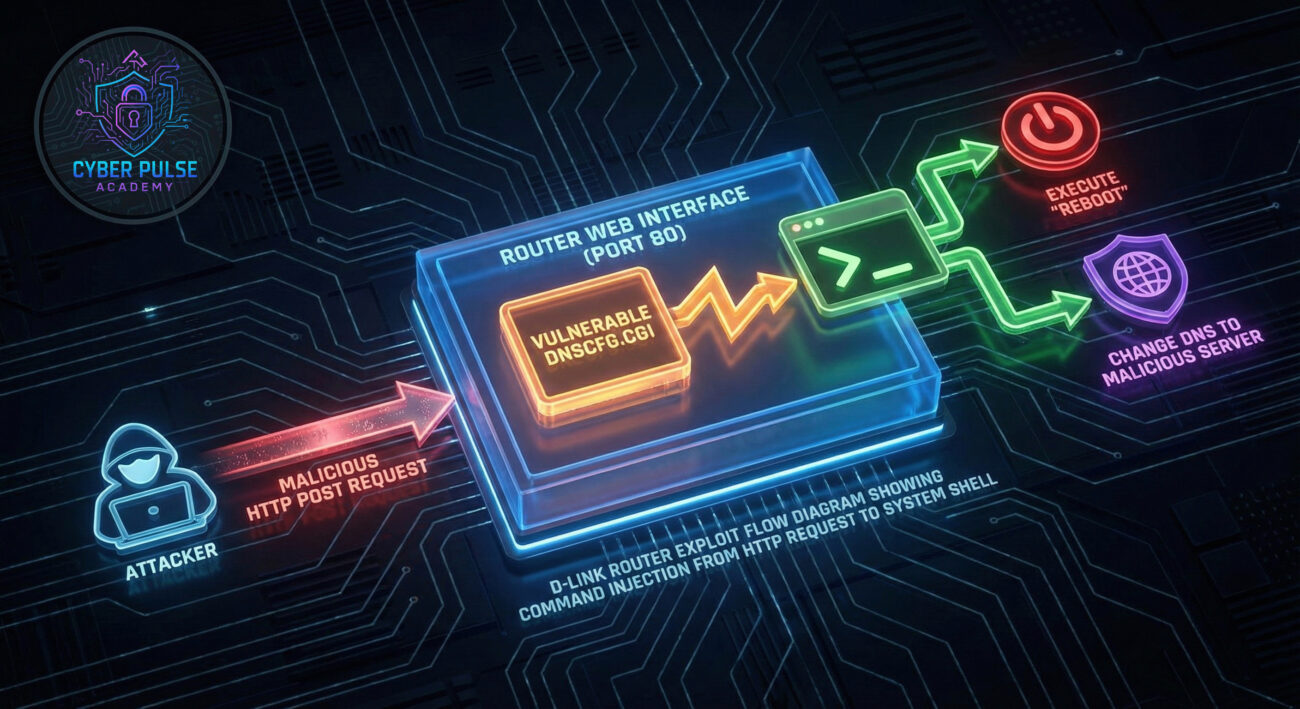
A normal, legitimate request to change the DNS server might look like this in the router's internal processing:
/usr/bin/dnscfg.cgi --dns1 "8.8.8.8" --dns2 "8.8.4.4"
An attacker exploits the flaw by submitting a specially crafted input for the DNS server field. They might input something like: 8.8.8.8"; reboot; ". The semicolon (;) is a command separator in Linux shells. Due to the lack of sanitization, the router's processing creates a disastrous command string:
/usr/bin/dnscfg.cgi --dns1 "8.8.8.8"; reboot; "" --dns2 "8.8.4.4"
The shell sees the semicolon, ends the intended dnscfg.cgi command, and then executes the reboot command inserted by the attacker. This is a simple example; real exploits use commands to download malware, establish persistent backdoors, or, most critically, change DNS settings to malicious servers controlled by the hacker.
The MITRE ATT&CK framework is a globally accessible knowledge base of adversary tactics and techniques. Mapping this D-Link router exploit to ATT&CK helps defenders understand the broader attack chain and implement detection at multiple stages.
| MITRE ATT&CK Tactic | Technique (ID & Name) | How It Applies to This Exploit |
|---|---|---|
| Initial Access | T1190 - Exploit Public-Facing Application | The attacker exploits the vulnerable dnscfg.cgi web endpoint, which is directly accessible from the internet on the router's WAN interface. |
| Execution | T1059 - Command and Scripting Interpreter | The command injection flaw allows the attacker to execute arbitrary shell commands (like reboot or wget to download malware) on the router's Linux system. |
| Persistence | T1543 - Create or Modify System Process | After gaining access, an attacker can modify startup scripts (e.g., /etc/rc.local) to ensure their malicious code runs every time the router boots. |
| Privilege Escalation | T1068 - Exploitation for Privilege Escalation | The exploit typically runs with the privileges of the web server process, which often already has high (root) privileges on embedded devices, so escalation is inherent. |
| Defense Evasion | T1070 - Indicator Removal | Attackers may clear router logs after compromising the device to erase evidence of their initial exploit and activities. |
| Command and Control (C2) | T1071 - Application Layer Protocol | Compromised routers can beacon out to attacker C2 servers using standard web (HTTP/HTTPS) or DNS protocols, blending with normal traffic. |
This mapping reveals that a single vulnerability can enable a multi-stage attack campaign. By understanding these tactics, blue teams can look for anomalies like unexpected outbound traffic from network infrastructure or changes to DNS settings on routers.
Let's translate this technical flaw into a concrete narrative to illustrate the severe impact of the D-Link router exploit.
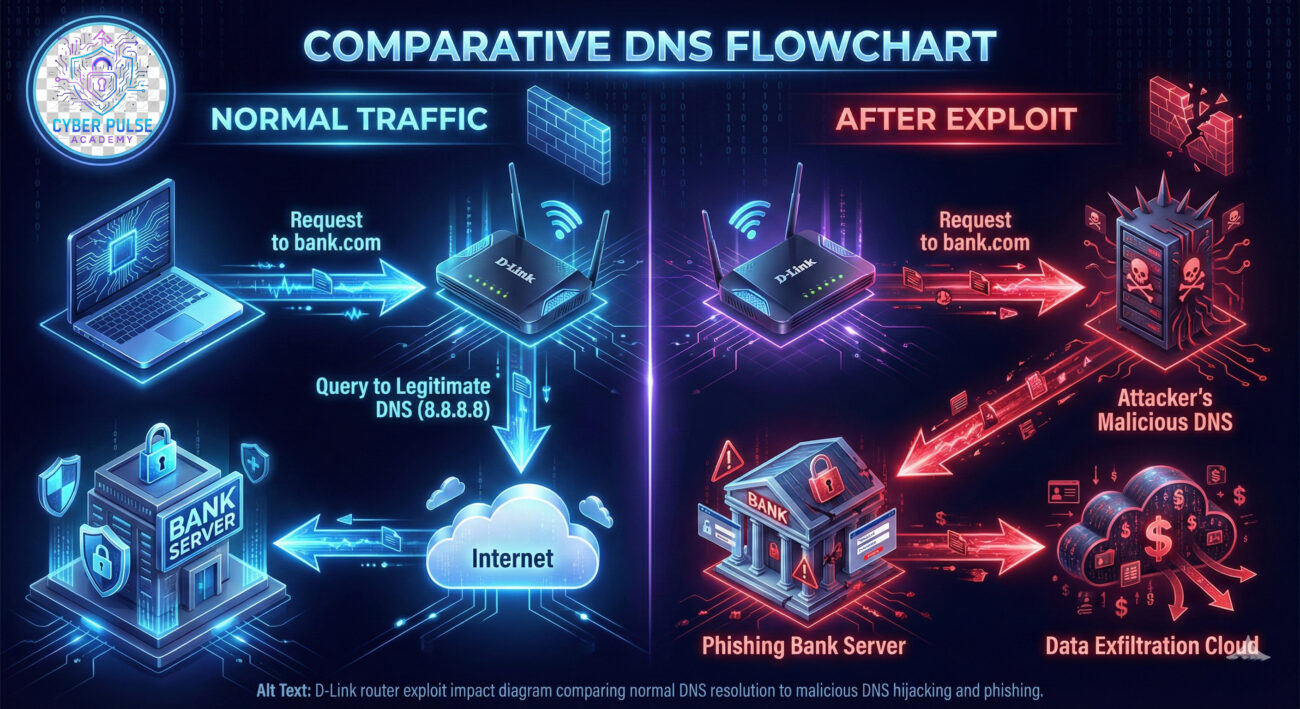
Act 1: The Initial Compromise. An attacker uses an automated scanner to find a legacy D-Link DSL-2740R router with its remote administration port (TCP 80) exposed to the internet. They send a crafted exploit payload to the dnscfg.cgi endpoint, which successfully changes the router's DNS settings to point to servers under their control.
Act 2: The Silent Redirect. When any user on the network (e.g., an employee working from home) tries to visit their company's email portal or online banking site, their device asks the compromised router for the website's IP address. The router, now using the attacker's malicious DNS servers, returns the IP address of a perfect phishing replica instead of the real site.
Act 3: The Payoff. The user, seeing a site that looks legitimate, enters their login credentials. These are captured by the attacker. Simultaneously, the malicious DNS can redirect all other traffic through a proxy, allowing the hacker to intercept unencrypted data or deploy malware to connected devices. This creates a persistent, network-level breach from a single unpatched device.
/dnscfg.cgi to change DNS settings.If you suspect you might be vulnerable, follow this actionable guide. Replacement is the ultimate solution, but these steps help you assess and mitigate risk immediately.
Check your network for affected models. Common methods include:
192.168.1.1 or 192.168.0.1) and find the model/firmware version in the status or admin section.nmap -sV [target-ip]) to fingerprint devices on your network. Look for HTTP titles containing "D-Link" and the model.If you find a vulnerable device, you cannot patch it. Take these steps to reduce attack surface while you plan for replacement:
This is the non-negotiable final step for any EoL device.
A: No. The affected D-Link models have been End-of-Life since early 2020. D-Link will not release an official firmware update to fix this D-Link router exploit. The only secure course of action is to replace the hardware with a currently supported model.
A: Safer, but not completely secure. Disabling remote (WAN) management blocks the most direct attack vector from the internet. However, if an attacker were to gain access to your local network (via a compromised laptop, for example), they could still potentially exploit the vulnerability from inside your network. Replacement remains critical.
A: You can perform a simple test. From a device connected to your network, visit a site like DNSLeakTest.com or WhatIsMyDNSServer.com. They will show you the DNS server your computer is actually using. Compare this to the DNS servers you configured in your router's settings. Any mismatch indicates a potential compromise.
A: Absolutely. Command injection is a common class of vulnerability in embedded devices, including routers from many manufacturers. The core lessons from this D-Link router exploit, managing device lifecycles, disabling unnecessary services, and monitoring for changes, apply universally to all network infrastructure.
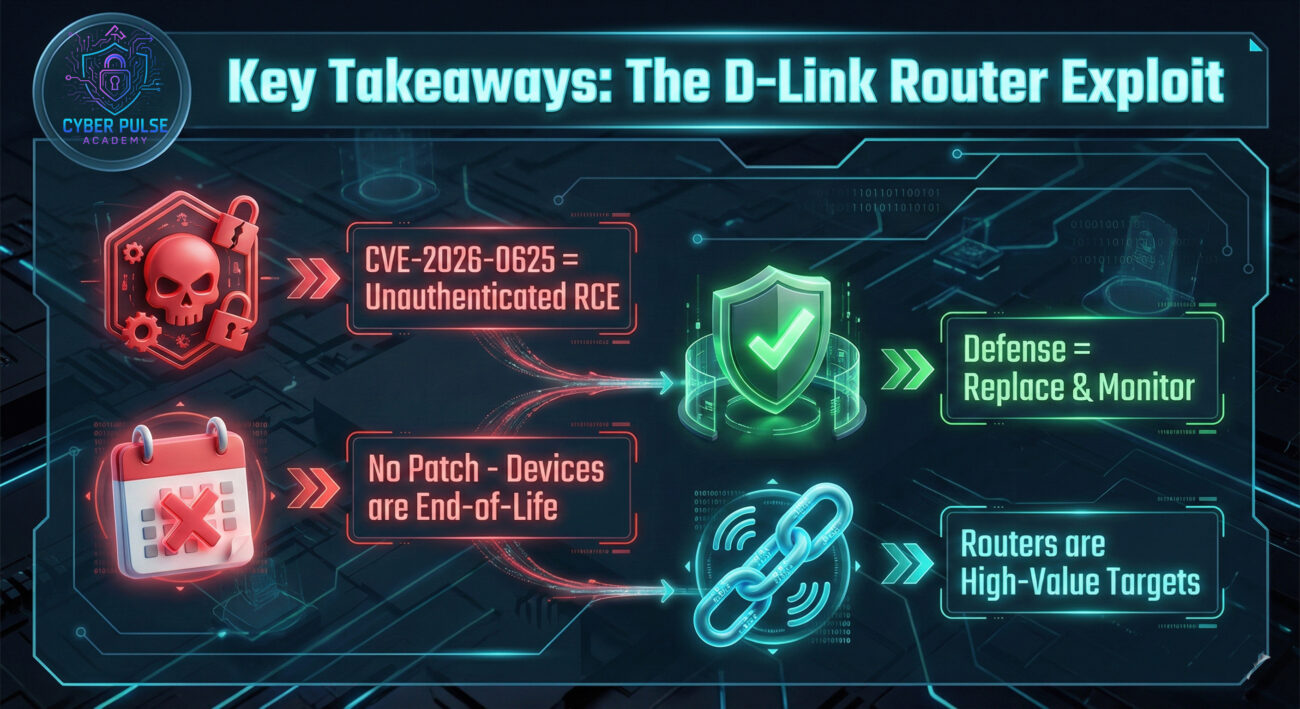
The active exploitation of CVE-2026-0625 is a stark reminder of the dangers posed by legacy, unmaintained hardware in our networks. This D-Link router exploit provides a masterclass in how a single, unpatched vulnerability can lead to a total network compromise.
Your Action Plan:
Cybersecurity is an ongoing process, not a one-time fix. By taking proactive steps to manage your network's hardware lifecycle and configuration, you build a resilient defense against not just this exploit, but the countless others that target foundational infrastructure. Start by checking your router model now.
© 2026 Cyber Pulse Academy. This content is provided for educational purposes only.
Always consult with security professionals for organization-specific guidance.
Every contribution moves us closer to our goal: making world-class cybersecurity education accessible to ALL.
Choose the amount of donation by yourself.