


















































Certification Courses
Hands-On Labs
Threat Intelligence
Latest Cyber News
MITRE ATT&CK Breakdown
All Cyber Keywords
Every click, every post, every account you create leaves a trace. This digital footprint is more than just a virtual shadow; it's a goldmine for cybercriminals. In what's known as a digital footprint attack, hackers systematically scour the internet for these traces to build a profile, identify vulnerabilities, and launch targeted attacks against individuals and organizations.
A digital footprint attack is not a single tool or malware. It's a methodology that leverages open-source intelligence (OSINT) and reconnaissance to turn your public online presence into an attack vector. Before a single malicious line of code is written, threat actors are piecing together your digital life, your job title on LinkedIn, your tech stack mentions on GitHub, your email in a data breach, your location from a social media check-in. This compiled intelligence fuels highly effective phishing, credential stuffing, social engineering, and even physical security breaches.
Your digital footprint consists of two main parts:
For cybersecurity professionals, this includes: email addresses, employee directories, technical forum answers (revealing internal tools), metadata in uploaded documents, and even badges in conference photos.
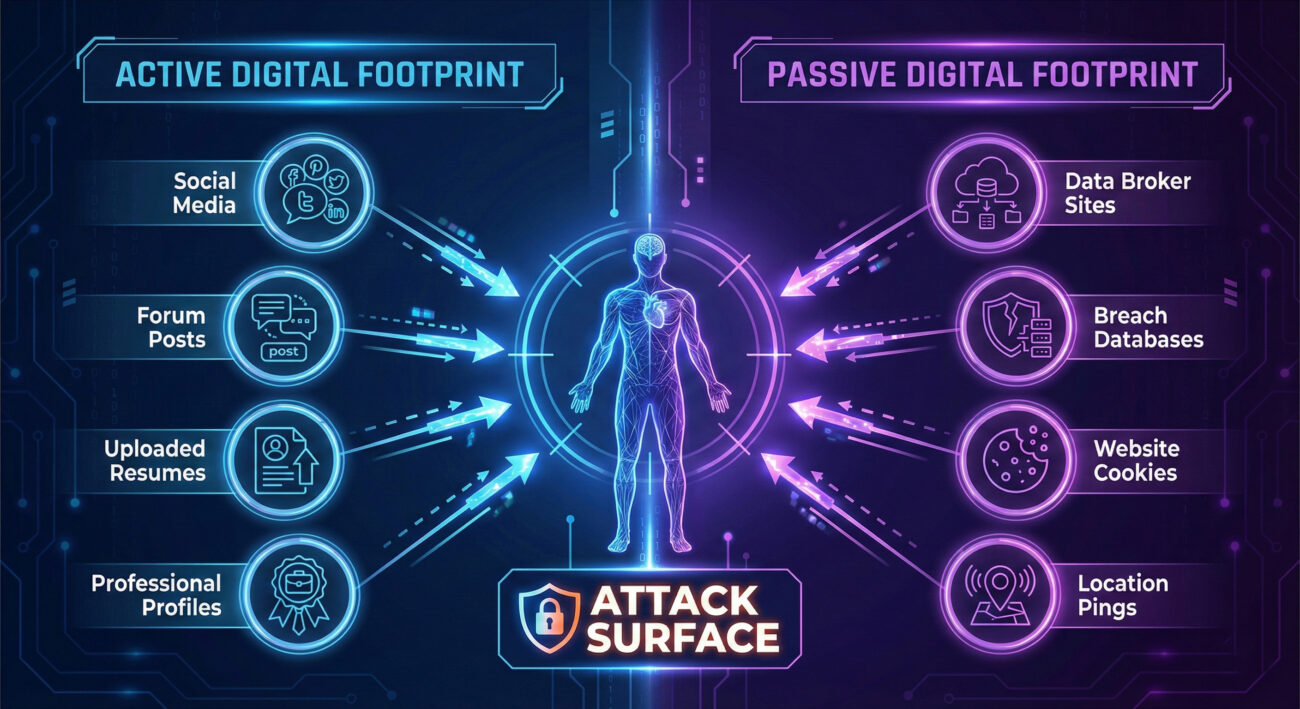
Here's a technical breakdown of how a digital footprint attack progresses:
The attacker uses automated OSINT tools and manual searches to gather data.
site:pastebin.com "targetcompany").Collected data is used to craft believable attack vectors.
The digital footprint attack maps directly to several techniques in the MITRE ATT&CK framework, primarily under the Reconnaissance and Resource Development tactics.
| MITRE ATT&CK Tactic | Technique ID & Name | How It Relates to Digital Footprint Attacks |
|---|---|---|
| Reconnaissance | T1593.001 - Search Open Technical Databases | Scanning GitHub for code leaks, Shodan for exposed devices, or domain registration (WHOIS) data. |
| Reconnaissance | T1589.001 - Gather Victim Identity Information | Collecting employee names, email addresses, and phone numbers from LinkedIn, company websites, or press releases. |
| Reconnaissance | T1596.005 - Search Victim-Owned Websites | Analyzing a target company's career page to identify software/hardware in use (e.g., "looking for an AWS expert"). |
| Resource Development | T1586.001 - Compromise Accounts | Using credentials from past breaches to take over personal accounts that might grant access to work resources (e.g., same password reused). |
Understanding this framework is crucial for defenders to anticipate and monitor for these precursor activities.
Let's trace a fictional but highly plausible attack chain:
A threat actor finds a mid-level manager at "TechCorp" on LinkedIn. The manager's profile lists they're "Excited to lead the migration to CloudProviderX!" and congratulates a colleague on a promotion.
The attacker crafts a phishing email posing as "CloudProviderX Support," referencing the migration. The email is sent to the manager's work email (format: [email protected], found on the company's contact page).
The manager clicks the link, entering their corporate credentials on a convincing fake login page. The attacker now has valid credentials.
Using these credentials, the attacker accesses the network, moves laterally, and eventually deploys ransomware. The initial entry point was entirely enabled by public digital footprint data.
Take proactive control. Follow this actionable guide:
Search for yourself (and your key employees) across multiple engines and platforms. Use incognito mode.
For a Red Teamer, a digital footprint is the starting point for every engagement. It's about efficiency: why brute force a door when you can find the key under the mat? Tools like Sherlock (for username hunting) and Recon-ng automate the collection. The goal is to build a "target package" with emails, potential passwords, social connections, and technical hints to craft a believable pretext for initial access.
The Blue Team must think like the attacker. This involves proactive monitoring for corporate data leaks (e.g., code on paste sites, employee credentials in breach dumps). Security awareness training must cover digital footprint risks. Defenders can also run footprint audits on their own organization to find and remove unnecessary exposed information before the adversary does. Tools like Digital Footprint Lab or commercial OSINT platforms can be used defensively.
Q: Can I completely erase my digital footprint?
A: Realistically, no. The goal isn't complete erasure (which is nearly impossible), but reduction and management. You can significantly shrink your attackable surface by removing unnecessary data and securing what remains.
Q: Is a digital footprint attack only a problem for executives?
A> Absolutely not. All employees are targets. An entry-level employee's credentials or system access can be the perfect foothold for a hacker to move laterally into a network.
Q: What's the single most important step I can take today?
A: Enable Multi-Factor Authentication (MFA) on your primary email account and password manager. This one action blocks the vast majority of automated credential-based attacks stemming from breached data.
Don't be a low-hanging fruit. Spend the next 30 minutes on your digital hygiene.
Your security starts with awareness. Share this guide with your team and start the conversation about digital footprint attacks today.
© 2026 Cyber Pulse Academy. This content is provided for educational purposes only.
Always consult with security professionals for organization-specific guidance.
Every contribution moves us closer to our goal: making world-class cybersecurity education accessible to ALL.
Choose the amount of donation by yourself.