


















































Certification Courses
Hands-On Labs
Threat Intelligence
Latest Cyber News
MITRE ATT&CK Breakdown
All Cyber Keywords
In the ever-evolving landscape of cybersecurity, attackers continuously refine their tradecraft, seeking the path of least resistance. One of the most persistent and effective techniques involves abusing trusted Windows mechanisms to bypass security controls. The recent exploitation of the popular c-ares DNS library via a DLL side-loading attack is a textbook example of this threat. This post will dissect this attack vector, explain its mechanics in beginner-friendly terms, and provide actionable defense strategies.
DLL side-loading is a hacker technique where a malicious Dynamic Link Library (DLL) is placed in a location where a legitimate, trusted application will load it instead of the intended, safe DLL. The recent campaign targeting the c-ares (C library for asynchronous DNS requests) software package perfectly illustrates this. Attackers bundled a malicious DLL named cyber.dll with the legitimate ares_init.exe tool. When executed, the legitimate executable, following standard Windows DLL search order, loads the malicious DLL, granting the attacker code execution within the context of a trusted process. This attack evades signature-based detection and leverages the trust associated with signed, legitimate software.
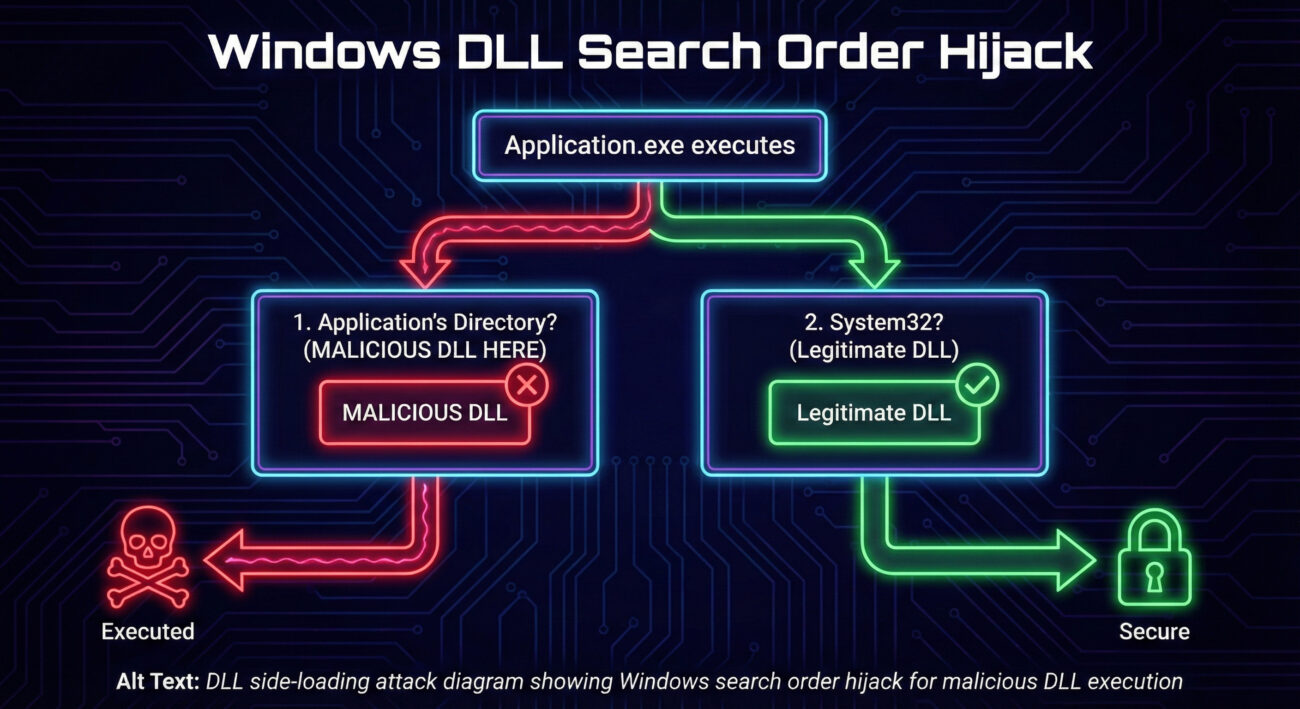
Imagine a trusted company van (legitimate.exe) that always picks up its driver (legitimate.dll) from a specific parking spot (System32 folder). A malicious actor learns this route and places an imposter driver (malicious.dll) in a parking spot closer to the van's starting point (the application's own folder). The van, simply following its standard "look for the driver" procedure, picks up the imposter first. That's DLL side-loading.
Technically, when a Windows application needs a DLL, it searches for it in a specific order (the DLL Search Order). The default order typically is:
C:\Windows\System32).The vulnerability arises when an application tries to load a DLL by name (e.g., cyber.dll) without specifying its full, safe path. If an attacker can place their malicious version of cyber.dll in a higher-priority search location (like the application's folder), it gets loaded instead of the legitimate one from System32.
The c-ares library includes a command-line tool, ares_init.exe, designed for testing and initialization. This tool depends on a DLL. Threat actors created a malware package containing:
ares_init.exe binary.cyber.dll file, crafted to be loaded by the executable.The attack likely spreads through phishing emails, malicious downloads, or compromised websites. When a user runs ares_init.exe (or is tricked into running it), the process follows the DLL search order. Since cyber.dll sits right beside the EXE in the same folder, it's loaded first. The malicious DLL's code then executes, potentially deploying a backdoor, stealing data, or downloading additional malware, all under the guise of a legitimate c-ares process.
The attacker delivers a ZIP archive or installer containing the legitimate ares_init.exe and the malicious cyber.dll. The user is socially engineered into extracting and running the EXE file.
Upon execution, ares_init.exe requests to load a necessary DLL module. It calls a standard Windows API (like LoadLibrary) for a DLL named "cyber.dll" (or similar).
Windows begins its search. It first checks the directory where ares_init.exe lives. It finds the attacker-placed cyber.dll there and stops searching. The legitimate version in System32 is never reached.
Windows loads the malicious cyber.dll into the memory space of ares_init.exe. The DLL's entry point function (DllMain) executes. This function contains the attacker's code, which now runs with the same privileges as the launched process.
The malicious DLL code can now perform its objectives: establish persistence, exfiltrate data, connect to a command-and-control (C2) server, or deploy a second-stage payload. All activity appears under the legitimate c-ares process name.
This attack maps clearly to the MITRE ATT&CK framework, a globally accessible knowledge base of adversary tactics and techniques.
| Tactic | Technique ID & Name | How It Applies to c-ares DLL Side-Loading |
|---|---|---|
| Defense Evasion | T1574.002 - Hijack Execution Flow: DLL Side-Loading | The core technique. Uses a legitimate executable to load a malicious DLL, evading application allowlisting and signature-based detection. |
| Execution | T1204.002 - User Execution: Malicious File | Relies on the user executing the delivered ares_init.exe file, often via social engineering. |
| Persistence | T1574.002 (also applies here) | The malicious DLL can be configured to execute its code every time the legitimate host executable is run, creating a persistence mechanism. |
| Privilege Escalation | T1574.002 | If the host executable (ares_init.exe) is run with higher privileges (e.g., by an admin), the malicious DLL code also executes with those elevated privileges. |
For a red teamer simulating an adversary, DLL side-loading is a prized technique.
Defenders must focus on disrupting the attack chain and detecting the anomaly.
C:\Program Files loading a DLL from a user's Downloads folder is a major red flag. Use Sysmon (Event ID 7: Image loaded) and SIEM correlation.CWDIllegalInDllSearch registry key or the SetDefaultDllDirectories() API call for custom applications.ares_init.exe from any location is dangerous.ares_init.exe on workstations should be investigated.CWDIllegalInDllSearch registry value to 0xFFFFFFFF to prevent loading from the current working directory. (Microsoft Documentation)%PROGRAMFILES%, %WINDIR%, etc.Build your defense in layers, following this actionable framework:
| Layer | Action | Tool/Technique |
|---|---|---|
| 1. Policy & Hardening | Harden the DLL Search Order across the enterprise. | Group Policy: Computer Configuration -> Administrative Templates -> MS Security Guide -> Configure DLL search order. |
| 2. Prevention | Restrict unauthorized code execution. | Deploy Windows Defender Application Control (WDAC) with a deny-by-default policy, incrementally allowing trusted software. (WDAC Guide) |
| 3. Detection | Monitor for anomalous DLL loads. | Sysmon Configuration (SwiftOnSecurity's config is a great start) alerting on DLL loads where ImageLoaded path is not in System32, SysWOW64, or approved application directories. |
| 4. Response | Have a playbook for suspected side-loading incidents. | Playbook steps: 1. Isolate host. 2. Capture memory & disk artifacts (MFT, prefetch, the suspicious DLL/EXE). 3. Analyze DLL metadata, imports, and behavior in sandbox. 4. Hunt for other occurrences using file hash (DLL/EXE) and parent process criteria. |
| 5. Awareness | Reduce the human attack surface. | Regular, engaging training on identifying phishing lures and the risks of executing unknown programs. Simulated phishing campaigns. |
A: Not exactly. It's an exploitation of a documented Windows feature (the DLL search order). The vulnerability often lies in application design (not specifying full DLL paths) or in environmental configurations (permissive file permissions). Microsoft provides features to harden against it.
A: Traditional signature-based AV may struggle because the host executable is legitimate. Modern Endpoint Detection and Response (EDR) solutions are better suited as they can detect the suspicious behavior (e.g., a process loading a DLL from a temp folder) using behavioral analytics.
A: Developers should:
SetDefaultDllDirectories(LOAD_LIBRARY_SEARCH_SYSTEM32) API to restrict DLL loading to secure directories.A: DLL Side-Loading and DLL Hijacking are often used interchangeably to describe this search order abuse. DLL Injection is a different technique where code is forcibly inserted into a running process's memory space, often requiring higher privileges or different APIs.
ares_init.exe with a malicious cyber.dll, demonstrating the practicality of this method.DLL side-loading is just one piece of the complex threat puzzle. To build a truly resilient security posture, continuous learning is key.
Next Steps:
Share this knowledge with your team, and start implementing these secure practices today. The cost of prevention is always lower than the cost of a breach.
© 2026 Cyber Pulse Academy. This content is provided for educational purposes only.
Always consult with security professionals for organization-specific guidance.
Every contribution moves us closer to our goal: making world-class cybersecurity education accessible to ALL.
Choose the amount of donation by yourself.