


















































Certification Courses
Hands-On Labs
Threat Intelligence
Latest Cyber News
MITRE ATT&CK Breakdown
All Cyber Keywords
Gathering victim domain properties is a reconnaissance technique where attackers collect technical and administrative information about an organization's internet domains before launching an attack. Think of it as a burglar casing a neighborhood by checking property records, security company signs, and daily routines before breaking in.
ATT&CK ID T1590.001
Tactics Reconnaissance
Platforms PRE
Difficulty 🟢 Low
Prevalence High
Imagine you're planning a sophisticated heist on a corporate headquarters. You wouldn't just show up and try the doors. You'd first gather public information: when does security change shifts? What's the company's official name? What vehicles are typically in the parking lot? Which doors are for deliveries? This is exactly what gathering domain properties entails in the digital world.
Attackers collect publicly available information about your organization's internet presence, domain names, registration details, mail server configurations, and associated subdomains. This information is all legally obtainable but becomes dangerous when used to map out attack vectors, craft convincing phishing emails, or identify outdated and vulnerable systems.
This technique is often the very first step in the cyber kill chain, occurring long before any malware is deployed or credentials are stolen. It's a low-risk, high-reward activity for threat actors that directly enables more dangerous follow-on actions like spear-phishing, credential stuffing, and brute-force attacks.
Before we dive deeper, let's demystify some common terms you'll encounter when discussing this reconnaissance technique.
| Term | Definition | Why It Matters |
|---|---|---|
| WHOIS | A query and response protocol used for querying databases that store registered users or assignees of an internet resource, like a domain name. | Reveals domain registrar, creation/expiry dates, and registrant contact information (often abused for social engineering). |
| DNS Records | Text instructions living in authoritative DNS servers that provide information about a domain (e.g., where email should be sent, which server hosts the website). | Exposes mail server (MX), name server (NS), and subdomain (A, AAAA, CNAME) information, mapping the target's digital infrastructure. |
| SPF/DKIM/DMARC | Email authentication protocols (Sender Policy Framework, DomainKeys Identified Mail, Domain-based Message Authentication Reporting & Conformance). | Reveals an organization's email security posture. Misconfigurations can be exploited for email spoofing and phishing campaigns. |
| Subdomain Enumeration | The process of finding subdomains for a target domain (e.g., dev.corp.com, vpn.company.com). | Uncovers hidden, development, or misconfigured web applications that are often less secure than the main website. |
| Passive DNS | Historical DNS record data collected from various points across the internet over time. | Allows attackers to see old, forgotten subdomains and IP associations that may still be active and vulnerable. |
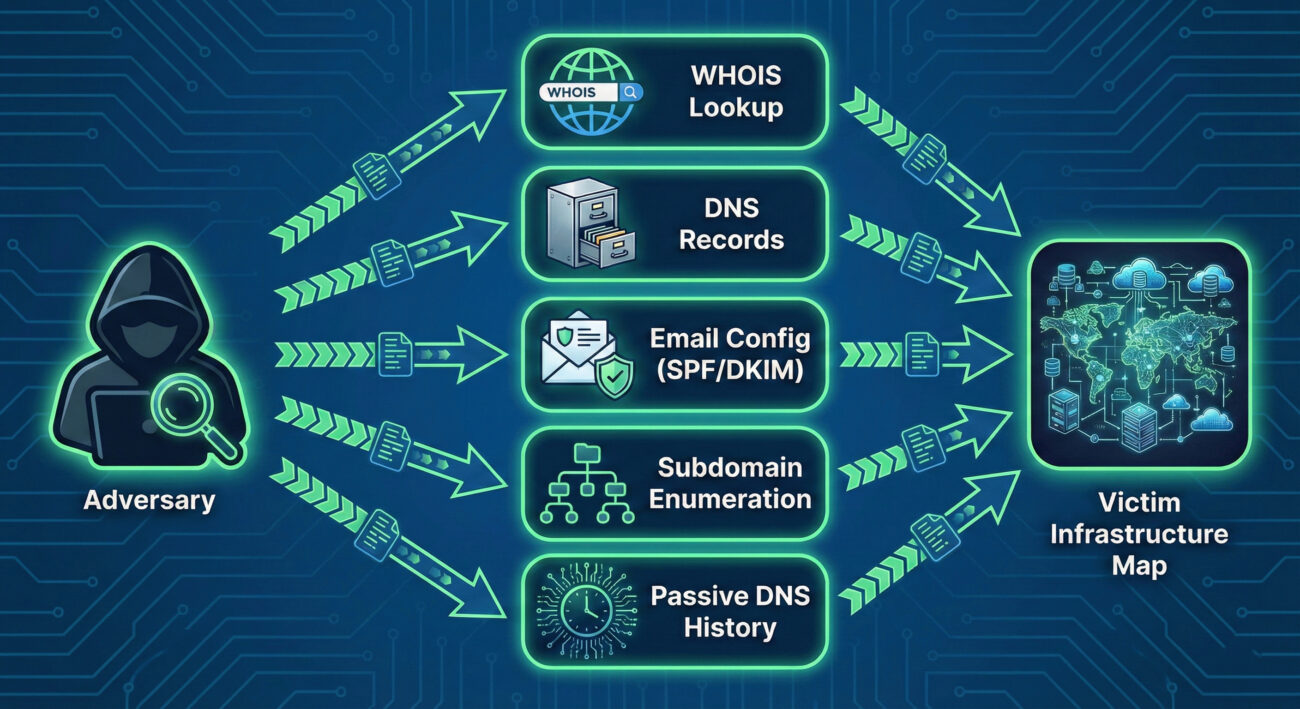
A threat actor conducting domain property reconnaissance follows a logical, layered process:
Think like a private investigator hired to gather dirt on a public figure, using only legal, open-source methods. Your goal isn't to break in (yet), but to build a comprehensive dossier. You scour property records (WHOIS), follow the subject's daily commute patterns (DNS traffic patterns), photograph all their known residences and offices (subdomains), and dig through old newspaper archives (Passive DNS) for forgotten addresses. Every piece of data is a potential lever for future manipulation or intrusion.
The mindset is one of patience and thoroughness. A red teamer knows that the time invested here pays exponential dividends later in the operation, reducing noise, increasing success rates for phishing, and revealing paths of least resistance.
Attackers use a blend of simple command-line utilities and powerful automated frameworks.
Common Tools:
Illustrative Commands:
# 1. Basic WHOIS lookup for registration info
whois example.com

# 2. Querying MX records to find mail servers
dig MX example.com +short
# Output might be: 10 mail.example.com

# 3. Using dig to get all DNS records (zone transfer attempt - often blocked)
dig ANY example.com @ns1.example.com

# 4. Checking SPF record to see authorized email senders
dig TXT example.com | grep spf
# Output might show: "v=spf1 include:_spf.google.com ~all"
The sophisticated Russian APT group known as APT29 (Cozy Bear, The Dukes), famously associated with the SolarWinds campaign, is a master of patient, thorough reconnaissance. In operations documented by cybersecurity firms, the group has been observed conducting extensive domain property reconnaissance long before launching their primary attacks.
They meticulously map target organizations' digital footprints, identifying not just primary domains but also subsidiary companies, acquired business units, and associated domain names. This intelligence allows them to craft highly convincing phishing lures and establish legitimate-looking but attacker-controlled infrastructure that blends in with the target's normal network patterns. This foundational work was critical to the success of their supply chain compromise against SolarWinds.
Reference: For an in-depth analysis of APT29's tactics, see the Mandiant Intelligence Profile on APT29.
Your job as a defender isn't to stop the reconnaissance, that's happening constantly in the public domain. Your job is to minimize its value and maximize its cost to the attacker. Think of yourself as the head of security for a celebrity. You can't stop paparazzi from taking public photos, but you can:
The detection philosophy shifts from "block the recon" to "understand the recon to predict the attack." A surge in DNS queries for your SPF record from a new region might precede a phishing campaign.
In a typical SOC, you won't see alerts titled "Domain Reconnaissance in Progress." Instead, you'll see subtle anomalies that require correlation.
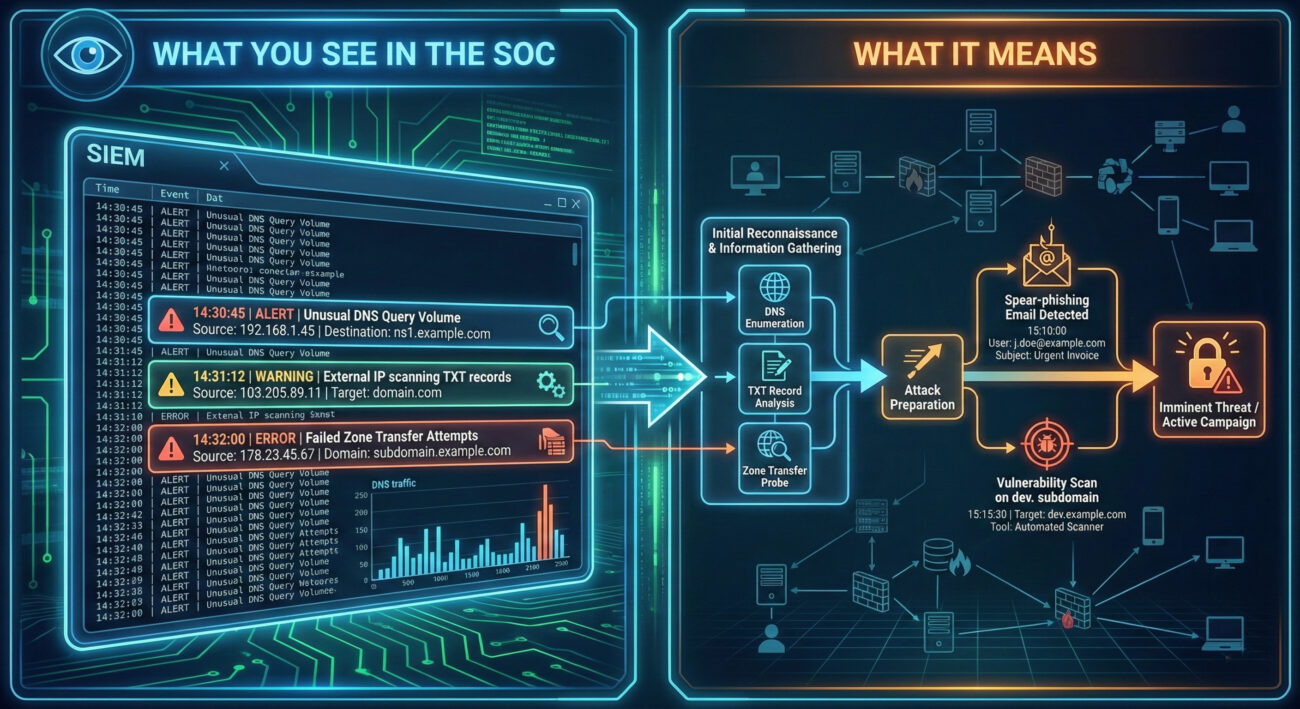
Here is a Sigma rule designed to detect potential subdomain enumeration activity. This rule looks for a high volume of unique DNS queries for a single target domain from a single source within a short timeframe, which is indicative of automated tools like Sublist3r or Amass.
# Sigma Rule: Potential DNS Subdomain Enumeration Activity
# Author: MITRE ATT&CK Field Guide
# Reference: T1590.001 - Gather Victim Identity Information: Domain Properties
# Log Source: DNS Server Logs (e.g., Windows DNS, Bind)
title: Potential DNS Subdomain Enumeration
id: a1b2c3d4-1234-5678-abcd-123456789012
status: experimental
description: Detects a high number of failed or unique NXDOMAIN responses for subdomains of a single parent domain, suggesting automated subdomain brute-forcing.
author: Blue Team
date: 2023/10/27
logsource:
    category: dns
detection:
    selection:
        rcode: NXDOMAIN  # Query returned non-existent domain
    aggregation:
        group_by:
            - src_ip
            - query  # The domain being queried
        count: query
        condition: count > 50  # Threshold: adjust based on baseline
        timeframe: 5m
    filter:
        - query|endswith: '.com'  # Focus on relevant TLDs, adjust as needed
        - '*/_tcp.*' not in query  # Filter out common SRV query noise
        - '*/_udp.*' not in query
    condition: selection and aggregation and filter
falsepositives:
    - Legitimate security scanners
    - Misconfigured applications
level: low
tags:
    - attack.reconnaissance
- attack.t1590.001You can't hide your domain, but you can control the information exposed and manage your assets proactively.
| Attacker Goal (Red Team) | Defender Action (Blue Team) |
|---|---|
| Find all subdomains to discover attack surfaces. | Maintain an accurate asset inventory and decommission unused subdomains. |
| Obtain admin contact info for social engineering. | Use WHOIS privacy services to obfuscate real contact details. |
| Identify mail server IPs and weak SPF/DMARC for spoofing. | Implement and enforce strict DMARC policies (p=reject) and monitor for failures. |
| Map the organization's digital infrastructure for planning. | Conduct regular external penetration tests to see what attackers see and remediate findings. |
| Find old/forgotten assets with lower security. | Perform quarterly external footprint audits using attacker tools (ethically). |
Sustained, high-volume DNS queries for TXT, MX, or ANY records, or a high rate of NXDOMAIN responses for subdomains from a single external IP address.
Enable WHOIS privacy, enforce a strict DMARC `reject` policy, and perform quarterly external footprint audits to find and secure assets before attackers do.
DNS server logs for NXDOMAIN spikes and ANY/TXT query patterns. Correlate recon activity with subsequent spear-phishing or vulnerability scan events.
Gathering domain properties is a pervasive, low-skill entry point into the cyber kill chain that enables almost every subsequent attack stage. While you cannot prevent it, you can drastically reduce its utility to adversaries through diligent security hygiene, proactive monitoring, and robust configurations.
Your next steps should be practical:
Reconnaissance sets the stage for all cyber attacks. By mastering the defense of this initial phase, you force attackers to work harder, make more noise, and increase their chances of being detected before they can cause real harm.
Every contribution moves us closer to our goal: making world-class cybersecurity education accessible to ALL.
Choose the amount of donation by yourself.