


















































Certification Courses
Hands-On Labs
Threat Intelligence
Latest Cyber News
MITRE ATT&CK Breakdown
All Cyber Keywords
Have you ever wondered what happens behind the scenes when you connect to a secure Wi-Fi network or VPN? That invisible handshake that grants you access while keeping hackers out is powered by Extensible Authentication Protocol (EAP) – the unsung hero of network security.
Extensible Authentication Protocol is a flexible framework that allows your devices to prove their identity before gaining network access. Think of it as a customizable security checkpoint that can use different types of identification methods depending on the situation.
In this guide, you'll learn: what EAP really is, why it's critical for your digital safety, the common types you encounter daily, how attackers might exploit it, and practical steps to ensure your connections remain secure.
Imagine you're trying to enter an exclusive club. The bouncer doesn't just check your ID – they have different verification methods: fingerprint scans for VIPs, facial recognition for members, or ticket validation for guests. Extensible Authentication Protocol works exactly like this digital bouncer for your network connections.
Developed in the late 1990s, EAP was designed as an authentication framework that could support multiple authentication methods without being tied to any single technology. This flexibility made it perfect for wireless networks, where security needs constantly evolve.
The brilliance of Extensible Authentication Protocol lies in its modular design. It provides the structure for the authentication conversation ("Who are you?" → "Here's my proof" → "You're verified") while allowing different "EAP methods" to handle the actual proof. Today, it's the foundation for secure Wi-Fi (WPA2/WPA3 Enterprise), VPNs, and even some wired network security.
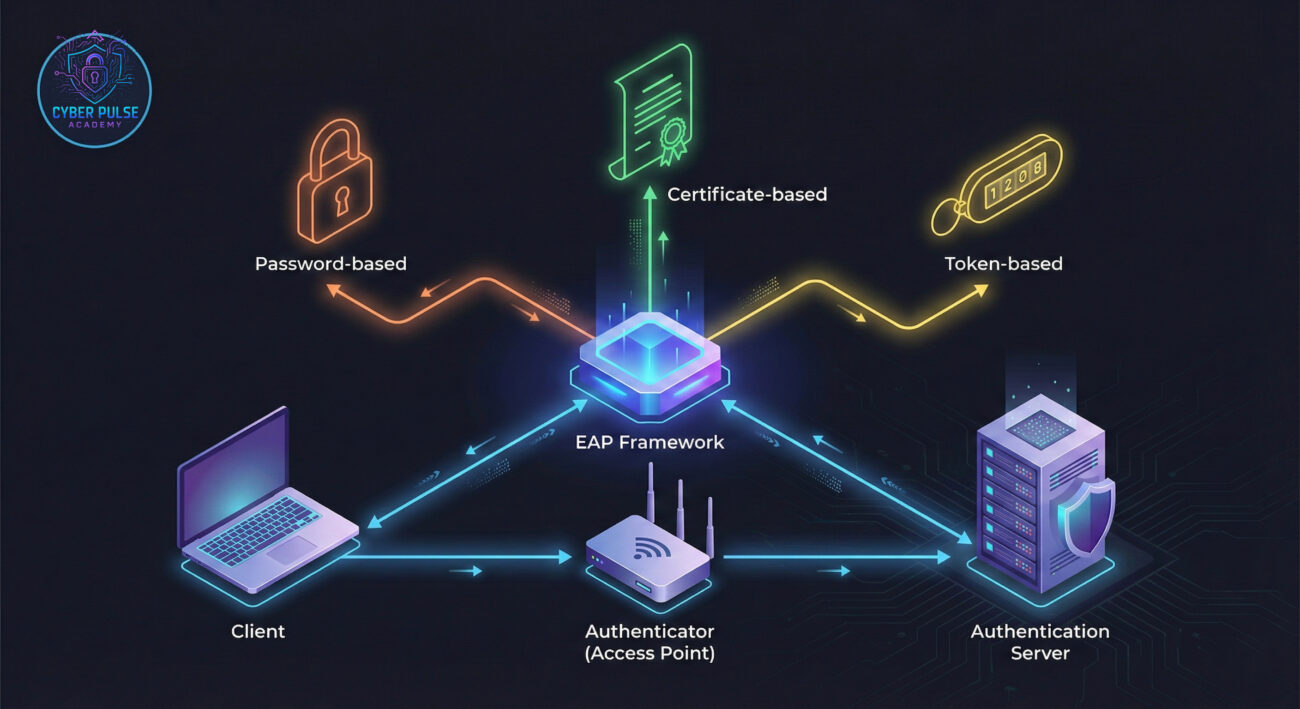
Every time you connect to your office Wi-Fi or a secure corporate VPN, Extensible Authentication Protocol is working silently in the background. According to the Cybersecurity and Infrastructure Security Agency (CISA), weak authentication remains one of the top vulnerabilities exploited in network attacks.
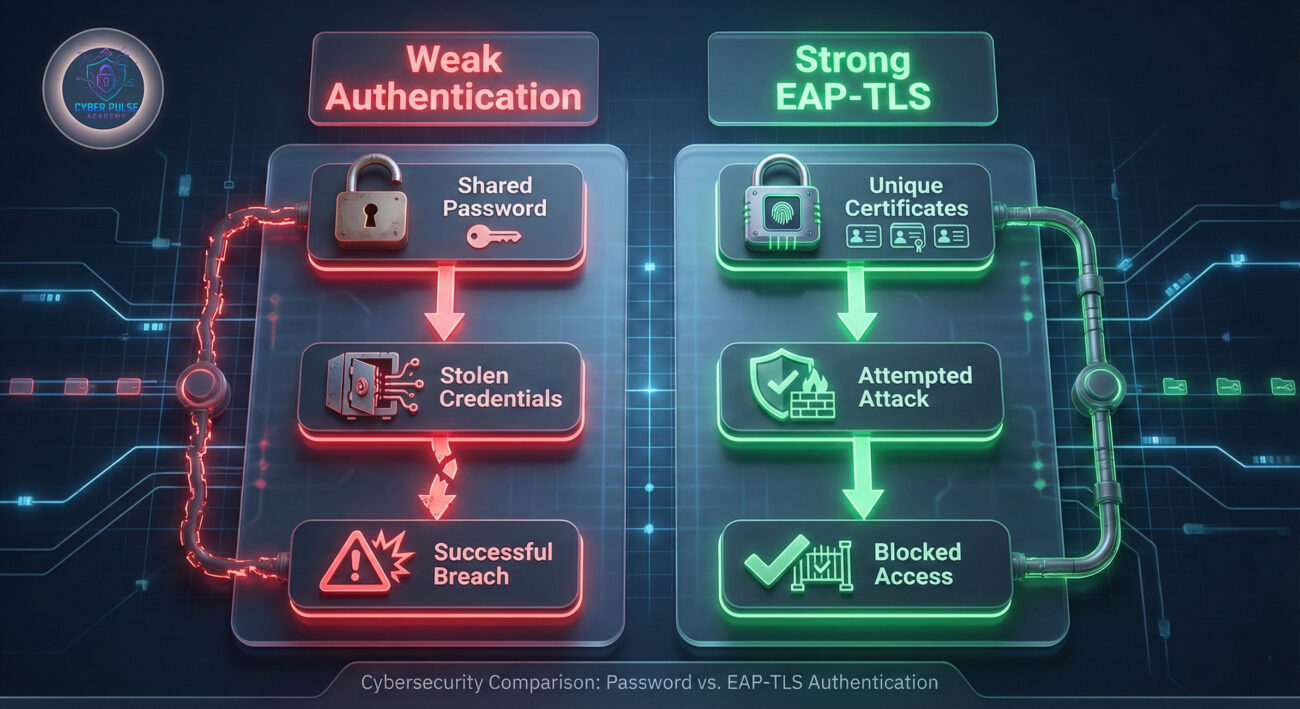
The 2023 Verizon Data Breach Investigations Report revealed that credential theft accounted for nearly 50% of all breaches. EAP helps combat this by providing stronger authentication options beyond simple passwords. When implemented correctly with methods like EAP-TLS (certificate-based), it creates a protected channel that's extremely difficult for attackers to penetrate.
What makes Extensible Authentication Protocol particularly important today is its role in the "zero trust" security model. As remote work expands and network perimeters dissolve, verifying every device and user before granting access becomes non-negotiable. EAP enables this continuous verification without disrupting user experience.
From your smartphone connecting to airport Wi-Fi to your laptop accessing company resources remotely, EAP variants are everywhere. Understanding this protocol helps you recognize secure networks from risky ones and make informed decisions about your digital safety.
| Term | Simple Definition | Everyday Analogy |
|---|---|---|
| EAP Framework | The container that defines how authentication conversations happen between devices | Like the rules of a job interview process (how questions are asked and answers given) |
| EAP Method | The specific authentication technique used within the EAP framework | Different interview techniques: background checks (EAP-TLS), reference calls (EAP-PEAP), or skill tests |
| RADIUS Server | The authentication server that verifies credentials in enterprise networks | The HR department that checks if your credentials match employee records |
| EAP-TLS | A secure method using digital certificates for authentication | Using a government-issued passport instead of just stating your name |
| EAP-PEAP | A method that creates a encrypted tunnel first, then sends credentials | Having a private conversation in a soundproof room before showing ID |
| Man-in-the-Middle Attack | When an attacker intercepts and potentially alters communication | A fake security guard stealing your ID info at the door |
Meet Sarah, an IT manager at "TechFlow Solutions," a mid-sized company with 150 employees. Before implementing Extensible Authentication Protocol, their Wi-Fi used a single shared password posted in the breakroom. Last month, they experienced a breach when a former employee's device (still connected) was compromised.
Sarah decided to implement EAP with EAP-TLS (certificate-based authentication). Here's what changed:
| Time/Stage | What Happened | Impact |
|---|---|---|
| Before EAP | Single password for all employees and guests | High risk of credential sharing, no individual accountability |
| Week 1: Planning | Sarah set up a RADIUS server and purchased digital certificates | Initial investment in secure infrastructure |
| Week 2: Implementation | EAP-TLS configured on Wi-Fi; certificates installed on employee devices | Each device now had unique, encrypted credentials |
| Week 3: Training | Employees learned to connect using certificates instead of passwords | Minor initial confusion, but secure habits formed |
| Month 2: Results | Former employee's device automatically rejected; unauthorized access attempts logged | Protected network, individual accountability restored |
| Month 3: Incident | A hacker tried to impersonate the Wi-Fi network | EAP-TLS detected the fake certificate; attack prevented |
The implementation of Extensible Authentication Protocol transformed TechFlow's security posture. When an employee left, Sarah simply revoked their certificate instead of changing the company-wide password. The system also provided detailed logs showing who connected when – invaluable during security audits.
Check what authentication method your current Wi-Fi or VPN uses:
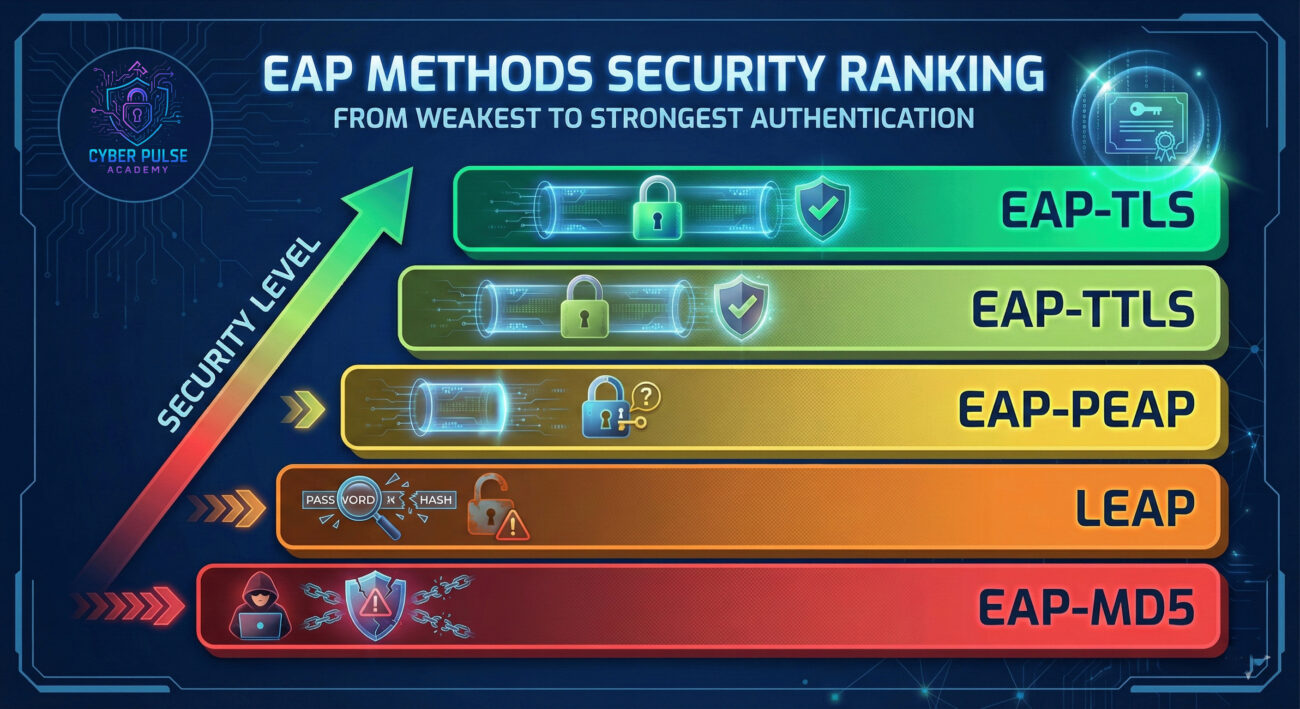
Learn which EAP methods provide strong security:
When connecting to an EAP-secured network:
For IT administrators setting up EAP:
Maintain your EAP implementation:
Understanding how attackers view Extensible Authentication Protocol helps you defend against them. Here's a simplified attack path and counter-move:
Attack Path (Eavesdropping & Impersonation): A hacker sets up a rogue access point with the same name as a legitimate corporate network. They use a weak EAP method or no encryption, hoping users will connect. Once connected, they capture credentials or deploy malware. The attacker might also try to downgrade the authentication method to something weaker during the handshake.
Defender's Counter-Move: Implement EAP-TLS with certificate validation. This ensures both parties verify each other's identity. Configure devices to reject connections that don't present the expected server certificate. Use network monitoring tools to detect rogue access points broadcasting familiar network names. Educate users to never bypass certificate warnings.
"EAP represents both a challenge and an opportunity. Weak implementations are gold mines – outdated methods like LEAP can be cracked in minutes. Even stronger methods have vulnerabilities if misconfigured. I look for certificate validation I can bypass, weak passwords in EAP-PEAP setups, or networks allowing multiple EAP methods (downgrade attacks). The goal is finding that one misconfigured device or user who clicks through certificate warnings."
"Properly implemented EAP is our strongest access control layer. We standardize on EAP-TLS with strict certificate policies and automated provisioning. Our monitoring focuses on authentication failures, unusual connection times, and certificate expiration. We've eliminated weak EAP methods entirely and educate users about certificate validation. Regular audits ensure our RADIUS servers are patched and configured correctly. EAP gives us both security and detailed logs for incident response."
Extensible Authentication Protocol is more than technical jargon – it's the foundation of modern network security that affects your daily digital life. Here's what to remember:
The Extensible Authentication Protocol landscape continues to evolve with WPA3 and new enterprise security requirements. By understanding these fundamentals, you're better equipped to evaluate network security, whether you're an end-user connecting to Wi-Fi or an IT professional designing secure infrastructure.
Now that you understand Extensible Authentication Protocol, take action:
Have questions about EAP implementation or encountered an authentication issue? Share your experiences in the comments below or explore our related guides on WPA3 security and VPN authentication methods.
Every contribution moves us closer to our goal: making world-class cybersecurity education accessible to ALL.
Choose the amount of donation by yourself.