


















































Email Addresses (T1589.002)
Ultimate Guide to Gather Victim Identity Information - Email Addresses: Attack & Defense
Gathering Email Addresses is the quiet, methodical first step in virtually every targeted cyber attack. This guide breaks down how adversaries harvest this foundational intelligence and how defenders can spot and disrupt their efforts.
Table of Contents
- Understanding Email Addresses in Simple Terms
- Decoding the Jargon: Key Terms for Email Addresses
- The Attacker's Playbook: Executing Email Addresses
- The Defender's Handbook: Stopping Email Addresses
- Building Resilience: Mitigation Strategies for Email Addresses
- Email Addresses Cheat Sheet
- Conclusion and Next Steps
Understanding Email Addresses in Simple Terms
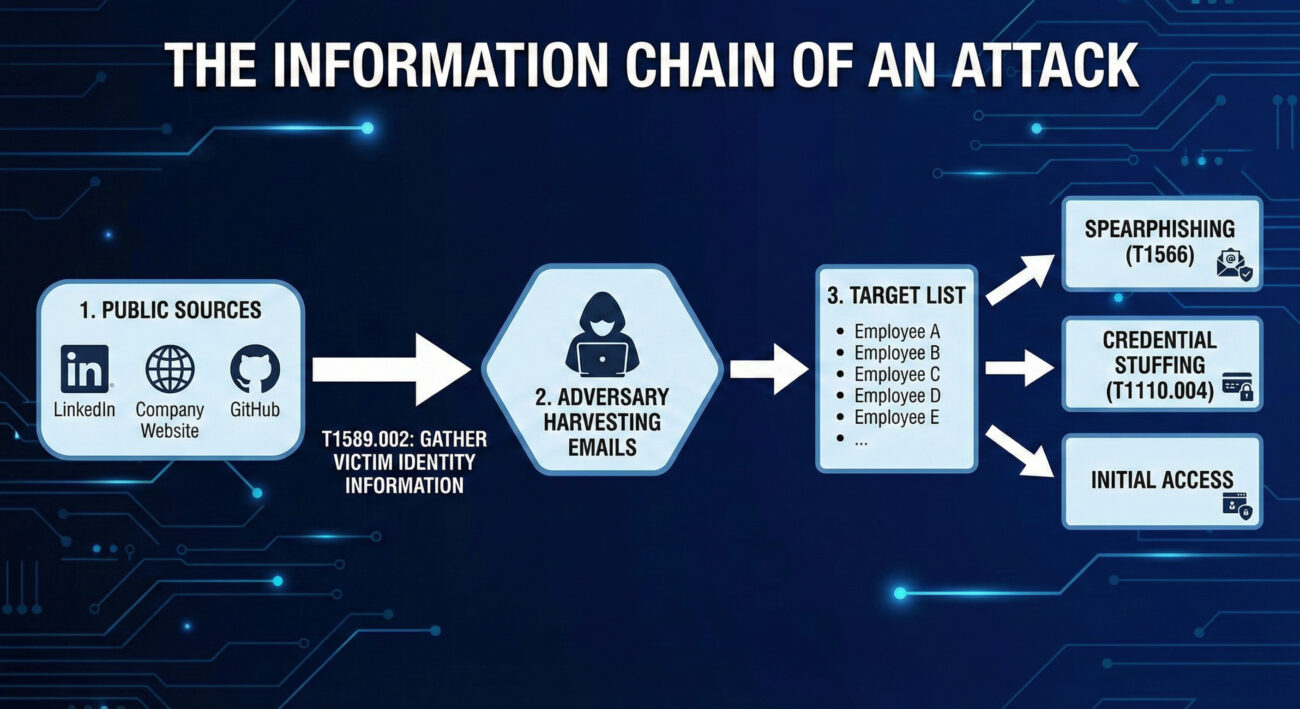
Before a hacker sends a malicious email, they need a target list. Gathering Email Addresses is the process of building that list. Think of it like a burglar casing a neighborhood. They don't just randomly try doorknobs on the first house they see. Instead, they might look for mailboxes with names, check social media for people posting about being on vacation, or note which houses have newspapers piled up. They're gathering intelligence to plan a more effective break-in.
In the cyber world, email addresses are the digital equivalent of those mailbox names. They are public identifiers, often tied to a person's role (e.g., [email protected]), that an adversary can find without ever touching the target's network. This information is then used to launch precise, believable phishing or spearphishing attacks, credential stuffing, or even to map out an organization's structure for a larger campaign.
Decoding the Jargon: Key Terms for Email Addresses
| Term | Plain English Meaning |
|---|---|
| Reconnaissance (TA0043) | The overall tactic of gathering information to plan future operations. Think of it as the "planning and scouting" phase before any action is taken. |
| Open Source Intelligence (OSINT) | The practice of collecting information from publicly available sources. This includes search engines, social media, public code repositories, and business registries. |
| Victim Identity Information (T1589) | The parent technique for gathering data about people within a target organization, including email addresses, social media profiles, and job titles. |
| Email Enumeration | The systematic process of discovering valid email addresses, often by guessing common formats (e.g., [email protected]) and checking them against public services. |
| Spearphishing | The highly targeted form of phishing that uses gathered information (like specific email addresses and job roles) to trick a particular individual. |
The Attacker's Playbook: Executing Email Addresses
Step-by-Step Breakdown
A professional adversary doesn't just Google a company name and hope for the best. Their process is methodical:
- Define the Target: Identify the target organization or industry sector.
- Initial Harvest: Scrape the company's official website, press releases, and "Our Team" pages for publicly listed emails.
- Expand via Social Media: Use LinkedIn, X (Twitter), and other platforms to find employees, their roles, and sometimes their email formats in bios or posts.
- Leverage Technical Leaks: Search code repositories (GitHub, GitLab) for commits containing company email addresses, often accidentally pushed by developers.
- Email Format Discovery & Enumeration: Deduce the corporate email format (e.g.,
[email protected],[email protected]). Use tools to generate lists and verify them against the company's email server or third-party services. - Enrichment & Organization: Correlate emails with job titles, departments, and project mentions to build a detailed target profile for the next attack phase.
Red Team Analogy & Mindset
A Red Teamer performing this technique is like a corporate headhunter building a "dream team" roster. They need to know who the key decision-makers are, who has access to valuable systems (IT, Finance), and who might be more susceptible to social pressure. The mindset is one of patience and thoroughness.
The goal isn't just to get a list of emails; it's to understand the human landscape of the target. Which executive just got promoted? Which system administrator is active on technical forums? This context makes the subsequent social engineering attack exponentially more effective.
Tools & Command-Line Examples
Adversaries use a mix of custom scripts, OSINT frameworks, and simple command-line tools.
- theHarvester: A classic OSINT tool for gathering emails, subdomains, and hosts.
- LinkedIn (and scrapers like linkedin2username): The primary social source for employee names and roles.
- Hunter.io & Phonebook.cz: Public APIs and websites that aggregate email addresses and verify formats.
- Simple Email Verification Scripts: Adversaries write scripts to check if generated emails exist by interacting with mail servers (via SMTP probes).
Example Command Snippet (theHarvester):
# Basic search for a domain using multiple data sources
theHarvester -d target-corp.com -b all -l 500

# -d: target domain
# -b: data source (google, linkedin, bing, etc. 'all' for all)
# -l: limit results

# Output will include discovered emails, hosts, and IPs.
# Adversaries then clean and filter this data for valid corporate emails.
# Example of a simple format enumeration idea (conceptual Python snippet)
import itertools
first_names = ["john", "jane"]
last_names = ["smith", "doe"]
domain = "@target-corp.com"
for fname, lname in itertools.product(first_names, last_names):
# Generate common formats
print(f"{fname}.{lname}{domain}")
print(f"{fname[0]}{lname}{domain}")
print(f"{fname}{lname[0]}{domain}")Real-World Campaign Example
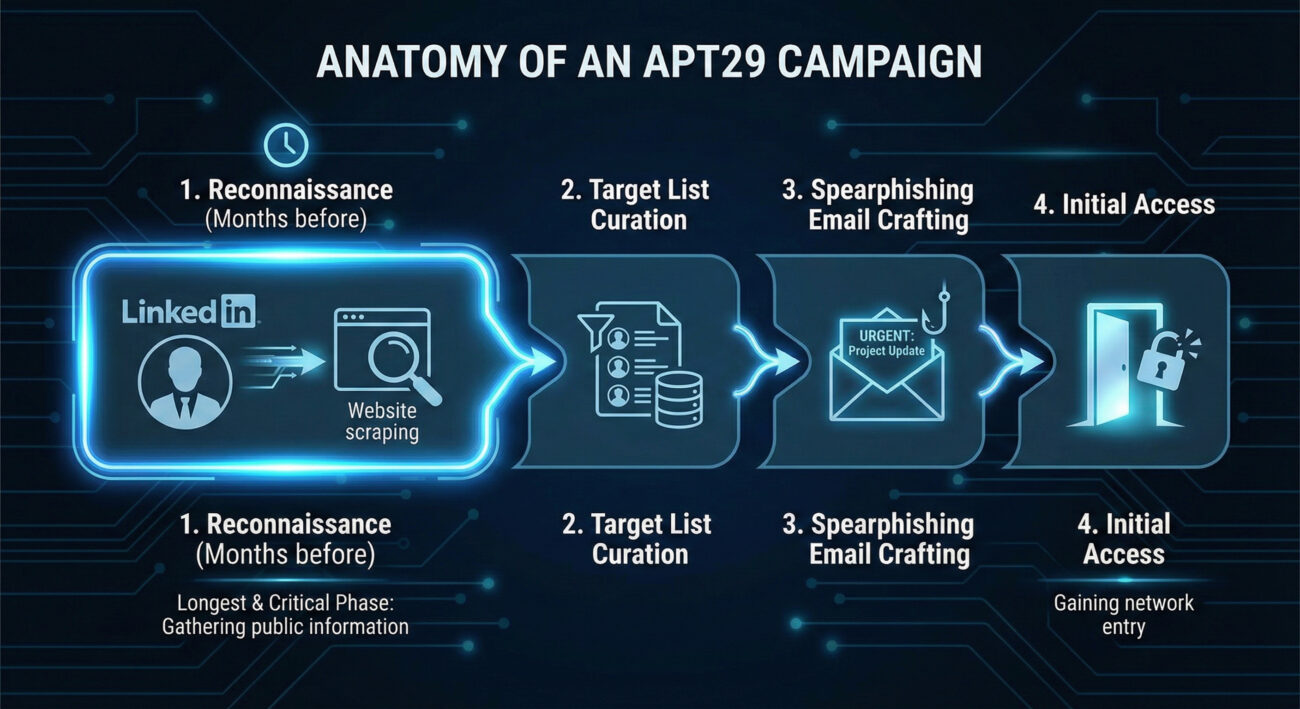
APT29 (Cozy Bear / Midnight Blizzard), a Russian state-sponsored group, is a master of patient, reconnaissance-heavy campaigns. In operations targeting government and diplomatic entities, they extensively profile their targets. This includes gathering employee email addresses from public sources like professional networking sites and conference attendee lists.
They use this intelligence to craft highly believable spearphishing emails. For example, they might impersonate a colleague from another department or a trusted external partner, using a gathered email address as a reference point to build credibility before sending a malicious link or attachment. This initial information gathering is a cornerstone of their long-term, stealthy compromise strategy.
Further Reading: Microsoft's report on Midnight Blizzard's social engineering details their use of gathered intelligence.
The Defender's Handbook: Stopping Email Addresses
Blue Team Analogy & Detection Philosophy
As a defender, you can't stop someone from looking at your public website. The philosophy here is awareness and adaptation. Think of yourself as a public figure's security detail. You know paparazzi (adversaries) will be taking pictures (gathering data). Your job isn't to stop all photography; it's to be aware of what information is in the public eye, understand how it could be used against your principal, and adjust your protective measures accordingly.
The goal is to reduce the attack surface and increase the cost for the adversary by making email gathering harder and less fruitful, thereby disrupting the kill chain before it even reaches your perimeter.
SOC Reality Check: What to Look For
Direct detection of T1589.002 is challenging because it happens outside your network. The "alert" is often indirect:
- Anomalous Web Server Logs: A spike in automated scans or bots scraping your "team.html" or "contact.php" pages from unfamiliar IPs or user-agents.
- Email Server Logs: An unusual volume of SMTP "VRFY" or "RCPT TO" commands from a single IP, indicating email enumeration attempts.
- Security Awareness Reports: An increase in employees reporting suspicious LinkedIn connection requests or targeted phishing reconnaissance.
The key is to treat these not as noise, but as early warning indicators of a impending spearphishing campaign.
Threat Hunter's Eye: Practical Query
This Sigma rule is designed to hunt for potential email enumeration activity against your Microsoft 365/O365 environment by detecting rapid-fire SMTP address validation attempts.
title: Potential O365 Email Address Enumeration
id: 9a5c1a7d-3a2f-4b8c-9e2a-1b3c4d5e6f7a
status: experimental
description: Detects multiple unique "User Not Found" responses from O365 within a short timeframe from a single source, indicative of email address guessing/enumeration.
author: Your Blue Team
date: 2023-10-26
tags:
    - attack.reconnaissance
    - attack.t1589.002
logsource:
    product: o365
    service: exchange
detection:
    selection:
        Workload: 'Exchange'
        Operation: 'UserLoginFailed'  # May vary; look for failed recipient validation events
        ResultStatus: 'UserNotFound'  # Look for status indicating invalid email
    timeframe: 5m
    condition: selection | count() by SourceIPAddress > 25
falsepositives:
    - Legitimate mail servers with misconfigured recipient validation
    - Some scanning services
level: medium
Key Data Sources for Detection
- Web Server Access Logs: For detecting scraping of contact pages.
- Mail Server (SMTP) Logs: For detecting "RCPT TO" failures and VRFY commands.
- O365/Azure AD Sign-in Logs: Filter for failed logins with error codes like "50126" (invalid username).
- DNS Query Logs: Unusual volumes of MX record queries for your domain from a single source.
- Threat Intelligence Feeds: Reports of your company's employee emails being found in credential dump lists or discussed on hacker forums.
Building Resilience: Mitigation Strategies for Email Addresses
Actionable Mitigation Controls
- Audit & Limit Public Information: Regularly review what employee information is on your public website and social media. Does your "Team" page need to list direct emails, or can it use a contact form? Encourage employees to review their LinkedIn privacy settings.
- Implement Non-Standard Email Formats: While not always practical, moving away from predictable formats (e.g.,
first.last@) to more random formats increases the guesswork for adversaries. - Disable Unnecessary SMTP Commands: On your public-facing mail servers, disable the "VRFY" and "EXPN" SMTP commands, which are explicitly designed to verify email addresses.
- Deploy Anti-Scraping Measures: Use web application firewalls (WAFs) and tools like CAPTCHAs or rate-limiting to deter automated bots from scraping your public sites.
- Security Awareness Training: Train employees, especially executives and IT staff, on operational security (OPSEC). They should understand that their public online presence is a source of intelligence for attackers.
Red vs. Blue: A Quick Comparison
| Attacker's Goal (Red Team) | Defender's Action (Blue Team) |
|---|---|
| Build a comprehensive, accurate list of target emails. | Reduce the accuracy and usefulness of publicly available emails. |
| Map organizational structure through names/roles. | Limit role-specific details in public employee profiles. |
| Verify emails are valid before launching a campaign. | Disable email verification protocols and monitor for enumeration attempts. |
| Use gathered intel to craft believable spearphishing lures. | Train staff to be skeptical of overly personalized or context-rich emails, even from seemingly known contacts. |
Email Addresses Cheat Sheet
Red Flag
A sudden spike in visits to your company's "About Us" or "Leadership" pages from unknown IPs, or an increase in failed "user not found" logins to your O365 tenant from a single source.
Blue's Best Move
Conduct a quarterly "self-OSINT" exercise. Google your company and key employees. See what an attacker sees, and systematically work to remove unnecessary personal data.
Hunt Here
Your mail server (SMTP) logs and O365/Azure AD sign-in logs are goldmines. Look for patterns of failed recipient validation (550 5.1.1 User unknown) clustered in time.
Conclusion and Next Steps
T1589.002 Gathering Email Addresses is a foundational, pervasive, and often underestimated technique. It represents the shift from untargeted attacks to precision operations. By understanding the attacker's methodology, defenders can move from a purely reactive posture to a proactive one.
Your next steps should be practical:
- Run a Self-Assessment: Use a tool like theHarvester against your own domain (with permission) to see what's easily available.
- Review Log Sources: Ensure you are ingesting and can query mail server and O365 authentication logs.
- Update Training: Incorporate OPSEC and awareness of information gathering into your security awareness program.
Remember, defense starts long before the first malware payload is delivered. It starts when someone first looks up your company's email format.
Further Reading & Internal Links:
- [Internal-Link: Phishing Initial Access Vectors] - See how gathered emails lead to T1566 Spearphishing.
- [Internal-Link: Mitigating Credential Stuffing Attacks] - Learn how exposed emails fuel password attacks.
- External Authority: The NIST Glossary entry on Reconnaissance provides a formal framework for this phase.
- External Resource: CISA Insights: Mitigating Spearphishing covers the full kill chain, including reconnaissance.