


















































Employee Names (T1589.003)
Ultimate Guide to Gather Victim Identity Information - Employee Names: Attack & Defense
Employee names are a foundational piece of data collected by adversaries to craft targeted social engineering attacks, personalize phishing lures, and map organizational structure for initial access.
Table of Contents
Understanding Employee Names in Simple Terms
Think of an organization as a high-security castle. Before an attacker tries to scale the walls or blast the gate, they first study the people who live and work there. They want to know: Who are the guards? Who delivers supplies? Who is the lord of the manor? Employee names are the first identifiers an adversary collects to answer these questions.
This isn't a high-tech hack. It's the digital equivalent of watching the castle from a nearby hill, talking to townsfolk in the local tavern, or picking up a discarded roster. The goal is simple: transform a faceless corporation into a list of real people who can be researched, manipulated, or impersonated in a future attack.
Decoding the Jargon: Key Terms for Employee Names
| Term | Simple Definition | Why It Matters |
|---|---|---|
| Reconnaissance (RECON) | The information-gathering phase of an attack, where the adversary learns about the target before taking any direct action. | Collecting employee names is a core RECON activity. It's passive and often undetectable by the target. |
| OSINT (Open-Source Intelligence) | Information collected from publicly available sources like websites, social media, and public records. | 95% of employee name collection uses OSINT. LinkedIn, company "About Us" pages, and press releases are goldmines. |
| Spearphishing | A highly targeted phishing email sent to a specific individual or group, often using personal details to seem legitimate. | Employee names are the critical ingredient that turns a generic spam email into a convincing, dangerous spearphishing lure. |
| Identity Sprawl | The widespread, often uncontrolled, distribution of employee information (like names and roles) across public and semi-public platforms. | It's the root cause that makes this technique so effective. The more sprawl, the easier the reconnaissance. |
| Social Engineering | Manipulating people into divulging confidential information or performing actions that compromise security. | Names are used to build trust and authority, making social engineering attempts much more likely to succeed. |
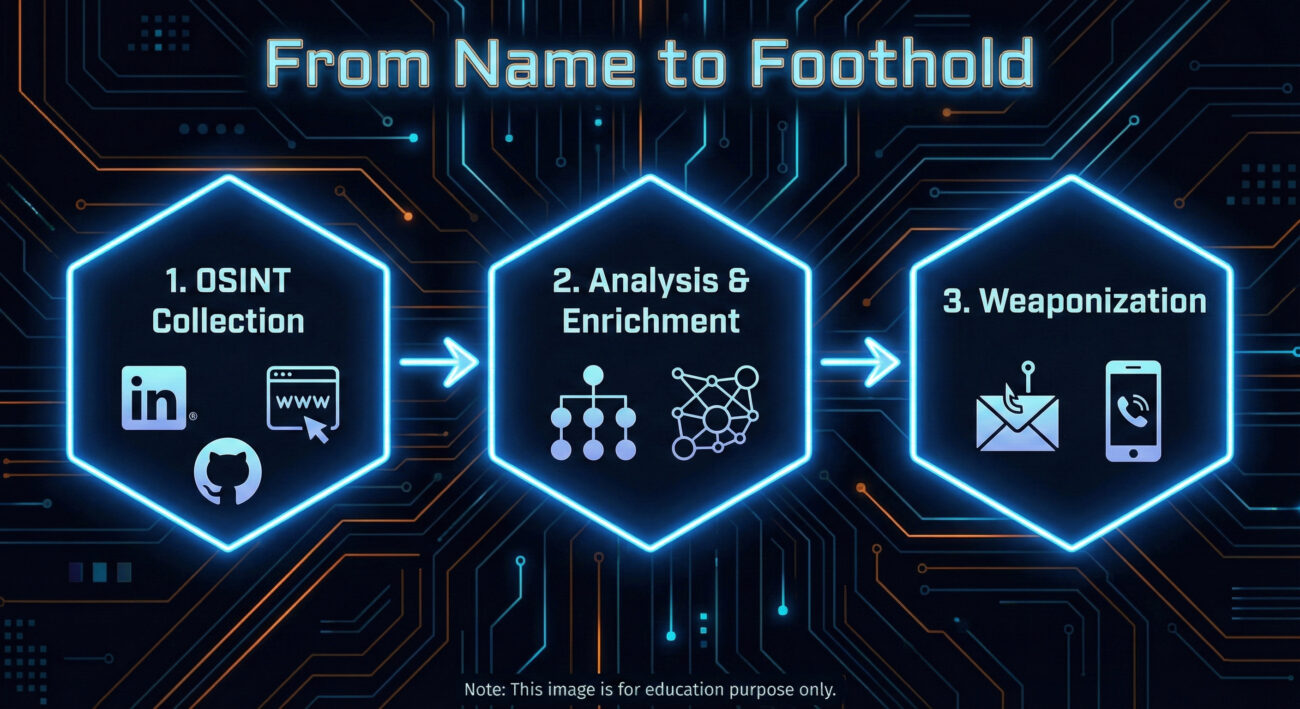
The Attacker's Playbook: Executing Employee Names Reconnaissance
This is the adversary's research phase. There's no malware deployed yet, no systems directly probed. The work is quiet, methodical, and leverages the information your organization freely provides.
Step-by-Step Breakdown
- Primary Source Harvesting: Start with the corporate website, especially "Leadership," "Team," "About Us," and "News/Press Release" sections. Extract full names, titles, and departments.
- Social Media Expansion: Use names to find employees on LinkedIn, Twitter (X), and even GitHub. LinkedIn is paramount for understanding reporting structures, skills, and tenure.
- Pattern Analysis: Determine email address formats (e.g., [email protected], [email protected]). Verify guesses using tools like Hunter.io or email verification services.
- Org Chart Reconstruction: Piece together a rudimentary organizational chart. Identify key personnel in IT, Finance, and Executive roles, high-value targets for follow-on attacks.
- Target Prioritization: Select individuals for the next phase (like spearphishing). Ideal targets may have public technical interests (from GitHub), are new to the company, or hold positions of authority with likely system access.
Red Team Analogy & Mindset
Imagine you're a private investigator hired to get information on a company. You wouldn't start by breaking in. You'd sit in a cafe across the street, note who comes and goes, check public records, and maybe sift through the company's trash. The mindset is one of patience and inference. Every public mention of an employee is a puzzle piece. A "Happy 5th work anniversary!" post on LinkedIn tells you they've been there five years. A GitHub commit tells you what technology stack they use. It's all about building a profile from fragments.
Tools & Command-Line Examples
- LinkedIn & Advanced Search Operators: The premier tool. Use "current company" filters and Boolean searches (e.g., "IT manager AT TargetCompany"). Sales Navigator is a red team's best friend.
- theHarvester: A classic OSINT CLI tool for gathering emails, names, subdomains, and more from public sources.
- Hunter.io / Phonebook.cz: Web-based services to discover email addresses associated with a domain and verify their format.
- LinkedIn2Username (or similar scripts): Tools to generate potential usernames from scraped LinkedIn data based on common patterns.
Example theHarvester Command:
theharvester -d "example.com" -b google,linkedin -l 100
# -d: target domain
# -b: data sources (google, linkedin, etc.)
# -l: limit results
# This command scrapes Google and LinkedIn for information related to example.com, potentially revealing employee names in bios or posts.
Real-World Campaign Example: APT29 (Cozy Bear)
The Russian-affiliated APT29 group is a master of patient, reconnaissance-heavy operations. In campaigns targeting government and diplomatic entities, they extensively profile their targets.
Before launching their infamous spearphishing campaigns (often using lure documents related to current events), they conduct deep OSINT research. This includes harvesting employee names and professional details from official websites, social media, and professional networking sites. This intelligence allows them to craft incredibly believable emails, sometimes impersonating real colleagues or contacts mentioned in the target's public profiles, significantly increasing their chance of success.
Reference: For a detailed analysis of APT29's tradecraft, see the advisory from the UK's NCSC and the US's CISA: Joint Advisory on APT29 (DoFollow).
The Defender's Handbook: Stopping Employee Names Exploitation
You can't prevent the world from seeing public information. The defense strategy isn't about making data invisible; it's about managing risk, training people, and detecting the misuse of that data in later attack stages.
Blue Team Analogy & Detection Philosophy
Think of yourself as a counter-intelligence officer. You know foreign agents are reading your public newspapers and watching your military parades. You can't stop that. But you can control what's in the newspaper, train your personnel to spot suspicious contact attempts, and have excellent surveillance (logging/detection) for when someone acts on that intelligence. Your goal is to make the adversary's recon data stale, misleading, or useless, and to catch them when they try to use it.
SOC Reality Check: What to Look For
You will not get an alert saying "Adversary viewed John Doe's LinkedIn profile." The attack surface here is largely invisible. Your detection opportunities come in the next phase.
- Surge in Failed Logins: An attacker testing email address formats (e.g., jdoe@, john.doe@) will generate failed authentication events.
- Spearphishing Email Delivery: An email that uses an internal employee's name correctly is a direct indicator that this recon occurred. This is your primary detection signal.
- Unusual External Website Visits: A corporate IP showing up in logs for many OSINT tool websites or performing suspicious scraping patterns might indicate internal recon (less common).
Threat Hunter's Eye: Practical Query
Hunt for the enumeration activity that often follows name collection. Here is a Sigma rule to detect patterns of username enumeration via failed logons, which can indicate an adversary validating harvested employee names/emails.
title: Potential Username Enumeration via Failed Logons
id: a1b2c3d4-5e6f-7890-abcd-ef1234567890
status: experimental
description: Detects multiple failed logon attempts for distinct usernames from a single source, which may indicate reconnaissance to validate harvested employee identities.
author: Your DFIR Team
logsource:
    product: windows
    service: security
    definition: 'Requirements: Audit Logon Events (Failure) must be enabled'
detection:
    selection:
        EventID: 4625
    filter:
        AccountType: 'User'
    timeframe: 5m
    condition: selection and not filter | count() by SourceIpAddress, WorkstationName > 10 distinct TargetUsernames
fields:
    - SourceIpAddress
    - WorkstationName
    - TargetUserName
falsepositives:
    - Legitimate authentication service issues
    - Misconfigured applications
level: medium
tags:
    - attack.reconnaissance
    - attack.t1589.003
Key Data Sources for Detection
- Authentication Logs (Azure AD, Okta, On-prem AD): For failed login patterns and unusual geographic attempts.
- Email Security Gateway Logs: To analyze spearphishing attempts that get blocked or delivered, noting the use of internal names.
- Web Proxy/Cloud Access Security Broker (CASB) Logs: To spot internal IPs potentially conducting OSINT scraping (though this is noisy).
- Endpoint Detection & Response (EDR): For post-breach activity that originated from a successful spearphish using a gathered name.
Building Resilience: Mitigation Strategies for Employee Names Recon
Actionable Mitigation Controls
- Implement a Public Information Policy: Define what employee information is appropriate for public websites and social media. Limit detailed titles and full team rosters on the corporate site. Encourage employees to use professional but vague titles on public LinkedIn profiles (e.g., "Infrastructure Engineer" vs. "Senior VMware and Azure Cloud Admin").
- Conduct Regular OSINT Audits: Periodically (quarterly/bi-annually), have a team member or hired red team simulate this recon against your company. Report on what they find and work with HR/Comms to reduce the sensitivity of the exposed data.
- Enhanced Security Awareness Training: Move beyond "don't click links." Train employees that their public information is used by attackers. Teach them to be suspicious of emails that use personal details sourced from LinkedIn, and to verify unusual requests via a secondary channel.
- Deploy Multi-Factor Authentication (MFA) Universally: MFA is your single best defense against credential-based attacks that follow successful spearphishing. Even if an attacker gets a password using a personalized lure, MFA will likely block access.
- Use Generic Contact Addresses: For public-facing functions (e.g., support, press, info), use role-based emails ([email protected]) instead of individual employee emails on the website.
Red vs. Blue: A Quick Comparison
| Attacker's Goal (Red Team) | Defender's Action (Blue Team) |
|---|---|
| Build a comprehensive, accurate list of employee names, roles, and contact info. | Reduce the accuracy and usefulness of public data through policy and training (secure by obscurity, applied wisely). |
| Use names to craft credible spearphishing lures and establish false trust. | Train users to recognize and report sophisticated lures, regardless of personalization. Implement strong email filtering. |
| Validate email address formats to enable password spraying or targeted credential attacks. | Monitor for and alert on username enumeration patterns. Enforce strong password policies and universal MFA. |
| Map the organization to identify high-value targets (IT admins, executives). | Implement strict access controls and privileged access management (PAM) so that compromising a high-value account is harder, even if they are identified. |
Employee Names Cheat Sheet
Conclusion and Next Steps
Employee names reconnaissance (T1589.003) is not a flashy exploit, but it is the bedrock of nearly all targeted cyber attacks. Defending against it requires a shift from purely technical controls to a blend of policy, awareness, and proactive hunting.
Your next steps:
- Conduct a Self-OSINT Assessment: Spend 30 minutes trying to find employee names and reconstruct an org chart for your own company. You'll be surprised at what you find.
- Review Your Public Information Policy: Work with HR and Corporate Communications. Is the data you're sharing necessary, or is it a risk?
- Tune Your Detections: Implement or refine a detection for username enumeration in your environment using the Sigma rule provided.