


















































Certification Courses
Hands-On Labs
Threat Intelligence
Latest Cyber News
MITRE ATT&CK Breakdown
All Cyber Keywords
In January 2026, a sophisticated supply chain attack targeted eScan Antivirus, a product developed by MicroWorld Technologies. Attackers compromised a regional update server and replaced a legitimate update component (Reload.exe) with a malicious version. This multi-stage malware then delivered PowerShell backdoors, disabled antivirus updates, and fetched additional payloads from attacker‑controlled servers. The incident affected hundreds of machines, mainly in India, Bangladesh, Sri Lanka, and the Philippines. It serves as a stark reminder that even security software can become a vector for attack when its update pipeline is compromised.
This post dissects the eScan antivirus supply chain attack from a beginner‑friendly yet technical perspective. We’ll walk through the infection chain, map it to MITRE ATT&CK, and provide actionable steps to defend against such threats. Whether you’re a student or a professional, understanding this incident will sharpen your awareness of software integrity risks.
According to telemetry from Kaspersky and Morphisec, the malicious update was pushed during a two‑hour window on January 20, 2026. It affected a subset of eScan customers whose systems automatically pulled updates from a specific regional cluster. The majority of infections were observed in:
Both enterprise and consumer endpoints were compromised. The malware’s goal was to establish persistent, stealthy access while making the antivirus appear functional (by tampering with update timestamps). In one case, a large Indian manufacturing firm found that their eScan consoles showed “last update: just now” even though the machines were beaconing to a command‑and‑control server in Eastern Europe.
“The attackers clearly studied eScan’s internals,” noted security researcher Michael Gorelik. “They knew exactly which files to replace and how to manipulate the update mechanism.”
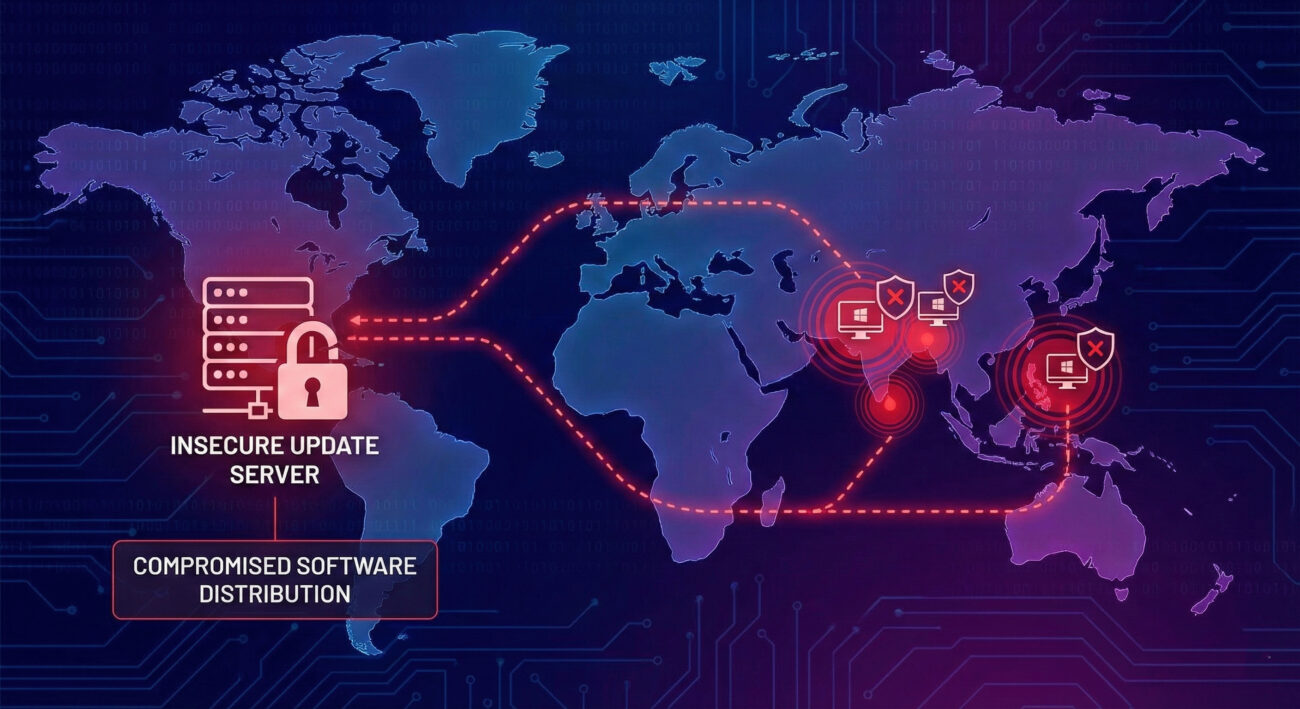
The attack consisted of multiple stages, each designed to evade detection and ensure persistence. Below is a simplified walkthrough of the technical chain.
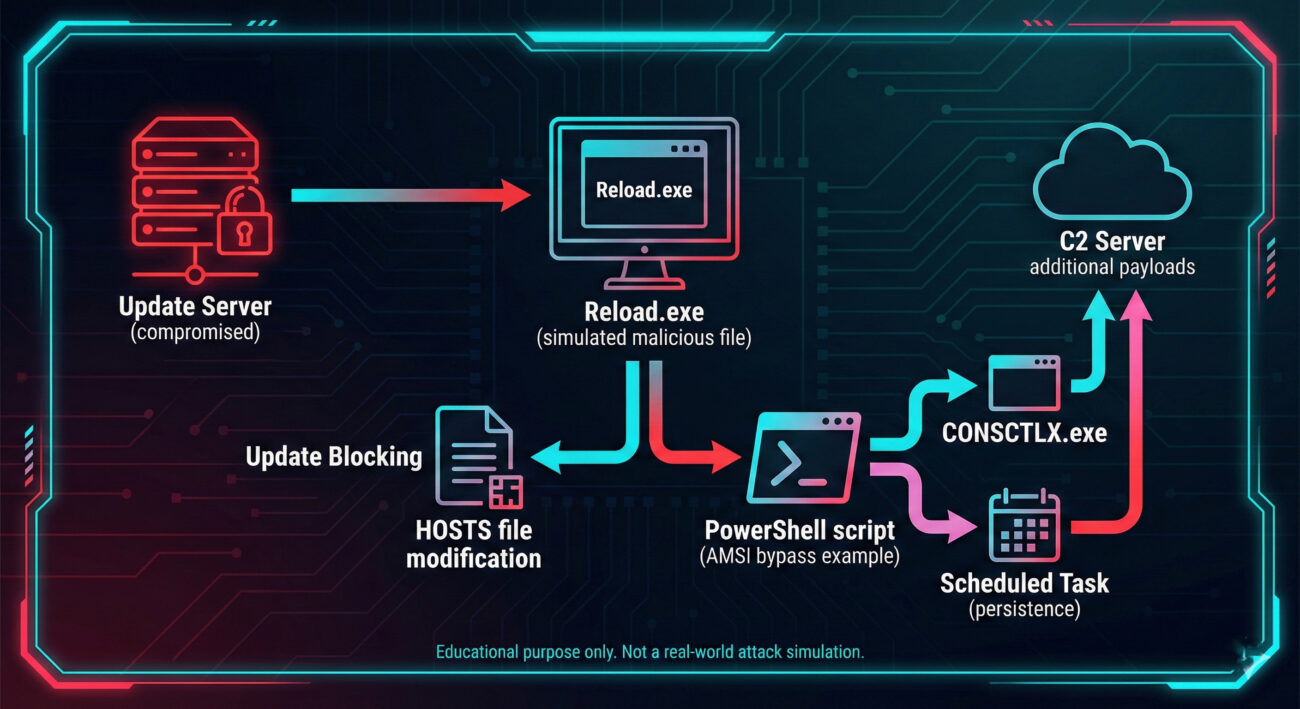
Attackers gained unauthorized access to one of eScan’s regional update servers (the exact method remains unknown). They replaced the legitimate C:\Program Files (x86)\escan\reload.exe with a malicious version signed with a fake, invalid digital signature.
When the next automatic update ran, the poisoned Reload.exe executed. It checked if it was launched from the Program Files folder (to avoid sandbox analysis) and then used an embedded UnmanagedPowerShell framework to run a Base64‑encoded PowerShell script inside its own process. This script included an AMSI bypass to disable Windows script detection.
The PowerShell script modified the HOSTS file to block eScan’s update domains, ensuring the victim couldn’t receive clean updates. It also replaced another legitimate component, CONSCTLX.exe, with a malicious version. To hide its activity, it wrote the current date to C:\Program Files (x86)\eScan\Eupdate.ini, making the antivirus report “up‑to‑date”.
Before delivering the final payload, the malware checked the system for analysis tools (debuggers, sandboxes) and security products (Kaspersky, etc.) from a hardcoded blocklist. If any were found, it went dormant.
If the environment was deemed “safe”, the malware contacted an external server to download two files: CONSCTLX.exe (which launched another PowerShell script) and a second PowerShell‑based backdoor installed as a scheduled task. This backdoor maintained persistence and could fetch arbitrary commands.
Key point: The entire chain used PowerShell (living‑off‑the‑land) to avoid writing many files to disk, and it abused trusted update paths to remain under the radar.
Understanding the tactics and techniques helps defenders build better detections. Here’s how the eScan incident maps to the MITRE ATT&CK framework (v14).
| Tactic | Technique ID | Technique Name | How It Was Used |
|---|---|---|---|
| Initial Access | T1195.001 | Supply Chain Compromise: Compromise Software Updates | Attackers breached eScan’s update server and replaced legitimate update files. |
| Execution | T1059.001 | PowerShell | Malicious Reload.exe executed PowerShell scripts (Base64) to perform further actions. |
| Persistence | T1053.005 | Scheduled Task | The final payload was set to run via a scheduled task for continued access. |
| Defense Evasion | T1562.010 | Impair Defenses: AMSI Bypass | PowerShell script included code to bypass Windows Antimalware Scan Interface. |
| Defense Evasion | T1565.001 | Data Manipulation: HOSTS file modification | Modified HOSTS file to block eScan update servers, preventing remediation. |
| Discovery | T1518.001 | Security Software Discovery | Checked for installed security tools (Kaspersky, etc.) to avoid analysis. |
For a complete mapping, additional techniques like System Information Discovery (T1082) and Ingress Tool Transfer (T1105) were also present.
Drawing from the NIST SP 800‑161 (Supply Chain Risk Management) and CIS Controls, here’s a practical framework to prevent incidents like the eScan breach.
| Phase | Action Items | Example Tools / Checks |
|---|---|---|
| Assess | Identify all third‑party software and their update mechanisms. | CMDB, software inventory lists. |
| Harden | Restrict outbound update traffic to known, pinned certificates; use a dedicated update proxy. | Zscaler, Palo Alto Networks with SSL decryption. |
| Monitor | Deploy file integrity monitoring (FIM) on critical binaries; alert on unexpected changes. | Wazuh, Osquery, Tripwire. |
| Respond | Have a playbook for suspected supply chain incidents: isolate endpoints, block C2, roll back updates. | EDR (CrowdStrike, SentinelOne), SOAR automation. |
The diagram below summarizes the multi‑stage infection chain discussed above.
A supply chain attack targets a trusted third‑party component or service that your organization relies on. In this case, attackers infected the update mechanism of antivirus software, so users who trusted eScan automatically received malware.
They didn’t “bypass” it target="_blank" rel="noopener noreferrer" class="tactic-name">they became part of it. By replacing a legitimate eScan file (Reload.exe), the malware ran with the same privileges as the antivirus. It also modified the HOSTS file to prevent the real eScan from updating, so it couldn’t be cleaned automatically.
According to the advisory, only users who updated during a two‑hour window on January 20, 2026, from a specific regional server were at risk. If you updated after that, or manually applied the patch released by MicroWorld, your system should be clean. Contact eScan support to verify.
AMSI (Antimalware Scan Interface) is a Windows feature that allows applications (like PowerShell) to send script content to antivirus for inspection. By bypassing AMSI, the malicious PowerShell script could run without being scanned, evading detection.
Focus on supply chain visibility: maintain an inventory of all software, enable file integrity monitoring, restrict outbound traffic, and enforce application whitelisting. Also, consider using a security product that includes behavior analysis to spot unusual update processes.
Now that you understand the eScan antivirus supply chain attack, take action:
MITRE ATT&CK: Supply Chain Compromise • Kaspersky’s technical analysis • Morphisec incident report • NIST SP 800‑161 (Supply Chain Risk)
© Cyber Pulse Academy. This content is provided for educational purposes only.
Always consult with security professionals for organization-specific guidance.
Every contribution moves us closer to our goal: making world-class cybersecurity education accessible to ALL.
Choose the amount of donation by yourself.