


















































Certification Courses
Hands-On Labs
Threat Intelligence
Latest Cyber News
MITRE ATT&CK Breakdown
All Cyber Keywords
The trusted tools in a developer's arsenal are becoming the latest attack vector. A sophisticated new malware campaign is weaponizing the Microsoft Visual Studio Code (VS Code) extension marketplace to deliver a powerful information stealer called Evelyn Stealer. This malware specifically targets software developers, a high-value target group with access to critical credentials, proprietary code, and organizational infrastructure. Understanding the mechanics of this attack is the first step in building effective defenses for your development environment.
The Evelyn Stealer campaign represents a dangerous evolution in cyber attacks, moving beyond phishing emails to compromise the very tools developers use daily. By uploading malicious extensions to the official VS Code marketplace, with names like "Theme for monkeytype" and "Codo AI", threat actors exploit the trust developers place in this ecosystem. Once installed, these extensions act as a trojan horse, initiating a multi-stage infection that results in comprehensive data theft from the victim's machine.
This malware is not just a simple credential scraper. It is a sophisticated tool designed to blend in, avoid detection, and persistently harvest a wide array of sensitive information, including browser cookies, cryptocurrency wallets, system credentials, and even desktop screenshots. Developers are targeted because compromising their workstations can provide a direct pipeline into an organization's source code, production servers, and cloud environments, making this a critical breach vector for enterprises.
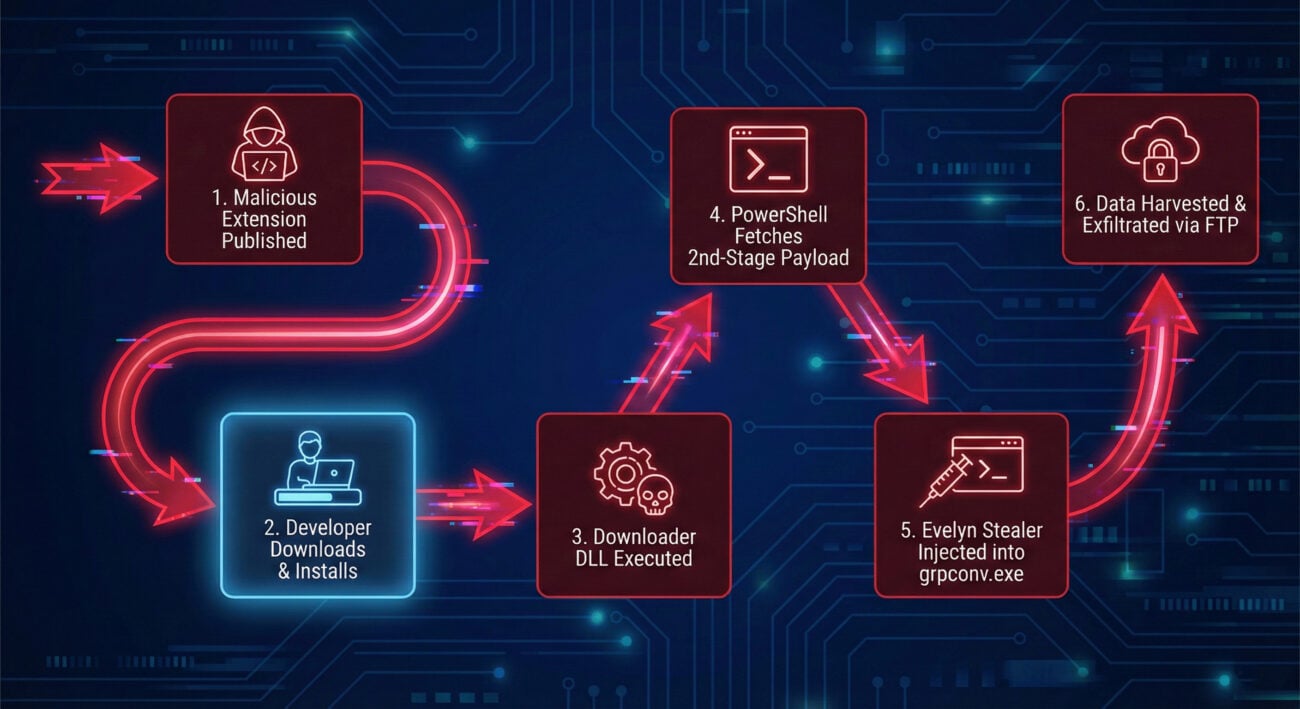
Understanding the sequence of events is crucial for detection and prevention. The Evelyn Stealer infection follows a carefully orchestrated chain designed to evade initial security checks.
Threat actors create seemingly useful or attractive VS Code extensions, like themes or AI assistants, and publish them to the official Visual Studio Code Marketplace. They rely on developers searching for tools and installing them without rigorous vetting.
Once the extension is installed and runs, it drops a malicious downloader DLL file (e.g., Lightshot.dll). This file is the first piece of the malware payload to touch the disk. Its primary job is to establish persistence and retrieve the next stage.
The downloader executes a hidden PowerShell command. This script uses legitimate system tools (Living off the Land Binaries or LOLBins) to fetch the second-stage payload, named runtime.exe, from a remote command-and-control (C2) server. Using PowerShell helps the activity blend in with normal admin tasks.
The runtime.exe payload is designed to avoid writing the core stealer to disk. It decrypts the main Evelyn Stealer module and injects it directly into the memory space of a legitimate, trusted Windows process: grpconv.exe (the Group Policy Conversion Tool). This fileless execution technique makes traditional antivirus scans less effective.
With the stealer active in memory, it begins its collection routine. To ensure it can grab browser data without interference, it forcibly closes browsers and then re-launches them in a hidden, headless state using a series of command-line flags designed to disable security features and logging.
All harvested data, from credentials and cookies to wallet files and screenshots, is compressed into a ZIP archive. This archive is then sent out of the victim's network to the attacker's server via File Transfer Protocol (FTP), completing the breach.
The power of Evelyn Stealer lies in its comprehensive and stealthy feature set. Below is a detailed table of its data harvesting capabilities and anti-analysis techniques.
| Category | Specific Target | Impact & Purpose |
|---|---|---|
| Credentials & Sessions | Cookies, Saved Logins from Chrome, Edge, Firefox; Session data from WhatsApp, Telegram | Allows attackers</span to hijack active sessions, bypassing passwords and multi-factor authentication (MFA) to access email, cloud accounts, and messaging apps. |
| Financial Data | Cryptocurrency wallet files (e.g., Exodus, Atomic, Electrum), Clipboard content | Direct financial theft. Monitoring the clipboard allows the malware to capture cryptocurrency addresses during transactions and replace them with the attacker's own. |
| System Intelligence | Installed apps, Running processes, Wi-Fi passwords, System information (hostname, OS) | Provides reconnaissance for further, targeted attacks within the network or for selling the information on cybercrime forums. |
| Anti-Analysis & Stealth | Virtual Machine (VM) detection, Mutex creation, Headless browser launch flags | Prevents execution in sandboxed analysis environments, avoids multiple instances causing crashes, and hides browser activity from the user during data theft. |
The Browser Trick: One of the most notable technical features is how Evelyn Stealer handles browsers. It terminates them, then relaunches them with flags like --headless=new, --no-sandbox, and --disable-logging. This allows it to programmatically access profile data (where cookies and passwords are stored) without triggering security warnings or leaving obvious traces in the user's visible session.
Framing the attack within the MITRE ATT&CK framework gives defenders a standardized language to understand the adversary's tactics, techniques, and procedures (TTPs). This is essential for building effective detection rules.
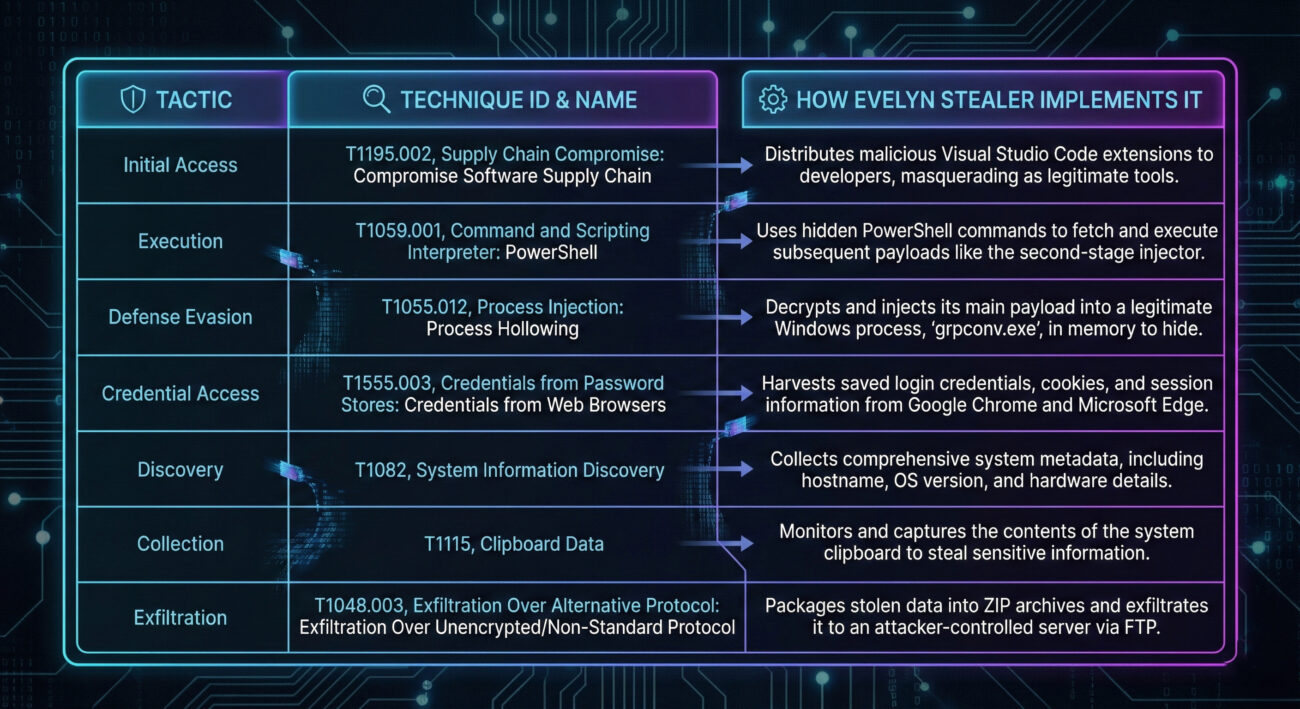
Here are the key MITRE ATT&CK techniques associated with the Evelyn Stealer campaign:
grpconv.exe.--no-sandbox, --disable-logging) actively disable security features.Protecting against threats like Evelyn Stealer requires a layered approach, combining policy, technology, and user awareness. Here are actionable steps for individuals and organizations.
grpconv.exe) as false positives.grpconv.exe from performing network calls or spawning other processes.server09.mentality[.]cloud).Understanding both sides of the cyber battlefield sharpens defenses. Here’s how Red Teams (attackers) and Blue Teams (defenders) view the Evelyn Stealer campaign.
Objectives: Gain initial access to developer machines, establish persistence, exfiltrate credentials and source code, and potentially move laterally to high-value internal targets.
Why This Attack is Appealing:
grpconv.exe) provides excellent operational security against traditional AV.Objectives: Prevent initial infection, detect anomalous behavior early, contain the breach, eradicate the threat, and learn to improve defenses.
Key Detection & Response Opportunities:
grpconv.exe, which is not its normal behavior.--no-sandbox, --headless), especially if they are not initiated by user interaction.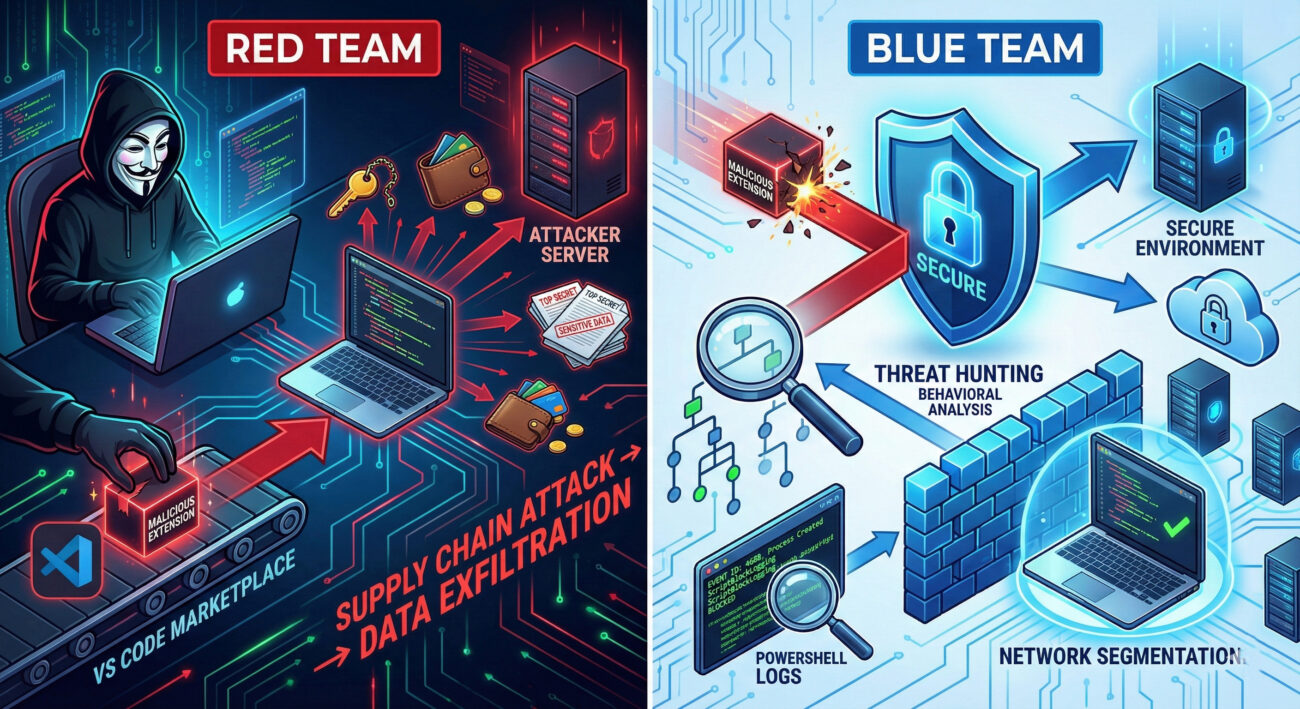
Go to the Extensions view in VS Code (Ctrl+Shift+X). Review the list for any extensions you don't recognize, especially from publishers you don't trust. Look for the specific malicious ones named in reports: "Theme for monkeytype", "Codo AI", or any from the publisher "BigBlack". Immediately uninstall any suspicious extensions. You can also check the official VS Code security guide for more tips.
While Microsoft has security checks, they are not foolproof. The marketplace operates on a scale that makes perfect screening impossible. It is a curated repository, not a guaranteed safe space. The responsibility ultimately falls on users and organizations to vet extensions before installation, similar to mobile app stores. Always check the publisher, reviews, download count, and the extension's source code repository if available.
Developers hold the "keys to the kingdom." Their machines often contain:
Signature-based antivirus may eventually detect known variants of the downloader DLL or payload files. However, due to its use of fileless techniques (injecting into grpconv.exe), polymorphic code (changing its decryption routine), and legitimate system tools (PowerShell), it can easily evade traditional AV. Behavior-based detection (provided by EDR/XDR platforms) that looks for the sequence of events, extension installs DLL, DLL calls PowerShell, PowerShell injects into system binary, is far more effective. Resources like the MITRE ATT&CK Framework help defenders understand these behaviors.
The Evelyn Stealer campaign is a wake-up call for the entire software development industry. It demonstrates that threat actors are strategically shifting their focus to the tools and personnel at the heart of digital innovation. Trust in software supply chains can no longer be implicit; it must be earned and verified.
The landscape of threats is constantly evolving, but with informed vigilance and proactive defenses, development teams can secure their environments and continue to innovate safely.
© 2026 Cyber Pulse Academy. This content is provided for educational purposes only.
Always consult with security professionals for organization-specific guidance.
Every contribution moves us closer to our goal: making world-class cybersecurity education accessible to ALL.
Choose the amount of donation by yourself.