


















































Certification Courses
Hands-On Labs
Threat Intelligence
Latest Cyber News
MITRE ATT&CK Breakdown
All Cyber Keywords
Imagine your computer getting infected by a virus that leaves no trace on your hard drive, bypasses your antivirus software completely, and lives only in your computer's memory. Sounds like science fiction? This is exactly how fileless malware works, and it's one of the most dangerous cyber threats today.
Fileless malware is a type of malicious software that operates without installing any files on your computer's hard drive, making it nearly invisible to traditional security tools. Think of it like a burglar who doesn't break your windows or doors but instead finds a key you left under the mat and lives in your house without ever leaving footprints.
In this guide, you'll learn: exactly what fileless malware is, how it can attack you without any downloads, a real-world scenario showing its danger, and most importantly, 5 critical steps to protect yourself even as a complete beginner.
Have you ever updated your antivirus, scanned your computer, and been told "No threats found," only to experience strange behavior like slow performance, pop-ups, or unauthorized transactions? You might have been a victim of fileless malware.
Unlike traditional viruses that download malicious files to your "Downloads" folder or "Program Files," fileless malware is a digital ghost. It hijacks legitimate tools already on your computer, like PowerShell, Windows Management Instrumentation, or macros in documents, to carry out its attacks. Because it uses trusted, built-in programs, it often goes undetected.
The cybersecurity landscape has shifted dramatically. According to the Cybersecurity and Infrastructure Security Agency (CISA), fileless attacks are among the top threats facing organizations and individuals because of their stealth. A report by CSO Online notes that nearly 40% of all malware attacks in 2023 were fileless.
Why should you, as an individual, care? Because attackers don't just target big corporations. Your personal banking information, social media accounts, and private data are valuable. A fileless malware attack could start with something as simple as clicking a link in a phishing email that looks like it's from your bank or a package delivery service.
This threat matters because it exploits the very tools designed to make your computer work better. It's like someone using your own house key to rob you, then putting the key back exactly where they found it. The damage is done, but there's no obvious evidence of a break-in.
Don't let technical jargon intimidate you. Here are the essential terms you need to understand fileless malware.
| Term | Simple Definition | Everyday Analogy |
|---|---|---|
| Fileless Malware | Malicious code that runs in your computer's memory without saving files to the hard drive. | A squatter living in your house without moving any furniture in. They're there, causing problems, but leave no permanent traces. |
| Living-off-the-Land (LOL) | Using legitimate system tools (like PowerShell) to perform malicious activities. | A thief using your own kitchen knife to cut open a safe, instead of bringing their own tools. |
| Memory (RAM) | Your computer's short-term, temporary workspace. It's wiped clean when you shut down. | A whiteboard in an office. Information is written and used during the day but erased at night. |
| Macro | A small program embedded in documents (like Word or Excel) to automate tasks. | A pre-recorded set of instructions on a voice assistant. Helpful when you set it, dangerous if a hacker changes the instructions. |
| Endpoint Detection & Response (EDR) | Advanced security software that monitors for suspicious behavior, not just known malware files. | A security guard who watches for suspicious behavior (like someone trying every door) instead of just looking for wanted posters. |
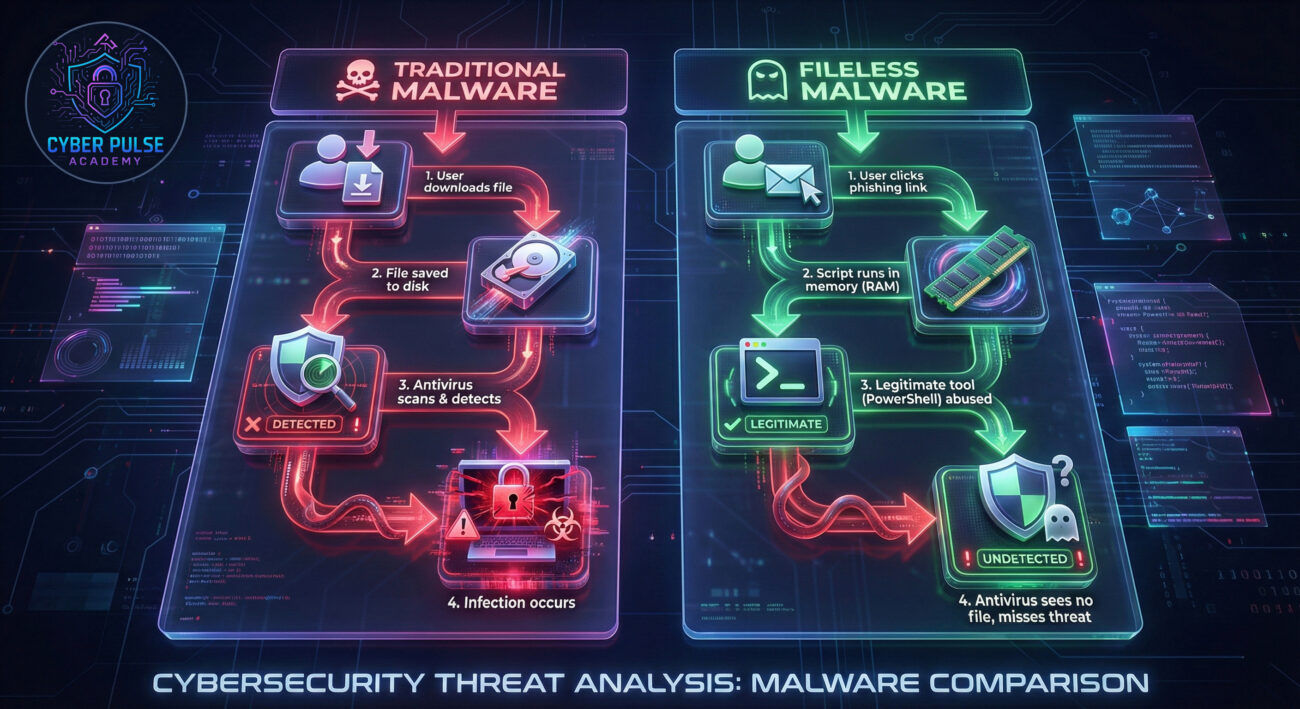
Sarah, a freelance graphic designer, received an urgent email from what appeared to be her accounting software. The email stated her account was locked and she needed to click a link to verify her identity. Stressed about losing access to her invoices, she clicked.
The link opened a legitimate-looking Microsoft Office 365 login page. She entered her credentials. Nothing seemed to download. But within minutes, strange things began to happen. Her computer slowed down. New admin accounts appeared. Her design files were accessed at odd hours.
Sarah ran her antivirus (which was up-to-date). It found nothing. The fileless malware had used the credentials she entered to run malicious PowerShell scripts directly in her computer's memory, establishing a backdoor for the attacker. No malicious files were ever created on her disk.
| Time/Stage | What Happened | Impact |
|---|---|---|
| Day 1, 10:15 AM | Sarah clicks the phishing link and enters her Office 365 credentials on a fake login page. | Credentials stolen. Attackers now have the keys to her digital life. |
| Day 1, 10:20 AM | Attackers use stolen credentials to log into her actual Office 365 account and send a malicious Office document with macros to her contacts. | Attack spreads to her clients and colleagues, damaging her reputation. |
| Day 1, 10:25 AM | A hidden PowerShell script runs from the document's macro. It runs entirely in memory, downloads more malicious code, and creates a hidden backdoor. | Full system compromise. Attackers can now control her PC remotely. No files are written to disk. |
| Day 3 | Sarah notices slow performance. Runs antivirus scan. No threats detected because the malware is fileless. | False sense of security. The infection continues undetected. |
| Day 7 | Attackers use the backdoor to encrypt Sarah's important design files and demand a Bitcoin ransom. | Critical data lost. Business operations halt. Financial and emotional distress. |
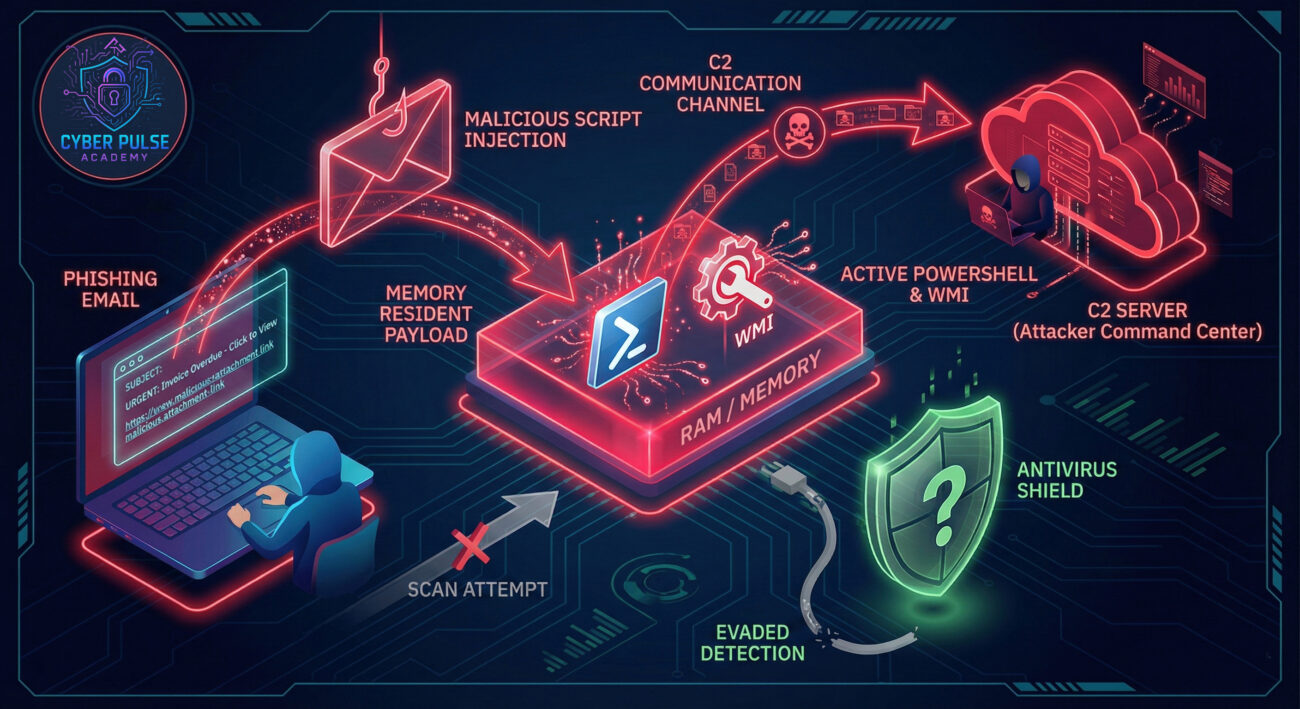
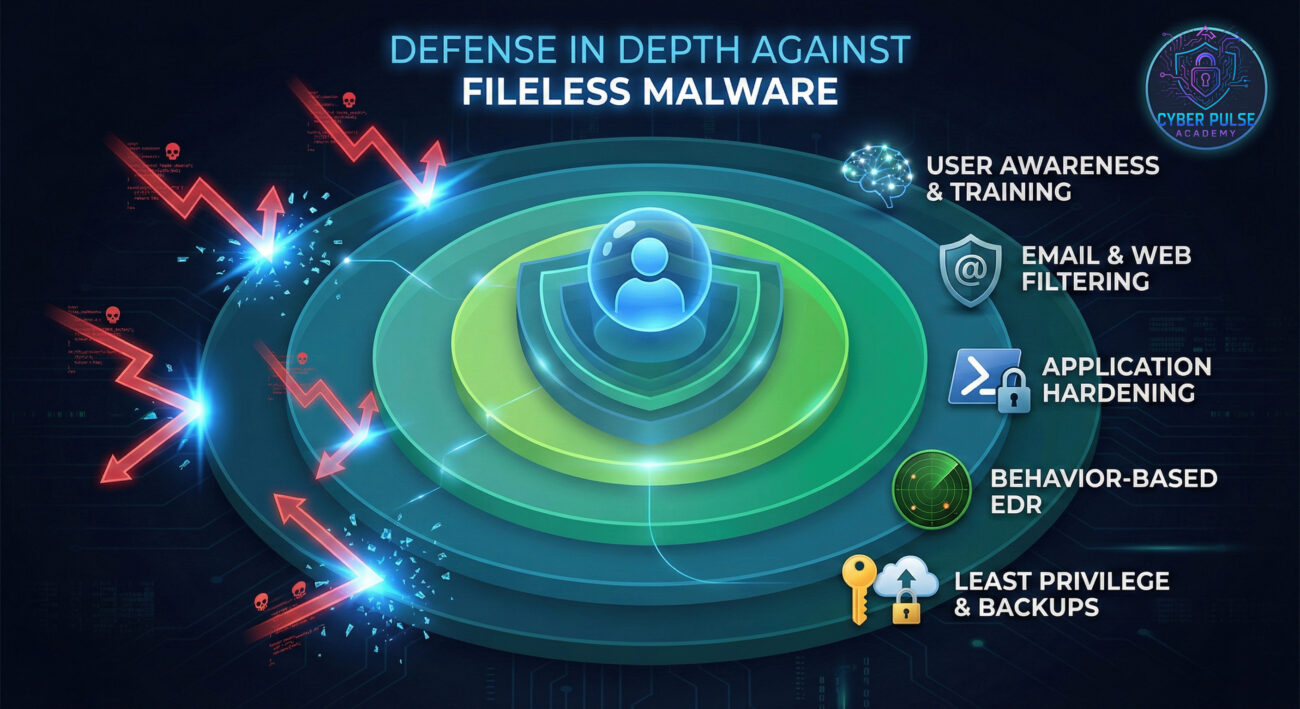
Protecting against fileless malware requires a shift from just "scanning files" to "monitoring behavior." Here is your actionable 5-step defense plan.
Attackers abuse tools like PowerShell and macros. Make them harder to misuse.
Traditional antivirus looks for bad files. You need tools that look for bad actions.
Don't use an administrator account for daily tasks. This limits what malware can do.
Most fileless attacks start with a phishing email or malicious website.
Assume some threats will get through. Have a plan to spot and stop them.
Let's peek into the mindset of both attacker and defender to understand the battlefield.
An attacker loves fileless malware because it's stealthy and persistent. Their goal isn't to destroy your computer, but to live inside it undetected for as long as possible, to steal data, spy, or use it as a launchpad for other attacks. They look for the path of least resistance: an unpatched Office vulnerability, a user with admin rights who will run a macro, or misconfigured PowerShell settings. They see your legitimate tools as weapons waiting to be used.
A defender knows they can't just look for malicious files; they must look for malicious behavior. They monitor for unusual patterns: Is PowerShell suddenly connecting to an IP address in a foreign country? Is a Word document spawning dozens of wscript processes? They focus on hardening configurations, applying the principle of least privilege, and educating users. Their win condition is making the attacker's job so noisy and difficult that they get detected or give up.
Fileless malware represents a sophisticated shift in cyber threats, moving from file-based detection evasion to complete memory-based invisibility. But you are not powerless.
Your key takeaways:
Start today. Review your macro settings, check if you're using a standard user account, and consider upgrading to a behavior-based security solution. Cybersecurity isn't about being perfectly secure, it's about being significantly harder to target than the next person.
Cybersecurity is a community effort. Have you encountered a suspicious email or attack? Do you have tips for others? Share your thoughts in the comments below. Let's build a more secure digital world together.
For further learning, explore our guides on Phishing Attacks and Password Managers.
© 2026 Cyber Pulse Academy. This content is provided for educational purposes only.
Always consult with security professionals for organization-specific guidance.
Every contribution moves us closer to our goal: making world-class cybersecurity education accessible to ALL.
Choose the amount of donation by yourself.