


















































Certification Courses
Hands-On Labs
Threat Intelligence
Latest Cyber News
MITRE ATT&CK Breakdown
All Cyber Keywords
Have you ever entered your credit card details on a trusted website, feeling secure because you saw the padlock icon? What if I told you that a hidden, malicious script could be silently copying every keystroke you make, sending your sensitive data to criminals halfway across the world in under 7 seconds? This isn't a hypothetical scenario, it's called formjacking, and it's one of the most dangerous yet overlooked cyber threats today.
Formjacking is a type of cyber attack where hackers inject malicious code into a website's payment or login form to secretly steal user information as it's entered. Think of it like a skilled pickpocket who installs an invisible camera above an ATM machine, recording every PIN entered by unsuspecting customers.
In this essential guide for beginners, you'll learn exactly how formjacking works, see a real-world scenario unfold, and most importantly, discover 7 practical steps to protect yourself from becoming the next victim. Whether you shop online weekly or monthly, this knowledge is your first line of defense.
Every 39 seconds, a cyber attack occurs somewhere on the internet. Among these, formjacking attacks are particularly insidious because they target the most sensitive moment of online interaction: when you submit personal data. According to a report by Symantec, over 4,800 websites are compromised with formjacking scripts every month.
The financial motivation is enormous. A single stolen credit card can sell for up to $45 on the dark web, and a full identity package can fetch hundreds. When attackers compromise a major e-commerce site, they can harvest thousands of records within hours. The 2018 British Airways breach, where 380,000 payment cards were stolen via formjacking, resulted in a record £20 million GDPR fine.
For the average user, the consequences extend beyond fraudulent charges. Stolen information often leads to identity theft, where criminals open new accounts in your name, damaging your credit score for years. The Cybersecurity and Infrastructure Security Agency (CISA) emphasizes that recovery from identity theft can take hundreds of hours.
What makes formjacking so dangerous is its stealth. Unlike phishing attacks that require you to click a suspicious link, formjacking works on websites you know and trust. The payment page looks completely normal, complete with HTTPS padlocks and legitimate branding. This is why understanding this threat is non-negotiable for anyone who shops, banks, or logs in online.
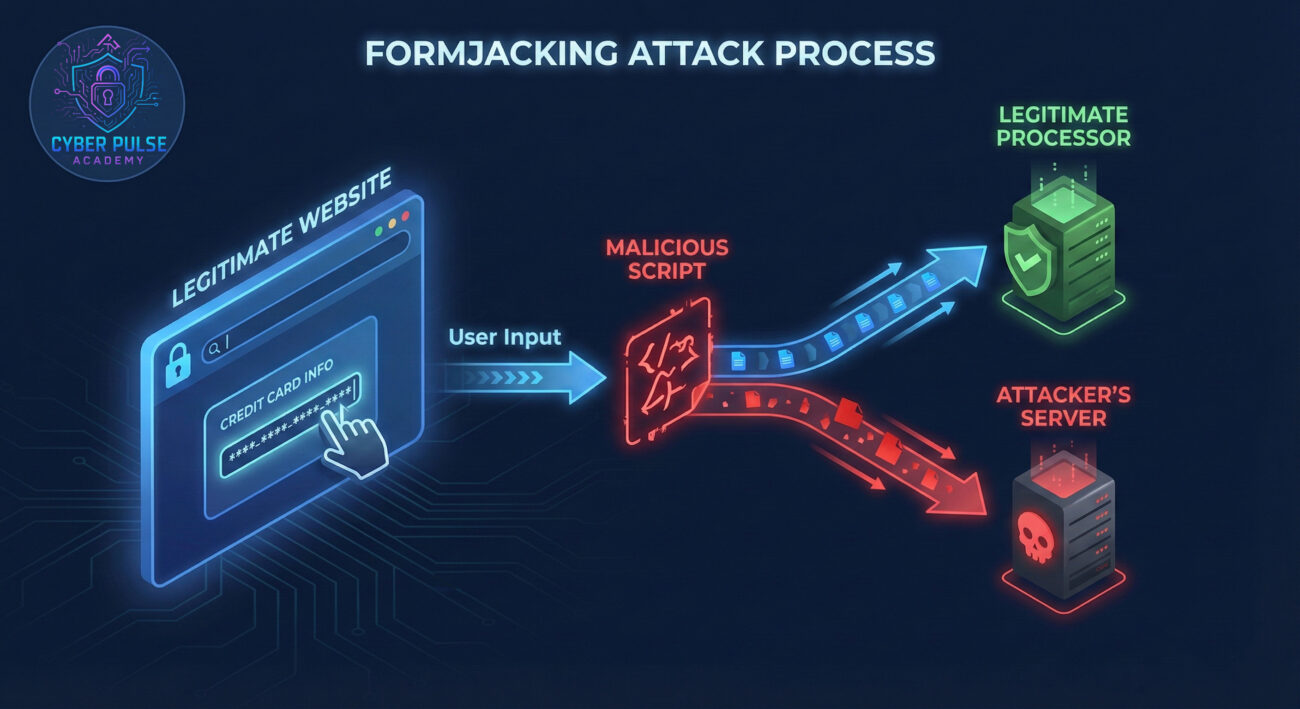
Before we dive deeper, let's clarify some essential terminology. Don't worry, we'll use simple analogies that make these concepts easy to grasp, even if you're completely new to cybersecurity.
| Term | Simple Definition | Everyday Analogy |
|---|---|---|
| Formjacking | Injecting malicious code into web forms to steal user data | A counterfeit card skimmer installed inside a legitimate ATM |
| JavaScript Injection | Inserting harmful code into a website's scripts | Someone secretly adding a recording device to a telephone line |
| Content Security Policy (CSP) | A security standard that prevents unauthorized script execution | A bouncer at a club checking IDs before allowing entry |
| Magecart | A well-known hacking group specializing in formjacking | A sophisticated gang of bank robbers who target specific vulnerabilities |
| Subresource Integrity (SRI) | Verifying that website resources haven't been tampered with | Checking the security seal on medicine to ensure it hasn't been opened |
Let's follow Sarah, a graphic designer who loves online shopping. One Tuesday evening, she visits her favorite clothing retailer, a well-known, reputable site she's used for years, to purchase a new winter coat for $189.99.
The website looks normal: the URL shows "https://" with a padlock, the branding is correct, and the payment page appears identical to her previous visits. Sarah enters her credit card details, name, address, and CVV code. Within milliseconds of clicking "Purchase," two things happen simultaneously: her legitimate transaction processes correctly, AND a malicious script secretly copies all her entered data to a server controlled by attackers in a different country.
Sarah receives her order confirmation and thinks nothing is wrong. Meanwhile, her stolen payment information is already being sold on the dark web. Three days later, she notices a $1,200 charge from an electronics store in another state. Her bank flags it as fraud, but the damage is done, her card must be canceled, and she must update payment information across all her subscription services.
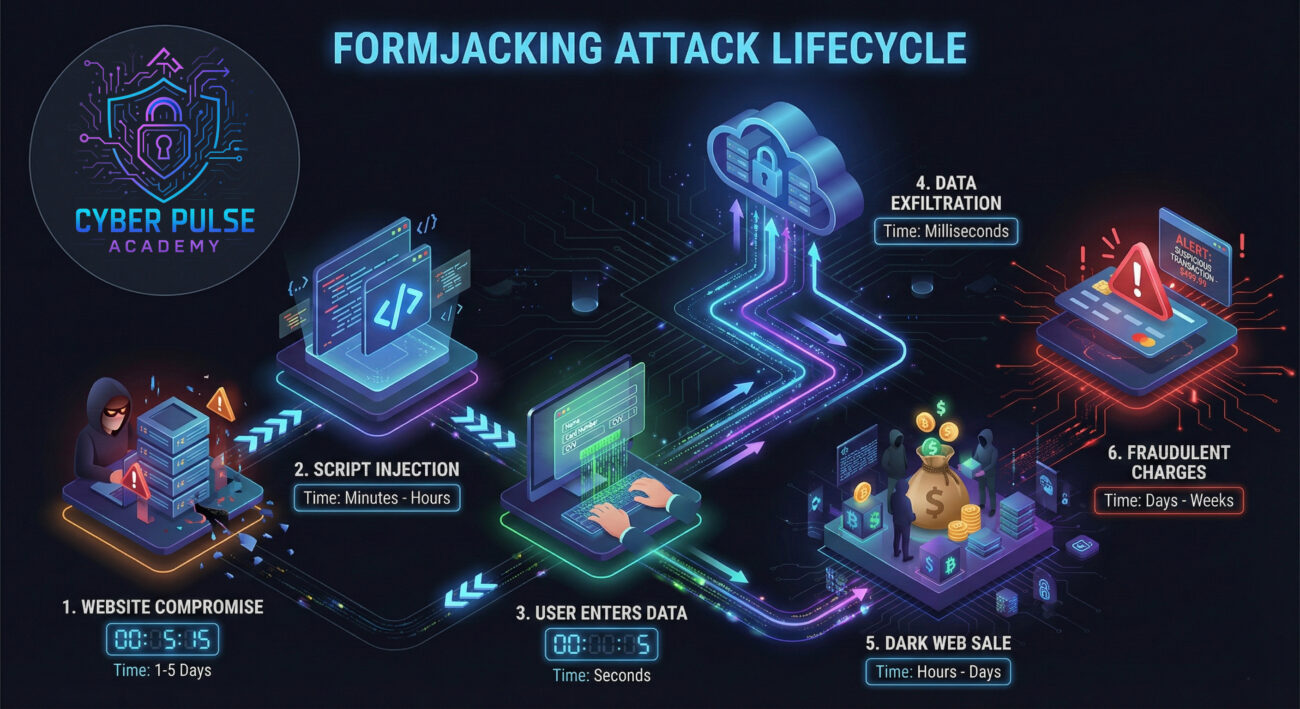
| Time/Stage | What Happened | Impact on Sarah |
|---|---|---|
| Day 0 | Attackers compromise the retailer's website through a vulnerable third-party plugin | None yet, vulnerability exists but is undetected |
| Day 14 | Malicious JavaScript is injected into the payment page loading script | Payment form now contains hidden malware |
| Day 21, 8:15 PM | Sarah enters her payment details; data is copied to attacker's server | Information stolen in under 7 seconds |
| Day 22 | Sarah's card details sold on dark web for $35 | Unaware of the breach |
| Day 24 | Fraudulent $1,200 charge appears on her statement | Financial loss and hours of recovery work begin |
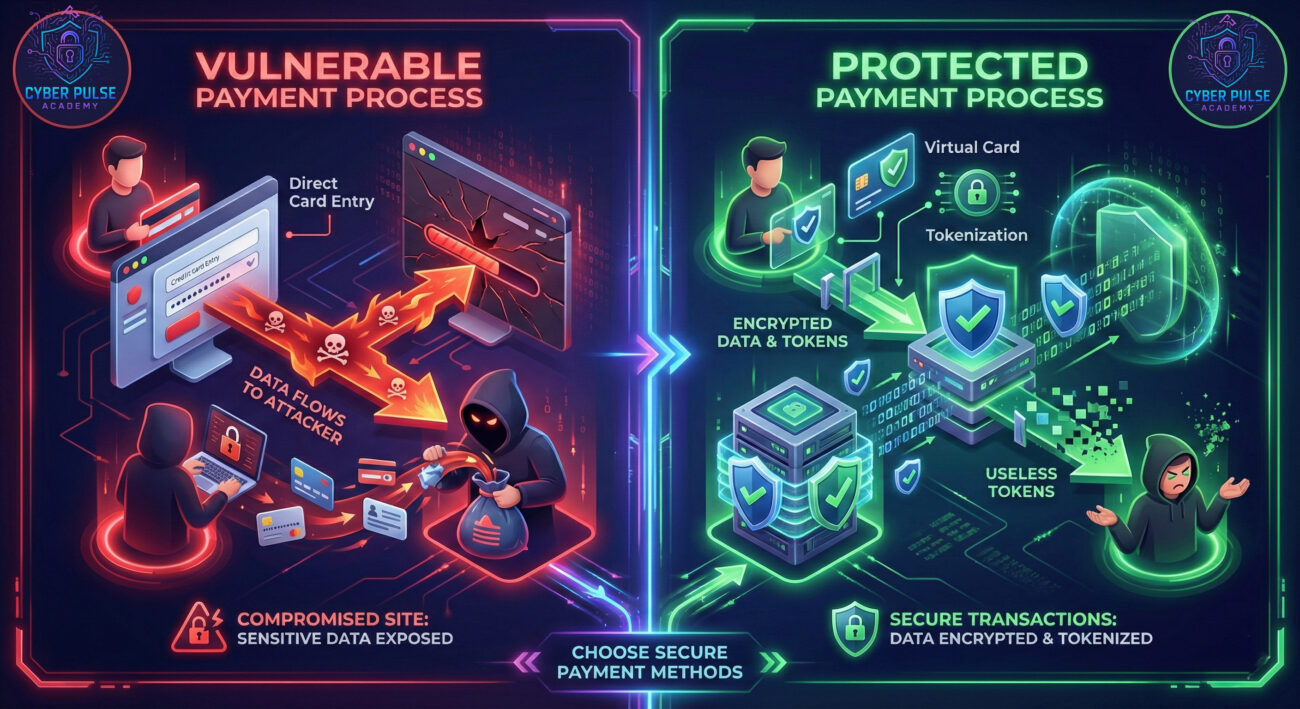
Now that you understand the threat, here's your actionable defense plan. These seven steps will significantly reduce your risk of falling victim to formjacking attacks.
Many banks and services like Privacy.com offer virtual card numbers. These are temporary, disposable card numbers linked to your real account.
Install reputable extensions that block malicious scripts and trackers.
When possible, use third-party payment processors instead of entering card details directly on merchant sites.
Don't wait for monthly statements, check your accounts weekly for suspicious activity.
Outdated browsers and operating systems have known vulnerabilities that attackers exploit.
While MFA doesn't prevent formjacking directly, it protects your accounts if credentials are stolen.
Awareness is your best defense. Follow reputable cybersecurity sources.
"Formjacking is beautiful in its efficiency. We don't need to trick users with phishing emails or exploit their devices directly. Instead, we find the weakest link in the supply chain, often a vulnerable third-party script, analytics tool, or payment processor used by hundreds of websites. Once we inject our few lines of JavaScript, it becomes a silent data harvesting machine. The victim's browser does the work for us, sending fresh payment data directly to our servers. We prefer targeting mid-sized e-commerce sites: big enough to have valuable traffic, small enough that they might not have sophisticated monitoring. The window between injection and detection is our payday."
"Our job is to assume breach and limit damage. We implement Content Security Policies (CSP) that whitelist approved script sources, preventing unauthorized code execution. We use Subresource Integrity (SRI) hashes to ensure third-party scripts haven't been tampered with. Monitoring focuses on anomalous outbound traffic, sudden data flows to unknown domains. We segment our network so that even if the marketing site is compromised, it can't reach the core payment systems. Regular security audits of all third-party vendors are non-negotiable. Education is key: we train developers to never trust user input and to implement proper input validation."
Formjacking represents a sophisticated evolution of cybercrime, one that exploits trust in legitimate websites rather than relying on user error. As online transactions continue to grow, understanding this threat becomes increasingly important for personal security.
Remember these essential points:
Your action plan should start today: enable virtual cards if your bank offers them, install a reputable script blocker, and commit to regular financial monitoring. Formjacking defenses are about proactive habits, not reactive panics.
Have you ever experienced unauthorized charges after shopping online? What security measures do you currently use for online payments? Share your experiences and questions in the comments below, let's build a community of security-aware users together.
Stay vigilant, stay protected, and remember: in cybersecurity, knowledge isn't just power, it's your first line of defense.
© 2026 Cyber Pulse Academy. This content is provided for educational purposes only.
Always consult with security professionals for organization-specific guidance.
Every contribution moves us closer to our goal: making world-class cybersecurity education accessible to ALL.
Choose the amount of donation by yourself.