


















































Certification Courses
Hands-On Labs
Threat Intelligence
Latest Cyber News
MITRE ATT&CK Breakdown
All Cyber Keywords
Gather Victim Host Information is a critical reconnaissance technique where attackers collect data about the hardware, software, and configurations of a target's systems before launching a direct attack. This intelligence allows them to tailor their malware, exploits, and lateral movement strategies for maximum impact.
ATT&CK ID: T1592
Tactics: Reconnaissance
Platforms: PRE (Windows, macOS, Linux), SaaS, IaaS, Network
Difficulty: 🟢 Low
Prevalence: High
Imagine a thief casing a neighborhood before a burglary. They don't just pick a house at random. They note which homes have alarm company stickers, which have dogs, which have old-looking windows, and which leave their garage side door unlocked.
Gather Victim Host Information is the digital equivalent. An attacker acts like that thief, systematically collecting public and semi-public data about your organization's computers, servers, and network devices. They want to know what operating systems you run (Windows 10? Windows Server 2012R2?), what software is installed (Outdated Java? Legacy VPN client?), and even hardware details. This isn't an attack yet, it's the meticulous planning that makes the eventual attack far more likely to succeed.
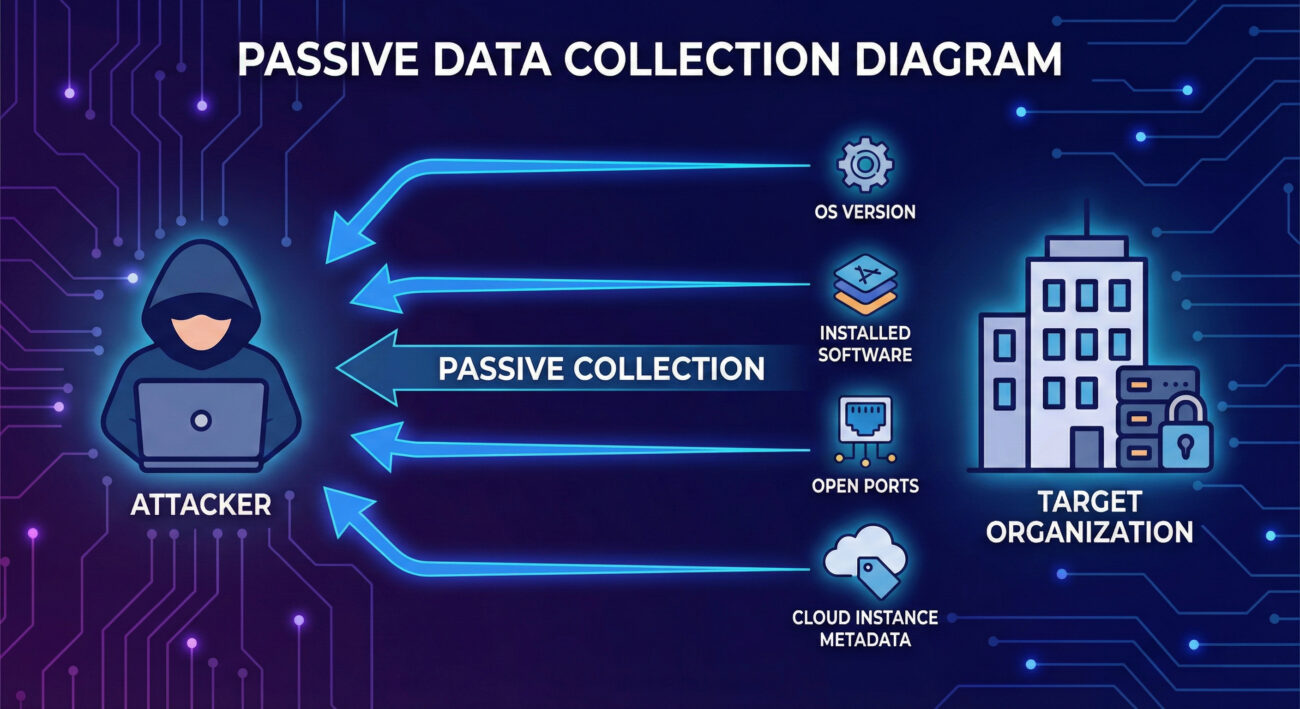
| Term | Definition | Why It Matters |
|---|---|---|
| Passive Reconnaissance | Collecting information without directly interacting with the target's systems. This includes scraping public websites, search engines, and social media. | It's virtually undetectable by the victim and is always the first step in targeted attacks. |
| Fingerprinting | The process of determining the specific software, OS version, or service running on a remote host based on its responses to network probes. | Allows attackers to map your attack surface and search for known vulnerabilities (exploits) for that specific version. |
| Metadata | Data about data. In cloud environments (IaaS/SaaS), this can include instance IDs, geographic regions, configuration tags, and more, often exposed via management APIs. | Cloud metadata is a goldmine for attackers, often revealing internal naming conventions, project structures, and potential misconfigurations. |
| Open Source Intelligence (OSINT) | Information gathered from publicly available sources to be used in an intelligence context. | The primary method for Gather Victim Host Information. It turns public data into a weapon. |
| Attack Surface | The sum of all possible points (software, ports, users, etc.) where an unauthorized user can try to enter or extract data from your environment. | The goal of this technique is to map and understand your attack surface to find the weakest entry point. |
Think like a safe cracker. You don't just walk up and start drilling. First, you identify the make and model of the safe (the OS/software). You listen to the clicks as you turn the dial (network responses). You research common factory defects for that model (public vulnerabilities). Every piece of information tells you something about the internal mechanism, reducing the variables and time needed to get inside.
The red team mindset here is one of patience and deduction. Success isn't measured by exploits launched, but by the quality and accuracy of the intelligence dossier built on the target.
Example Nmap Command for OS & Service Detection:
nmap -sV -O --script banner,ssl-cert 203.0.113.0/24Explanation of flags:
-sV: Probes open ports to determine service/version info.-O: Enables OS detection.--script banner,ssl-cert: Runs Nmap scripts to grab service banners and SSL certificate details, which often contain hostnames and organizational info.Example Shodan-style Search Concept:
# This is a conceptual search query an attacker might use in Shodan's web interface
net:"203.0.113.0/24" product:"Apache httpd" port:"443"
The APT29 (Cozy Bear) group, associated with Russian intelligence, is a master of sophisticated reconnaissance. In campaigns targeting government and diplomatic entities, they have been observed conducting extensive Gather Victim Host Information.
They meticulously profile targets using publicly available information, then use that data to craft believable spear-phishing emails and to identify specific vulnerabilities in software they know the victim uses. This highly targeted approach makes their initial compromises extremely stealthy and effective.
External Reference: For a detailed analysis, see the joint advisory from CISA and the UK's NCSC: "APT29 targets COVID-19 vaccine development", which details their reconnaissance tradecraft.
Your job is not to prevent someone from looking at your house, that's impossible. Your job is to ensure they learn as little as possible from that look. Think of it as operational security (OPSEC). Don't leave your server manuals and network diagrams in the publicly viewable recycling bin (job postings, error messages). Use uniform curtains on all windows (standardized, minimal banners). Assume a motivated observer is always watching.
The defender's philosophy shifts from "prevent all scanning" (a losing battle) to "minimize information leakage and detect anomalous reconnaissance activity."
You won't get a screaming alert titled "VICTIM HOST INFO GATHERING." Instead, look for subtler signs:
Here is a Sigma rule designed to detect potential host and service fingerprinting activity, characteristic of the Gather Victim Host Information phase. This rule looks for Nmap-style scanning patterns.
# Sigma Rule: Potential Nmap Service and OS Detection Scan
title: Potential Nmap Service and OS Detection Scan
id: a7b3c8d2-f1e0-4b5a-9c87-123456789abc
status: experimental
description: Detects command-line arguments commonly used by Nmap for service version (-sV) and OS detection (-O) scanning.
references:
    - https://nmap.org/book/man-version-detection.html
    - https://attack.mitre.org/techniques/T1592/
author: Cyber Defense Field Guide
date: 2024-10-27
tags:
    - attack.reconnaissance
    - attack.t1592
logsource:
    category: process_creation
    product: windows
detection:
    selection:
        CommandLine|contains|all:
            - 'nmap'
            - '-sV'
        CommandLine|contains|any:
            - '-O'
            - '-A'
            - '--osscan-limit'
    condition: selection
fields:
    - CommandLine
    - User
    - ParentProcessName
falsepositives:
    - Legitimate security testing by authorized personnel
level: low
| Attacker's Goal (Red) | Defender's Action (Blue) |
|---|---|
| Find the OS version of the public web server. | Remove or obfuscate the `Server:` header in HTTP responses. |
| Discover all subdomains associated with the target. | Monitor DNS logs for brute-force subdomain enumeration and consider using DNS wildcards cautiously. |
| Identify outdated software (e.g., WordPress 4.0). | Implement a strict patch management policy and automate updates where possible. |
| Map the cloud infrastructure (AWS S3 buckets). | Use IAM policies, enforce S3 bucket encryption & "block public access" settings, and enable CloudTrail logging. |
| Get internal network info from job postings. | Work with HR to review job descriptions for unnecessary technical detail before posting. |
Gather Victim Host Information (T1592) is the foundation of every targeted cyber attack. While often low-tech and passive, its effectiveness is undeniable. By understanding the attacker's methodology, their tools, their mindset, and their goals, you can fundamentally shift the balance in your favor.
Defending against it isn't about building higher walls; it's about giving observers less to see and being alert for those who are looking too closely. Implement the mitigation controls, use the provided detection logic, and make defensive reconnaissance a regular part of your security program.
Your Action Plan:
Further Reading & Internal Links:
Every contribution moves us closer to our goal: making world-class cybersecurity education accessible to ALL.
Choose the amount of donation by yourself.