


















































Certification Courses
Hands-On Labs
Threat Intelligence
Latest Cyber News
MITRE ATT&CK Breakdown
All Cyber Keywords
Gather Victim Identity Information is the foundational reconnaissance step where adversaries collect data like names, emails, job titles, and affiliations to enable and tailor their attacks.
ATT&CK ID T1589
Tactics Reconnaissance
Platforms PRE
Difficulty 🟢 Beginner
Prevalence High
Imagine a thief planning to rob a house. They don't just pick a random door. First, they might watch the neighborhood, check which homes have expensive cars, look for mail with names on it, or see when people leave for work. Gather Victim Identity Information is the digital version of this "neighborhood watch."
Before launching any spear-phishing email or password-spraying attack, adversaries need to know who they are targeting. This technique is all about collecting the digital "name tags" and "daily routines" of potential victims, names, email addresses, social media profiles, job roles, and professional connections. This information makes subsequent attacks dramatically more effective and convincing.
| Term | Simple Definition |
|---|---|
| OSINT (Open-Source Intelligence) | The practice of collecting information from publicly available sources. Think of it as using Google, social media, and public records to build a profile. |
| Reconnaissance (Recon) | The overall phase of gathering information before an attack. T1589 is a key part of this phase. |
| PII (Personally Identifiable Information) | Any data that can identify a specific individual (e.g., name, email, phone number, employee ID). This is the primary hacker's target in this technique. |
| Credential Stuffing | An attack enabled by this recon, where stolen usernames/passwords are tried on other sites. Knowing a person's email is the first step. |
| Spear-phishing | A highly targeted phishing attack. Effective spear-phishing is impossible without first gathering victim identity information like job title and colleagues' names. |
This isn't a single action but a methodical process:
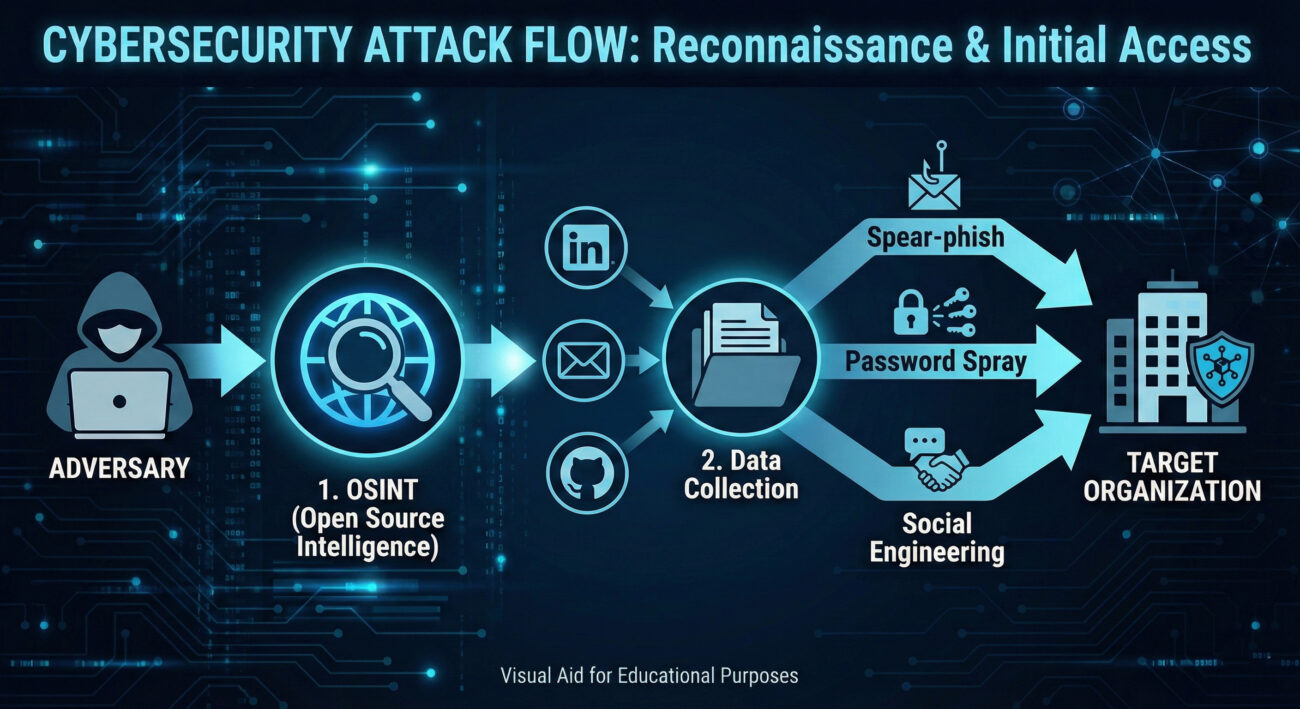
Think of yourself as a private investigator hired to test a company's human firewall. Your job isn't to break in yet, but to build a comprehensive dossier on key individuals. The more details you have, the more believable your pretext will be. You're not looking for a zero-day exploit here; you're looking for the human element, names, relationships, habits, and digital footprints that can be leveraged.
Attackers use a mix of manual sleuthing and automated OSINT tools.
Example theHarvester Command:
theharvester -d "example.com" -b google,linkedin
# -d: Target domain
# -b: Data sources (Google search, LinkedIn)
# Output will list discovered emails and hosts.
Manual OSINT Example (LinkedIn Search): An attacker searches for "System Administrator at Example Corp," reviews the profile for skills, endorsements, and connections to other employees, then uses that info to craft a phishing email about a fake "IT Security Certificate" from a colleague they found.
The Lazarus Group (APT38), a North Korean state-sponsored actor, is known for extensive reconnaissance. Before their infamous SWIFT network attacks and cryptocurrency heists, they spent considerable time gathering victim identity information on employees at financial institutions and crypto exchanges.
They used fake LinkedIn profiles posing as recruiters or tech professionals to connect with and gather intelligence on their targets, learning about roles, projects, and trust relationships to enable highly effective social engineering. This reconnaissance phase was critical to the success of their multi-million dollar attacks.
Reference: CISA Advisory on Lazarus Group (AA22-279A)
You are the security manager of a secure corporate headquarters. You can't stop people from looking at your building from the public street (passive OSINT). However, you can:
Direct detection of passive OSINT is nearly impossible, it looks like normal web traffic. Your focus shifts to correlated indicators and post-reconnaissance activity.
Hunt for early signs of targeted attacks by looking for reconnaissance patterns against your public web assets. The following KQL (Azure Sentinel/Microsoft Defender) query looks for a single external IP making requests to many different employee-oriented pages, which could indicate scraping.
// KQL Query: Hunting for Potential Web Scraping of Employee Info
let timeframe = 24h;
let targetPaths = dynamic(["/about", "/team", "/leadership", "/careers", "/contact", "/staff", "/people"]);
Weblogs
| where TimeGenerated >= ago(timeframe)
| where ClientIP startswith "10." or ClientIP startswith "192.168." or ClientIP startswith "172." // Filter out internal IPs
| where CsUriStem has_any (targetPaths) // Look for requests to pages likely containing PII
| summarize DistinctPagesAccessed = dcount(CsUriStem),
          UserAgents = make_set(CsUserAgent),
          FirstSeen = min(TimeGenerated),
          LastSeen = max(TimeGenerated)
          by ClientIP, CsHost
| where DistinctPagesAccessed >= 5 // Tune this threshold based on your site's normal traffic
| project-rename Suspicious_IP = ClientIP, Target_Host = CsHost
| order by DistinctPagesAccessed desc
// This identifies external IPs accessing an unusual number of 'employee info' type pages, potentially mapping your organization.
Since you can't block Google, mitigation is about hardening your public footprint and preparing for the inevitable follow-on attacks.
| Attacker's Goal (Red Team) | Defender's Action (Blue Team) |
|---|---|
| Build a comprehensive target list of employees and their roles. | Minimize publicly available employee PII; use role-based contacts. |
| Discover corporate email naming conventions (e.g., [email protected]). | Implement MFA to make guessed/breached emails useless without the second factor. |
| Understand organizational structure for social engineering. | Conduct regular, realistic social engineering drills and awareness training. |
| Find old passwords in breach dumps to enable credential stuffing. | Enforce password filters to block previously breached passwords and monitor for authentication anomalies. |
Employees reporting a surge in connection requests from unknown "recruiters" or "industry peers" on LinkedIn, especially those asking detailed questions about projects or tools.
Mandate MFA on ALL external-facing services (email, VPN, cloud apps) and conduct a quarterly "self-OSINT" audit to see what your company's public footprint looks like.
In web server logs for scraping patterns and in authentication logs for the resulting password spray attacks that use the gathered email lists.
Gather Victim Identity Information (T1589) is the quiet, often undetectable first move in a long-chain cyber attack. While you cannot prevent it outright, understanding its methodology is crucial for building a proactive defense. By minimizing your public attack surface, hardening identity systems, and training your human layer, you can significantly raise the cost and complexity for the adversary, potentially causing their campaign to fail at this earliest stage.
Your Action Plan:
Further Reading from Authoritative Sources:
Every contribution moves us closer to our goal: making world-class cybersecurity education accessible to ALL.
Choose the amount of donation by yourself.