


















































Certification Courses
Hands-On Labs
Threat Intelligence
Latest Cyber News
MITRE ATT&CK Breakdown
All Cyber Keywords
In the interconnected world of the Internet of Things (IoT), a single vulnerability can serve as a master key for attackers seeking to infiltrate networks. The recent discovery of an unpatched firmware vulnerability (CVE-2025-65606) in the TOTOLINK EX200 wireless range extender serves as a stark case study. This critical flaw demonstrates how an error in a device's fundamental code can be weaponized to achieve complete remote device takeover, turning a benign network helper into a potent attack vector.
The CVE-2025-65606 vulnerability is not a typical bug; it's a systemic failure in error-handling logic within the device's firmware update mechanism. Discovered by researcher Leandro Kogan and disclosed by CERT/CC, this flaw exists in TOTOLINK EX200 devices whose firmware hasn't been updated since February 2023. More alarmingly, the vendor has not released a patch, indicating the product may be end-of-life.
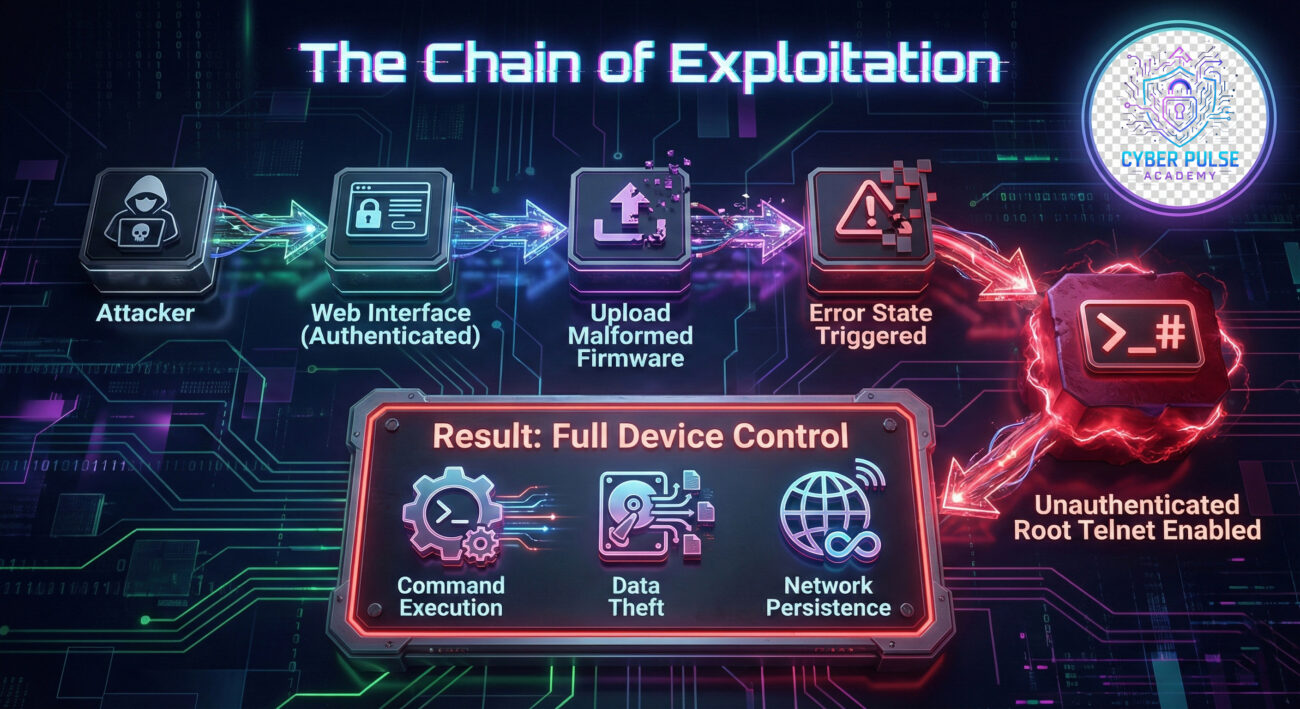
What makes this IoT firmware vulnerability particularly dangerous is its post-authentication nature. An attacker only needs valid login credentials for the device's web management portal, which could be obtained through default passwords, weak credentials, or a separate phishing scheme. Once inside, they can weaponize a standard administrative function (firmware upload) to permanently open a backdoor. This transforms a limited-access account into a gateway for unrestricted, root-level control.
To understand this firmware vulnerability, think of the device's firmware upload handler as a security checkpoint. Normally, it checks the "passport" (firmware signature/format) of anyone trying to enter (upload new code). In the TOTOLINK EX200, when this checkpoint receives a blatantly fake or malformed passport, instead of denying entry and raising an alarm, it has a catastrophic failure: it abandons its post entirely and unlocks a secret, unguarded entrance (telnet service) with VIP (root) access for everyone.
The flaw resides in the `/cgi-bin/upload_firmware.cgi` handler. When a user with administrative privileges uploads a file via the web interface, the following logic is intended to execute:
1. Receive uploaded file.
2. Validate file header and structure.
3. If valid, proceed with firmware update.
4. If invalid, display error message and abort.
However, the vulnerable code lacks a proper "clean-up" or "rollback" state for specific malformed files. The pseudocode below illustrates the flawed logic:
// PSEUDOCODE - Flawed Error Handling
processFirmwareUpload(file) {
    init_telnet_service(); // Intended for authorized debug, should require auth
    if (!validateFirmwareHeader(file)) {
        // ERROR: Missing deinit_telnet_service() call here!
        display_error("Invalid firmware");
        return;
    }
    // ... proceed with normal update
}
When validation fails on a specifically crafted file, the process crashes or exits in an "abnormal error state." Crucially, it does not shut down the telnet service it initialized at the start of the upload sequence. This leaves the telnet daemon running on the default port (23), bound to all network interfaces (0.0.0.0), with root privileges, and, most critically, with no password authentication required.
This creates a stunning privilege escalation path. An attacker with basic web admin access (a low-privilege user) performs the following:
telnet [device_ip]) and immediately receives a root shell (# prompt).This root shell grants the attacker the ability to install persistent malware, reconfigure the device as a network sniffer, pivot to attack other devices on the local network, or turn the device into a bot in a larger botnet.
Understanding this IoT firmware vulnerability through the lens of the MITRE ATT&CK framework reveals the broader tactics and techniques at play. This framework categorizes the steps an adversary takes, turning a specific flaw into a predictable pattern of attack.
| MITRE ATT&CK Tactic | Technique (ID) | Application in CVE-2025-65606 |
|---|---|---|
| Initial Access | Valid Accounts (T1078) | The attacker first obtains valid credentials for the web interface, often via default passwords or credential guessing. |
| Execution | Exploitation for Client Execution (T1203) | They exploit the firmware upload flaw to trigger the error condition and execute their objective (starting the telnet service). |
| Persistence | Create Account (T1136), Server Software Component (T1505) | With root access, they can create new system accounts or install backdoored firmware to maintain access. |
| Privilege Escalation | Exploitation for Privilege Escalation (T1068) | The core of the vulnerability: exploiting the logic flaw to escalate from web user to root-level system access. |
| Lateral Movement | Remote Services (T1021) | The compromised range extender can be used as a launch point to attack other devices on the same local network. |
| Command and Control | Ingress Tool Transfer (T1105), Remote Access Software (T1219) | The unauthenticated telnet service acts as a perfect C2 channel for executing commands and transferring tools. |
This mapping is crucial for defenders. It shifts the perspective from "patching one bug" to "disrupting a multi-stage kill chain." By implementing secure configurations (disabling default accounts) at the Initial Access stage, you can prevent the entire attack sequence from beginning, even before the firmware vulnerability itself is addressed.
Let's break down how an attacker would exploit this vulnerability in a controlled, ethical testing environment (e.g., a penetration testing lab). This highlights the frightening simplicity of the chain.
The attacker scans the network for devices on common IoT ports (80, 443, 8080 for web interfaces). Upon finding a TOTOLINK EX200, they attempt to log into the web admin panel. This often succeeds by using default credentials (admin/admin, admin/password) which are rarely changed on such devices. This step alone highlights a critical failure in basic security hygiene.
After logging in, the attacker navigates to the firmware update section. Instead of a legitimate firmware file, they prepare a malicious payload. This could be a simple text file renamed with a `.bin` extension, or a firmware file deliberately corrupted in its header. The exact trigger requires specific malformation, which the researcher identified through reverse engineering or fuzzing.
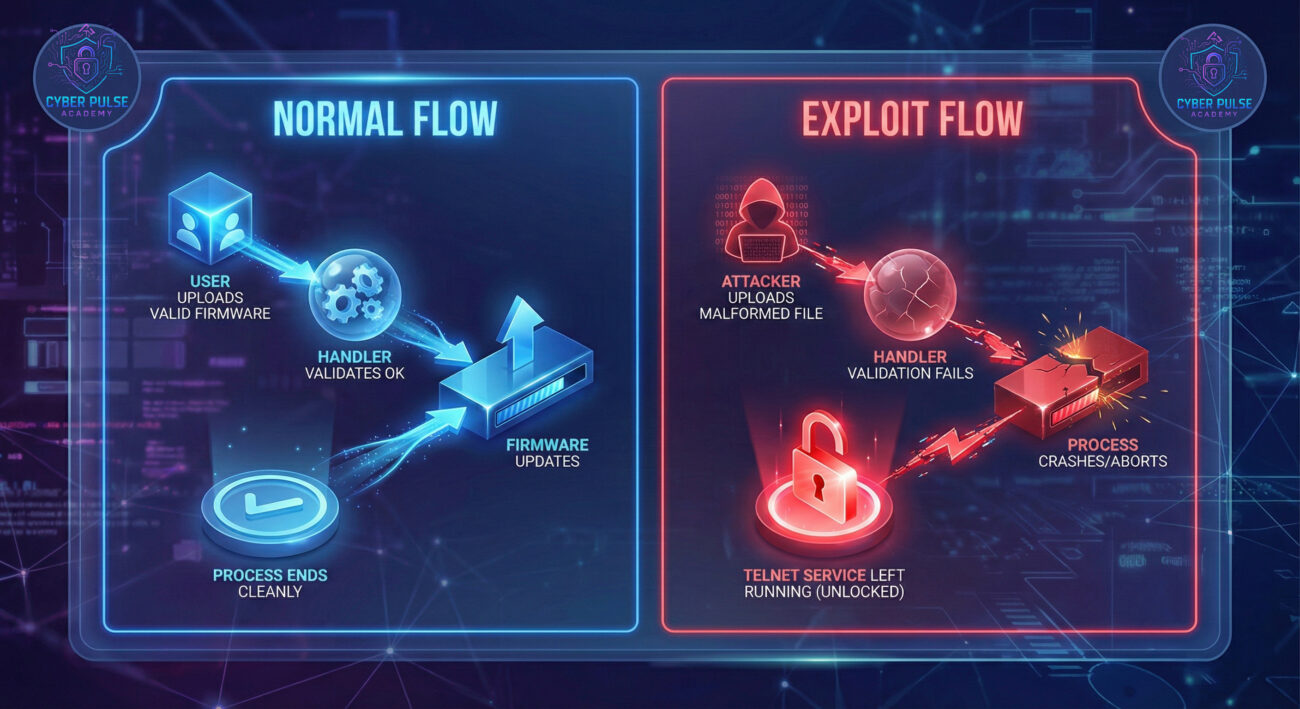
The attacker uploads the malicious file. The web interface likely returns a generic error. However, in the background, the abnormal exit of the upload handler has left the telnet service running. The attacker then uses a standard telnet client to connect to the device's IP address on port 23. No username or password is requested, and they are immediately greeted with a root shell prompt (#). The device is now fully compromised.
With root access, the attacker's options are limitless. They might:
For a red teamer or threat actor, this vulnerability is a golden ticket. It's a post-authentication flaw, which often receives less scrutiny than pre-auth bugs. The exploit is highly reliable and provides the highest level of access. The target devices are numerous, often poorly maintained, and sit inside network perimeters, making them perfect footholds for lateral movement.
Key Attack Opportunities:
For defenders, this vulnerability is a nightmare scenario that highlights systemic failures: end-of-life devices, weak default security, and insufficient input validation. Since a patch is unavailable, defense relies entirely on mitigation and compensating controls.
Critical Defense Actions:
For security teams, here is a practical, phased framework to defend against such IoT firmware vulnerabilities and build resilience.
| Phase | Action Items | Tools & Resources |
|---|---|---|
| 1. Discovery & Assessment |
|
Nmap, Shodan (for internet-facing devices), internal vulnerability scanners. |
| 2. Immediate Containment |
|
Firewall (e.g., pfSense, enterprise firewalls), configuration management scripts. |
| 3. Strategic Segmentation |
|
Network switches supporting VLANs, next-gen firewalls for inter-VLAN filtering. |
| 4. Monitoring & Enforcement |
|
SIEM (e.g., Splunk, Elastic), IDS/IPS (e.g., Suricata, Snort), NAC solutions. |
| 5. Long-term Governance |
|
GRC (Governance, Risk, Compliance) platforms, asset management systems. |
A: Absolutely. The device may function normally, but it could be silently compromised. A hacker controlling it could be stealing data from your network, using it to attack other devices, or consuming your bandwidth for malicious activities, all without obvious signs. Functionality does not equal security.
A: Implement immediate compensating controls: 1) Change the admin password to a strong, unique one. 2) Ensure the management web interface is not accessible from the internet (check your router's port forwarding rules). 3) If possible, create firewall rules on your main router to block the EX200 from initiating any connections to the internet except what's strictly necessary. The ultimate solution is to replace the device with a supported model.
A: Look for these signs: 1) Unexpected activity like the device's LED lights behaving oddly. 2) A significant, unexplained drop in network performance. 3) Use a network scanner (like Nmap) from another computer to see if port 23 (telnet) is open on the device's IP address. If port 23 is open, assume it is compromised. You can also check device logs via the web interface for failed login attempts or firmware upload errors you didn't initiate.
A: CVE-2025-65606 is specific to the EX200 model. However, the class of vulnerability, faulty error handling in firmware update mechanisms, is common in the IoT world. Other models and brands may have similar flaws. This incident underscores the importance of treating all IoT devices with a baseline of suspicion and applying universal security practices (segmentation, strong credentials) across your entire device fleet.
The TOTOLINK EX200 IoT firmware vulnerability (CVE-2025-65606) is a powerful lesson in modern cybersecurity. It demonstrates that risk often lurks in the most mundane devices and that a single logic flaw can demolish an entire device's security model. The absence of a patch forces us to rely on foundational defense-in-depth principles: hardening credentials, segmenting networks, and monitoring diligently.
For beginners, let this be a cornerstone case study. Security is not just about software patches; it's about architecture and process. For professionals, it's a call to rigorously assess the IoT ecosystem within your organization, which is often the soft underbelly of a corporate network. By understanding the attacker's methodology through frameworks like MITRE ATT&CK and implementing a structured defensive plan, you can transform a point of weakness into a controlled, monitored segment of your infrastructure.
Begin today. Inventory one segment of your network for IoT devices this week. Change one default credential. Review one firewall rule. Building a secure environment is a continuous process. For further learning, explore resources from the CISA Secure Our World initiative, the OWASP IoT Project, and stay updated via trusted security advisories like CERT/CC's VINCE.
© 2026 Cyber Pulse Academy. This content is provided for educational purposes only.
Always consult with security professionals for organization-specific guidance.
Every contribution moves us closer to our goal: making world-class cybersecurity education accessible to ALL.
Choose the amount of donation by yourself.