Executive Summary: The Kimwolf Wake-Up Call
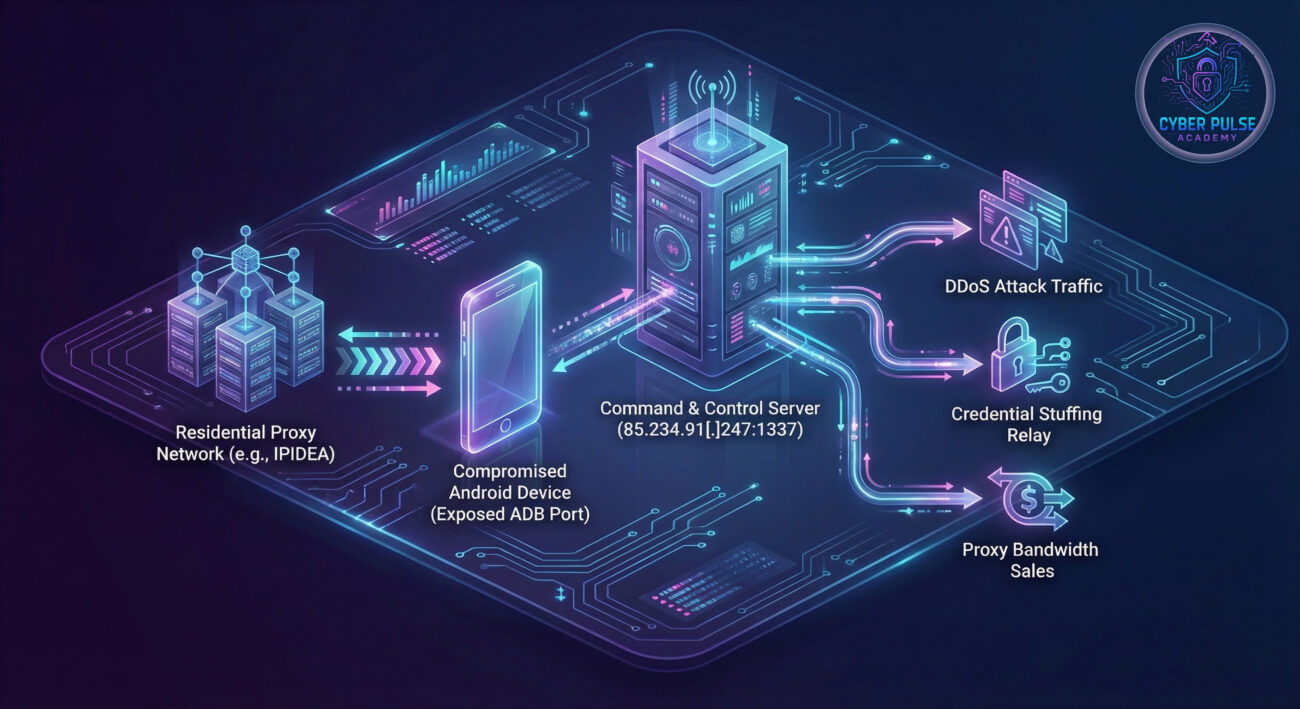
In early 2026, the cybersecurity community was alerted to one of the most pervasive mobile threats in recent memory: the Kimwolf Android botnet. This sophisticated malware has infected over two million Android devices, transforming them into weapons for Distributed Denial-of-Service (DDoS) attacks, credential stuffing, and a lucrative residential proxy service. Unlike typical malware that relies on user interaction, Kimwolf exploits a technical misconfiguration, the exposed Android Debug Bridge (ADB) interface, often found on non-standard Android devices like smart TVs and set-top boxes.
The scale is staggering. Security firm Synthient observed approximately 12 million unique IP addresses per week associated with this botnet, with concentrations in Vietnam, Brazil, India, and Saudi Arabia. What makes Kimwolf particularly insidious is its attack vector: it doesn't need you to click a phishing link. It quietly scans the internet for an open door (port 5555, used by ADB) and walks right in. This guide will dissect the Kimwolf Android botnet, explain its mechanics in beginner-friendly terms, and provide a actionable framework for defending against such threats.
How Kimwolf Works: Anatomy of a Silent Invasion
The Two-Pronged Attack Vector
Kimwolf's initial infection doesn't follow the usual script. It employs a clever two-step process that bypasses traditional user-centric attack methods:
- Step 1: Tunneling Through Residential Proxies: The attackers first rent IP addresses from commercial residential proxy services, most notably China-based IPIDEA. These services provide "clean," residential IP addresses that blend in with normal internet traffic, helping the attackers' scanning activities evade basic geo-blocking or attack rate-limiting defenses.
- Step 2: Exploiting Exposed ADB Interfaces: Using these proxy IPs, the botnet's scanning infrastructure searches the internet for devices with the Android Debug Bridge (ADB) service exposed and, crucially, unauthenticated. ADB is a legitimate developer tool, but when left open to the internet (typically on port 5555), it allows complete remote control. An astonishing 67% of compromised devices had unauthenticated ADB enabled by default.
Infection and Persistence
Once a vulnerable device is found, the malware payload is delivered. The main payload establishes persistence and opens a backdoor, listening on port 40860. It then calls home to a Command & Control (C&C) server at the IP address 85.234.91[.]247:1337 to receive instructions. In many cases, the devices, often low-cost, unofficial Android TV boxes, are suspected of being pre-infected at the supply chain level with proxy SDKs, making them part of the botnet before they even reach the consumer.
| Component |
Technical Detail |
Purpose |
| Initial Access |
Exposed & unauthenticated ADB port (5555) |
Provides root-level access without password |
| Scanning Infrastructure |
Residential proxy networks (e.g., IPIDEA) |
Hides scan source IPs, evades blacklists |
| Malware Payload |
Listens on port 40860, connects to C&C |
Establishes remote control channel |
| Command & Control |
85.234.91[.]247:1337 |
Issues commands for DDoS, proxying, etc. |
Real-World Impact & Attack Scenario
Imagine you purchase an affordable Android TV box online. Unbeknownst to you, it arrives with a hidden passenger, a proxy Software Development Kit (SDK) embedded in the firmware. You connect it to your home Wi-Fi. Now, your device, your network's IP address, and your internet bandwidth become a commodity sold on the shady digital underground.
This is the reality for millions. The Kimwolf Android botnet turns infected devices into Swiss Army knives for cybercrime:
- DDoS Attacks: Your device could be ordered to flood a website or online service with junk traffic, knocking it offline. Kimwolf is suspected behind several record-setting attacks in late 2025.
- Credential Stuffing Relays: Synthient detected the botnet's infrastructure being used to launch credential-stuffing attacks against IMAP servers and websites. Your device's IP is used to hide these login attempts, making them appear to come from a legitimate residential connection.
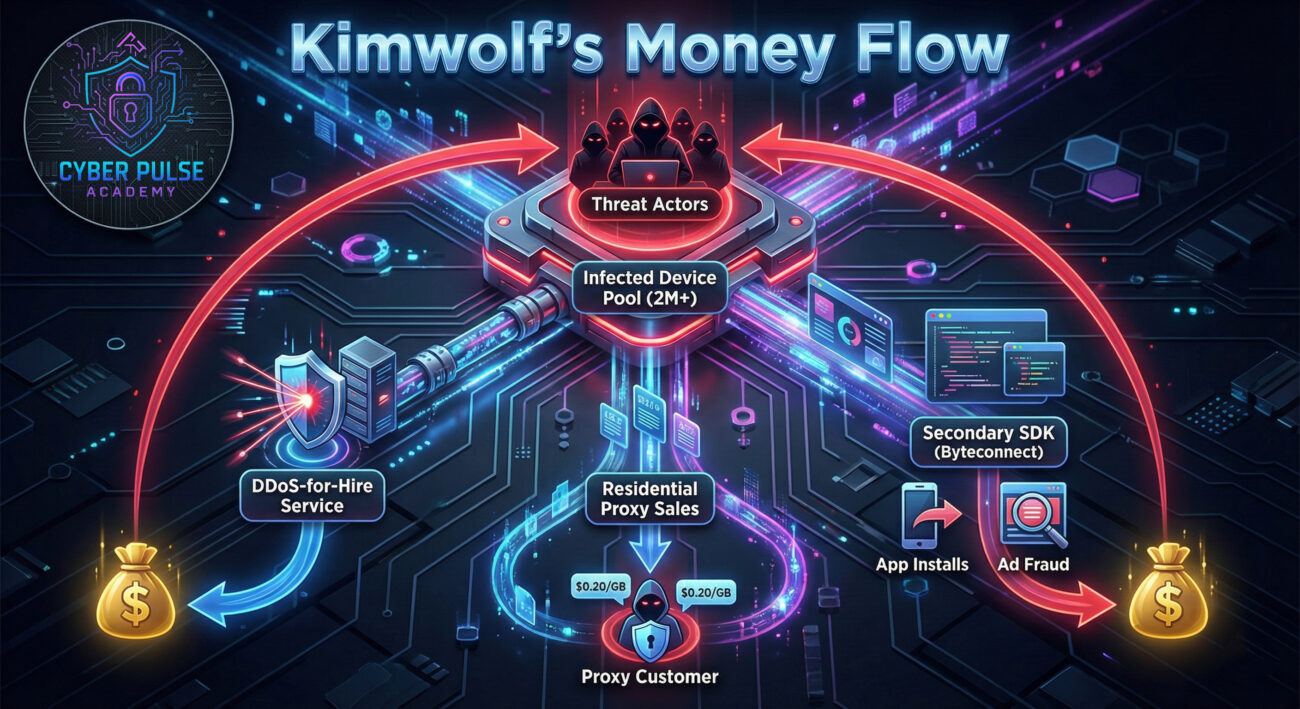
- Residential Proxy Network: The botnet's operators aggressively sell access to the pool of infected devices as a cheap, "high-quality" residential proxy service for as low as $0.20 per GB.
Key Insight: The primary targets aren't high-end smartphones but often inexpensive, off-brand Android-based IoT devices like smart TVs and streaming boxes. These devices are frequently neglected, rarely updated, with obscure settings left in insecure default states, making them the perfect, persistent botnet foot soldiers.
The Hacker's Playbook: Kimwolf's Monetization Strategy
Understanding the attacker's motivation is key to anticipating their next move. Kimwolf isn't vandalism; it's a sophisticated, multi-stream criminal business.
Three Revenue Streams
- Residential Proxy Bandwidth Sales: This is the core business. The botnet's operators sell access to the IP addresses of infected devices. These "residential" IPs are highly valued for bypassing anti-bot measures on websites. They offered unlimited bandwidth for just $1,400 a month, undercutting legitimate services.
- DDoS-for-Hire: The botnet's massive, distributed firepower is weaponized and offered as a service to other criminals who wish to take down websites or online competitors.
- Secondary SDK Monetization (Byteconnect): Some infected devices are further loaded with an additional SDK, like Plainproxies Byteconnect. This SDK can force the device to perform tasks like silently installing apps or clicking on ads, generating fraudulent revenue for the threat actors.
Blue Team Defense Framework: From Detection to Protection
Immediate Actionable Steps
For network defenders, system administrators, and security-conscious individuals, here is a layered defense framework:
1. For Organizations & Network Operators
- Block RFC 1918 at the Perimeter: Proxy providers and organizations should block outbound requests from their networks to private IP ranges (RFC 1918). This prevents infected internal devices from being used as a tunnel to attack other internal devices, which was a key part of Kimwolf's spread.
- Implement Egress Filtering: Monitor and filter outbound traffic. Unexpected connections to port 1337 or 40860 from any device, especially non-computer IoT gear, should be a major red flag.
- Conduct Internal ADB Audits: Scan your internal network for devices responding on port 5555 (ADB). Any found should be immediately investigated and secured.
2. For Device Owners & Manufacturers
- Disable ADB or Enforce Authentication: On any Android device, especially TVs and boxes, go to Developer Options and ensure "ADB debugging" is OFF. If you must use it, ensure "Network debugging" is OFF and a strong authentication method is in place.
- Update Firmware: Regularly check for and apply firmware updates from the device manufacturer. This is the best defense against pre-installed malware and known exploits.
- Purchase from Reputable Sources: Be wary of extremely cheap, no-name Android devices. Stick to brands with a reputation for providing security updates.
Red Team vs. Blue Team: The Adversarial View
🔴 Red Team (Threat Actor) View
Objectives: Establish a large, resilient, and profitable botnet. Maintain stealth and monetize access through multiple channels.
Tactics & Techniques:
- Exploitation: Targeting a non-user-facing service (ADB) that is often overlooked by defenders.
- Obfuscation: Using legitimate residential proxy services to hide scanning origins and blend into normal traffic.
- Supply Chain Compromise: Partnering with or coercing device manufacturers/firmware providers to pre-install proxy SDKs for a built-in botnet army.
- Business Model: Operating like a SaaS (Security-as-a-Service, but for crime), with competitive pricing for proxies and DDoS.
🔵 Blue Team (Defender) View
Objectives: Detect, contain, and eradicate the botnet. Harden systems to prevent initial infection and lateral movement.
Strategies & Countermeasures:
- Threat Intelligence: Monitoring for reports on new C&C IPs (like 85.234.91[.]247) and ports (40860, 1337) to block at firewalls.
- Network Segmentation: Isolating IoT devices on a separate VLAN to limit the blast radius if one is compromised.
- Proactive Hunting: Using tools like Shodan or internal scanners to continuously search for exposed ADB interfaces on their own network.
- Vendor Management: Pressuring IoT device suppliers to adhere to security baselines, provide updates, and avoid insecure default configurations.
Common Mistakes & Best Practices
❌ Common Mistakes
- Leaving ADB debugging enabled, especially with "Network debugging" turned on, on any internet-connected device.
- Assuming IoT devices like smart TVs are inherently "dumb" and not a security risk to the network.
- Purchasing the cheapest possible Android-based device without considering the vendor's security reputation or update policy.
- Using default network configurations that allow all devices to communicate freely (flat network).
- Focusing security efforts only on servers and workstations, ignoring the growing IoT attack surface.
✅ Best Practices
- Conduct a regular audit of all devices on your network for unnecessary open ports, specifically port 5555 (ADB).
- Implement network segmentation. Put all consumer IoT devices on a dedicated network segment with restricted internet and internal access.
- Establish a procurement policy that requires IoT devices to have a proven track record of security updates and the ability to disable unused services.
- Deploy a Network Intrusion Detection System (NIDS) to monitor for suspicious outbound traffic patterns, like connections to known malicious C&C servers.
- Educate all users (including employees and family) about the risks of non-standard Android devices and the importance of checking device settings.
Frequently Asked Questions (FAQ)
Q1: My phone is a brand-name Samsung/Google. Am I safe from Kimwolf?
Likely yes, but stay vigilant. Kimwolf primarily targets Android-based IoT devices (TVs, boxes) with exposed ADB. Major smartphone brands typically have ADB disabled by default and enforce strong authentication if enabled. However, the principle remains: always disable ADB debugging when not in active use by a developer.
Q2: How can I check if my Android TV or device is infected?
Direct detection can be tricky. Look for indirect signs: unusually high data usage (for proxy traffic), a slower than normal internet connection for all devices on your network, or the device running hot. The most reliable method is to check your router's connected devices list and see if there are any suspicious outbound connections, or use a network scanning tool to see if port 40860 is open on the device.
Q3: What's the difference between Kimwolf and the AISURU botnet?
Kimwolf is assessed to be an Android variant of the AISURU botnet. While they share connections and possibly infrastructure, Kimwolf appears specifically tailored to exploit the Android/ADB ecosystem, whereas AISURU may have a broader target base. Think of them as related criminal enterprises operating in slightly different neighborhoods.
Q4: Has the Kimwolf threat been neutralized?
No, the infrastructure is still active. While some countermeasures have been taken, like IPIDEA patching its service on December 27, 2025, to block access to sensitive local ports, the botnet's C&C servers were still operating at the time of the report. The scale (2M+ devices) means it will remain a significant threat for the foreseeable future.
Key Takeaways & Call to Action
🚀 Your Action Plan Starts Now
The Kimwolf Android botnet is a stark lesson in modern cyber threats: they are automated, profit-driven, and exploit the seams between technology and human oversight. To fortify your defenses:
- Audit your home and work networks for devices with ADB exposed.
- Segment your network to isolate IoT devices.
- Update and harden all internet-connected devices, not just computers.
- Educate others about the risks of insecure default settings on smart devices.
Cybersecurity is a continuous process. Stay informed by following reputable threat intelligence sources like The Hacker News, the Cybersecurity and Infrastructure Security Agency (CISA), and research from firms like Synthient.
Stay vigilant, stay secure.
© 2026 Cyber Pulse Academy. This content is provided for educational purposes only.
Always consult with security professionals for organization-specific guidance.