


















































Certification Courses
Hands-On Labs
Threat Intelligence
Latest Cyber News
MITRE ATT&CK Breakdown
All Cyber Keywords
Imagine installing a simple tool to help with your crypto trading, only to find it’s a digital pickpocket that silently empties your wallet. This is the reality of a sophisticated attack recently uncovered by cybersecurity researchers. A malicious Chrome extension, masquerading as a helpful trading automator for the MEXC exchange, was caught programmatically stealing users' API keys with full withdrawal permissions. This incident is a masterclass in supply-chain attack vectors and highlights critical flaws in how we trust browser ecosystems. For cybersecurity professionals and crypto enthusiasts alike, understanding this threat is the first step in building effective defenses.
In early 2026, a malicious Chrome extension named "MEXC API Automator" was identified on the official Chrome Web Store. Its purported function was to help users automate trading on the MEXC cryptocurrency exchange by simplifying API key generation. In reality, it was a highly targeted credential-stealing tool.
The extension operated with surgical precision. Once installed, it lay dormant until a user visited MEXC’s specific API management page. It then activated, hijacking the user’s authenticated browser session to create a new API key with withdrawal permissions enabled, a critical detail it actively hid from the user’s view. The newly minted API key and secret were instantly exfiltrated to a threat actor-controlled Telegram bot. This gave the attacker persistent, long-lived access to the victim’s exchange account, independent of the user’s password or 2FA, enabling them to drain funds at their leisure.
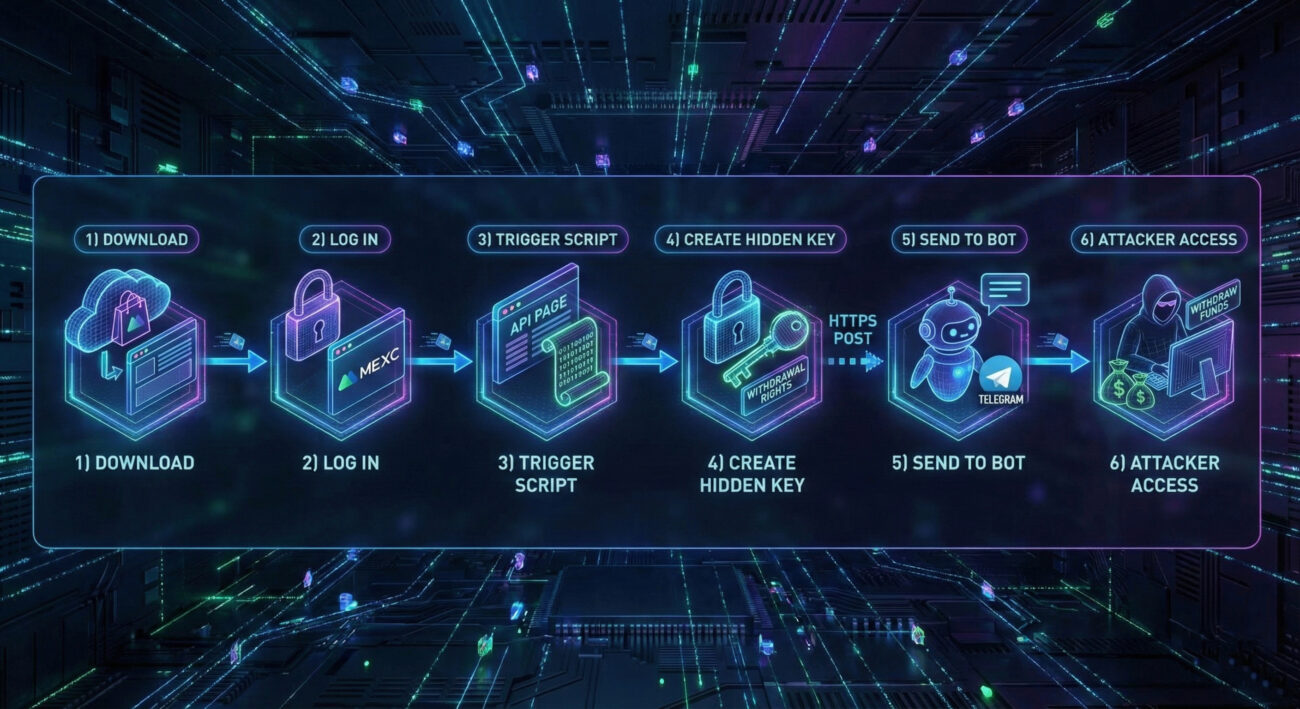
This attack is a clever blend of social engineering and technical exploitation. Let's dissect the step-by-step malware functionality.
The threat actor publishes the "MEXC API Automator" extension on the official Chrome Web Store. This is a critical trust exploit, users assume the store is vetted. The extension description promises legitimate utility: automating API key creation for trading bots.
The extension's malicious code is packaged in a content script (e.g., script.js). It doesn't act immediately. It uses a condition check to wait for the perfect moment. The script constantly monitors the browser's active tab URL. The attack triggers only when the user navigates to the specific MEXC API management page, detected by the URL fragment /user/openapi. This ensures the user is already logged in, providing an active, authenticated session to hijack.
Once on the target page, the script injects itself into the page context. It then programmatically interacts with the MEXC web interface, mimicking a human user. Using JavaScript, it:
As soon as the new API "Access Key" and "Secret Key" are displayed on the page, the script scrapes these values. It then sends them via a secure HTTPS POST request to a hardcoded command-and-control (C2) endpoint: a Telegram Bot API URL. Telegram provides the attackers with an anonymous, resilient, and easily accessible data collection point.
The user remains completely unaware. Even if they uninstall the extension moments later, the damage is done. The attacker now possesses a valid API key with withdrawal rights. This key acts as a long-lived backdoor, allowing the attacker to log into the victim's exchange account programmatically, bypassing all password and 2FA protections, to withdraw funds at any time until the key is manually revoked by the user.
This attack chain demonstrates a terrifying efficiency: it bypasses most traditional security controls (passwords, 2FA) by abusing the legitimate API system and the user's existing trust in their browser session.
The MITRE ATT&CK framework is a globally accessible knowledge base of adversary tactics and techniques. This malicious Chrome extension campaign employs a clear sequence of techniques, providing a perfect case study.
| MITRE ATT&CK Tactic | Technique (ID & Name) | How It's Used in This Attack |
|---|---|---|
| Initial Access | T1472: Supply Chain Compromise | The attacker compromises the software supply chain by publishing a malicious extension on the trusted Chrome Web Store, a primary distribution point. |
| Execution | T1204.002: User Execution - Malicious File | The user is socially engineered to execute the threat by manually installing the malicious browser extension, believing it to be a legitimate tool. |
| Persistence | T1136: Create Account T1552.001: Unsecured Credentials - Credentials In Files |
Creation of a new, attacker-controlled API key establishes persistence. The stolen keys (credentials) are stored remotely by the attacker for long-term use. |
| Defense Evasion | T1552.008: Unsecured Credentials - API Keys T1564.001: Hide Artifacts - Hidden Window |
Stealing API keys bypasses standard authentication. The script hides the enabled withdrawal permission in the UI, concealing its malicious activity from the victim. |
| Credential Access | T1539: Steal Web Session Cookie T1555.003: Credentials from Password Stores |
By operating within an authenticated browser session, the script effectively hijacks the session. It then steals the newly generated API keys, which are credentials for programmatic access. |
| Exfiltration | T1041: Exfiltration Over C2 Channel | The stolen API keys are transmitted out of the victim's environment over an encrypted HTTPS channel to a Telegram Bot (the C2 server). |
| Impact | T1537: Transfer Funds | The ultimate goal and impact: using the stolen API keys to fraudulently transfer cryptocurrency out of the victim's exchange wallet. |
Understanding this ATT&CK mapping is crucial for defenders. It shifts the view from a single incident to a replicable pattern of behavior that can be hunted for and defended against systematically.
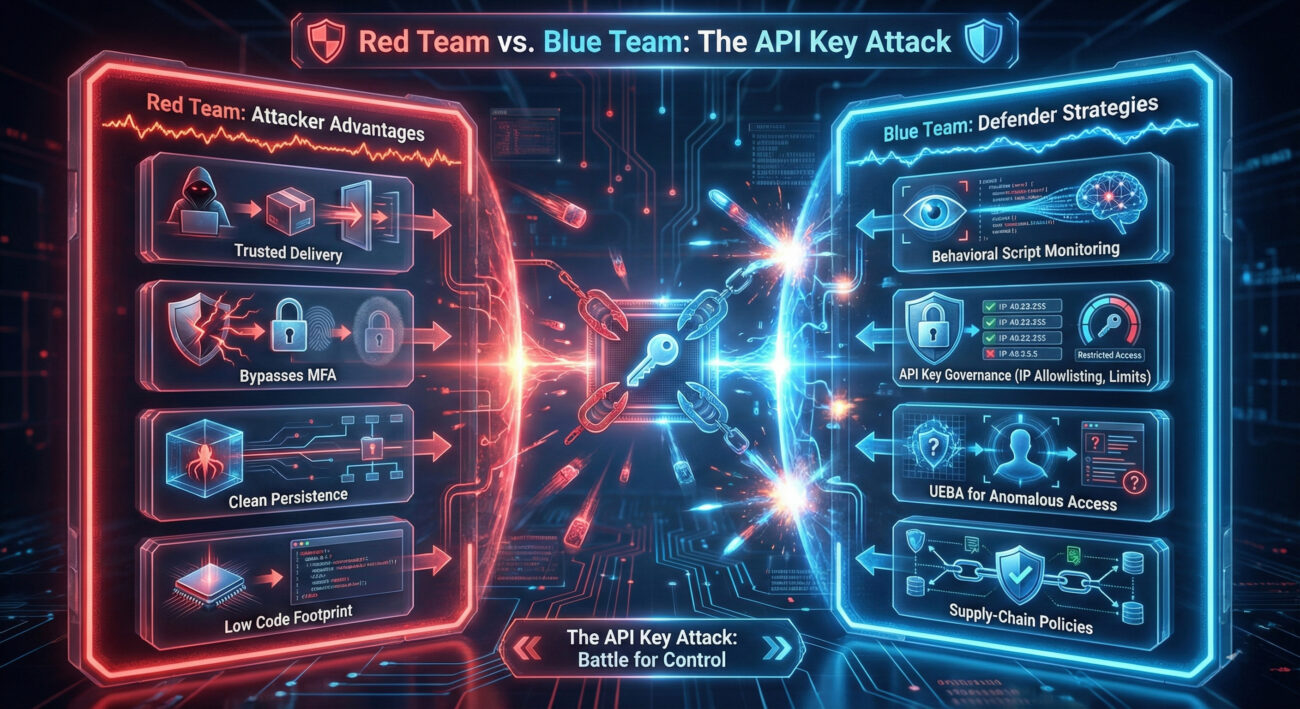
Objective: Steal cryptocurrency with low detection risk.
Why This Vector is Elegant:
Future Evolution: Red teams predict future variants will target multiple exchanges, use heavier code obfuscation, and request broader browser permissions (like reading all site data) to maximize impact.
Challenge: Defending against an attack that exploits trusted platforms and user behavior.
Key Detection & Prevention Points:
Core Principle: The defense must shift from just securing the login to securing the entire post-authentication session and the credentials (API keys) generated within it.
Knowledge without action is insufficient. Here is a layered defense framework to protect yourself and your organization from similar supply-chain attacks targeting credentials.
| Common Mistake (The Risk) | Best Practice (The Defense) | Why It Matters |
|---|---|---|
| Installing browser extensions without research, trusting the Web Store implicitly. | Vet every extension. Check developer, reviews, permissions, and update history. Use browser settings to limit extensions to specific sites. | Prevents the initial infection vector. You are the most important firewall. |
| Creating API keys with "Withdrawal" permission enabled by default "just in case." | Apply the Principle of Least Privilege (PoLP). Only enable the specific permissions your bot needs (e.g., "Read" and "Trade"). | This is the single most effective technical control. A key without withdrawal rights cannot drain your wallet. |
| Never reviewing or cleaning up old, active API keys. | Schedule quarterly audits of all connected apps and API keys across all financial services. Revoke what you don't use. | Reduces your attack surface and cleans up potential lingering backdoors you've forgotten. |
| Using the same browser for daily browsing (with many extensions) and high-value financial activities. | Segment your activities. Use a dedicated, clean browser or a "Guest" profile for logging into exchanges and banks. | Contains the blast radius of a compromised extension. Malware in your main profile can't touch your financial session. |
| Relying solely on passwords and 2FA, assuming they fully protect your account. | Understand that API keys are powerful passwords. Secure them with the same rigor: IP restrictions, usage limits, and active monitoring. | Shifts security mindset to post-login credential management, which is where modern attacks are increasingly focused. |
Wrong. This is the most dangerous misconception. Uninstalling the extension removes the threat actor's tool from your browser, but it does not revoke the API keys it may have already stolen. If those keys were created with withdrawal rights, the attacker still has access. You must immediately log into your exchange account, navigate to the API management section, and revoke all recently created or unfamiliar API keys.
Traditional antivirus may struggle because the extension is a legitimate Chrome component from a trusted source. However, modern Endpoint Detection and Response (EDR) solutions could detect the malicious behavior, such as a browser process making anomalous network connections (to a Telegram API) or performing unusual DOM manipulation on a specific financial website. Behavioral detection is key here.
Absolutely. While this specific incident targeted Chrome, the attack vector is universal. Firefox Add-ons, Microsoft Edge Extensions, and Safari Extensions galleries are all potential distribution points for similar malicious code. The same defensive principles apply across all browsers.
Exchanges can implement several protective measures:
The "MEXC API Automator" incident is not an isolated event; it's a template for future attacks. It exploits the convergence of trust (in app stores), necessity (of API keys), and oversight (in post-authentication security).
For further reading on secure browsing and API security, consult these excellent external resources:
Stay vigilant, practice defense in depth, and remember: in cybersecurity, your habits are either your strongest shield or your weakest link.
© 2026 Cyber Pulse Academy. This content is provided for educational purposes only.
Always consult with security professionals for organization-specific guidance.
Every contribution moves us closer to our goal: making world-class cybersecurity education accessible to ALL.
Choose the amount of donation by yourself.