


















































Certification Courses
Hands-On Labs
Threat Intelligence
Latest Cyber News
MITRE ATT&CK Breakdown
All Cyber Keywords
Collection is the phase where attackers, having gained access to your environment, systematically gather the data they came to steal. It's the quiet, methodical harvest before the storm of exfiltration.
Collection is the cybersecurity equivalent of a thief rummaging through your house after picking the lock, they're not just trespassing; they're actively searching for your cash, jewelry, and sensitive documents.
Why does this tactic matter so much? Because this is the critical pivot from "we have a foothold" to "we have the goods." Success in Collection directly enables data theft, espionage, and ransomware leverage. If defenders fail to detect activity at this stage, they effectively hand the keys to the kingdom to the adversary, making the eventual breach inevitable and far more damaging.
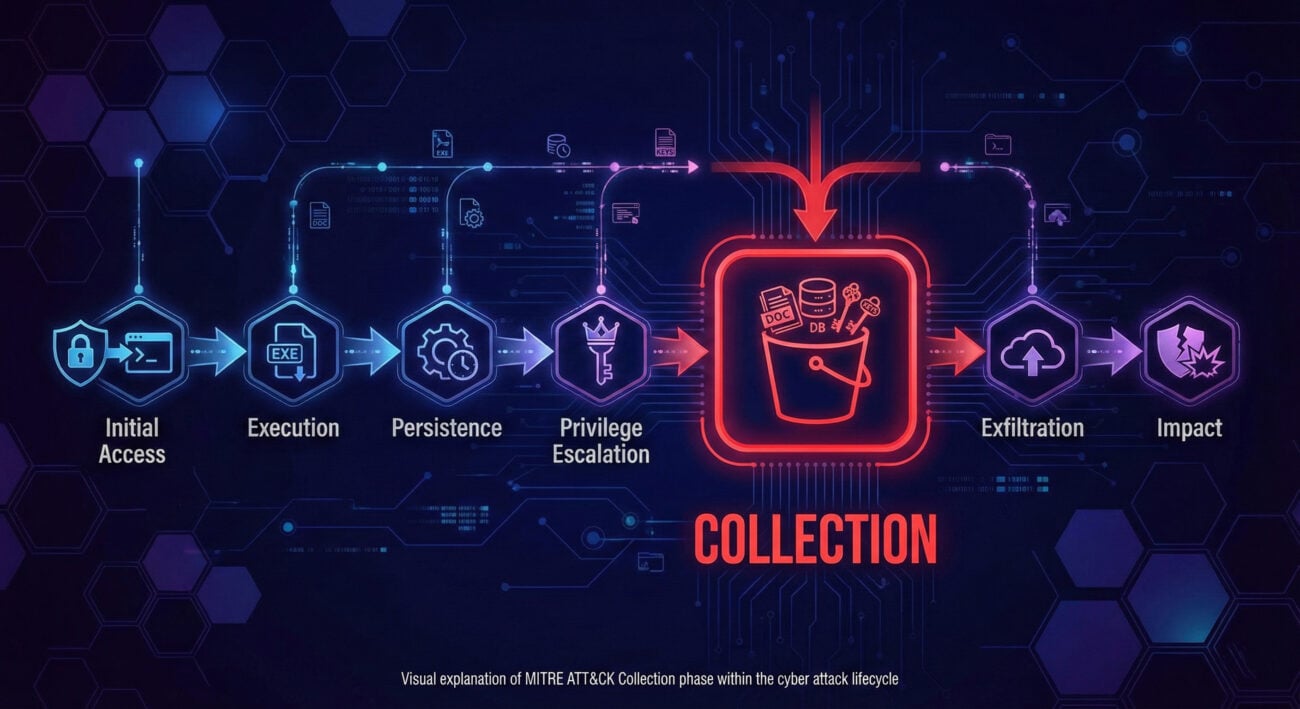
Imagine your network is an ancient, sprawling library archive (like the Library of Alexandria). The attacker isn't a smash-and-grab vandal. They are a determined, unethical archeologist who has secretly tunneled into the basement (Initial Access).
Their goal isn't to burn the library down, yet. It's to methodically locate and catalog the most valuable scrolls. They check the main catalog (file directory listing), search for specific keywords in scroll titles (data searching), carefully unroll promising documents to photograph them (screen capture), and even make notes about which shelves contain the real treasures (target data location). They gather all this into their satchel, preparing for the moment they can sneak it all out through their tunnel (Exfiltration).
This is Collection: the meticulous, targeted gathering of information before the final theft.
From the attacker's seat, Collection is a race against time and detection. The goal is to be the most efficient archeologist possible: find the crown jewels (domain admin hashes, source code, financial records) without tripping any pressure plates (alerts). The feeling is one of focused intensity. The methodology involves using native tools (Living-off-the-Land Binaries) as much as possible to blend in, while systematically exploring every "room" in the digital library.
Mimikatz (for harvesting credentials from memory), LaZagne (for extracting passwords from local applications), and Nigilant32 (for live memory capture and analysis). For more advanced groups, custom PowerShell scripts are the tool of choice for stealthy Collection.
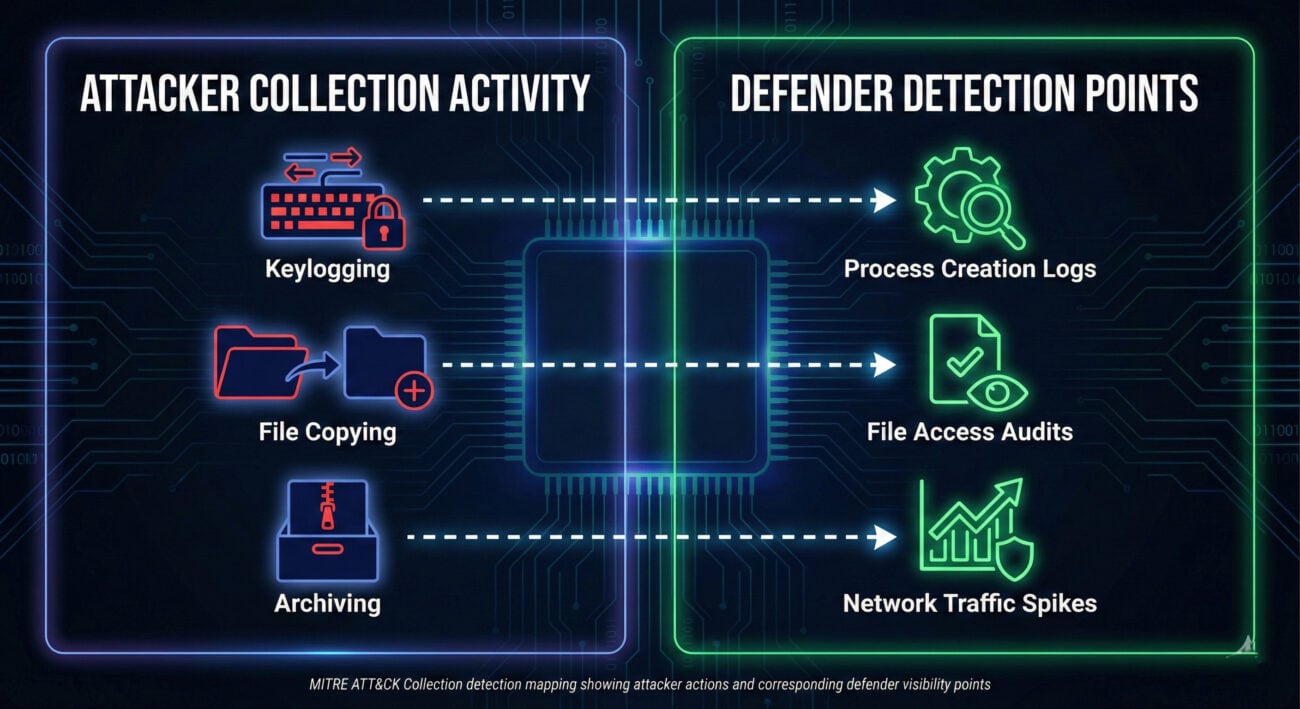
As a defender, you're not patrolling every aisle 24/7. You've installed motion sensors near the rare book section (sensitive file servers), weight sensors on shelves (monitoring for bulk file reads), and acoustic detectors that listen for the sound of a camera shutter (API calls for screen capture). Your goal is to detect the archeologist's activity the moment they stop browsing and start collecting.
These are the log lines that should make your spine straighten:
Hunt for anomalous archive utility execution. Most users don't run 7-Zip or WinRAR from the command line. Look for processes named `7z.exe`, `rar.exe`, or `powershell.exe` using `Compress-Archive`, where the command line includes paths to common staging locations (`Temp`, `Public`, `Recycle.Bin`) and the source files are from multiple, disparate user or business directories. Correlate this with outbound network connections shortly after.
Endpoint Detection and Response (EDR) platforms are crucial for detecting process-level Collection (keyloggers, screen capture). Data Loss Prevention (DLP) solutions can flag on the movement of sensitive data patterns. File Integrity Monitoring (FIM) or User and Entity Behavior Analytics (UEBA) can spot abnormal access to large volumes of files.
The SolarWinds compromise was a masterclass in stealthy, long-term Collection. After gaining access via the poisoned SolarWinds Orion update, the threat group (identified as NOBELIUM) spent months quietly exploring victim networks.
Explicit Connection: In the SolarWinds attack, the threat group NOBELIUM used Collection when they deployed a backdoor ("Sunburst") that enumerated Active Directory, browsed file systems, and collected system information. This allowed them to identify high-value targets (like email servers and security tools) and selectively gather specific emails and security credentials for their final espionage goals.
Below is a high-level map of key Techniques under the Collection tactic (TA0009). Think of this as your index to the attacker's playbook. Each technique has numerous sub-techniques for deeper study.
| Technique ID | Name | Brief Purpose |
|---|---|---|
| T1560 | Archive Collected Data | Compress or encrypt stolen data to prepare for exfiltration and avoid detection. |
| T1113 | Screen Capture | Capture screenshots or record the victim's desktop to obtain information. |
| T1005 | Data from Local System | Collect files from the local file system of the compromised host. |
| T1074.001 | Data Staged: Local Data Staging | Gather and group stolen files in a central location on the victim system before exfil. |
| T1056 | Input Capture | Intercept user input via keyloggers, GUI capture, or clipboard monitoring. |
| T1530 | Data from Cloud Storage | Collect data from cloud storage services (AWS S3, Azure, Google Drive). |
| T1213 | Data from Information Repositories | Gather data from databases, wikis, SharePoint, or other shared knowledge stores. |
Every contribution moves us closer to our goal: making world-class cybersecurity education accessible to ALL.
Choose the amount of donation by yourself.