Discovery (TA0007)
The Attacker's Critical Mapping Phase & How to Stop It
Introduction: The "So What?" Hook
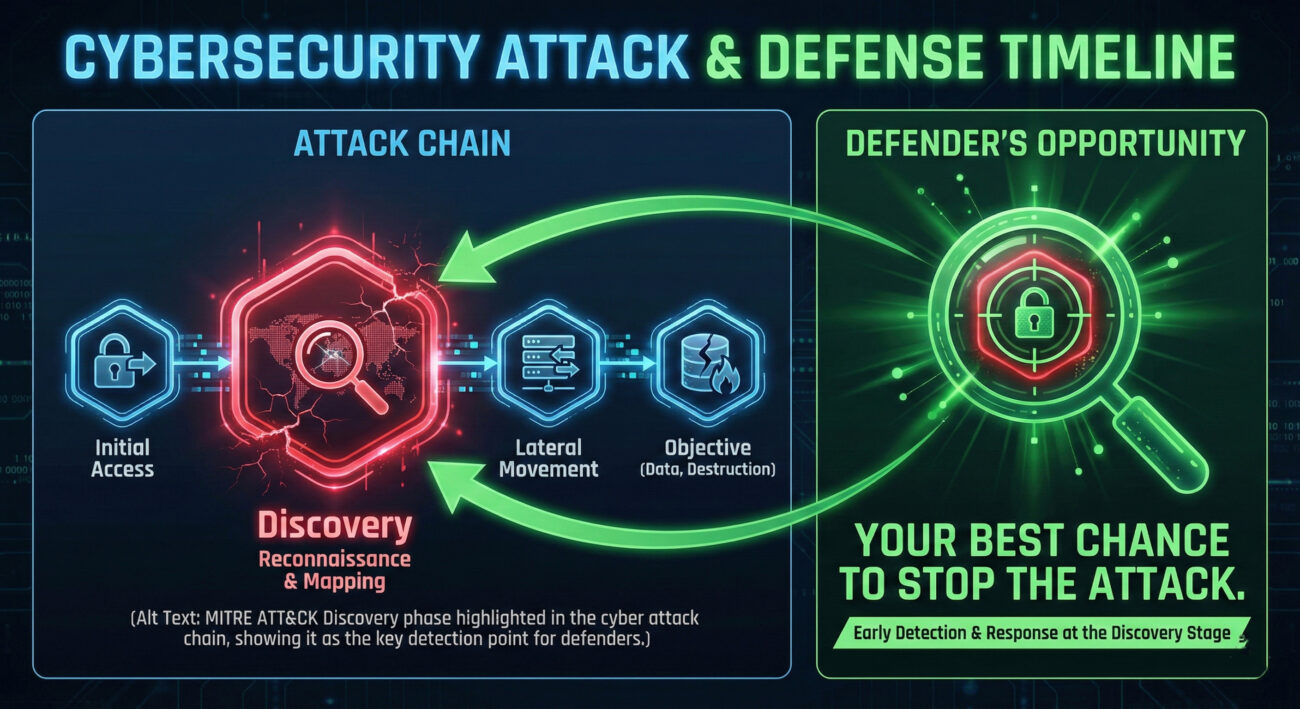
In the MITRE ATT&CK framework, Discovery is the systematic process where an attacker, having gained an initial foothold, works to understand the environment they've compromised.
Attackers don't just blindly stumble into valuable data. After the initial breach, they must answer critical questions: What kind of system is this? Who else is on the network? What data is here, and where are the domain controllers, file servers, or databases? Discovery is the phase dedicated to answering these questions. Success here transforms a single compromised workstation into a launchpad for widespread lateral movement, data theft, or ransomware deployment.
For defenders, failing to detect Discovery activity is like having a burglar silently case your entire house while your alarm system stays silent. It's the quiet, preparatory stage that enables the loud, devastating breach. Catching these actions early is perhaps the most effective way to stop an attack chain before it escalates.

The Core Analogy: The First Reconnaissance Flight
Imagine a military force has managed to secretly land a single special operative behind enemy lines. Their mission isn't to attack yet—it's to map everything.
This operative's first task is Discovery. They quietly observe patrol routes (network traffic), identify command bunkers (domain controllers), sketch supply depot locations (file shares), and document communication lines (trust relationships). They note which doors have weak locks (unpatched software) and which uniforms grant access to restricted areas (privileged accounts).
They don't fire a shot. They use binoculars, not missiles. But the detailed map they create is what allows the full invading force to later move with precision, overwhelm defenses at key weak points, and achieve their ultimate objective efficiently. In your network, the compromised user account or endpoint is that operative. Every command they run to list users, view network connections, or check system info is a data point on their map.
Vocabulary Decoder Ring
- Enumeration: The automated process of querying a system or network to extract lists of information (users, groups, shares, sessions). Why it matters here: It's the primary method for Discovery, turning a single point of access into a comprehensive layout of the target.
- System Information Discovery: Techniques to gather details about the operating system, hardware, time zone, or installed software on a compromised host. Why it matters here: It tells the attacker what they're dealing with and helps tailor next-stage payloads or identify valuable targets.
- Network Share Discovery: Finding shared folders and drives on the network, both local and remote. Why it matters here: Shares are prime targets for sensitive data and are often used for lateral movement.
- Account Discovery: Identifying what user and service accounts exist, both locally and in domain environments. Why it matters here: Finding privileged accounts (Domain Admins, SQL Service accounts) is a key goal of Discovery, as they become the targets for credential theft and privilege escalation.
- Process Discovery: Listing running applications and services on a system. Why it matters here: Attackers look for security software (AV/EDR) to disable, understand what's normal to blend in, and identify potentially vulnerable running services.
The Attacker's Playbook (Red Team View)
Red Team Analogy: The Cartographer Spy
As the operative behind enemy lines, my goal is invisibility and intelligence. Every command is a discreet question whispered to the environment. I feel for the boundaries, catalog assets, and identify the high-value targets (HVTs). My success isn't measured in damage done now, but in the accuracy and completeness of the map I send back. This map will guide the entire campaign.
Common Discovery Techniques
Here are 3-5 top-level techniques attackers use for Discovery (from MITRE ATT&CK TA0007):
- T1087 - Account Discovery: Enumerating user accounts, mailboxes, and groups to identify targets for privilege escalation or lateral movement.
- T1135 - Network Share Discovery: Finding accessible network drives and shared folders that may contain sensitive data or offer movement paths.
- T1018 - Remote System Discovery: Actively scanning the network to identify other reachable hosts using tools like `net view`, `ping` sweeps, or port scanners.
- T1082 - System Information Discovery: Gathering detailed info about the OS, configuration, and environment (e.g., `systeminfo`, `hostname`, `quser`).
- T1057 - Process Discovery: Listing running processes to understand the system landscape and spot security tools.
The Attacker's Toolbox
Attackers use built-in system commands ("Living-off-the-Land Binaries" or LOLBins) and specialized tools:
- LOLBins: `net.exe`, `ipconfig`, `systeminfo`, `whoami`, `tasklist`, `dir`, `nltest`.
- PowerShell: Scripts and cmdlets like `Get-Process`, `Get-NetTCPConnection`, `Get-ADUser`.
- Advanced Tools: BloodHound/SharpHound (for mapping Active Directory trust relationships), Advanced IP Scanner, or modules within Cobalt Strike and Metasploit.
Command-Line Glimpse: The Sound of Mapping
Below is a realistic sequence of commands an attacker might run from a command prompt on a compromised Windows system. Each line is a discrete act of Discovery.
# 1. First, get basic orientation: Who am I and what is this machine?
C:\> whoami /all
C:\> hostname
C:\> systeminfo | findstr /B /C:"OS Name" /C:"OS Version" /C:"Domain"
# 2. See what other users are logged on or have recently been active.
C:\> quser
C:\> net user
# 3. Discover local network connections and active shares.
C:\> netstat -ano # Lists network connections and associated processes
C:\> net view # Lists machines in the domain/workgroup
C:\> net share # Lists local SMB shares
# 4. Look for domain information (if the machine is domain-joined).
C:\> net group "Domain Admins" /domain # The ultimate target list
The Defender's Handbook (Blue Team View)
Blue Team Analogy: The Air Traffic Controller
You're monitoring the radar screen of your network airspace. Normal, scheduled flights (legitimate admin activity) have predictable patterns. The goal of Discovery detection is to spot the unauthorized, low-altitude reconnaissance flight that doesn't file a flight plan. It's not attacking, but its flight path, pinging every tower, scanning runways, is a massive red flag indicating hostile intent.
SOC Reality Check: What You'll See in the Logs
Discovery actions are often noisy in logs, but they blend with normal admin work. Context is king.
- Windows Security Event ID 4688: A new process was created. Look for parent/child process anomalies: `cmd.exe` spawning `net.exe`, or `explorer.exe` spawning `systeminfo.exe` (unusual). Command line arguments are critical.
- Windows Security Event ID 4661: A handle to an object was requested. Filter for `SAM_DOMAIN` or `SAM_SERVER` access from non-domain controller systems, which can indicate account enumeration.
- Sysmon Event ID 1 (Process Create): With proper configuration, this provides rich detail on process creation, including hashes and parent command lines, perfect for spotting LOLBin abuse.
- Network Logs: Sudden spikes in SMB (445/tcp) or RPC (135/tcp) traffic from a single internal host to many others is a classic sign of network scanning (T1018).
Threat Hunter’s Eye: A Hypothesis to Test
"A user account that normally only logs into a finance workstation is suddenly active on a developer's machine and, within minutes, executes a series of `net` commands (`net user`, `net group /domain`, `net view`)." This combination of unusual logon location followed by rapid, sequential account and network discovery commands is a high-fidelity hunt.
Defensive Tools & Categories
- Endpoint Detection and Response (EDR): Essential for capturing detailed process creation and command-line execution data across your fleet.
- SIEM with Robust Log Ingestion: Correlates Windows event logs, Sysmon, and EDR alerts to build a narrative.
- Network Detection and Response (NDR) / Traffic Analysis: Identifies internal scanning patterns and anomalous protocol usage (e.g., excessive LDAP queries).
Blue Team Command & Detection Logic
Here's an example of a Sigma detection rule (used in many SIEMs) looking for a cluster of discovery commands. This is the kind of logic that turns logs into alerts.
title: Rapid Sequence of Network Discovery Commands
description: Detects a cluster of standard discovery commands executed in quick succession, indicative of manual reconnaissance.
logsource:
category: process_creation
product: windows
detection:
selection:
Image|endswith:
- '\net.exe'
- '\systeminfo.exe'
- '\tasklist.exe'
- '\whoami.exe'
CommandLine|contains:
- ' user '
- ' group '
- ' view '
- ' localgroup '
condition: selection and timeframe 30s count by User and Hostname > 4
falsepositives:
- Legitimate system administration activity
level: medium
Real-World Example: From Headlines to Logs
The SolarWinds SUNBURST Campaign
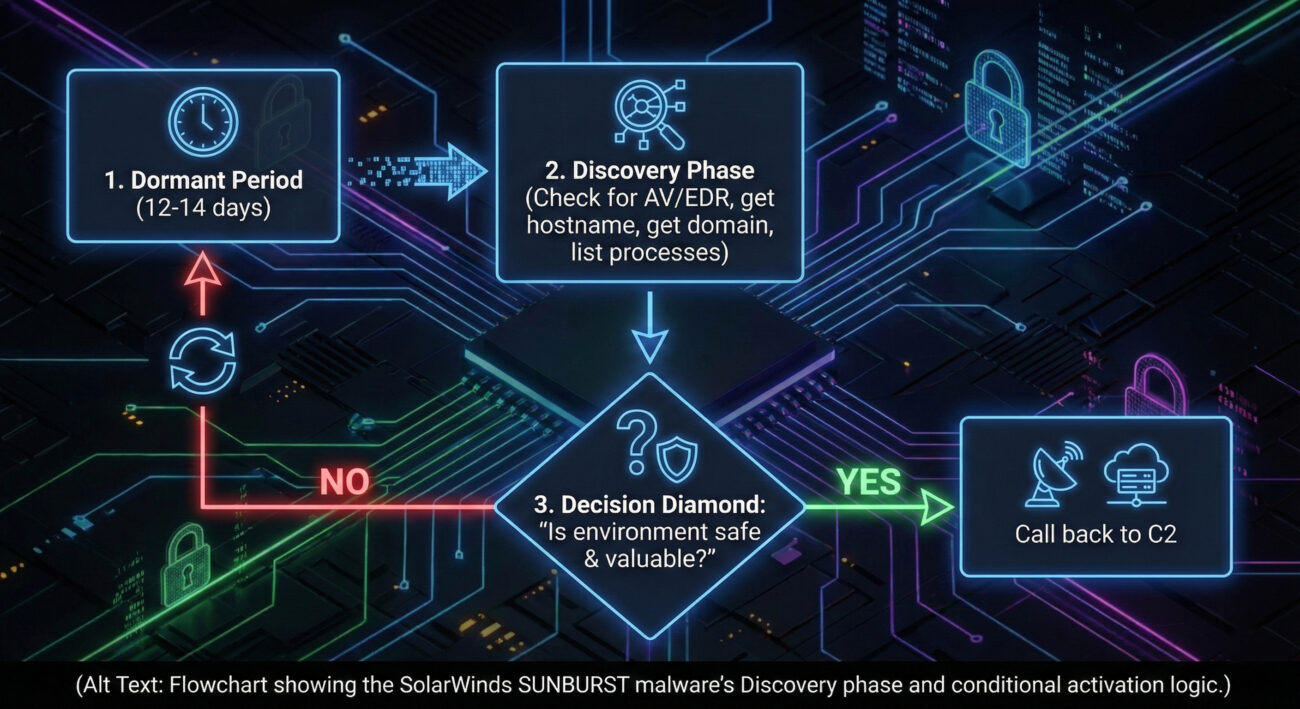
In the massive SolarWinds supply chain attack, the threat group (often associated with APT29 or NOBELIUM) gained initial access via a trojanized software update. Once the malicious backdoor ("SUNBURST") was inside a target network, it didn't immediately act.
In the SolarWinds attack, the threat group used Discovery when they programmed the SUNBURST malware to lie dormant for up to two weeks while it carefully gathered system information. It performed checks for security tools, enumerated running processes, and identified the domain name. This cautious, deliberate Discovery phase allowed the malware to avoid detection in hostile environments and only communicate with its command-and-control servers if it determined it was in a valuable, production network. This allowed them to ensure they only activated their most valuable implants, preserving their attack infrastructure and focusing on high-priority targets.
Mapping the MITRE ATT&CK Landscape for Discovery
This table maps some of the key Techniques under the Discovery tactic (TA0007). Remember, each of these can have numerous sub-techniques—these are the high-level categories.
| Technique ID |
Name |
Brief Purpose |
| T1087 |
Account Discovery |
Identify user, group, and service accounts for targeting. |
| T1135 |
Network Share Discovery |
Find accessible shared drives and folders on the network. |
| T1018 |
Remote System Discovery |
Probe the network to find other active hosts and systems. |
| T1082 |
System Information Discovery |
Gather details about the OS, hardware, and environment configuration. |
| T1083 |
File and Directory Discovery |
List files and directories on local and remote systems to locate data. |
| T1046 |
Network Service Discovery |
Scan for available network services (ports) on local or remote hosts. |
| T1057 |
Process Discovery |
List running processes to understand software and find security tools. |
Key Takeaways & Immediate Actions
For Everyone
- Discovery is the "quiet before the storm." It's the attacker's mapping phase, where they learn your network's layout, users, and systems to plan their next moves efficiently.
- Because it often uses normal system tools, detecting it relies on spotting abnormal patterns, context, and sequence of commands, not just the commands themselves.
For Leadership
- Business Risk: Unchecked Discovery enables targeted, widespread compromise. It directly leads to larger-scale data breaches, ransomware deployment across the network, and prolonged attacker dwell time, significantly increasing recovery costs and business disruption.
For Defenders: 3 Actionable Steps
- Enable and Centralize Detailed Logging: Ensure command-line process auditing (Windows Event ID 4688 w/ Command Line, Sysmon) is enabled on all critical endpoints and ingested into your SIEM. This is the primary data source for hunting Discovery.
- Build Behavioral Baselines & Alerts: Create alerts for rapid-fire execution of discovery commands (`net`, `systeminfo`, `whoami`, `ipconfig`) from non-admin workstations or outside normal admin hours. Use the Sigma rule example as a starting point.
- Hunt for the "Unknown Admin": Regularly hunt for discovery activity originating from user accounts or machines that are not part of your IT/system administration teams. Context of "who" is as important as "what".
Further Learning & References