


















































Certification Courses
Hands-On Labs
Threat Intelligence
Latest Cyber News
MITRE ATT&CK Breakdown
All Cyber Keywords
Network Security Appliances involves identifying and fingerprinting security devices like firewalls, VPN gateways, and intrusion detection systems to map defensive perimeters and find potential weaknesses before launching an attack.
ATT&CK ID T1590.006
Tactics Reconnaissance
Platforms PRE
Difficulty 🟢 Low
Prevalence High
Imagine you're a burglar casing a neighborhood. You wouldn't just look at houses, you'd note which homes have alarm company signs, security cameras, guard dogs, or particularly strong doors. Network Security Appliances reconnaissance is the digital equivalent. Before launching an attack, adversaries scan your digital perimeter to identify what security devices you have deployed, firewalls, VPN gateways, web application firewalls (WAFs), and intrusion detection systems.
This isn't about breaking in yet; it's about understanding your defenses. By fingerprinting these appliances, attackers can determine make, model, version, and sometimes even configuration details. This intelligence is gold: it tells them what vulnerabilities might exist (based on known flaws for that version), what evasion techniques to use, and where the weakest link in your security chain might be located.
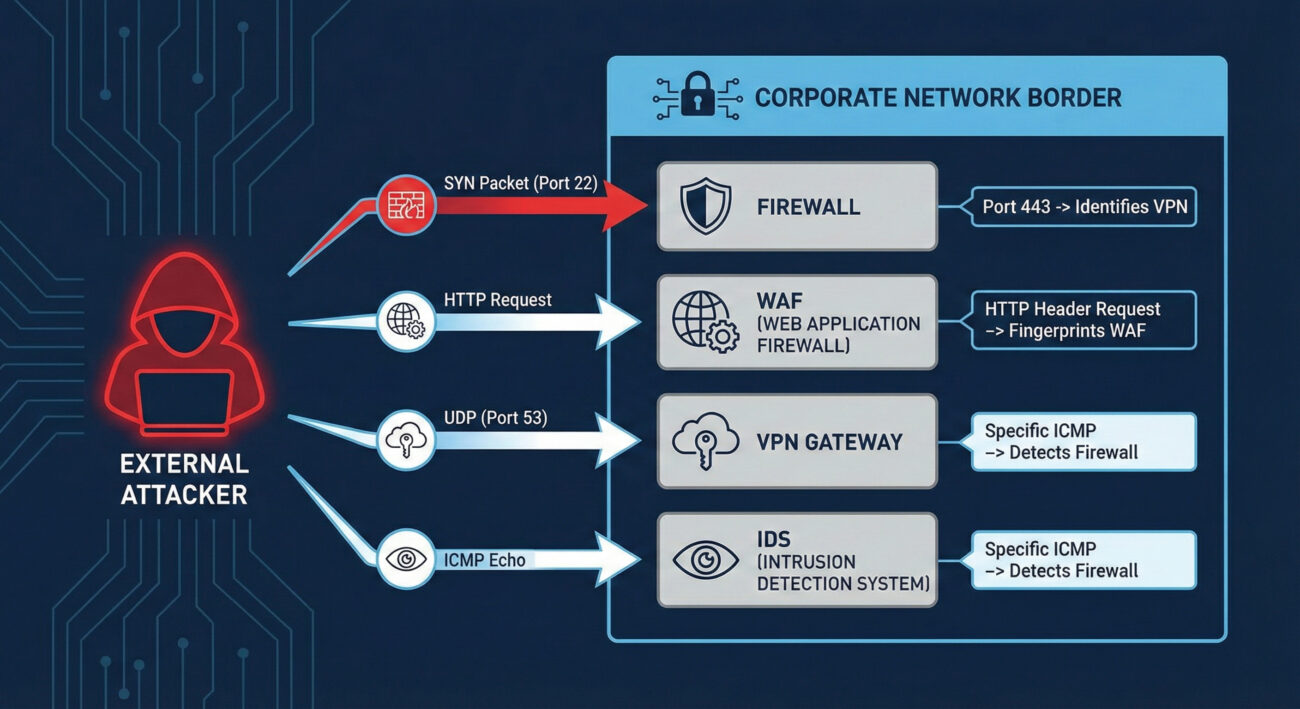
| Term | Definition | Why It Matters |
|---|---|---|
| Banner Grabbing | Connecting to a network service (like SSH, HTTP, FTP) and recording the "banner" or identification string it sends back. | A primary method for fingerprinting appliances. A banner might reveal "Cisco ASA 9.16" or "Fortinet FortiGate". |
| Fingerprinting | The process of determining the type and version of a networked device or software based on its responses to crafted probes. | Allows attackers to map your security stack and research version-specific exploits or misconfigurations. |
| Attack Surface | The sum of all possible points (attack vectors) where an unauthorized user can try to enter or extract data from your environment. | Every exposed security appliance expands your attack surface. Knowing what's exposed is the first step to reducing it. |
| Next-Generation Firewall (NGFW) | A firewall that integrates additional capabilities like intrusion prevention, deep packet inspection, and application awareness. | A common target for reconnaissance. Identifying an NGFW model helps an attacker understand what deep inspection they need to evade. |
| VPN Concentrator/Gateway | A hardware device or software that creates secure remote access tunnels for many simultaneous users. | A high-value target. Fingerprinting can reveal vulnerabilities (e.g., CVE-2019-19781 in Citrix VPN) that provide a direct entry point. |
The process is methodical and often automated. An adversary begins with a broad net and progressively refines their focus.
nmap-service-probes file) to identify the exact appliance and version.Think of yourself as a penetration tester on a physical security assessment. You don't run at the main vault first. You walk the perimeter, take photos of locks, alarm sensors, and guard patrol patterns. You note the brand of the security cameras to see if they have known weaknesses. Your goal in this phase isn't theft, it's building a detailed blueprint of the defense system. The mindset is one of patience and curiosity: "What do they have protecting them, and what does that tell me about how to get in later?"
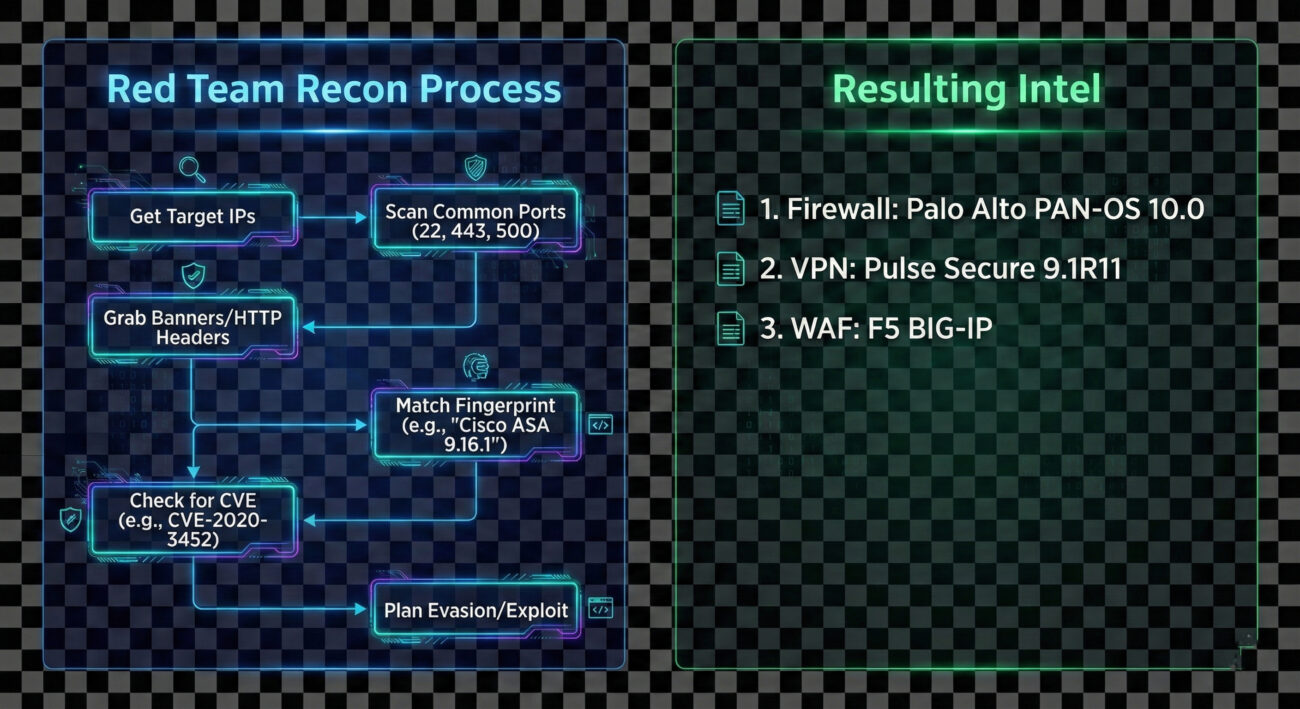
This reconnaissance is heavily tool-driven. Here are the common ones:
-sC) and service/version detection (-sV) are perfect for this.Example Nmap Commands:
# Basic service and version detection on common security appliance ports
nmap -sV -p 22,80,443,4443,8443,9000 203.0.113.0/24 -oA security_scan

# Aggressive banner grabbing with NSE scripts
nmap -sV --script=banner,http-title,ssh-auth-methods -p 22,443,8443 target.corporate.com

# Specific script to detect and fingerprint VPN services
nmap -sU -p 500,4500 --script=ike-version target_gateway.company.com
# The comments above show how an attacker uses Nmap to probe for and fingerprint services on standard management and VPN ports.
The Chinese state-sponsored group APT29 (Cozy Bear) is a master of meticulous reconnaissance. In campaigns leading up to the 2020 SolarWinds compromise, and in other operations, APT29 has been observed conducting extensive network security appliance mapping. They would scan for and fingerprint VPN appliances (like Pulse Secure and Fortinet) and firewalls to identify potential vulnerabilities or misconfigured devices that could provide initial access or be used as command-and-control (C2) infrastructure.
This reconnaissance was not a one-off event but a persistent, low-and-slow effort integrated into their broader intelligence-gathering mission. By understanding the target's security perimeter in detail, they could tailor their intrusion methods with high precision.
External Reference: Mandiant's detailed report on UNC2452 (related to SolarWinds) discusses the group's sophisticated tradecraft, including victim environment reconnaissance.
You're the security manager for a high-security facility. Your job isn't to stop people from looking at the building, that's impossible. Your job is to notice when someone is taking an unusual amount of interest, photographing details, or testing door handles. For Network Security Appliances, the blue team philosophy is: "Assume you will be scanned. Detect the scan. Obscure the useful details." You shift from trying to prevent all reconnaissance (impossible) to making the reconnaissance data unreliable or raising alarms when it occurs.
In your SIEM, you'll see noise. The key is separating benign internet background radiation from targeted reconnaissance.
Here is a Splunk SPL query designed to hunt for horizontal scanning activity targeting common security appliance management ports. This looks for a single source IP hitting multiple distinct internal IPs on a specific set of ports within a short time window.
index=firewall OR index=vpn
    dest_port IN (22, 80, 443, 4443, 8443, 9000, 500, 4500)
    action="allowed" OR action="denied"
| bucket _time span=5m
| stats
    values(dest_ip) as targeted_hosts,
    values(dest_port) as ports_probed,
    count as total_events
    by src_ip, _time
| where mvcount(targeted_hosts) > 5
| where mvcount(ports_probed) >= 3
| table _time, src_ip, targeted_hosts, ports_probed, total_events
| sort - total_events
# This query identifies potential scanners by looking for sources that have connected to more than 5 different internal hosts on at least 3 of the listed security appliance ports within a 5-minute window.
/admin, /login, or specific vendor paths.Convert MITRE's high-level mitigations into concrete actions your team can implement this quarter.
| Attacker Goal (Red Team) | Defender Action (Blue Team) |
|---|---|
| Identify all exposed security appliances. | Minimize exposed appliances; use jump hosts/VPNs for management. |
| Fingerprint exact make, model, and version. | Obfuscate banners and keep software patched to negate the value of version data. |
| Find unpatched vulnerabilities in identified versions. | Implement a rigorous patch management program with SLAs for critical external devices. |
| Use intelligence to plan evasion and initial access. | Use detection queries to alert on reconnaissance activity, gaining early warning of impending attacks. |
A single external IP making sequential TCP/SYN connections to ports 22, 80, 443, 8443 across multiple internal IPs within minutes. This is a classic horizontal scan for management interfaces.
Take management interfaces offline. Use a VPN (itself non-publicly managed) to access a management network. If public access is unavoidable, enforce strict source IP whitelisting.
Correlate logs from your perimeter firewall, VPN concentrator, and WAF. Look for the same source IP appearing across these logs in a short timeframe, probing different services.
Network Security Appliances reconnaissance (T1590.006) is a foundational step in the adversary lifecycle. While simple in execution, its value to an attacker is immense. As defenders, we cannot stop the internet from knocking at our door, but we can control what it sees, how we watch those knocks, and how quickly we fix the flaws it might discover.
Your action plan:
Continue Your Learning:
Stay vigilant, measure your attack surface, and remember: the best time to detect an intrusion is before it happens, during the reconnaissance phase.
Every contribution moves us closer to our goal: making world-class cybersecurity education accessible to ALL.
Choose the amount of donation by yourself.