


















































Certification Courses
Hands-On Labs
Threat Intelligence
Latest Cyber News
MITRE ATT&CK Breakdown
All Cyber Keywords
Ever wondered how your computer logs into your office network without asking for your password every time? That's NTLM (NT LAN Manager) working behind the scenes, an authentication protocol that's both essential and potentially vulnerable.
Think of NTLM as an old but still-used secret handshake between your computer and the network server. It's been around since the 1990s and, while newer handshakes exist, this one is still surprisingly common in many organizations.
In this guide, you'll learn: what NTLM authentication really is, why it's a potential security risk, how attackers might exploit it, and most importantly, how to protect your systems with modern alternatives.
Imagine walking into a members-only club where the bouncer recognizes you instantly without checking your ID every time. That's essentially what NTLM does for Windows networks. It's the authentication protocol that allows your computer to prove who you are to servers and other computers on the network.
Developed by Microsoft in the 1990s, NTLM (which stands for NT LAN Manager) was a revolutionary step forward from its predecessor, LM (LAN Manager). It provided a way to authenticate users without sending passwords in plain text over the network, a huge security improvement at the time.
However, like an old lock that hasn't been replaced in decades, NTLM has known vulnerabilities that modern attackers can exploit. Many organizations still use it for compatibility with legacy systems, creating potential security gaps that need careful management.
Despite being over 25 years old, NTLM authentication is still widely used. According to Microsoft's own documentation, completely disabling NTLM can break legacy applications and systems that haven't been updated to use modern protocols like Kerberos.
The risk comes from NTLM's vulnerabilities. It's susceptible to pass-the-hash attacks, where an attacker can intercept the hashed password and reuse it without ever knowing the actual password. This makes NTLM a favorite target for cybercriminals looking to move laterally through a network.
Recent cybersecurity advisories from CISA highlight that attacks leveraging legacy protocols like NTLM are still common in enterprise breaches. The 2023 Verizon Data Breach Investigations Report noted that credential theft remains a top attack vector, and legacy authentication protocols often facilitate this.
For the everyday user, understanding NTLM matters because it's often the invisible gateway that protects, or potentially exposes, your organizational data. Whether you're an IT administrator or just security-conscious, knowing about this protocol helps you ask the right questions about your network's security posture.
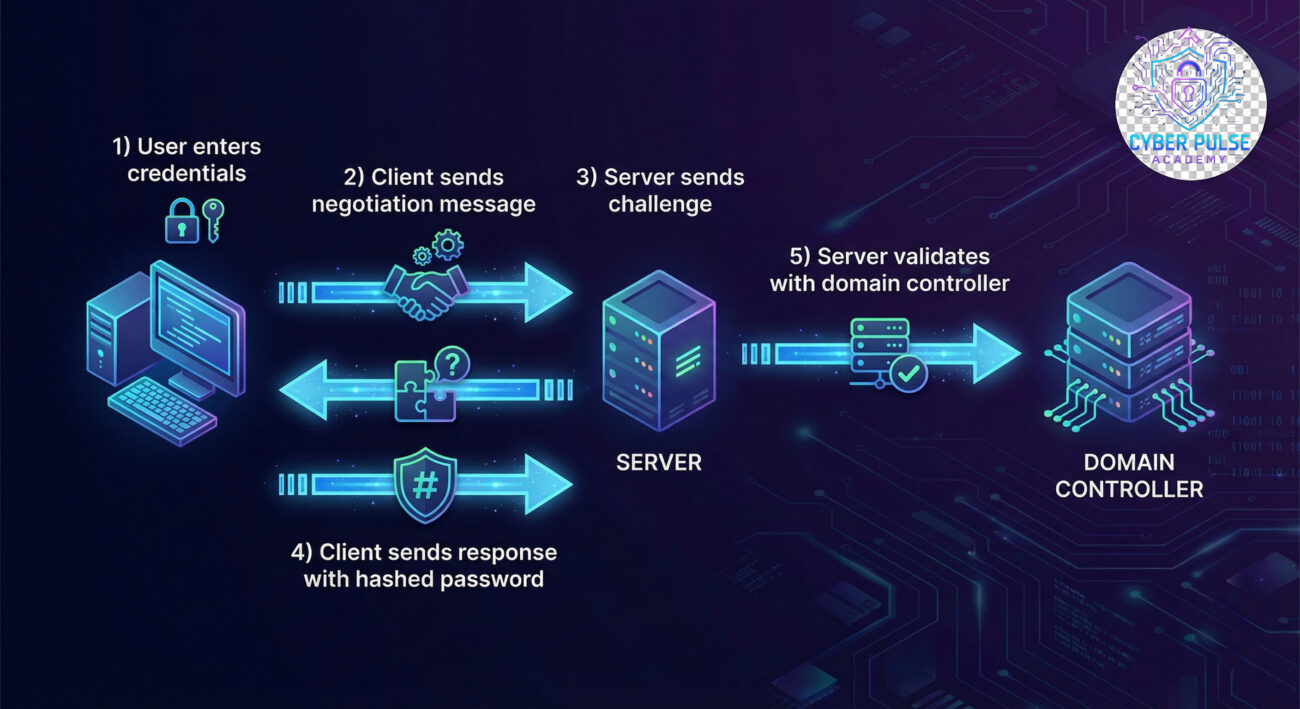
| Term | Simple Definition | Everyday Analogy |
|---|---|---|
| NTLM | An authentication protocol that allows users to prove their identity to a server without sending passwords in plain text | Like a secret club handshake that proves membership without showing your ID card |
| Challenge-Response | The method NTLM uses where the server sends a random "challenge" that the client must answer correctly using the password hash | Like a guard asking for today's password, you must know how to transform it correctly to gain entry |
| Pass-the-Hash Attack | An attack where hackers intercept and reuse the hashed password instead of cracking it | Stealing someone's already-stamped ticket instead of forging a new one |
| Kerberos | The modern authentication protocol that replaces NTLM with stronger security features | Like upgrading from a simple lock to a biometric security system with time-limited access tokens |
| LM Hash | The weak predecessor to NTLM that splits passwords and converts to uppercase | Like writing your password in all caps and cutting it in half, much easier for thieves to handle |
Meet Sarah, the IT manager at "Bright Solutions," a 50-employee marketing firm. Like many small businesses, they had legacy systems that relied on NTLM authentication for file sharing and internal applications. Sarah knew about the risks but kept putting off the migration to Kerberos because "everything was working fine."
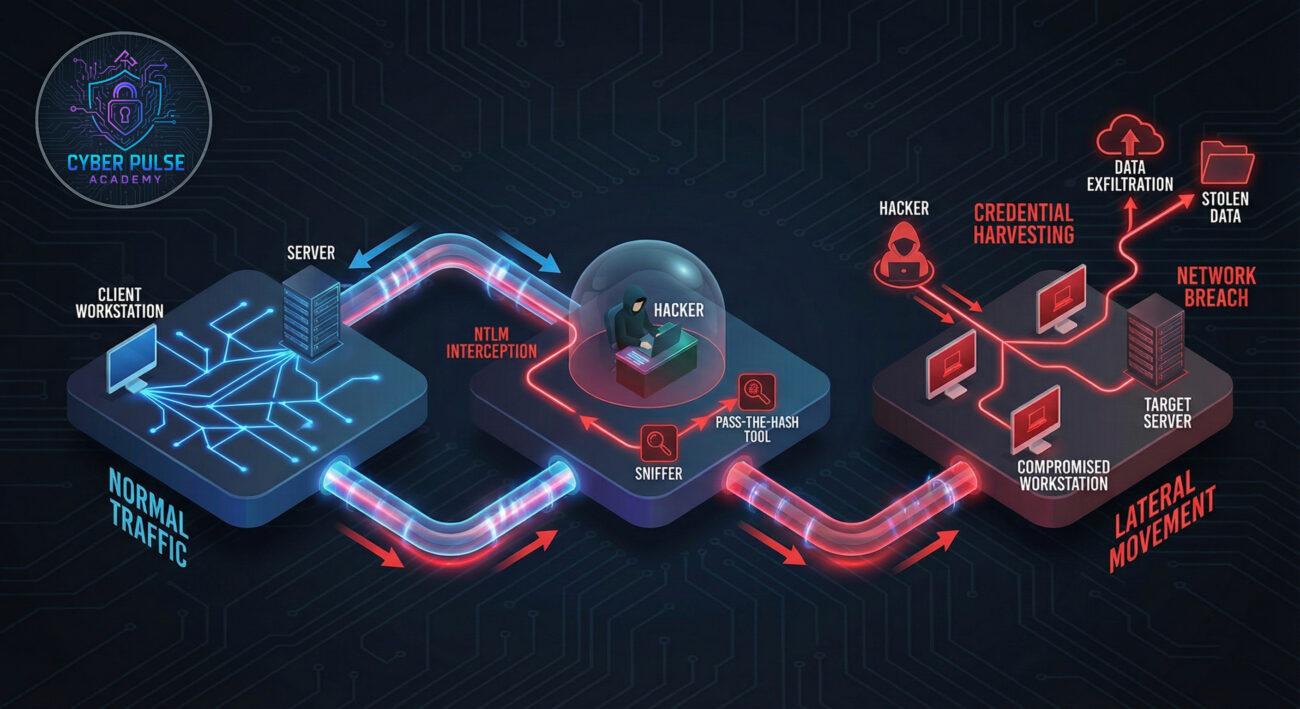
In March 2023, an employee clicked on a phishing email that installed credential-stealing malware. The malware didn't capture plaintext passwords, instead, it harvested NTLM hashes from memory. The attacker then used these hashes in a pass-the-hash attack to move laterally through the network, eventually accessing the financial server containing client payment information.
| Time/Stage | What Happened | Impact |
|---|---|---|
| Day 1: 9:00 AM | Employee receives phishing email about "urgent invoice" | Initial infection - malware installed |
| Day 1: 2:00 PM | Malware harvests NTLM hashes from memory | Credentials compromised without password theft |
| Day 2: 3:00 AM | Attacker uses hashes to access file server via NTLM | Lateral movement begins |
| Day 2: 10:00 AM | Attacker reaches financial server using same hashes | Critical data exposed - 200 client records |
| Day 2: 1:00 PM | Sarah detects unusual login times via security monitoring | Attack contained - incident response begins |
Fortunately, Sarah had implemented some security monitoring that flagged the unusual login times (3:00 AM for a 9-to-5 business). The breach was contained before data was exfiltrated, but the incident cost $15,000 in forensic investigation and system hardening. The near-miss convinced leadership to fund immediate migration from NTLM to Kerberos.
Before making changes, understand where and how NTLM is being used in your network.
Network security: Restrict NTLM settings)Control where NTLM can be used while maintaining functionality for legacy systems.
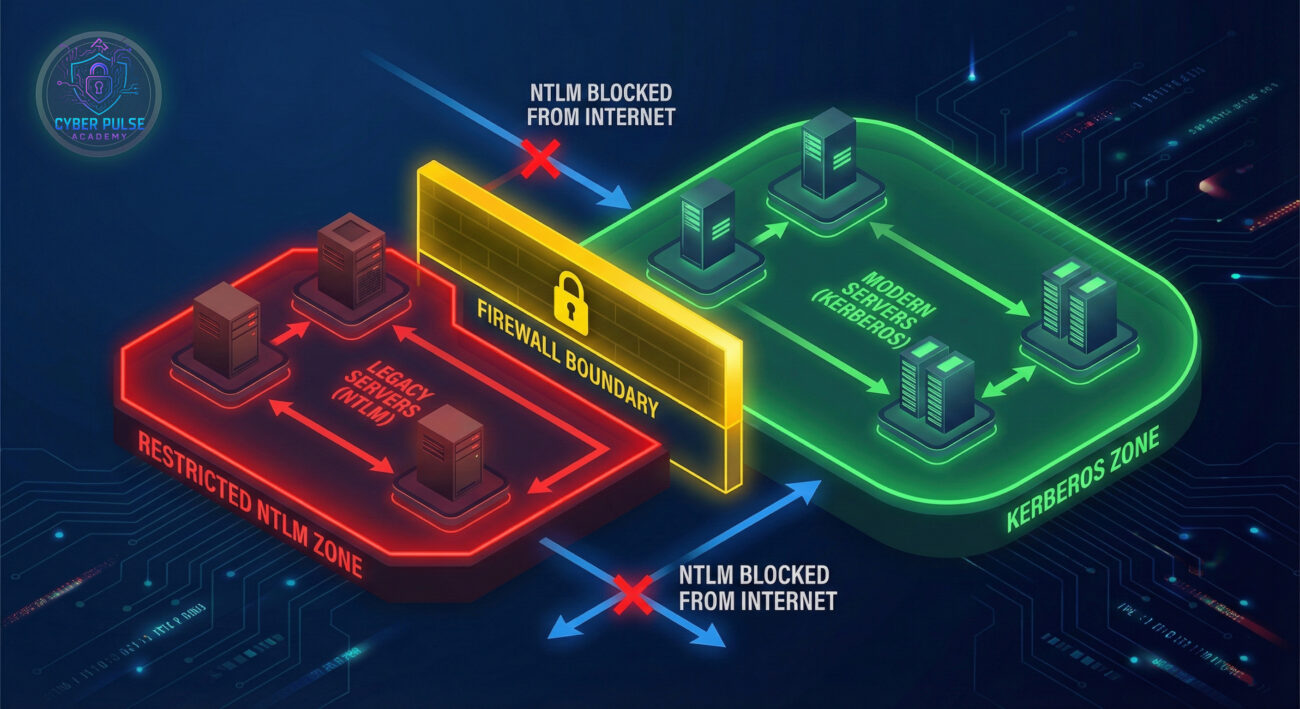
Since NTLM relies on password hashes, make those hashes harder to crack.
Add an extra layer of security that NTLM alone doesn't provide.
Gradually replace NTLM with its more secure successor.
Keep watching for suspicious NTLM usage even after implementing controls.
From an attacker's perspective, NTLM is like finding an old skeleton key that still works on some doors. Here's one simple attack path they might take:
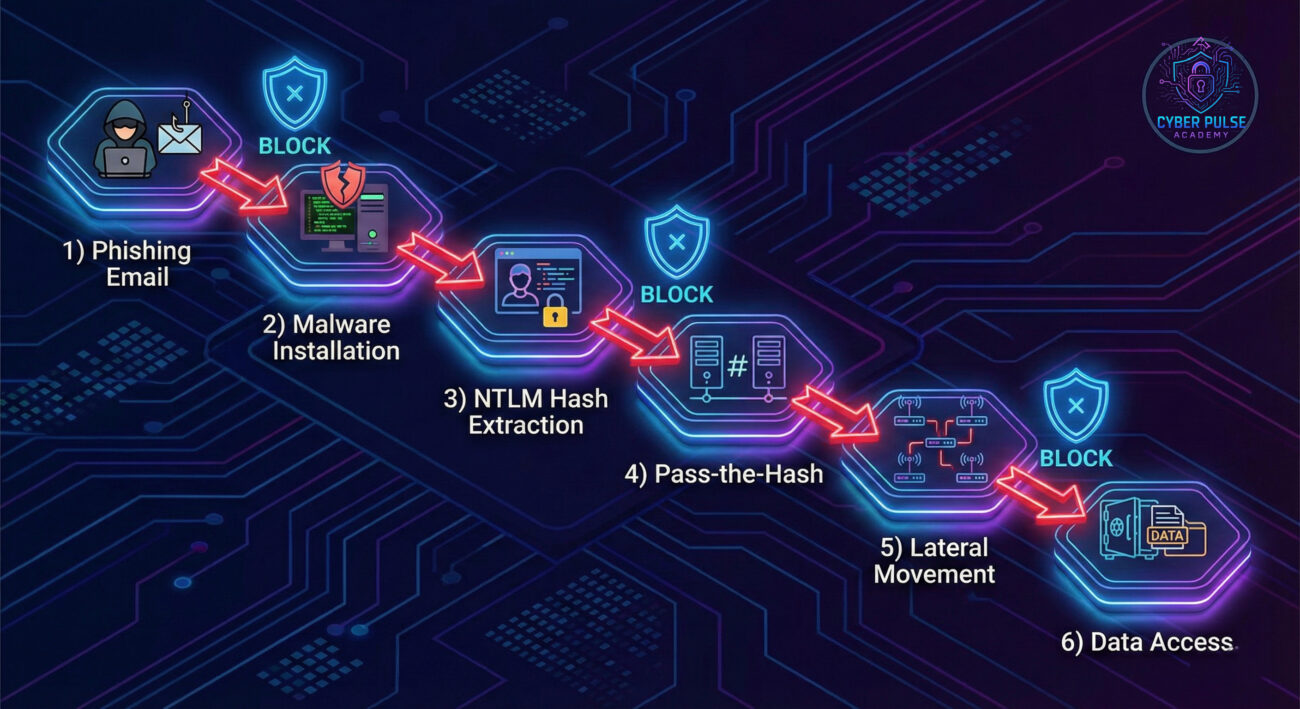
Attack Path: The attacker sends a phishing email with a malicious attachment. When opened, it runs a script that dumps NTLM hashes from memory (using tools like Mimikatz). The attacker then uses these hashes to authenticate to other systems via NTLM without needing the actual password. They move laterally until finding valuable data or domain administrator access.
Defender's Counter-Move: A savvy defender monitors for unusual NTLM authentication patterns, like a user account authenticating from multiple systems simultaneously, or NTLM logins occurring at 3 AM. They've implemented restricted admin mode which prevents pass-the-hash from working on certain sensitive systems, and they use credential guard to protect hashes in memory. Most importantly, they're gradually eliminating NTLM entirely where possible.
"NTLM is a gift that keeps giving. Many organizations have it enabled for backward compatibility, which means we can often find at least one system willing to accept NTLM authentication. The pass-the-hash technique is beautiful in its simplicity, we don't need to crack passwords, just reuse the hashes. We look for systems without Credential Guard, users with local admin rights, and networks where NTLM isn't monitored. Every time we see NTLM in use, we know there's potential for lateral movement."
What they care about: Finding systems with NTLM enabled, harvesting hashes from memory, identifying where those hashes will work, and moving without triggering alerts.
"NTLM is a necessary evil we're working to eliminate. We know its vulnerabilities, but legacy applications sometimes demand it. Our strategy is containment and monitoring. We restrict NTLM to specific network segments, implement EPA where possible, and monitor event logs for suspicious NTLM activity. We're on a migration path to Kerberos, but until then, we treat every NTLM authentication as potentially suspicious and have alerts for abnormal patterns."
What they care about: Minimizing NTLM usage, protecting hashes in memory, detecting misuse quickly, and maintaining business functionality during the migration to modern authentication.
Understanding NTLM is crucial for anyone responsible for network security. While it served well in its time, today it represents both a legacy necessity and a potential security vulnerability that requires careful management.
Here are your key takeaways:
The journey from NTLM to modern authentication isn't overnight, but with careful planning, auditing, and implementation of security controls, you can significantly reduce your risk while maintaining business operations. Start by auditing your NTLM usage today, you might be surprised at what you find.
Have questions about NTLM in your environment? Noticed something unusual in your authentication logs? Share your experiences or questions in the comments below, let's build a more secure digital world together.
Remember: The first step to better security is understanding what you're protecting. You've just taken that step with NTLM.
Every contribution moves us closer to our goal: making world-class cybersecurity education accessible to ALL.
Choose the amount of donation by yourself.