


















































Certification Courses
Hands-On Labs
Threat Intelligence
Latest Cyber News
MITRE ATT&CK Breakdown
All Cyber Keywords
After years of warnings, Microsoft has officially ignited the deprecation of NTLM (New Technology LAN Manager) with a concrete three-stage plan. This NTLM phase-out aims to replace the legacy protocol with Kerberos as the default authentication method in Windows. The move responds to decades of vulnerabilities, including pass-the-hash, relay attacks, and weak cryptography, that have made NTLM a favorite target for attackers. For cybersecurity professionals and IT teams, this transition is both a challenge and an opportunity to harden their identity infrastructure. This guide breaks down the plan, the risks, and exactly how to prepare.
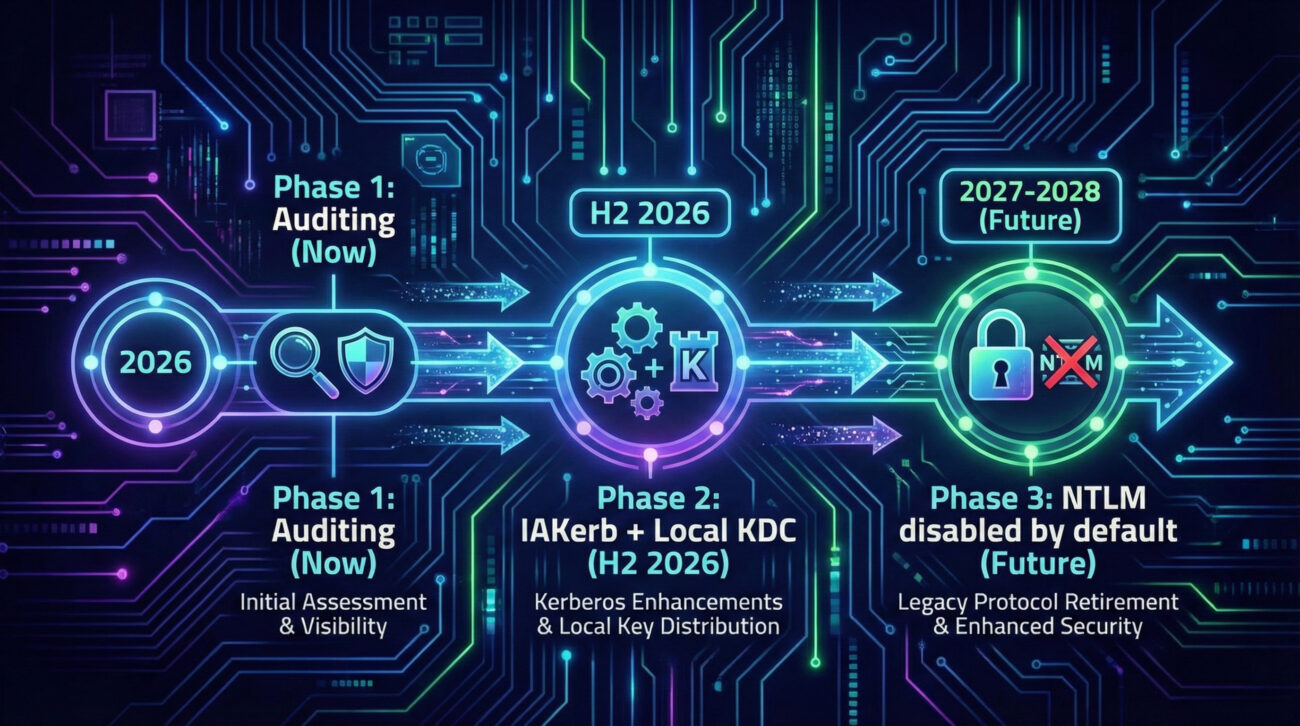
Whether you're a student, a system administrator, or a CISO, understanding the NTLM phase-out is essential. Microsoft's roadmap includes enhanced auditing now, new features like IAKerb and local KDC in late 2026, and finally disabling NTLM by default in future Windows releases. Let's dive deep into what this means for your environment.
NTLM is a challenge-response authentication protocol introduced by Microsoft in the early 1990s. It has long been considered insecure due to its use of weak cryptography (like LM/NTLM hashes) and vulnerability to multiple attack techniques documented in the MITRE ATT&CK framework.
Key techniques adversaries use against NTLM include:
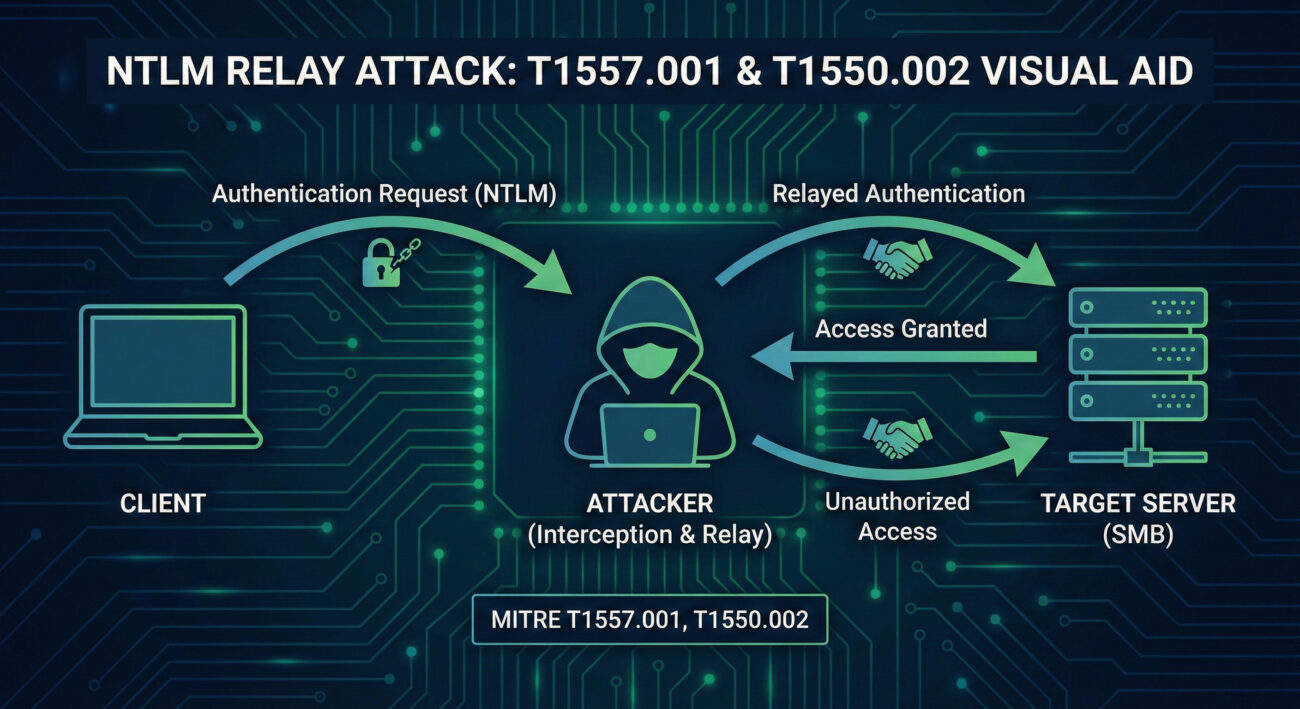
As Mariam Gewida from Microsoft stated, "NTLM is susceptible to various attacks, including replay and man-in-the-middle attacks, due to its use of weak cryptography." Despite being formally deprecated in June 2024, NTLM remains widely used in enterprises due to legacy applications, network constraints, or simple inertia. This exposes organizations to credential theft and lateral movement.
The shift to Kerberos brings modern security features: mutual authentication, ticket-based access, support for MFA, and resistance to replay attacks. Microsoft's three-stage plan ensures a secure-by-default future while providing tools to ease migration.
Enhanced NTLM auditing allows administrators to log and analyze exactly where NTLM is still used. This includes which applications, servers, or clients are requesting NTLM authentication. Without this visibility, migration is impossible.
Microsoft will introduce two key technologies to eliminate common blockers:
The next version of Windows Server and its associated Windows client will ship with NTLM network authentication disabled. Organizations can re-enable it via Group Policy if absolutely necessary, but the default state is secure.
Use Group Policy: Computer Configuration → Policies → Windows Settings → Security Settings → Local Policies → Security Options → Network security: Restrict NTLM: Audit NTLM authentication in this domain. Collect logs from Domain Controllers and members.
Analyze the logs to identify all applications, services, or devices that still use NTLM. Pay special attention to legacy servers, printers, scanners, and in-house apps.
Create a test OU with GPOs that block NTLM (e.g., "Network security: Restrict NTLM: NTLM authentication in this domain" set to "Deny all"). Validate that critical apps still work via Kerberos.
For apps that break, work with vendors to enable Kerberos, or consider wrapping legacy apps with Kerberos-aware proxies. Microsoft's upcoming IAKerb and Local KDC (Phase 2) may help, but plan to remove NTLM entirely.
Use "Deny all" audit modes first, then move to blocking. Leverage Group Policy to disable NTLM in pilot rings before full rollout.
With NTLM still present, red teams leverage:
Once NTLM is disabled, these attack paths become significantly harder, forcing attackers to target Kerberos (which requires more complex techniques like Kerberoasting or Golden Tickets).
Defenders can use the phase-out to:
| Feature | NTLM | Kerberos |
|---|---|---|
| Authentication type | Challenge-response (symmetric) | Ticket-based (asymmetric + symmetric) |
| Mutual authentication | No (server not authenticated to client) | Yes (both parties verify) |
| Resistance to replay | Weak (timestamps optional) | Strong (timestamps + session keys) |
| Pass-the-hash risk | High – hashes are sufficient | Low – requires ticket + session key |
| MFA support | Limited (NTLMv2 can leverage, but rarely used) | Native (with PKINIT, smart cards, Windows Hello) |
| Default in Windows | Legacy fallback | Domain-joined default |
A: Only if it hard-codes NTLM and cannot use Kerberos. Microsoft is providing IAKerb and local KDC to cover many legacy scenarios. You should test and plan to upgrade.
A: Phase 3 focuses on network NTLM. Local logons may still use NTLM until further notice, but the goal is to eventually move everything to Kerberos (including via Local KDC).
A: Enable the Group Policy setting "Network security: Restrict NTLM: Audit NTLM authentication in this domain" and review the logs on Domain Controllers. Microsoft also provides detailed guidance.
A: Yes, all versions of NTLM (including v2) are being phased out. NTLMv2 is more secure than v1 but still vulnerable to relay and pass-the-hash.
Don't wait until 2026. Begin with these three actions:
For deeper dives, explore these resources:
© Cyber Pulse Academy. This content is provided for educational purposes only.
Always consult with security professionals for organization-specific guidance.
Every contribution moves us closer to our goal: making world-class cybersecurity education accessible to ALL.
Choose the amount of donation by yourself.