


















































Certification Courses
Hands-On Labs
Threat Intelligence
Latest Cyber News
MITRE ATT&CK Breakdown
All Cyber Keywords
Have you ever clicked "Login with Google" or "Continue with Facebook" on a new app or website and wondered how it works so seamlessly? That magic is powered by OAuth 2.0, the silent guardian of modern online security that protects billions of logins every day.
Imagine you're checking into a hotel. Instead of giving the front desk your house keys (password), you give them a special key card (access token) that only works for your room and expires when you leave. That's OAuth 2.0 in a nutshell – it lets you grant limited access to your information without revealing your master key.
In this beginner-friendly guide, you'll learn exactly how OAuth 2.0 works, why it's crucial for your online safety, common mistakes that lead to security breaches, and how to stay protected when using it every day.
Remember the last time you signed up for a new app and sighed at the thought of creating yet another password? Or worse, when you heard about yet another data breach exposing millions of passwords? This is exactly the problem OAuth 2.0 was born to solve.
OAuth 2.0 (Open Authorization 2.0) is an authorization framework that allows applications to securely access user data from other applications without needing their passwords. Think of it as a digital bouncer that checks your ID at the door but doesn't need to know where you live.
Here's a simple analogy: You want to hire a house cleaner. Instead of giving them a copy of your house key (dangerous!), you install a smart lock that gives them a temporary code that only works on Thursdays from 9 AM to 12 PM and only lets them into the living room and kitchen. That's OAuth 2.0 – controlled, limited, and revocable access.
In this guide, you'll discover how this powerful protocol protects your data when you login with social media accounts, how it can be misused by attackers, and most importantly, how you can use it securely in your daily digital life.
In today's interconnected digital world, OAuth 2.0 has become the backbone of online authorization. Over 85% of the top 10,000 websites use some form of OAuth, according to recent cybersecurity research. But why has this protocol become so ubiquitous?
First, it solves the password fatigue problem. The average person has over 100 online accounts, and reusing passwords across sites creates massive security vulnerabilities. When you use "Login with Google," you're leveraging Google's strong security measures like two-factor authentication and advanced threat detection instead of relying on a potentially weak password you created for that random app.
Second, OAuth 2.0 enables the modern app ecosystem. From fitness apps accessing your Google Calendar to project management tools pulling data from your Dropbox, this protocol makes seamless integration possible while maintaining security boundaries. The Cybersecurity and Infrastructure Security Agency (CISA) emphasizes the importance of such frameworks in building a secure digital infrastructure.
Recent incidents have shown both the strength and potential weaknesses of OAuth implementations. According to a CSO Online report, OAuth-related attacks increased by 200% in the past two years, highlighting why understanding this technology is crucial for everyone, not just cybersecurity professionals.
When implemented correctly, OAuth 2.0 provides a robust layer of protection. It allows you to grant specific permissions (like "read your email" but not "send email as you") and revoke access anytime. This principle of least privilege is a cornerstone of modern cybersecurity, as emphasized by the National Institute of Standards and Technology (NIST) guidelines.
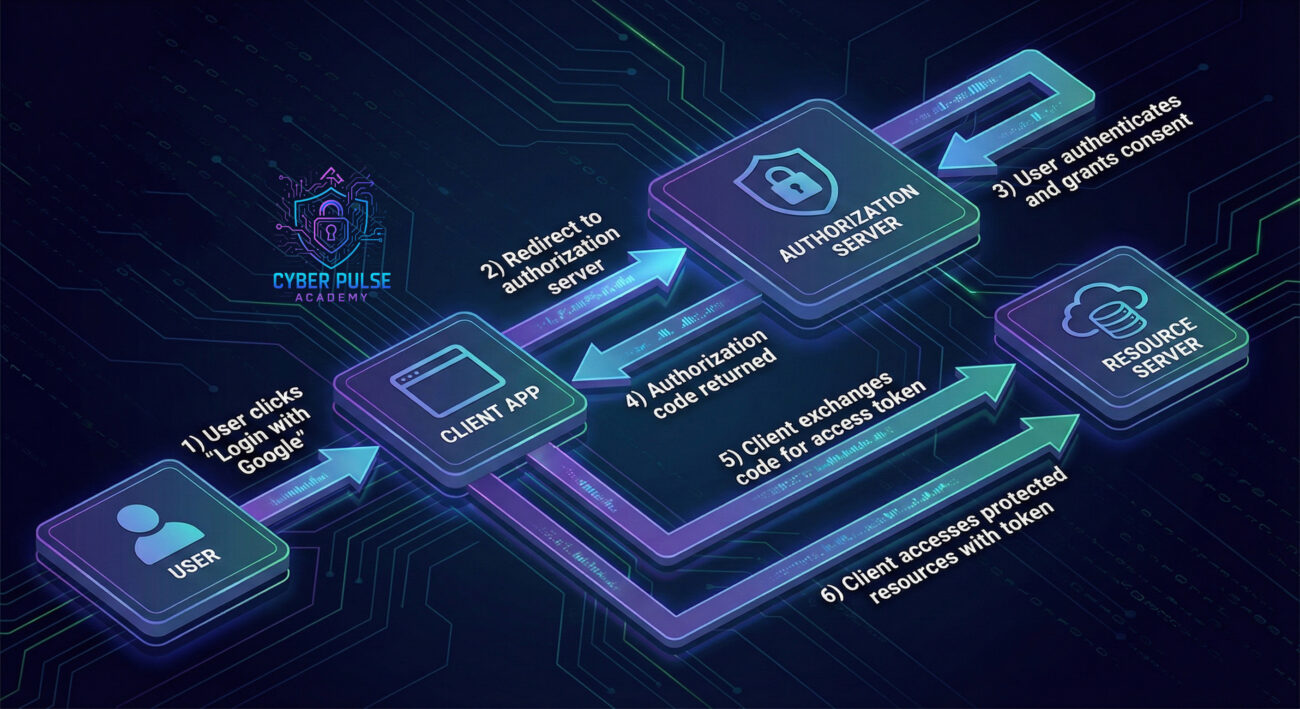
Understanding these five essential terms will help you grasp how OAuth 2.0 works and why it's so important for your online security.
| Term | Simple Definition | Everyday Analogy |
|---|---|---|
| Resource Owner | That's you – the person who owns the data and grants access to it. | You're the homeowner deciding who gets a key to your house. |
| Client | The application that wants to access your data (like a new fitness app). | The house cleaner who needs temporary access to your home. |
| Authorization Server | The service that verifies your identity and issues access tokens (like Google or Facebook). | The property management company that issues temporary key cards after checking your ID. |
| Access Token | A temporary digital key that grants limited access to specific resources. | A hotel key card that works only for your room and only during your stay. |
| Scope | The specific permissions you grant (like "read emails" but not "delete emails"). | Telling the cleaner they can access the kitchen and living room but not your bedroom or home office. |
Meet Sarah, a graphic designer who just discovered a new social media scheduling app called "PostPerfect." The app promises to help her manage all her social accounts from one dashboard. When she signs up, she sees the familiar "Login with Google" button and clicks it.
Here's what happens behind the scenes in Sarah's OAuth 2.0 journey:
| Time/Stage | What Happened | Impact & Security Consideration |
|---|---|---|
| Initial Click | Sarah clicks "Login with Google" on PostPerfect | PostPerfect (Client) redirects Sarah to Google (Authorization Server) – her password is never shared with PostPerfect |
| Authentication | Google asks Sarah to login (if not already) and shows a consent screen | Google verifies Sarah's identity using its strong authentication system, possibly including 2FA |
| Consent Screen | Sarah sees what PostPerfect wants: "View your email address" and "Post content to YouTube" | Critical security moment – Sarah should check if these permissions make sense for a social media scheduler |
| Token Exchange | Sarah grants permission → Google gives PostPerfect an access token | The token is like a valet key – works only for specific things and can be revoked anytime by Sarah |
| Data Access | PostPerfect uses the token to get Sarah's email and post to her YouTube | If PostPerfect had a security breach, attackers would get tokens, not passwords (less damaging) |
| Two Weeks Later | Sarah stops using PostPerfect and revokes its access in her Google account | The tokens immediately become useless – this is why OAuth 2.0 is safer than password sharing |
Sarah's story shows how OAuth 2.0 balances convenience with security. Unlike the old days where she would have given PostPerfect her Google password (giving them full access forever), she now grants limited, revocable access through a secure protocol.
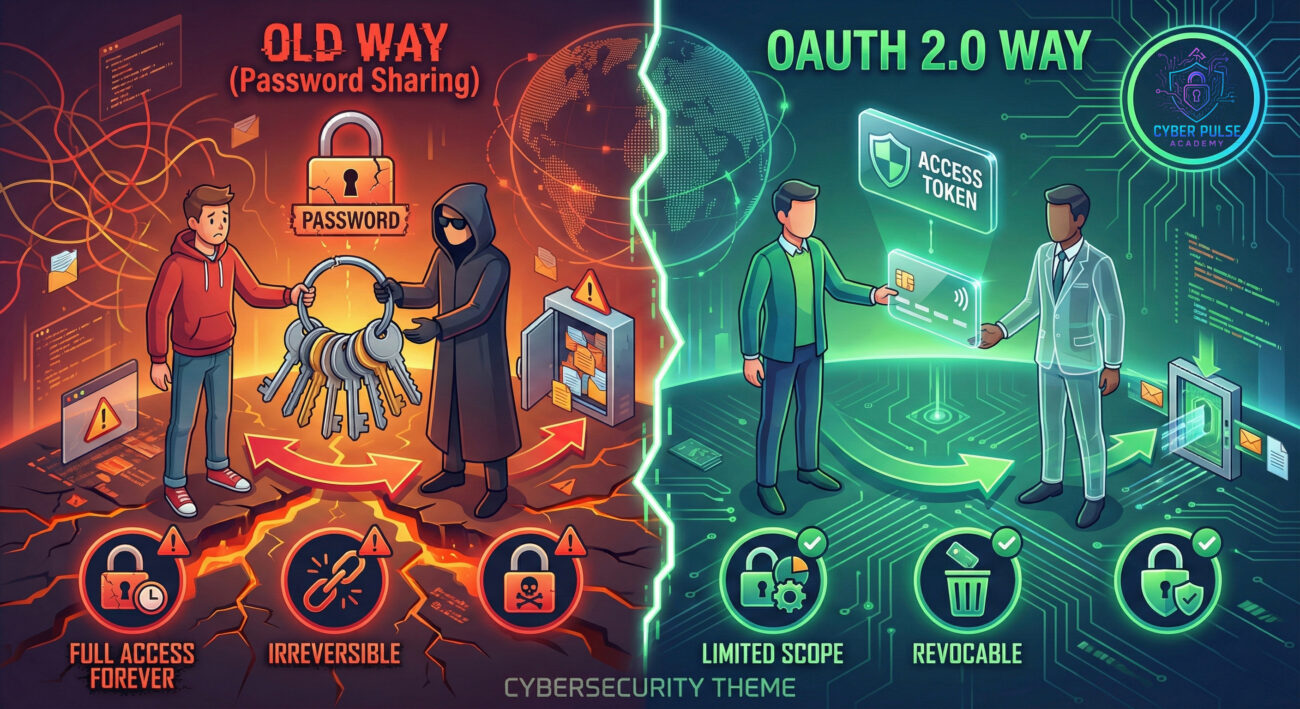
Now that you understand how OAuth 2.0 works, here's your practical guide to using it safely in your daily online activities.
Look for buttons like "Login with Google," "Continue with Facebook," or "Sign in with Apple." These indicate OAuth 2.0 is being used. Consider using these instead of creating new passwords when possible.
When the authorization server (like Google) shows you what the app wants to access, actually read it. This is your most important security checkpoint.
Some services like Google offer "App Passwords" – unique passwords for specific applications that you can revoke individually.
Most major providers let you review and revoke app access. Make this a quarterly habit.
OAuth 2.0 has different "flows" for different situations. As a user, you'll mostly encounter the Authorization Code flow (most secure for web apps).
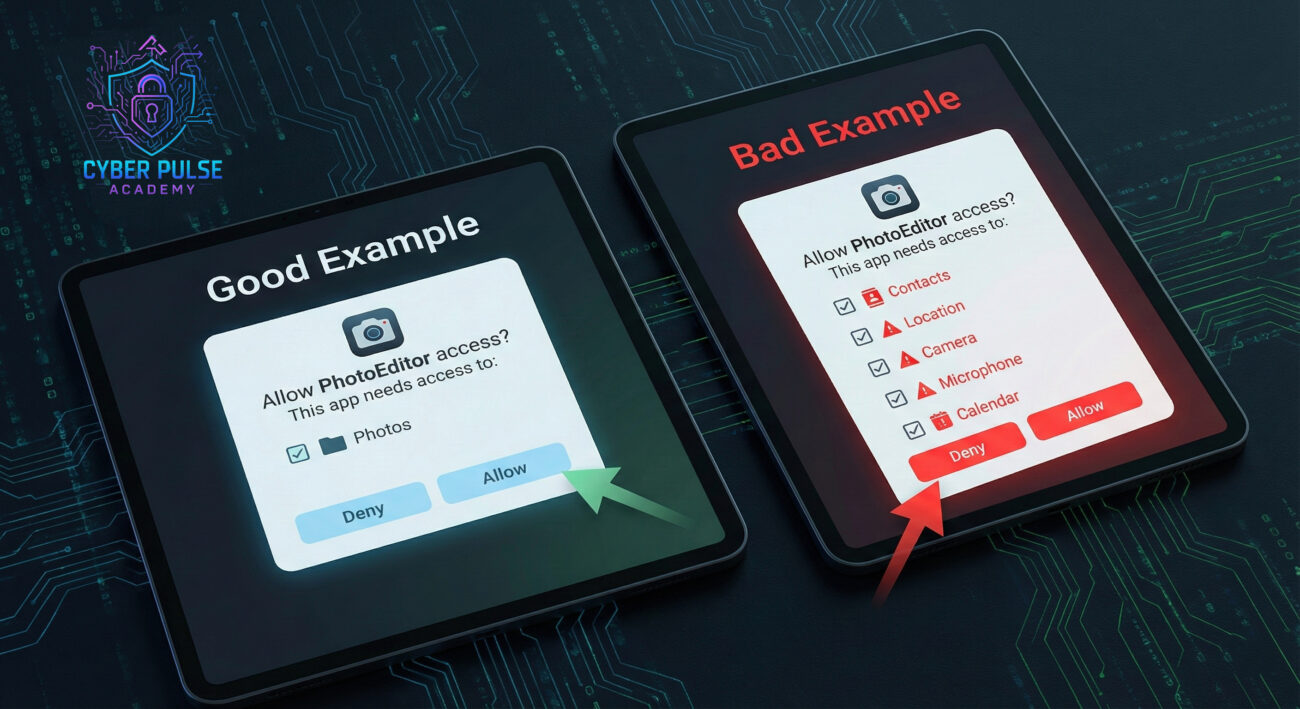
Note: This section explains how attackers could abuse OAuth weaknesses in a simplified, educational way to help you understand defenses. Always use cybersecurity knowledge ethically and legally.
Let's walk through how a threat actor might exploit weak OAuth 2.0 implementations, and how you can defend against it.
1. Attackers create a malicious app that looks legitimate – maybe "Productivity Dashboard 2024" – and register it with a real OAuth provider like Google.
2. They craft a convincing email pretending to be from a known service, asking users to "re-authorize" their account or grant access to a "new feature."
3. When users click the link, they see a genuine Google login page (it is – the attacker can't fake that), then a consent screen asking for permissions. The trick? The app name and requested permissions might seem reasonable at first glance.
4. If the user grants access, the attacker gets an access token that lets them read emails, contacts, or other data – all without ever stealing a password.
1. Always verify the app name and publisher on the consent screen. Legitimate apps from companies like Microsoft will show their verified publisher status.
2. Be skeptical of unexpected permission requests. Did you initiate this login, or did an email prompt you? When in doubt, navigate directly to the service's website instead of clicking links.
3. Use the principle of least privilege in your own app development and usage. Only grant what's absolutely necessary.
4. Monitor for suspicious activity. Both users and organizations should watch for unusual access patterns or data transfers.
"OAuth 2.0 is a treasure map showing where to find valuable data without breaking doors. I look for misconfigured redirect URLs where I can steal authorization codes. I hunt for apps with overly broad scopes – if I can trick one user into granting access, I get their data and a token that looks legitimate. My favorite tactic? Creating malicious apps with names similar to popular services and hoping users don't read the consent screen carefully. The beauty is that even security-aware users are trained to trust OAuth login screens – that trust is my weapon."
"OAuth 2.0 is our secure gatekeeper when implemented correctly. We enforce strict redirect URI validation and use PKCE (Proof Key for Code Exchange) to prevent code interception attacks. We monitor token usage patterns for anomalies and implement short token lifetimes with secure refresh mechanisms. User education is crucial – we teach our team to verify publisher information and question permission requests. We regularly audit registered OAuth applications and use conditional access policies to restrict token usage by location, device, or behavior. Every consent screen is a security checkpoint, not a speed bump."
Congratulations! You've just leveled up your cybersecurity knowledge by understanding OAuth 2.0, one of the most important protocols protecting your online life today. Let's recap what you've learned:
The digital landscape is constantly evolving, and OAuth 2.0 represents a significant improvement over the password-based systems of the past. By understanding how it works and following the best practices outlined in this guide, you're not just protecting your own data – you're contributing to a more secure internet for everyone.
Remember: Security isn't about being paranoid; it's about being informed. Now when you click "Login with Google," you'll understand the sophisticated dance of tokens, scopes, and permissions happening behind the scenes to keep your data safe.
Now that you understand OAuth 2.0, take 5 minutes today to:
Have questions about OAuth or other cybersecurity topics? Share them in the comments below, and let's continue the conversation about building a more secure digital world together!
Every contribution moves us closer to our goal: making world-class cybersecurity education accessible to ALL.
Choose the amount of donation by yourself.