


















































Certification Courses
Hands-On Labs
Threat Intelligence
Latest Cyber News
MITRE ATT&CK Breakdown
All Cyber Keywords
A newly disclosed critical vulnerability in OpenClaw (CVE-2026-25253, CVSS 8.8) allows attackers to achieve remote code execution with just one click on a malicious link. OpenClaw, an open‑source AI personal assistant running locally on user devices, became an overnight sensation with over 149,000 GitHub stars. However, its Control UI trusts unvalidated URL parameters and automatically sends authentication tokens, enabling cross‑site WebSocket hijacking. An attacker can steal the token, disable sandboxing, and execute arbitrary commands on the host machine. This post breaks down the OpenClaw remote code execution flaw, how to defend against it, and why every user must update to version 2026.1.29 immediately.
The flaw was discovered by Mav Levin of depthfirst and patched on January 30, 2026. Even instances bound to localhost are vulnerable because the victim’s browser acts as a bridge. Below we dissect the exploit from both a beginner and professional perspective.
OpenClaw’s Control UI reads the gatewayUrl directly from the query string without any validation. When the page loads, it automatically establishes a WebSocket connection to that URL, sending the stored gateway token in the payload. Because the server does not validate the WebSocket Origin header, any website can initiate a cross-origin WebSocket connection to the victim’s local OpenClaw instance.
This token exfiltration lets an attacker’s site receive the token, then use it to authenticate as the victim. The token carries privileged scopes like operator.admin and operator.approvals, allowing the attacker to modify configuration and disable security guardrails.
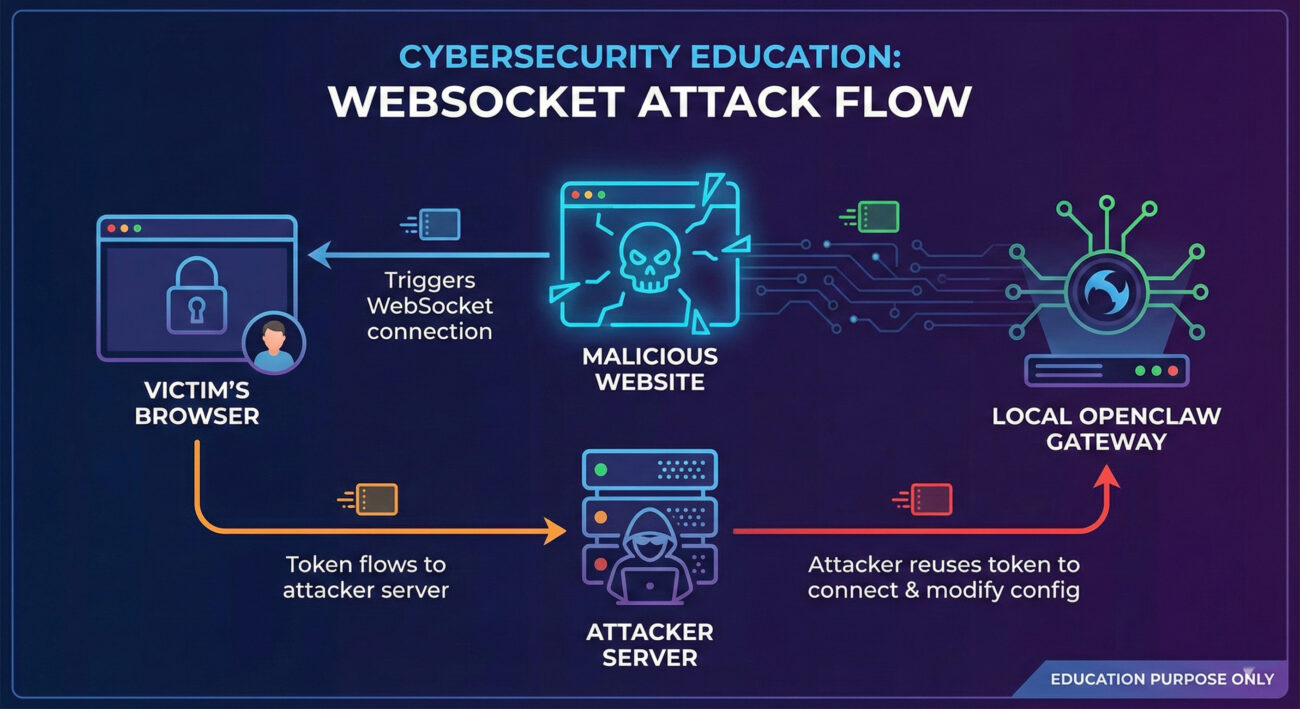
Once the attacker has the token, they can:
exec.approvals.set to "off".tools.exec.host to "gateway" – forcing commands to run directly on the host.node.invoke requests.The entire chain takes milliseconds and works even if OpenClaw listens only on loopback, because the browser initiates the outbound connection.
Imagine a cybersecurity professional, Alex, who installed OpenClaw to help automate tasks. Alex receives a direct message on social media with a link promising a free AI tool. The link points to a seemingly harmless webpage. Upon clicking, the page silently executes JavaScript that exploits the OpenClaw bug.
Without any visible effect, the attacker now has full control over Alex’s OpenClaw instance. They disable the sandbox and run a reverse shell, gaining persistent access to Alex’s laptop. Sensitive files, credentials, and internal network resources are now exposed. All from a single click.
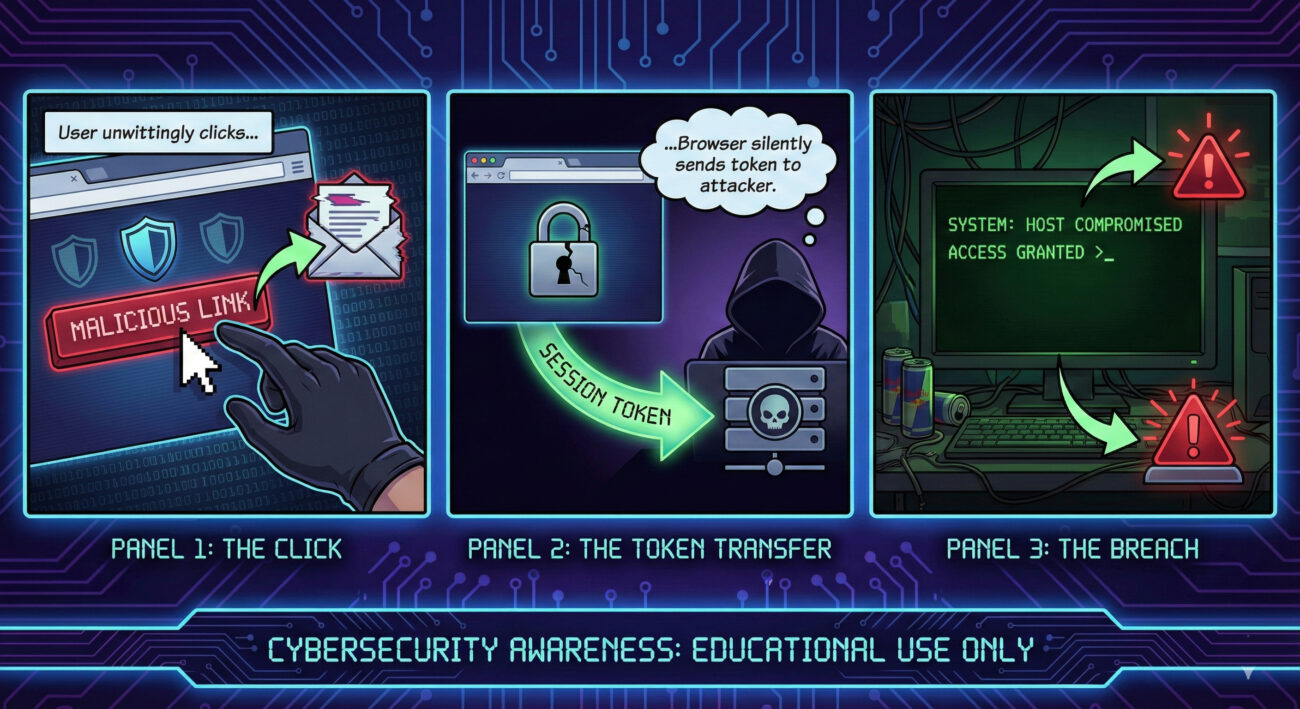
The link leads to a page controlled by the attacker. It could be a phishing site, an ad, or a link in a chat.
JavaScript on the page sends a WebSocket connection to the victim's OpenClaw gateway (usually localhost:8080 or similar). The browser automatically includes any stored authentication token because the OpenClaw server doesn't check the Origin header.
The token is sent to the attacker’s server (the same malicious site can receive it via WebSocket or separate exfiltration).
Using the stolen token, the attacker connects to the victim’s OpenClaw API from their own machine, now with operator privileges.
The attacker changes settings to turn off user approval and forces tools to run on the host (bypassing Docker).
Finally, the attacker invokes node.invoke with arbitrary commands, achieving full RCE on the host machine.
This attack aligns with several MITRE ATT&CK techniques. Understanding them helps defenders build better detections.
| Tactic | Technique ID | Technique Name | How it applies |
|---|---|---|---|
| Initial Access | T1189 | Drive-by Compromise | Victim visits malicious website → one-click exploit. |
| Credential Access | T1539 | Steal Web Session Cookie / Token | Token exfiltration via cross-site WebSocket. |
| Defense Evasion | T1562.001 | Impair Defenses: Disable or Modify Tools | Attacker turns off user approval and sandbox. |
| Execution | T1059.008 | Command and Scripting Interpreter: Network Device CLI | Using node.invoke to run system commands. |
| Command and Control | T1105 | Ingress Tool Transfer | Attacker sends commands via WebSocket/API. |
exec.approvals.set).localhost:<port>.exec.approvals.set.node.invoke spawning shells.OpenClaw maintainer Peter Steinberger released a fix on January 30, 2026. Here’s a quick framework to secure your deployment:
gatewayUrl and checks WebSocket Origin headers.For temporary mitigation before patching, consider blocking outbound WebSocket connections from browsers to localhost using browser extensions or group policies, but patching is the only complete fix.
A: Visiting a malicious page is enough – no interaction beyond the page load is required. Hence "one‑click" (actually zero‑click after navigation).
A: If you haven’t updated to the patched version, an attacker could access your files, run commands, and steal data. Update now.
A: Yes. The victim’s browser runs on the same machine, so it can connect to 127.0.0.1. The attacker’s page initiates the connection from the browser, making it a local connection.
A: Look for unexpected changes in OpenClaw configuration (e.g., sandbox disabled), unknown outbound connections, or processes spawned by node. Also check logs for token reuse from unusual IPs.
A: No, it’s a web security flaw in the Control UI. However, the sandbox bypass makes any subsequent AI prompt injection far more dangerous.
Don't wait for a breach. Update OpenClaw, share this post with fellow developers, and review your endpoint security.
⬇️ Download Patched Version📚 Learn more about WebSocket security (internal guide) | AI security best practices (blog)
© Cyber Pulse Academy. This content is provided for educational purposes only.
Always consult with security professionals for organization-specific guidance.
Every contribution moves us closer to our goal: making world-class cybersecurity education accessible to ALL.
Choose the amount of donation by yourself.