


















































Certification Courses
Hands-On Labs
Threat Intelligence
Latest Cyber News
MITRE ATT&CK Breakdown
All Cyber Keywords
Have you ever received a random 6-digit code via text when logging into your bank account or email? That's an OTP (One-Time Password) – your digital bodyguard in a world of constant cyber threats. Think of it as a single-use key that self-destructs after opening the door, making it useless to anyone who tries to steal it.
An OTP is a temporary, uniquely generated code used to verify your identity during login or transaction processes. Unlike traditional passwords that never change (until you change them), an OTP works exactly once and then expires, usually within 30-60 seconds.
In this beginner-friendly guide, you'll discover: how OTP security transforms your digital safety, the different types of OTP systems, common attacks to watch for, and secure practices you can implement today. By the end, you'll understand why this simple 6-digit code is one of the most powerful tools in modern cybersecurity.
Every 39 seconds, a hacker attempts to break into a computer somewhere in the world. In this environment, static passwords alone are like leaving your front door unlocked. The OTP (One-Time Password) adds a dynamic, ever-changing layer of security that has become essential for protecting our digital identities.
Consider this: over 80% of hacking-related breaches involve stolen or weak passwords, according to Verizon's 2023 Data Breach Investigations Report. This statistic highlights why multi-factor authentication (MFA), where OTP often serves as the second factor, is no longer optional. Major organizations like CISA (Cybersecurity & Infrastructure Security Agency) now mandate MFA implementation for basic cyber hygiene.
From banking transactions to social media logins and remote work access, OTP security touches nearly every aspect of our connected lives. When you receive that temporary code, you're participating in a global security protocol that has prevented countless fraudulent transactions and identity theft attempts. This simple mechanism creates what security experts call "defense in depth" – multiple layers of protection that make unauthorized access exponentially more difficult.
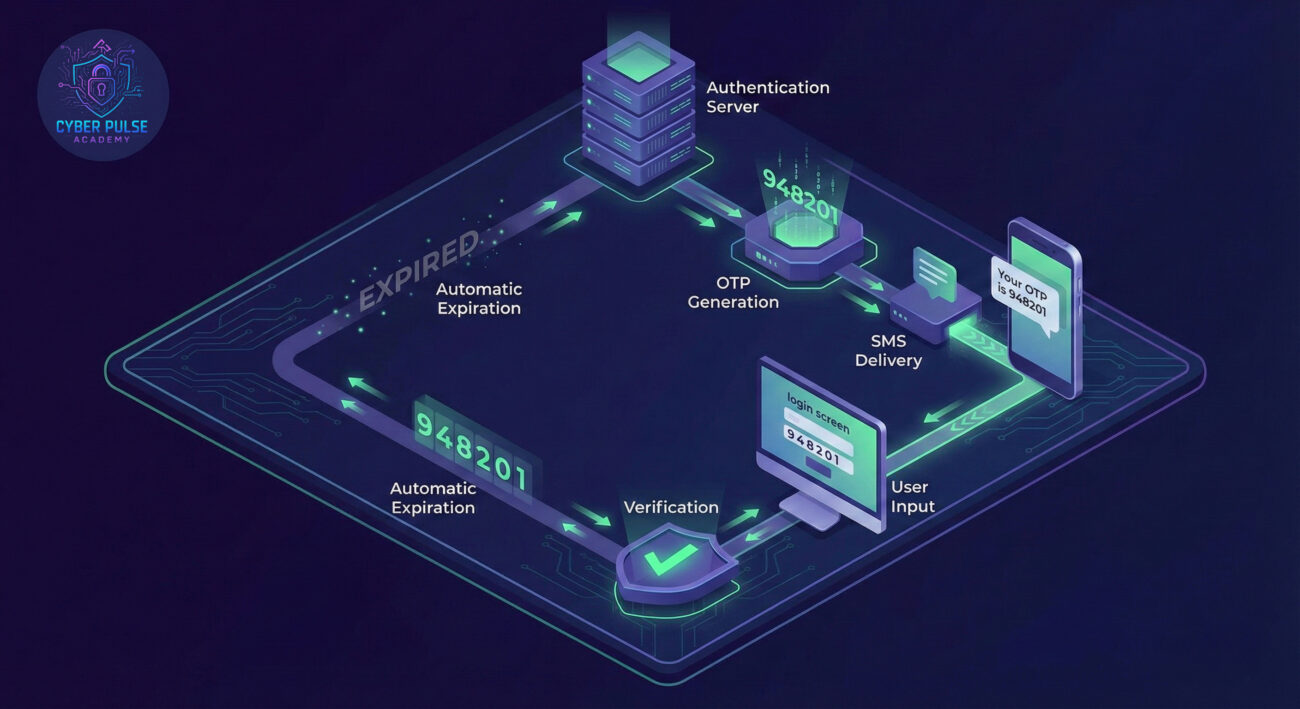
| Term | Simple Definition | Everyday Analogy |
|---|---|---|
| OTP (One-Time Password) | A temporary, single-use code for verifying identity | A concert ticket that tears in half when you enter – can't be reused |
| MFA/2FA | Multi-Factor / Two-Factor Authentication (using OTP as one factor) | Requiring both a key (password) and fingerprint (OTP) to open a safe |
| SIM Swapping | Attack where hackers take control of your phone number to intercept OTPs | A thief convincing the post office to redirect all your mail to their address |
| TOTP | Time-based OTP – codes that change every 30 seconds based on synchronized time | A synchronized clock that generates a new secret handshake every half minute |
| Authenticator App | Secure mobile application that generates OTPs without SMS | A self-contained digital code generator in your pocket |
Sarah, a freelance graphic designer, almost became a statistic. It started when she received a suspicious text claiming her bank account had unusual activity, with a link to "verify her identity." Despite her gut feeling, she clicked – entering her login credentials on a convincing fake bank website.
The attackers now had her username and password. But when they tried to log into her actual bank account, they hit a wall: the bank required an OTP (One-Time Password) sent to her phone. Here's where the story could have gone two ways:
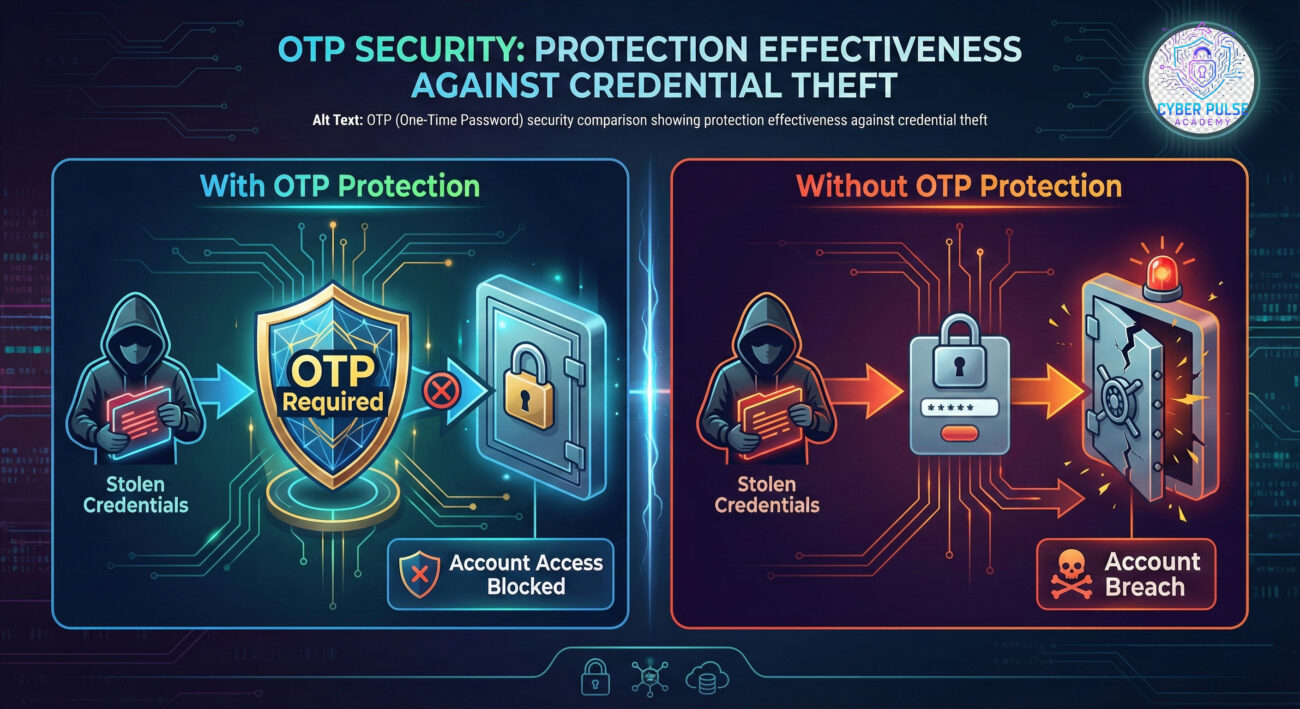
Fortunately, Sarah had recently attended a cybersecurity workshop. She recognized the next move: the attackers would call her, pretending to be bank security, asking for the OTP code she just received. When that call came, she hung up immediately and contacted her bank directly using the number on her card.
| Time/Stage | What Happened | Impact |
|---|---|---|
| Day 1, 2:00 PM | Sarah receives phishing text and clicks malicious link | Credentials compromised |
| Day 1, 2:15 PM | Attackers attempt login but encounter OTP requirement | Initial breach prevented |
| Day 1, 2:20 PM | Sarah receives legitimate OTP and suspicious follow-up call | Social engineering attempt identified |
| Day 1, 2:25 PM | Sarah contacts bank directly, changes password, enables stronger MFA | Account secured, no financial loss |
This timeline shows how the OTP (One-Time Password) created a critical barrier. Even with her password stolen, the temporary code requirement stopped the attack in its tracks, giving Sarah time to respond and secure her account completely.
Start with your most critical accounts and work systematically:
While SMS OTP is better than nothing, authenticator apps provide superior security:
Always create backup options for when you can't access your OTP method:
Develop secure habits around OTP usage and management:
Protect the backup methods that could bypass your OTP security:
Stay alert to potential security issues through OTP patterns:
Prepare for scenarios where you lose access to your OTP device:
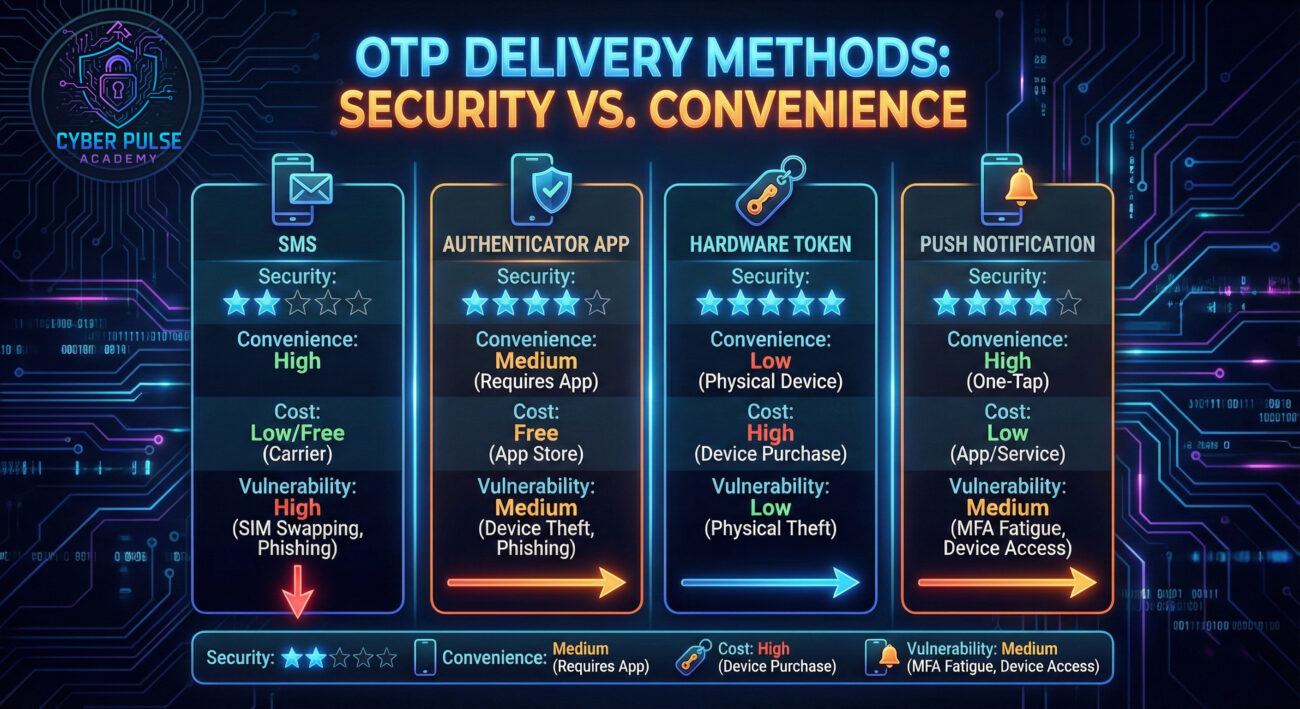
Understanding how attackers think about OTP (One-Time Password) systems reveals why certain practices are crucial. From an attacker's perspective, OTP represents the primary obstacle between stolen credentials and account access.
Simple Attack Path: An attacker obtains credentials through a phishing campaign or data breach. They attempt login but encounter OTP requirements. Their next move targets the OTP delivery method – often through SMS interception via SIM swapping or social engineering. They might call the victim posing as technical support, claiming to need the OTP for "verification" or "system maintenance." If successful, they bypass the OTP barrier entirely.
Defender's Counter-Move: Security-aware individuals and organizations implement OTP through methods resistant to these attacks. Using time-based OTP (TOTP) from authenticator apps eliminates the SMS vulnerability. Training users to recognize that legitimate support will never ask for OTP codes creates a human firewall. Monitoring for unusual OTP requests or rapid-fire OTP attempts can detect automated attacks early. The defender's mindset shifts from "is the password strong?" to "how many independent barriers exist between attackers and access?"
OTP is an obstacle to bypass, not necessarily break. We look for the weakest implementation – SMS-based systems vulnerable to SIM swapping, predictable "emergency" codes, or users trained to share codes. Our approach is psychological: creating urgency ("your account is compromised!") or authority ("this is security, we need your code"). We automate credential stuffing with tools that recognize OTP prompts, then switch to social engineering. The goal isn't cracking the OTP algorithm but circumventing its human element or delivery method.
OTP represents a dynamic barrier that complements static credentials. We prioritize implementation quality: TOTP over SMS, mandatory enrollment for privileged accounts, and monitoring for OTP-related anomalies. Our focus extends beyond deployment to user education – ensuring people understand why they should never share codes. We layer defenses: strong passwords plus OTP plus behavioral analytics. The OTP isn't the finish line but one checkpoint in a comprehensive secure authentication journey designed to create multiple failure points for attackers.
The journey to mastering OTP (One-Time Password) security begins with understanding its role as your digital gatekeeper. This temporary code transforms your authentication from a single lock into a multi-layered security checkpoint that adapts to each login attempt.
Key takeaways from our comprehensive guide:
As cyber threats evolve, so do our defenses. The OTP (One-Time Password) represents one of the most accessible yet powerful tools in personal and organizational cybersecurity. By implementing the practices outlined here – starting with enabling OTP on your email and financial accounts today – you're not just following security best practices; you're actively participating in a global defense system that makes the digital world safer for everyone.
Ready to take the next step? Begin by enabling OTP protection on your primary email account this week, then schedule time to secure your three most important financial accounts. Remember: cybersecurity isn't about being perfectly protected but about being consistently more secure than the average target.
Have questions about implementing OTP security? Encountered a suspicious OTP request? Share your experiences and questions in the comments below. Your real-world stories help build our collective cybersecurity knowledge. For more beginner-friendly security guides, explore our password security masterclass and complete 2FA implementation guide.
Every contribution moves us closer to our goal: making world-class cybersecurity education accessible to ALL.
Choose the amount of donation by yourself.