


















































Certification Courses
Hands-On Labs
Threat Intelligence
Latest Cyber News
MITRE ATT&CK Breakdown
All Cyber Keywords
In the ever-evolving landscape of cyber threats, a new sophisticated malware named PluggyApe has emerged, showcasing a dangerous trend: the abuse of legitimate, encrypted communication services for command and control (C2). Unlike traditional malware that uses easily blocked domains or IP addresses, PluggyApe covertly leverages apps like Signal and Telegram to receive instructions and exfiltrate data, slipping past conventional network defenses. This post provides a comprehensive, beginner-friendly breakdown of the PluggyApe malware, its operational mechanics mapped to the MITRE ATT&CK framework, and actionable steps for defenders.
PluggyApe represents a significant shift in malware tradecraft. Its primary innovation is using end-to-end encrypted (E2EE) messaging platforms, specifically Signal's API and Telegram's Bot API, as its C2 channel. This technique, known as "living off the land" for network traffic, makes detection exceptionally difficult because the traffic appears as legitimate, encrypted communication to popular services. The PluggyApe malware is primarily an information stealer and backdoor, capable of harvesting credentials, capturing screenshots, logging keystrokes, and providing persistent remote access to compromised systems.
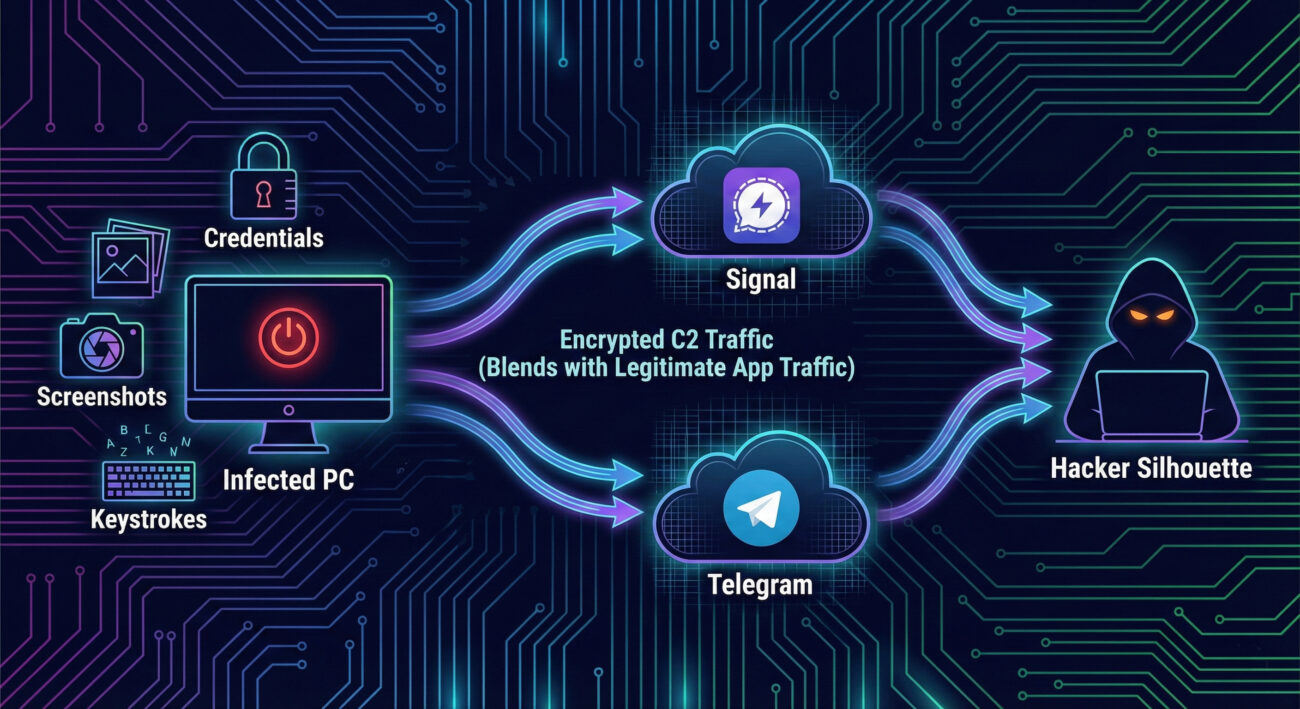
Discovered in early 2026, PluggyApe is a modular malware written in C++. It functions as a full-featured remote access trojan (RAT) and data theft tool. The name "PluggyApe" derives from its use of "pluggable" transport mechanisms for C2 communications and its "ape"-like behavior of mimicking legitimate processes.
Its core capabilities include:
The attack begins with a user being tricked into executing a malicious file, often delivered via spear-phishing emails or disguised as a software update. Once executed, PluggyApe deploys its multi-stage payload.
The user executes a dropper, often a downloaded `.exe` or `.js` file. This dropper is heavily obfuscated to avoid signature-based detection. It decrypts and loads the main PluggyApe payload into memory.
The malware establishes persistence by creating a scheduled task (e.g., via `schtasks.exe`) or setting a Run registry key. It then uses a technique called Process Hollowing: it starts a legitimate, suspended Windows process (like `svchost.exe`), unmaps its memory, and injects its own malicious code before resuming it. This makes the malware appear as a trusted system process.
This is the hallmark of PluggyApe. The malware does not connect to a suspicious IP. Instead, it uses the official, public APIs of Signal and Telegram.
All this traffic is wrapped in TLS, identical to normal app traffic, making it nearly impossible to distinguish on the network level without deep behavioral analysis.
Upon receiving commands from the C2 channel, PluggyApe executes its modules. Stolen data (credentials, files, screenshots) is compressed, encrypted, and broken into chunks. These chunks are then uploaded as "messages" or "files" through the same Signal or Telegram channels, blending in with normal app data flow.
The MITRE ATT&CK framework is a knowledge base of adversary tactics and techniques. PluggyApe employs a wide range of these, making it a potent threat.
| MITRE ATT&CK Tactic | Technique (ID & Name) | How PluggyApe Uses It |
|---|---|---|
| Initial Access | T1566.001 - Phishing: Spearphishing Attachment | Delivered via targeted emails with malicious attachments. |
| Execution | T1059.003 - Command and Scripting Interpreter: Windows Command Shell | Uses cmd.exe to execute commands for discovery and lateral movement. |
| Persistence | T1547.001 - Boot or Logon Autostart Execution: Registry Run Keys | Adds an entry to HKCU\Software\Microsoft\Windows\CurrentVersion\Run. |
| Defense Evasion | T1055.012 - Process Injection: Process Hollowing | Injects code into a legitimate svchost.exe process to hide. |
| Command & Control | T1071.001 - Application Layer Protocol: Web Protocols | Uses HTTPS to communicate with Signal/Telegram APIs (legitimate web services). |
| Command & Control | T1102.002 - Web Service: Bidirectional Communication | Uses Telegram Bot API and Signal as two-way communication channels. |
| Exfiltration | T1048.003 - Exfiltration Over Alternative Protocol: Exfiltration Over Unencrypted Non-C2 Protocol | Exfiltrates data over the encrypted but "legitimate" protocols of Signal/Telegram. |
| Collection | T1056.001 - Input Capture: Keylogging | Logs keystrokes to capture credentials and other sensitive input. |
Imagine a mid-sized financial company. An accountant receives an email seemingly from a tax software provider about a "critical security update." The attached file, `Update_2026.exe`, is the PluggyApe dropper.
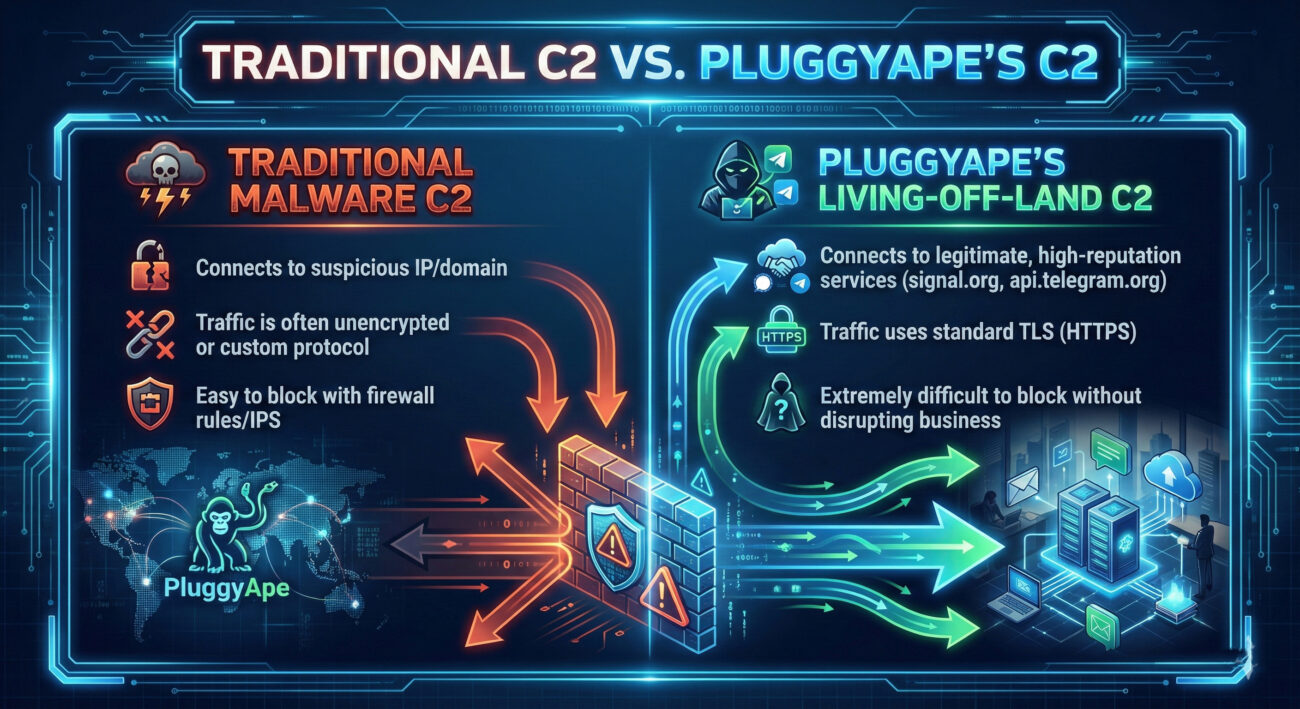
Advantages:
Challenges:
Detection Challenges:
Defensive Opportunities:
Build your defense in layers using the "Defense-in-Depth" strategy:
Q: Can I just block Signal and Telegram at my firewall to stop this malware?
A: Technically yes, but it's often impractical. These are legitimate business communication tools for many organizations. A better approach is behavioral monitoring on the endpoint and network to detect malicious use of these services, rather than outright blocking.
Q: Is my personal Signal/Telegram account at risk if I use these apps?
A: No. PluggyApe does not compromise the Signal or Telegram apps themselves. It uses their public APIs as a channel. Your personal messages remain end-to-end encrypted. The risk is to the infected machine, not your account on the service.
Q: As a beginner, what's the single most important thing I can do to protect against threats like PluggyApe?
A: Cultivate a mindset of zero-trust. Do not blindly trust emails, links, or attachments. Enable MFA everywhere possible, and keep your software updated. For system administrators, implementing application allowlisting is a highly effective first technical control.
Q: Where can I find more technical indicators (IOCs) for PluggyApe?
A: Follow trusted cybersecurity research blogs and threat intelligence platforms. For analysis on this specific threat, refer to the original article on The Hacker News. For general IOC databases, check resources like AlienVault OTX or VirusTotal.
Threats like PluggyApe are not theoretical, they are active and evolving. Begin strengthening your defenses today.
Your Action Plan:
For continuous learning, bookmark reputable cybersecurity resources like SANS Blog, CISA Alerts, and The Hacker News.
Stay vigilant, stay informed, and build your defenses layer by layer.
© 2026 Cyber Pulse Academy. This content is provided for educational purposes only.
Always consult with security professionals for organization-specific guidance.
Every contribution moves us closer to our goal: making world-class cybersecurity education accessible to ALL.
Choose the amount of donation by yourself.