


















































Certification Courses
Hands-On Labs
Threat Intelligence
Latest Cyber News
MITRE ATT&CK Breakdown
All Cyber Keywords
Have you ever wondered how employees securely connect to their company's Wi-Fi or VPN from anywhere in the world? Or how universities manage thousands of students accessing campus networks daily? The secret hero behind these secure connections is called RADIUS.
RADIUS (Remote Authentication Dial-In User Service) is the invisible bouncer that checks credentials before granting network access. Imagine it as a highly efficient club doorman who verifies your ID, checks the guest list, and tracks your entry and exit, all while maintaining detailed logs for security.
In this beginner-friendly guide, you'll learn:
Picture this: You start a new job at a tech company. On your first day, you're given login credentials to access the corporate Wi-Fi. You enter your username and password, and within seconds, you're connected. Behind that simple login screen, RADIUS is working tirelessly to verify your identity and grant you appropriate access.
RADIUS is an authentication protocol that acts as a central gatekeeper for network access. Developed in the 1990s for dial-up internet, it has evolved to secure everything from Wi-Fi networks to VPNs and enterprise switches. Think of it as the traffic controller of network security, directing authentication requests, checking credentials against a database, and enforcing access policies.
Without RADIUS, organizations would struggle with scattered authentication systems, weak security controls, and no centralized logging. This guide will demystify RADIUS completely, transforming you from a curious beginner to someone who understands this critical cybersecurity component.
In today's hybrid work environment, employees access corporate resources from offices, homes, cafes, and airports. Each connection represents a potential security vulnerability if not properly secured. RADIUS provides the centralized authentication that makes secure remote access possible.
Consider these realities: According to the Cybersecurity and Infrastructure Security Agency (CISA), weak authentication mechanisms are a leading cause of network breaches. The NIST Special Publication 800-53 emphasizes the importance of strong authentication controls for federal systems. RADIUS, especially when combined with Multi-Factor Authentication (MFA), addresses these critical security requirements.
The power of RADIUS lies in its ability to centralize authentication. Instead of each network device (Wi-Fi access points, VPN concentrators, switches) maintaining its own user database, they all communicate with a central RADIUS server. This means when an employee leaves the company, disabling their account in one place immediately revokes all network access, a crucial security control.
Every time you connect to enterprise Wi-Fi, use an Eduroam network at a university, or log into a corporate VPN, RADIUS is likely working behind the scenes. Its importance has only grown with the expansion of remote work and cloud services.
Before diving deeper, let's clarify essential RADIUS terminology with simple definitions and everyday analogies:
| Term | Simple Definition | Everyday Analogy |
|---|---|---|
| RADIUS Server | The central authentication computer that verifies user credentials against a database | A passport control officer at an airport who checks your passport against global databases |
| NAS (Network Access Server) | The device (Wi-Fi access point, VPN gateway) that users connect to, which talks to the RADIUS server | The airline check-in counter that collects your boarding pass request before sending it to passport control |
| Authentication | The process of verifying "who you are" (username/password, certificates, etc.) | Showing your ID to enter a restricted building |
| Authorization | Determining "what you're allowed to do" after authentication succeeds | Being granted specific building access levels (floor 3 only, not the server room) |
| Accounting | Logging user activity (connection time, data usage) for security audits | The security guard recording your entry/exit times in a logbook |
Complex concepts become clearer with visualization. Here are key diagrams that illustrate how RADIUS works:
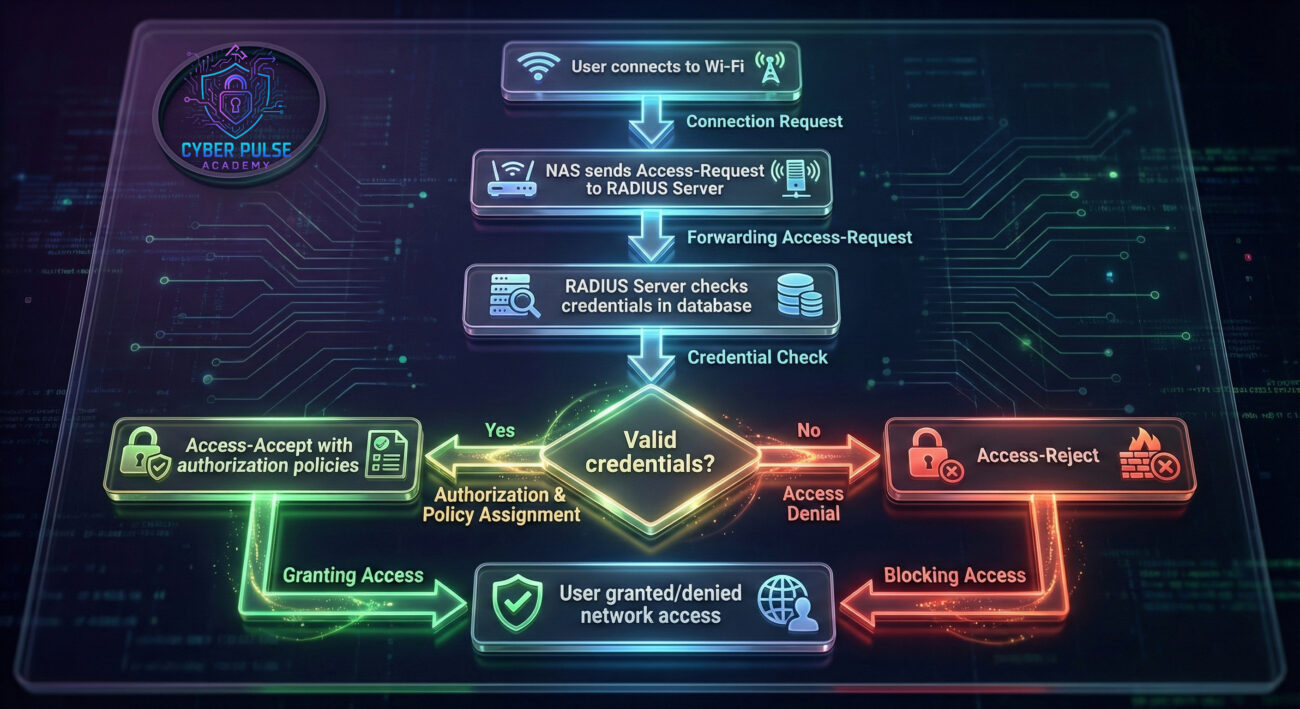
Understanding the basic flow helps, but RADIUS becomes even more powerful with additional security layers:
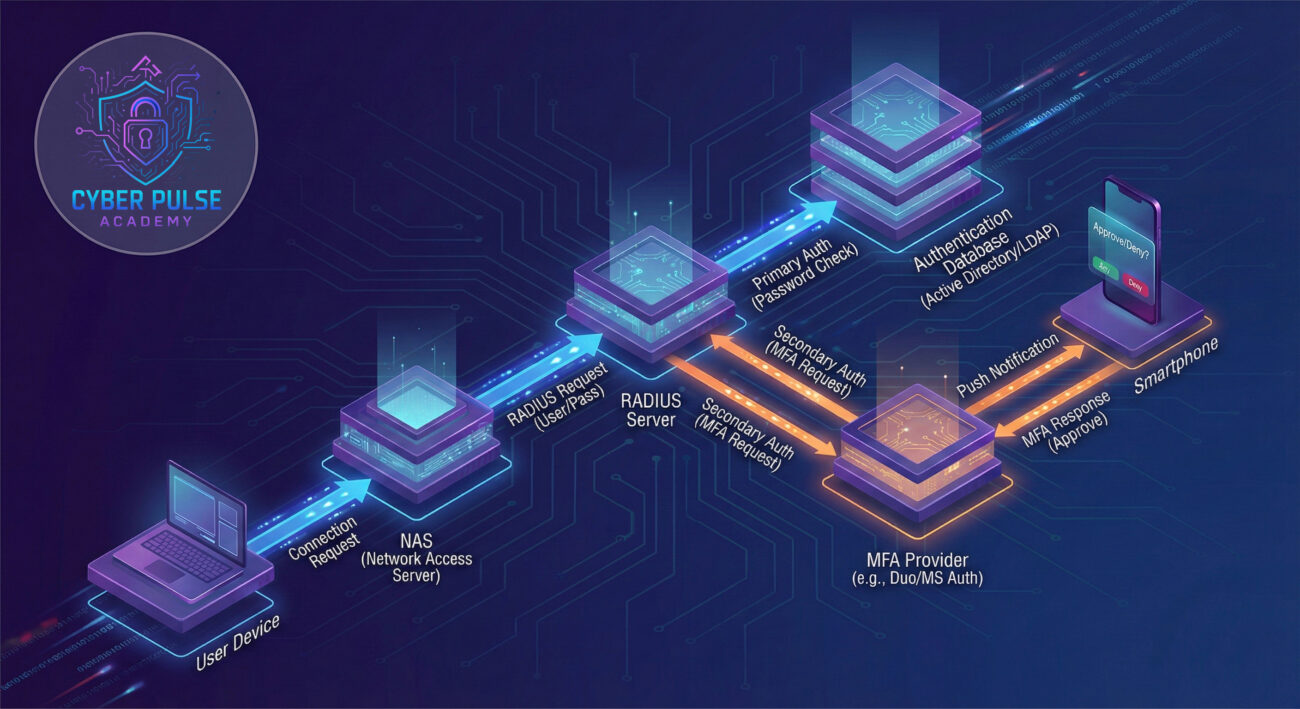
Let's follow Alex, a student at Cyber University, to see RADIUS in action. The university previously used shared Wi-Fi passwords posted around campus, a major security risk. After a minor data breach, they implemented RADIUS authentication.
Before RADIUS Implementation:
After RADIUS Implementation:
Here's what happens when Alex connects to campus Wi-Fi with RADIUS:
| Time/Stage | What Happened | Impact & Security Benefit |
|---|---|---|
| 8:45 AM | Alex opens laptop in library, selects "CyberUni-Secure" Wi-Fi | NAS (Wi-Fi access point) prompts for credentials |
| 8:46 AM | Alex enters student ID "a12345" and password | NAS encrypts credentials and sends Access-Request to RADIUS server |
| 8:46:02 AM | RADIUS server checks against Active Directory database | Valid credentials confirmed, student status verified as "active" |
| 8:46:03 AM | RADIUS server applies policies: Alex gets "Student" VLAN with internet access but no admin resources | Least-privilege access enforced based on user role |
| 8:46:04 AM | Access-Accept sent back to NAS with VLAN assignment | Alex connected to appropriate network segment |
| Throughout day | RADIUS accounting logs track Alex's session duration and data usage | Complete audit trail for security monitoring |
| After graduation | Alex's account disabled in Active Directory | Automatic network access revocation, no manual cleanup needed |
Implementing RADIUS requires careful planning. Follow these steps for a secure deployment:
Before implementation, understand what needs protection:
Select RADIUS server software that fits your organization:
Configure your access points, VPNs, and switches to talk to the RADIUS server:
Define who gets access to what:
Security without visibility is ineffective:
Understanding how attackers think helps you defend better. Here's a simplified view of RADIUS attack paths and countermeasures:
Attack Path 1: Credential Stuffing
An attacker obtains leaked credentials from another data breach and tries them against your RADIUS authentication. Since people reuse passwords, this often works. The attacker starts with just internet access but uses it to probe for other vulnerabilities.
Defender's Counter-Move:
Implement account lockout policies after 5-10 failed attempts. Better yet, use Multi-Factor Authentication (MFA) which makes stolen passwords useless alone. Regularly check if your users' credentials appear in known breach databases.
Attack Path 2: RADIUS Downgrade Attacks
Some legacy devices support weaker authentication methods. An attacker might spoof being an old device to force the RADIUS server to use less secure authentication (like PAP instead of EAP).
Defender's Counter-Move:
Disable weak authentication protocols entirely. Allow only strong methods like EAP-TLS (certificate-based) or PEAP-MSCHAPv2 (with strict certificate validation). Regularly review and update supported authentication methods.
"RADIUS is a centralized authentication goldmine. If we can compromise the RADIUS server itself, we gain credentials for the entire network. Even without full compromise, we look for misconfigurations: weak shared secrets between NAS and RADIUS, lack of certificate validation allowing man-in-the-middle attacks, or missing MFA on privileged accounts. We love when organizations use default settings or fail to monitor authentication logs, it lets us brute force or spoof authentication without detection."
"RADIUS gives us centralized visibility and control. We can enforce consistent policies across all network access points, segment users appropriately, and maintain detailed logs for forensic analysis. Our focus is hardening the RADIUS server, implementing strong authentication methods, and monitoring for anomalies. We treat RADIUS as a critical infrastructure component, it gets regular security updates, redundancy, and is included in our incident response plans. Every authentication attempt is logged, and we've set thresholds to alert on potential brute force attacks."
You've now journeyed from RADIUS beginner to having solid foundational knowledge. Let's recap the key takeaways:
RADIUS may not be the flashiest cybersecurity technology, but it's a workhorse that enables secure network access at scale. Whether you're implementing it in your organization or just understanding how your workplace Wi-Fi works, this knowledge empowers you to think more securely about network authentication.
Remember: In cybersecurity, the fundamentals matter most. Mastering protocols like RADIUS builds the foundation for understanding more complex security architectures.
Ready to deepen your cybersecurity knowledge?
What aspect of network security would you like us to cover next? Have questions about implementing RADIUS in your environment? Share your thoughts in the comments below!
For more beginner-friendly cybersecurity guides, check out our articles on password security best practices and network segmentation strategies.
Stay curious, stay secure! 🔒
Every contribution moves us closer to our goal: making world-class cybersecurity education accessible to ALL.
Choose the amount of donation by yourself.