


















































Certification Courses
Hands-On Labs
Threat Intelligence
Latest Cyber News
MITRE ATT&CK Breakdown
All Cyber Keywords
Have you ever wondered why your bank's app shows you only your accounts, while bank employees see much more? Or why you can edit some files at work but only view others? This isn't random, it's RBAC working behind the scenes to keep information secure while letting people do their jobs. Role-Based Access Control (RBAC) is one of cybersecurity's most powerful protection systems, yet it remains mysterious to many beginners.
Think of RBAC as a digital bouncer at an exclusive club. The bouncer doesn't check everyone's ID individually against a giant list. Instead, they have simple rules: "VIP members get backstage access, regular members get the main floor, and guests stay in the lobby." In the digital world, RBAC works similarly, assigning permissions based on roles rather than individual people, creating order from potential chaos.
In this beginner-friendly guide, you'll discover exactly how RBAC transforms cybersecurity from confusing to manageable. You'll learn the simple principles behind this powerful system, see real-world examples of RBAC in action, and understand how to apply these concepts to protect your own digital environments, whether for work, personal projects, or future cybersecurity learning.
Imagine a small company with 10 employees where everyone has access to everything: payroll, client data, financial records, marketing plans. When one employee leaves, changing 50 different permissions becomes a nightmare. Now scale this to a corporation with 10,000 employees, chaos becomes a security disaster waiting to happen. This is exactly the problem RBAC solves.
According to a 2023 CISA report, approximately 80% of security breaches involve compromised credentials or improper access controls. The IBM Cost of a Data Breach Report 2023 found that companies using mature identity and access management practices (including RBAC) saved an average of $180,000 per breach compared to those without. These aren't just statistics, they represent real financial loss, reputational damage, and operational disruption that proper RBAC implementation can prevent.
In your daily digital life, RBAC touches everything. When you use Netflix, your account has "viewer" permissions, while Netflix employees have different access levels for content management. When you visit a hospital, doctors access medical records, nurses update treatment logs, and front desk staff see only appointment schedules, all controlled by RBAC. This system creates digital boundaries that protect sensitive information while enabling efficient operations.
The magic of RBAC lies in its simplicity: instead of managing thousands of individual permissions, you manage a handful of roles. When someone's job changes, you update their role once. When security requirements evolve, you modify the role definitions. This systematic approach reduces human error, the leading cause of security vulnerabilities, while creating an auditable trail of who can access what and why.
Before we dive deeper, let's clarify the essential vocabulary of RBAC. These five terms form the foundation you'll build upon:
| Term | Simple Definition | Everyday Analogy |
|---|---|---|
| Role | A collection of permissions that represents a job function or responsibility within an organization. | Like a "Driver's License" that gives you permission to operate specific vehicle types (car, motorcycle, truck) without listing every road you can drive on. |
| Permission | The specific authorization to perform an action on a resource (read, write, delete, execute). | Individual keys on a keyring, one opens the office door, another opens file cabinets, another starts the company vehicle. |
| User | An individual person or system account that gets assigned one or more roles. | An employee who receives their work ID badge that grants access to certain building areas based on their department. |
| Least Privilege | The security principle of giving users only the minimum permissions needed to perform their job. | Bank tellers can access cash drawers but not the vault; managers can access both but can't approve their own loans. |
| Separation of Duties | Dividing critical tasks among multiple people to prevent fraud or error. | In accounting: one person creates invoices, another approves them, a third processes payments, no single person controls the entire process. |
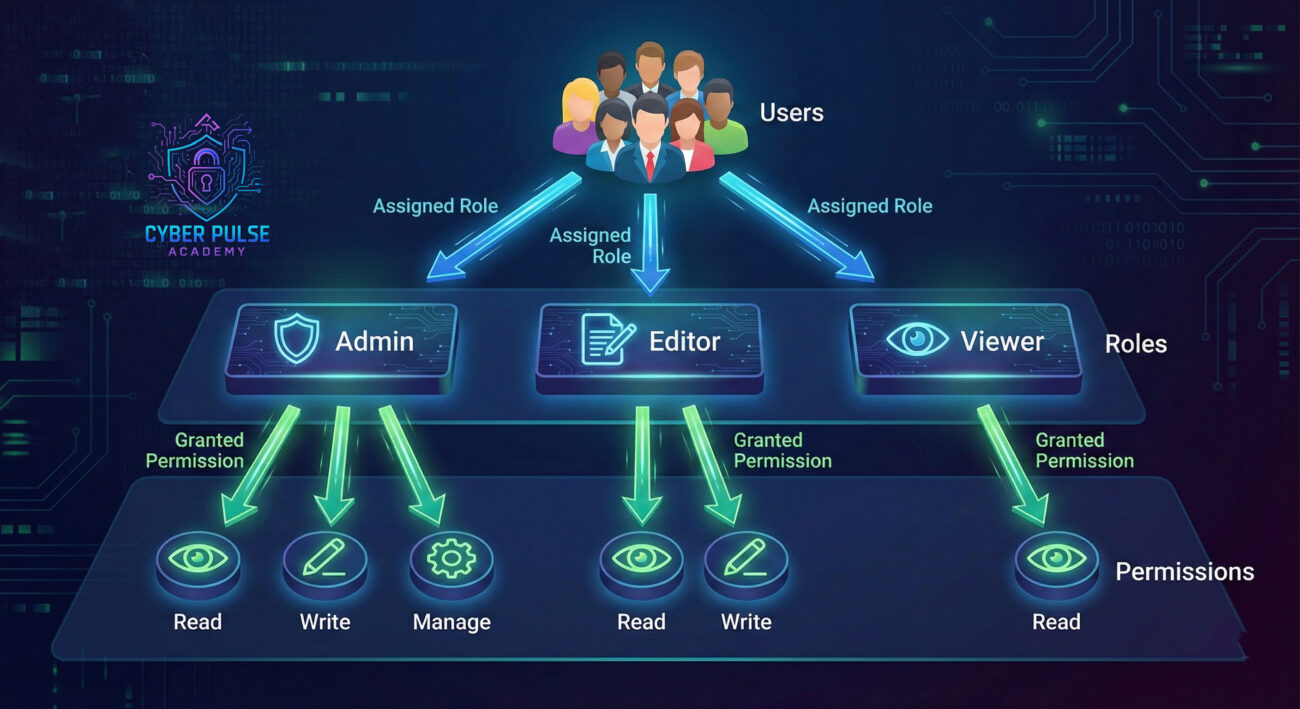
Let's follow "City General Hospital" as they transition from chaotic access control to a structured RBAC system. Before the change, their digital records system worked like a shared office where everyone had master keys, doctors, nurses, administrators, and even interns could potentially access any patient record, billing information, or prescription database.
The turning point came when an administrative assistant accidentally modified a patient's medication schedule while trying to update insurance information. No malicious intent, just someone having access beyond their job requirements. The hospital realized their security vulnerability wasn't about keeping people out, but about properly managing what insiders could do.
They implemented RBAC with these defined roles:
The transformation timeline tells the story:
| Time/Stage | What Happened | Impact |
|---|---|---|
| Before RBAC | 450 employees with individual permissions managed across 15 different systems | 3-5 security incidents monthly, audit trails incomplete, onboarding took 3 days |
| Phase 1 Implementation | Defined 8 core roles based on job functions, mapped existing users | Immediate visibility into who had inappropriate access; reduced permission management time by 60% |
| Phase 2 (3 months) | Implemented least privilege principle, removed unnecessary access | Security incidents dropped by 80%, compliance audits became straightforward |
| 1 Year Later | Regular role reviews, added temporary "Emergency Access" role with time limits | Onboarding reduced to 4 hours, satisfied HIPAA compliance requirements, created secure foundation for new systems |
Dr. Sarah Chen, a cardiologist at the hospital, noted: "At first, I was frustrated when I couldn't access billing information to help a patient. But then I realized, that's not my job. Our billing specialists handle that faster and more accurately. Now I focus on medicine, and the system ensures patient data is protected even from well-meaning mistakes."
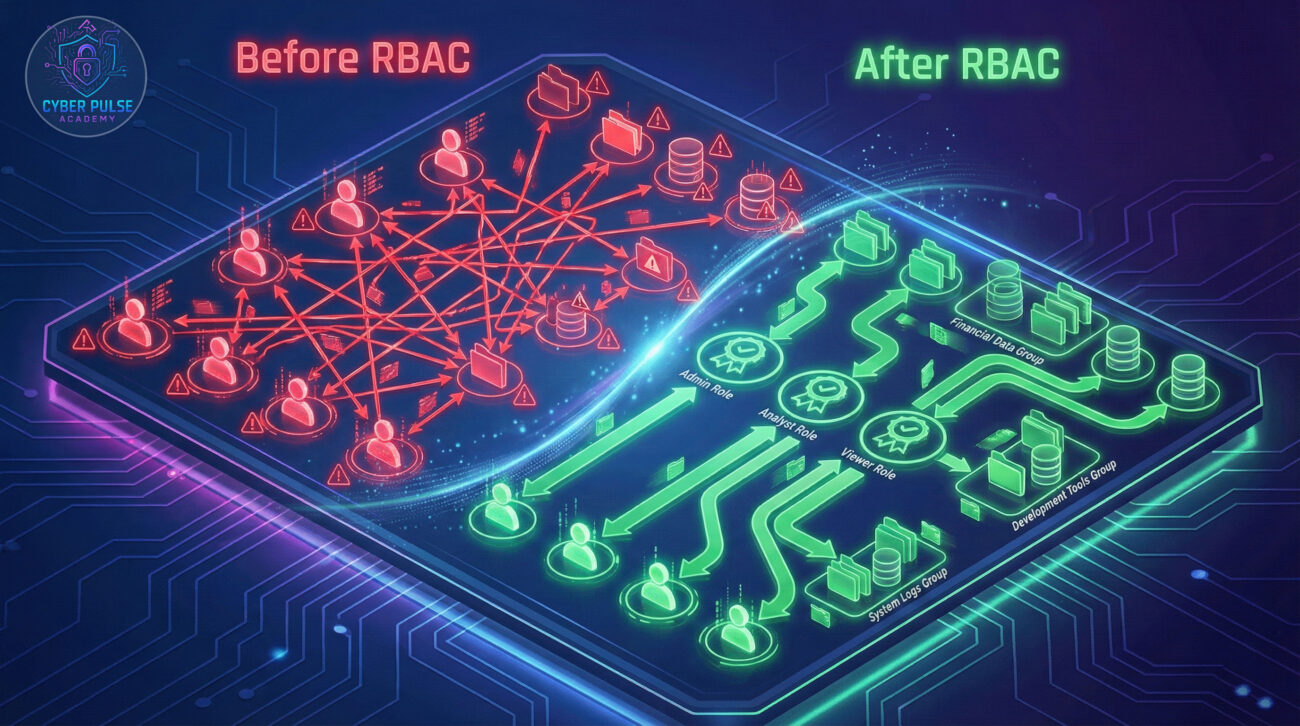
Whether you're securing a small business, a personal project, or learning for cybersecurity certification, these seven steps provide a practical roadmap for RBAC implementation.
Before defining roles, you need to know what you're protecting and who needs access. Create a comprehensive list:
Think of this as creating a map before building roads. You wouldn't design traffic patterns without knowing where buildings are located.
Roles should reflect what people do, not what they're called. A "Marketing Manager" and "Marketing Specialist" might need identical system access. Instead, define roles like:
This approach creates stable roles that outlast employee turnover and organizational restructuring.
For each role, ask: "What's the minimum access needed to perform this function?" Start with no permissions, then add only what's essential:
Remember: it's easier to grant additional access later than to recover from a security breach caused by excessive permissions.
Some roles naturally contain others. A "Senior Administrator" might have all "Junior Administrator" permissions plus additional capabilities. Create clear hierarchies:
This structure prevents permission conflicts and simplifies audits. Learn more about privilege management best practices.
Choose appropriate RBAC implementation tools based on your environment:
Document every role's purpose, permissions, and assignment rationale. This becomes invaluable for compliance and troubleshooting.
Never roll out RBAC changes without testing. Create test scenarios:
Use a phased approach, start with a pilot group, gather feedback, refine roles, then expand. Consider implementing multi-factor authentication alongside RBAC for enhanced security.
RBAC isn't "set and forget." Businesses evolve, and so should your roles:
Regular maintenance ensures your RBAC implementation remains effective and compliant over time.

When attackers encounter a system with weak or no RBAC, they see opportunity. Their first goal is to find any user account they can compromise, often targeting those with excessive permissions. A receptionist's account with administrative access to the financial database is a golden ticket. Without proper role separation, compromising one account can mean access to everything.
Attackers look for "permission outliers", users whose access doesn't match their job function. They exploit forgotten service accounts with outdated permissions. They watch for temporary access that never got revoked. In poorly implemented RBAC systems, attackers can move laterally through networks once they gain any foothold, because roles aren't properly segmented.
The ultimate prize? Finding and compromising an account with the "keys to the kingdom", a role so over-privileged it provides access to critical systems, data, and administrative functions. Proper RBAC implementation makes this lateral movement difficult and contains any breach to limited systems.
Defenders view RBAC as their organizational blueprint for security. It's not just about restricting access, it's about enabling business safely. Proper RBAC creates predictable, auditable patterns of access that make anomalies stand out. When everyone in the "Accounts Payable" role accesses the same systems daily, unusual access attempts trigger immediate alerts.
Defenders use RBAC to implement the principle of least privilege systematically. They design roles so that even if credentials are compromised, the damage is contained. They create separate roles for development, testing, and production environments. They implement approval workflows for privileged access requests, creating both security controls and audit trails.
When incidents occur, defenders rely on RBAC's structure to quickly identify affected systems based on the compromised user's roles. This accelerates containment and recovery. Regular RBAC reviews become opportunities to tighten security before attackers find weaknesses.
Role-Based Access Control transforms cybersecurity from an overwhelming challenge into a manageable system. By now, you understand that RBAC isn't about complex technology, it's about applying simple organizational principles to digital security:
Remember the hospital example? Their journey from chaotic permissions to structured RBAC reduced security incidents by 80% while improving operational efficiency. Whether you're securing a small business, managing home network permissions, or preparing for cybersecurity certification, these same principles apply at any scale.
The most important step is to begin. Start mapping your current access patterns today. Identify one system where you can implement basic role-based controls. As you experience the benefits, reduced management overhead, clearer security boundaries, easier audits, you'll understand why RBAC remains a cornerstone of effective cybersecurity decades after its creation.
Have questions about applying these concepts to your specific situation? Want to share your RBAC implementation experiences? Join the conversation in the comments below or explore our related guides on Identity and Access Management fundamentals and Zero Trust security models.
What's the first role you would create in your environment? Share your thoughts below!
Every contribution moves us closer to our goal: making world-class cybersecurity education accessible to ALL.
Choose the amount of donation by yourself.
1 Comment
Thanks for sharing. I read many of your blog posts, cool, your blog is very good.