


















































Certification Courses
Hands-On Labs
Threat Intelligence
Latest Cyber News
MITRE ATT&CK Breakdown
All Cyber Keywords
The cybersecurity landscape has witnessed a significant evolution in the tools used by advanced persistent threat (APT) groups. In early 2026, the Iranian state-sponsored group known as MuddyWater (also tracked as MERCURY, Static Kitten, or TA450) unveiled a new weapon in its arsenal: a Remote Access Trojan (RAT) written in the Rust programming language, dubbed "RustyWater." This marks a strategic shift for the group, which has traditionally relied on PowerShell-based scripts and VBScript malware. The RustyWater RAT represents a more sophisticated, evasive, and persistent threat, primarily delivered through spear-phishing campaigns targeting government, telecommunications, and IT service organizations across the Middle East and Europe.
For beginners, understanding this attack is crucial. A RAT is a type of malware that gives an attacker remote administrative control over a victim's computer. By rewriting their tools in Rust, threat actors gain advantages like improved performance, memory safety (which ironically reduces detection signatures), and the ability to cross-compile for multiple operating systems. This breach vector underscores the continuous cat-and-mouse game in cybersecurity, where defenders must understand not just the "what," but the "how" and "why" of evolving hacker techniques.
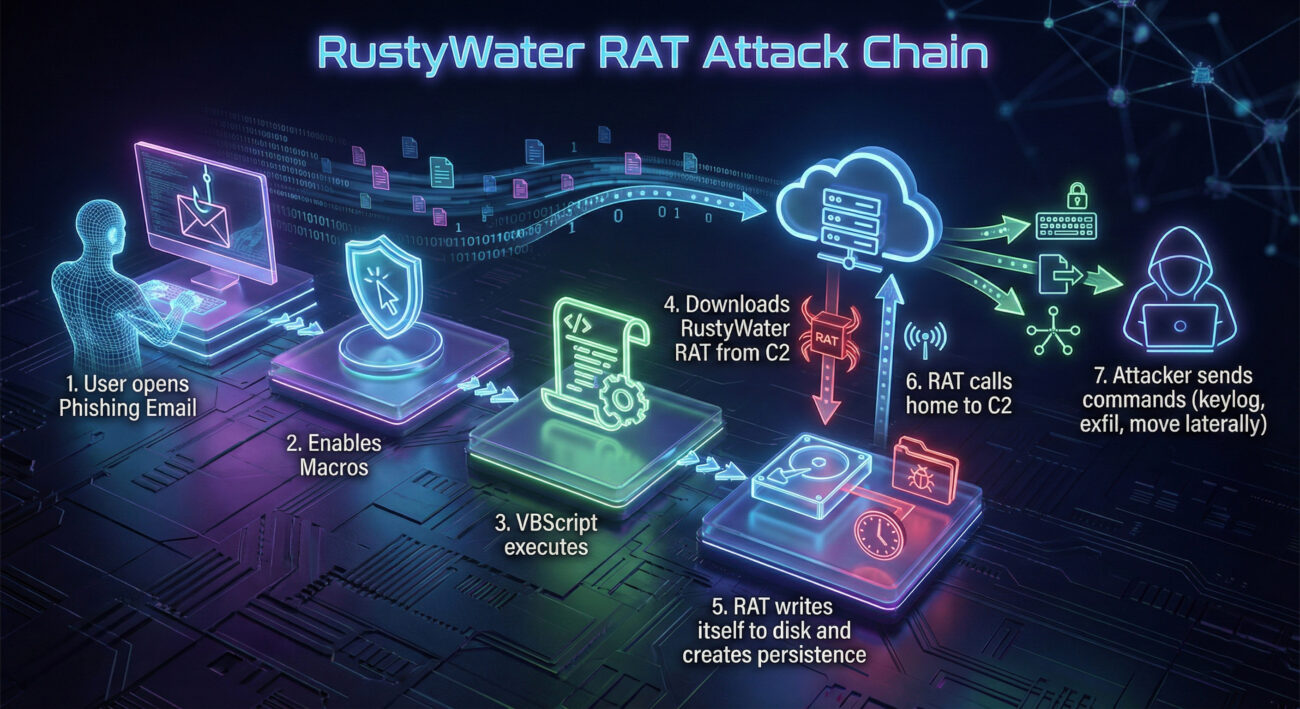
The RustyWater RAT campaign follows a multi-stage, highly evasive infection chain designed to bypass traditional security measures. Let's break down the step-by-step process of how this attack unfolds, from the initial phishing email to full system compromise.
The attack begins with a carefully crafted spear-phishing email. The email appears to come from a trusted source, such as a regional telecommunications authority or a known business partner. It contains a malicious Microsoft Office attachment (like a .DOCX file) or a link to a compromised website. The email's subject and body are tailored to the target, increasing the likelihood of it being opened.
Once the victim opens the attachment, they are prompted to "Enable Content" or enable macros to view the document properly. This is a classic social engineering trick. Enabling macros allows the embedded malicious VBScript or PowerShell code to execute. This initial payload is not the RustyWater RAT itself but a lightweight downloader or dropper.
The initial script (the dropper) connects to a hacker-controlled server (Command & Control or C2) and downloads the second-stage payload. In this case, it fetches the RustyWater RAT binary. The use of Rust allows this binary to be compiled as a standalone executable with no external dependencies, making it easier to run on the victim's machine without raising immediate suspicion.
The RAT establishes persistence on the infected host. It may achieve this by creating scheduled tasks, modifying registry run keys, or dropping a shortcut file in the startup folder. Crucially, the Rust language's memory management makes the RAT harder to detect with signature-based antivirus tools. The RAT also employs basic obfuscation and may use legitimate Windows processes to mask its network communications (a technique called living-off-the-land).
With the RAT firmly installed, the attackers have full remote control. They can now perform various malicious activities, including:
The MITRE ATT&CK framework is a globally accessible knowledge base of adversary tactics and techniques based on real-world observations. Mapping the RustyWater RAT campaign to this framework helps defenders understand the specific methods used and plan effective countermeasures.
| MITRE ATT&CK Tactic | Technique ID & Name | How RustyWater Uses It |
|---|---|---|
| Initial Access | T1566.001 - Phishing: Spearphishing Attachment | Delivers the initial dropper via a malicious Office document attached to a targeted email. |
| Execution | T1059.005 - Command and Scripting Interpreter: Visual Basic | Uses VBScript macros within the Office document to execute the initial payload. |
| Persistence | T1547.001 - Boot or Logon Autostart Execution: Registry Run Keys / Startup Folder | Adds entries to the Windows Registry or startup folder to ensure the RAT runs after every reboot. |
| Defense Evasion | T1027 - Obfuscated Files or Information | Uses Rust's inherent characteristics and potential packing to evade signature-based detection. |
| Command and Control (C2) | T1071.001 - Application Layer Protocol: Web Protocols | Communicates with its C2 server using HTTPS, blending traffic with normal web traffic. |
| Collection | T1005 - Data from Local System | Scans the local file system for documents of interest (PDF, DOCX, XLSX) to exfiltrate. |
| Exfiltration | T1041 - Exfiltration Over C2 Channel | Sends stolen data back to the attacker over the same established C2 channel. |
From a technical standpoint, the shift to Rust by a group like MuddyWater is noteworthy. Rust is a systems programming language praised for its speed and memory safety (it prevents common bugs like buffer overflows). For threat actors, these features are a double-edged sword: they create more stable, less crash-prone malware that is also harder for traditional antivirus to spot, as it doesn't exhibit the "messy" memory patterns of C/C++ malware.
Below is a simplified pseudocode representation of how the dropper might fetch and execute the RustyWater RAT. This illustrates the logic, not the actual malicious code.
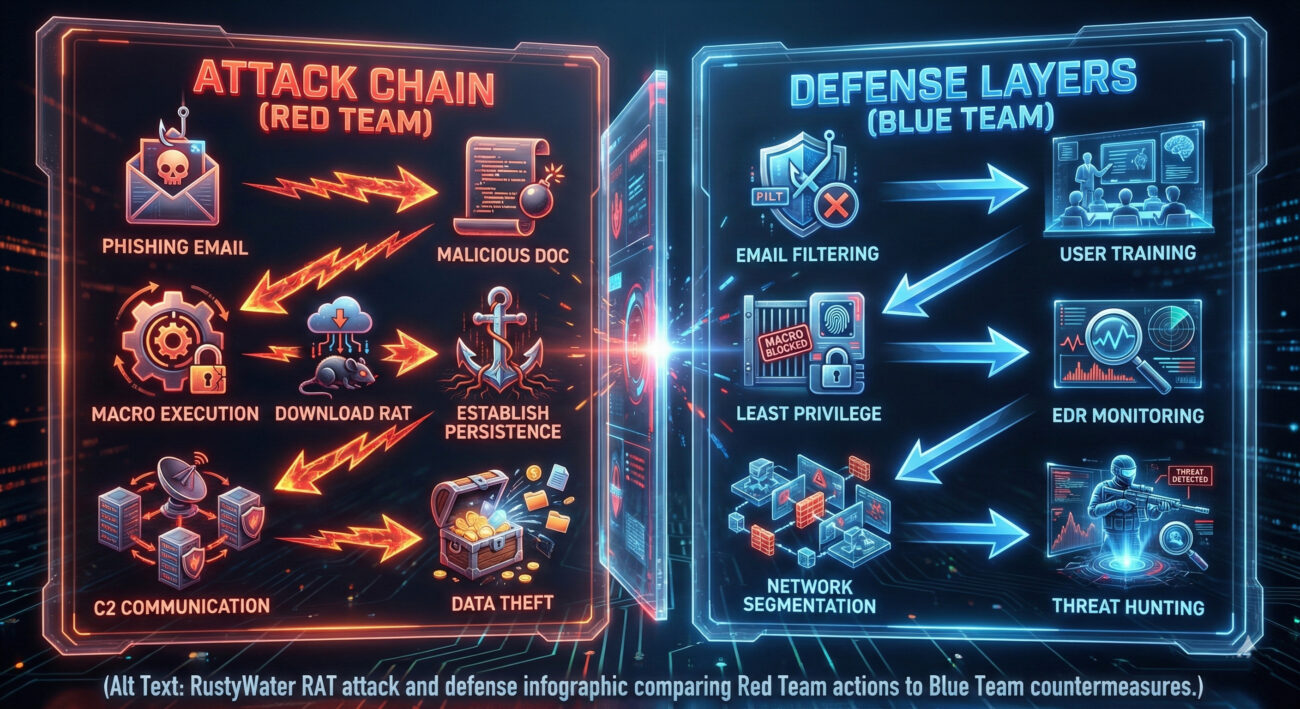
Objectives: Establish long-term access, steal specific data, maintain stealth.
Objectives: Prevent initial infection, detect anomalous behavior, contain breaches, eradicate threats.
Here is a practical, step-by-step framework any organization can implement to defend against threats like the RustyWater RAT.
Deploy advanced email security gateways that use sandboxing and URL analysis. More importantly, conduct regular, engaging security awareness training that teaches users how to identify and report phishing attempts. Make reporting easy with a dedicated email button.
Configure endpoints securely. This includes:
Move beyond traditional antivirus. Implement a modern Endpoint Detection and Response (EDR) or Extended Detection and Response (XDR) platform. These tools monitor for behavioral anomalies, such as a Word document spawning a scripting engine, which is a key indicator of this attack chain.
Monitor outbound network traffic for connections to known-bad IPs/domains (via threat intelligence feeds) and for unusual data transfers. Segment your network to contain any potential breach. Critical servers should only be accessible from specific, authorized workstations.
Subscribe to threat intelligence feeds to stay updated on the latest indicators of compromise (IOCs) for groups like MuddyWater. Don't just wait for alerts; empower your security team to conduct proactive threat hunting. Look for the TTPs (Tactics, Techniques, and Procedures) mapped in the MITRE ATT&CK table above within your own environment.
Q: Why is MuddyWater using Rust now? Isn't that more work for them?
A: Yes, it requires more development skill. However, the payoff is significant: Rust-based malware is more stable, harder to reverse-engineer, and crucially, has a much lower detection rate by traditional antivirus due to its clean memory patterns and the relative novelty of Rust in the malware space. It's a long-term investment in operational security.
Q: As a small business, are we a target for this kind of sophisticated attack?
A: While APT groups often target governments and large corporations, they frequently use smaller businesses in the supply chain as a stepping stone. If you are a managed service provider (MSP), IT vendor, or hold data valuable to a larger target, you could be at risk. The defense principles (user training, MFA, backups) are scalable and vital for organizations of all sizes.
Q: What's the single most effective defense against this specific attack?
A> There is no "silver bullet," but if we had to choose one, it would be disabling Office macros for documents originating from the internet via Group Policy. This breaks the initial execution chain for this and countless other malware campaigns. Combine this with user training to explain why this policy is in place.
Q: Where can I find Indicators of Compromise (IOCs) for RustyWater?
A> Reputable threat intelligence platforms and blogs from cybersecurity companies often publish IOCs (hashes, IPs, domains) following major disclosures. Always consult multiple sources. For educational purposes, you can review reports on sites like Palo Alto Networks Unit 42, CrowdStrike Blog, or Mandiant Blog.
1. Evolution is Constant: Threat actors like MuddyWater are continuously evolving, adopting modern programming languages like Rust to create stealthier, more resilient malware.
2. The Human Element is Critical: The attack starts with a phishing email. A well-trained user is your most effective first line of defense.
3. Defense in Depth is Non-Negotiable: No single tool can stop every threat. You need layered security: email filtering, endpoint hardening, EDR, network controls, and proactive hunting.
4. Know the Adversary's Playbook: Using frameworks like MITRE ATT&CK helps you anticipate attacker moves and validate your defenses against real-world techniques.
5. Actionable Steps Exist: From disabling internet macros to implementing EDR and MFA, there are clear, actionable measures you can take today to significantly raise your security posture against threats like the RustyWater RAT.
The technical details of the RustyWater RAT highlight a clear trend towards more sophisticated attacks. Your defense must be equally sophisticated and proactive.
This Week: Check your Group Policy or endpoint management console. Ensure macros from the internet are blocked. Schedule a 15-minute security awareness email for your team about phishing.
This Month: Review your endpoint security. Are you using next-gen EDR, or just traditional antivirus? Begin a pilot if needed. Test your backups.
Stay Informed: The cybersecurity landscape changes daily. Follow trusted resources to keep learning:
The Hacker News |
Krebs on Security |
CISA Alerts |
MITRE ATT&CK Framework
Remember: Cybersecurity is a journey, not a destination. Start building your defense layers today.
© 2026 Cyber Pulse Academy. This content is provided for educational purposes only.
Always consult with security professionals for organization-specific guidance.
Every contribution moves us closer to our goal: making world-class cybersecurity education accessible to ALL.
Choose the amount of donation by yourself.