


















































Certification Courses
Hands-On Labs
Threat Intelligence
Latest Cyber News
MITRE ATT&CK Breakdown
All Cyber Keywords
Scanning IP Blocks is the process of systematically probing ranges of internet addresses to discover active hosts, open ports, and accessible services before an attack.
ATT&CK ID T1595.001
Tactics Reconnaissance
Platforms PRE
Difficulty 🟢 Low
Prevalence High
Imagine a thief planning to rob a neighborhood. They don't just randomly pick a house. First, they drive through the streets at night, looking for signs of life: which houses have lights on, which have cars in the driveway, which have dogs, and which have flimsy-looking locks or open windows. This "drive-by" is exactly what Scanning IP Blocks is in the digital world.
The internet is made up of billions of possible addresses (IPs). Attackers can't target them all. Scanning IP Blocks is their methodical "drive-by" to find the "houses" (live hosts, servers, devices) worth a closer look. They send out small digital "knocks" (network packets) to entire ranges of addresses and listen for a "hello" (response) that indicates something is there and potentially vulnerable. This is the foundational step in almost every cyber attack, turning the vast, unknown internet into a mapped-out target list.
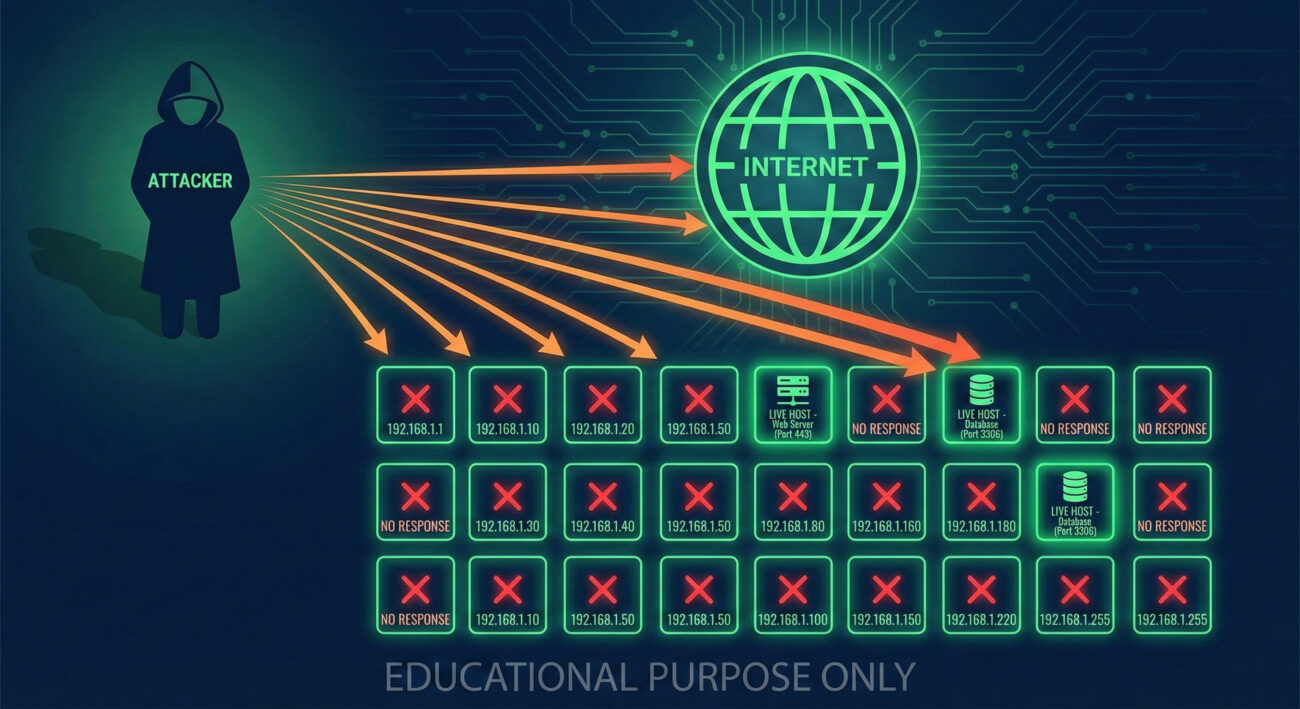
| Term | Plain English Definition |
|---|---|
| IP Block / CIDR Range | A contiguous set of IP addresses defined by a starting address and a mask (e.g., 203.0.113.0/24). Think of it as a specific "zip code" for internet addresses. |
| Port | A numbered door on a computer where specific network services listen (e.g., Port 80 for web traffic, Port 22 for SSH). Scanning finds which doors are open. |
| Ping Sweep (ICMP Echo) | The most basic scan, sending a "Hello, are you there?" packet to every address in a range to see which ones respond. |
| SYN Scan (Half-Open Scan) | A stealthier method to check for open ports. It initiates a connection but leaves it hanging, never completing the "handshake," to avoid some logs. |
| Banner Grabbing | After finding an open port, connecting to it to read the "welcome message" (banner) from the service, often revealing software name and version. |
Think of yourself as a military scout before a major operation. Your job isn't to engage the enemy. Your job is to be invisible, observant, and thorough. You sketch the terrain, note guard posts (firewalls), map patrol routes (network traffic), and identify weak points in the fence (open ports). Speed and stealth are key. You use the quietest methods possible to avoid tripping alarms (IDS/IPS). The intelligence you gather here directly enables the success, or failure, of the entire campaign that follows.
# Basic ping sweep to find live hosts in a /24 subnet
nmap -sn 203.0.113.0/24

# Stealth SYN scan on the top 1000 TCP ports of a live host
nmap -sS 203.0.113.45

# Aggressive scan with service and version detection on a target list
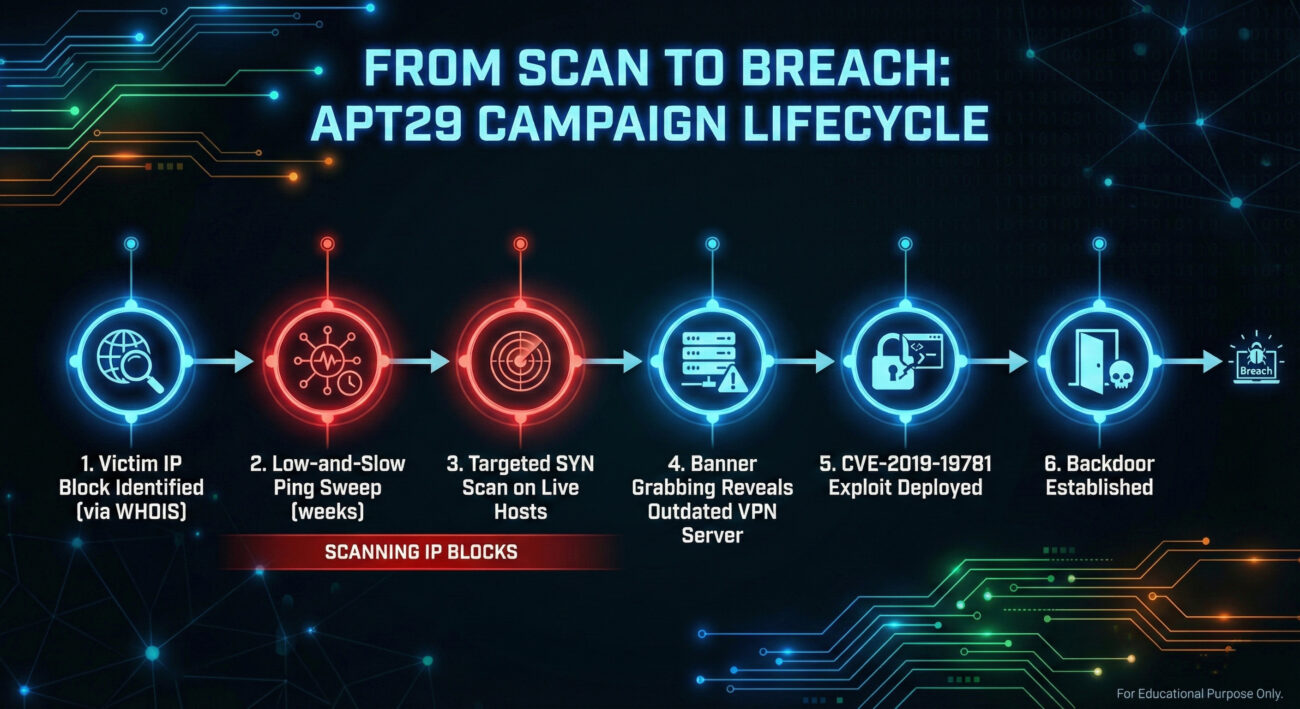
nmap -sV -sC -O -iL target_list.txt -oA full_scan_resultsThe threat actor known as APT29 (Cozy Bear, Midnight Blizzard), associated with Russian intelligence, is a master of quiet, persistent reconnaissance. In campaigns targeting government and corporate networks, they extensively employ Scanning IP Blocks as a precursor.
Before deploying their custom malware, they conduct broad, low-and-slow scans to profile their target's external network presence. They don't just scan the main corporate website's IP; they scan the entire registered address space of the organization and its subsidiaries, looking for forgotten development servers, misconfigured cloud instances, or vulnerable VPN gateways. This methodical approach allows them to find the path of least resistance into an otherwise secure network.
For an in-depth analysis, read the joint advisory from CISA and international partners: CISA Alert (AA20-296A) on Russian SVR Targeting.
You are the sentry in the watchtower, looking out over the castle walls. Your goal isn't to stop every single scout from looking at the castle, that's impossible. Your goal is to spot the scouts, understand their patterns, and raise the alarm before their army arrives. You look for patterns: is one "traveler" walking back and forth along the tree line, sketching? Are there faint, repeated footprints near the postern gate at the same time each night? In network defense, you shift from trying to "prevent" scanning (difficult) to detecting it early and using it as a critical warning signal of impending attack.
Your SIEM will be noisy. Not every scan is a sophisticated APT. Look for these patterns to separate the signal from the noise:
Here is a ready-to-use Sigma rule to hunt for horizontal scanning activity from a single source. This rule looks for a source IP touching too many distinct destination IPs within a timeframe, a classic signature of block scanning.
title: High Volume of Connections to Different Destinations
id: 5a3b8c7d-9f1a-4c2b-8e3d-6f5a4b3c2d1a
status: experimental
description: Detects a source IP making connections to a high number of unique destination IPs, which may indicate network scanning or reconnaissance.
author: Blue Team Field Guide
date: 2024/10/26
logsource:
    category: firewall
    product: generic
detection:
    selection:
        event_type: "connection_initiated"
    aggregation:
        source_ip:
            - count(dest_ip) > 50  # Adjust threshold based on your environment
        timeframe: 5m
    condition: selection and aggregation
falsepositives:
    - Load balancers or NAT gateways
    - Legitimate network scanners (e.g., security teams, Shodan)
level: medium
tags:
    - attack.reconnaissance
    - attack.t1595
- attack.t1595.001| Attacker's Goal (Red Team) | Defender's Action (Blue Team) |
|---|---|
| Map the entire external IP range to find any live host. | Reduce the public IP range to only essential, monitored assets. |
| Identify all open ports to understand the attack surface. | Harden hosts and enforce "deny by default" firewall policies to close unnecessary ports. |
| Perform scans stealthily to avoid detection. | Implement behavioral analytics and hunting rules to detect low-and-slow scanning patterns. |
| Use scan data to pick the weakest target for exploitation. | Use scan attempts as an early warning system to trigger enhanced defensive posturing. |
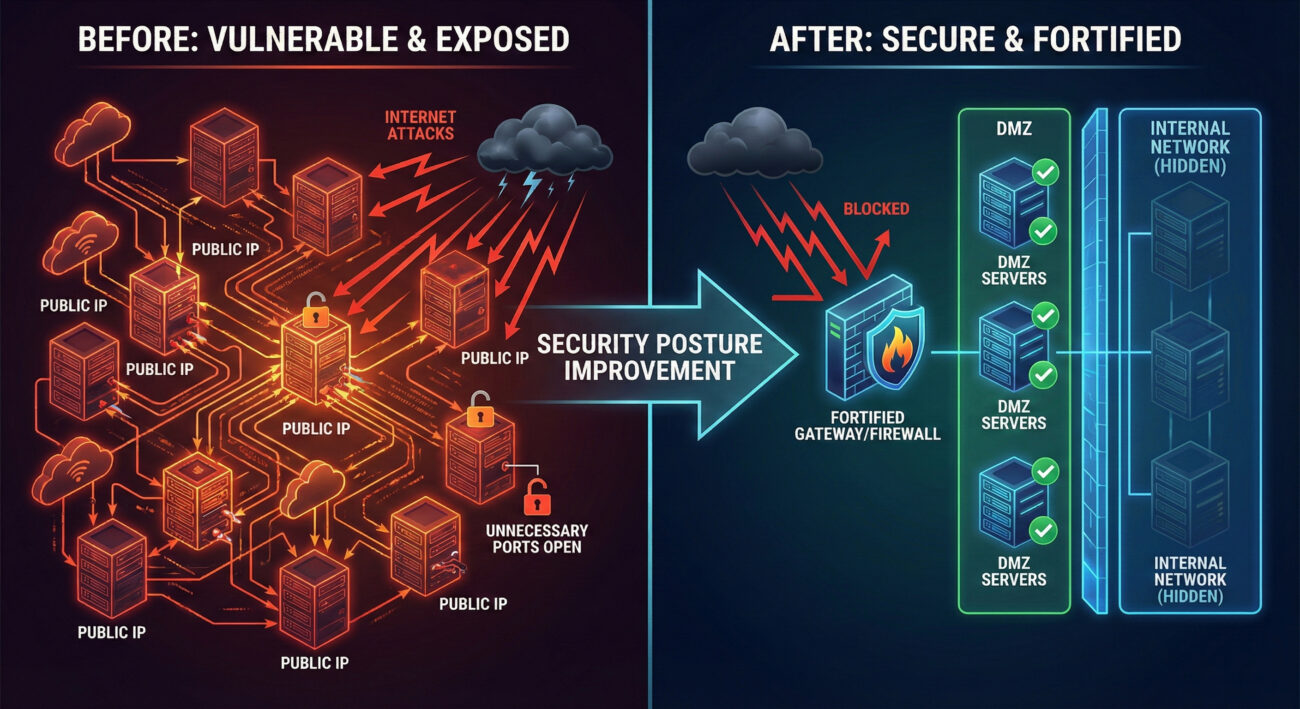
Scanning IP Blocks (T1595.001) is not a sophisticated exploit, but it is arguably one of the most dangerous techniques because it enables all others. It is the eye of the attacker, surveying the battlefield. As a defender, you cannot stop the eyes from looking, but you can control what they see and ensure you see them first.
Your next steps should be practical: 1) Run an external scan against your own organization's IP blocks (with permission!) using a tool like Nmap to see exactly what an attacker sees. 2) Review and tune the Sigma rule provided for your specific SIEM (Splunk, Elastic, etc.). 3) Schedule a quarterly audit of your public-facing assets to ensure your attack surface is shrinking, not growing.
Continue your learning journey with related techniques:
For comprehensive guidance on network defense, refer to the authoritative NIST SP 800-160 Vol. 2 on Systems Security Engineering.
Every contribution moves us closer to our goal: making world-class cybersecurity education accessible to ALL.
Choose the amount of donation by yourself.