


















































Certification Courses
Hands-On Labs
Threat Intelligence
Latest Cyber News
MITRE ATT&CK Breakdown
All Cyber Keywords
Have you ever wondered how websites remember you're logged in after closing your browser? Or why sometimes you get randomly signed out of your accounts? The answer lies in session management – the invisible handshake that keeps you authenticated online.
In simple terms, session management is how websites keep track of your logged-in state. Think of it like getting a wristband at a concert – once you have it, you can come and go without showing your ticket every time. But what happens if someone steals your wristband?
In this guide, you'll learn: exactly how digital sessions work, common vulnerabilities hackers exploit, and 7 practical steps to protect your sessions from compromise. Whether you're new to cybersecurity or just want to understand what happens behind the login screen, this guide breaks it down in plain English.
Imagine you walk into a bank where the teller knows you by name. You don't need to show ID every time – they recognize you immediately. Now imagine that same teller giving your identity to anyone who mentions your name. That's essentially what happens with session management on the web.
Every time you log into a website, a digital session begins. This session is represented by a unique token (usually stored in cookies) that tells the website, "Yes, this is still Sarah from 10 minutes ago." Proper session management ensures that only you – and not hackers, malware, or unauthorized users – can use that token to access your account.
According to the OWASP Top 10, broken authentication (which includes poor session management) remains one of the most critical web application security risks. When attackers compromise sessions, they can access bank accounts, private messages, and sensitive data without ever knowing your password.
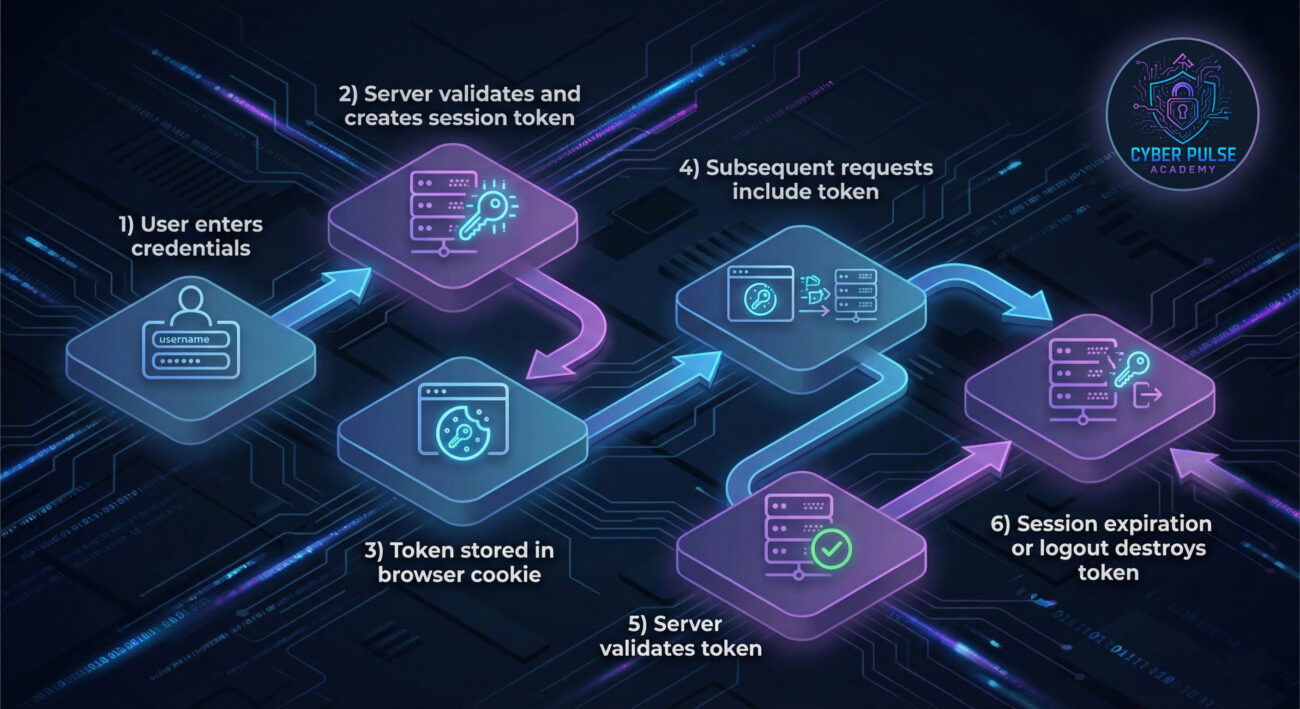
In today's digital world, we maintain dozens of simultaneous sessions – email, banking, social media, work accounts. Each represents a potential entry point for cybercriminals. A 2023 report from Verizon's Data Breach Investigations Report found that credential theft and session hijacking contributed to nearly 50% of all breaches.
Why does session management matter so much? Because passwords alone aren't enough. Even with a strong password, if your session token gets stolen, attackers can bypass authentication entirely. This is why major services like Google and Facebook continuously monitor for suspicious session activity.
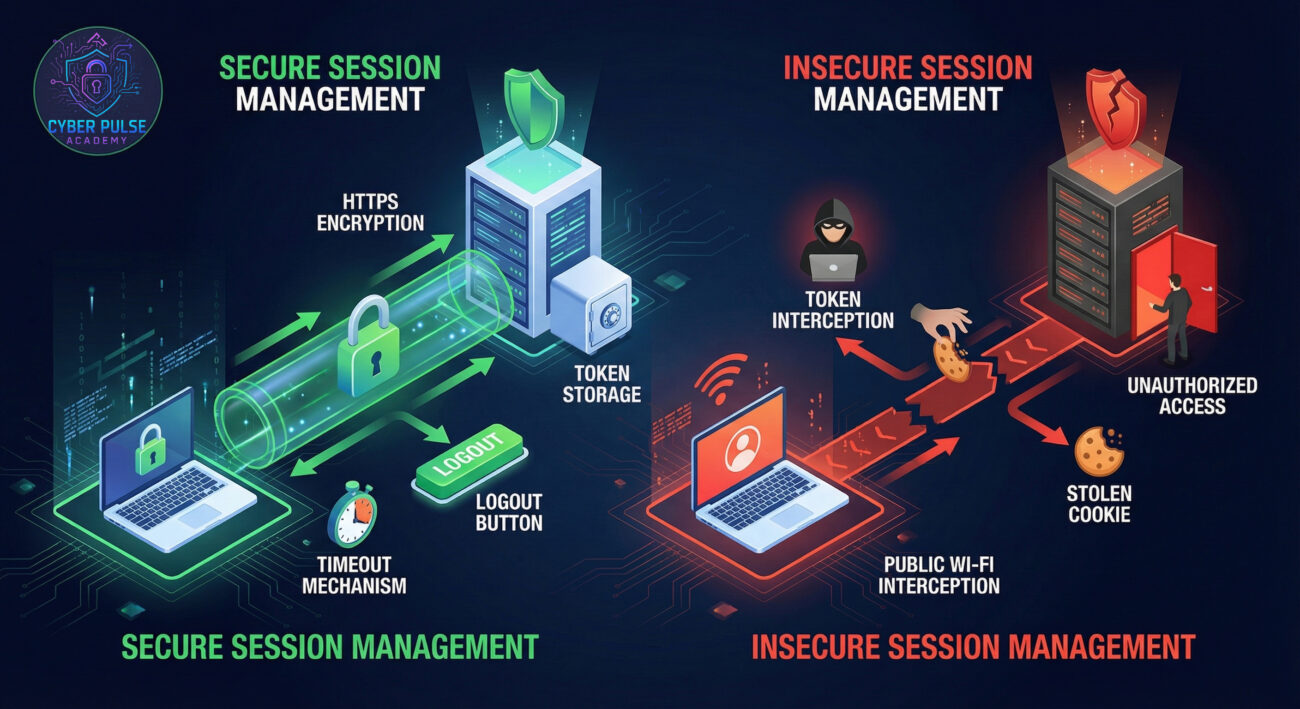
Consider this: when you use a public Wi-Fi hotspot, you're potentially exposing your sessions to eavesdroppers. Without proper encryption and session protection, someone on the same network could hijack your logged-in state. This isn't theoretical – tools for session stealing are readily available in the hacker underground.
The Cybersecurity and Infrastructure Security Agency (CISA) emphasizes proper session handling as fundamental to identity and access management. Good session management includes automatic timeouts, secure token generation, and protection against token theft – all concepts we'll explore in this guide.
| Term | Simple Definition | Everyday Analogy |
|---|---|---|
| Session Token | A unique digital pass created after successful login that identifies your authenticated state | Like a concert wristband that lets you re-enter without your ticket |
| Cookie | A small piece of data stored in your browser that often contains session information | Like a coat check ticket - you give it to get your coat (access) back |
| Session Hijacking | When an attacker steals your valid session token to impersonate you | Like someone stealing your concert wristband to get in for free |
| Session Timeout | Automatic logout after a period of inactivity for security | Like a library computer that logs out after 15 minutes of no use |
| Stateless vs Stateful | Whether the server remembers your session (stateful) or requires token validation each time (stateless) | Like a bartender who remembers your tab vs one who needs your receipt each time |
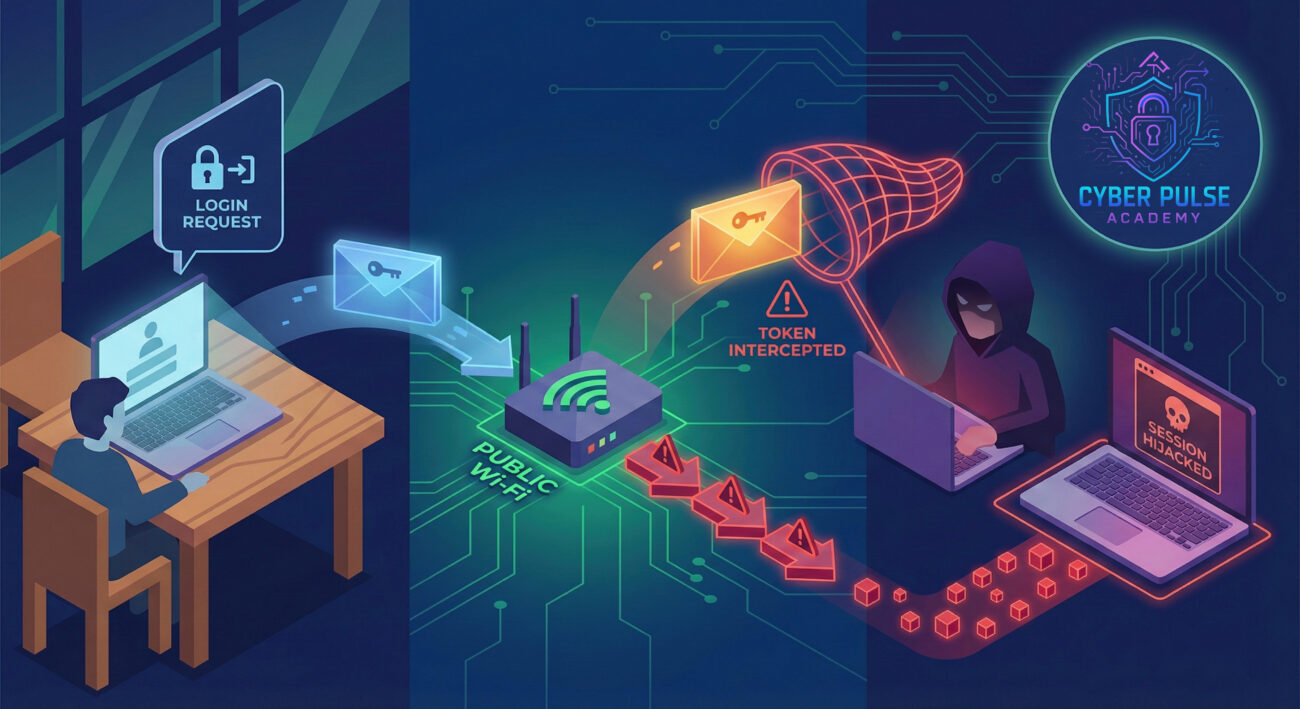
Meet Sarah, a freelance graphic designer who frequently works from coffee shops. One Tuesday morning, she connects to the café's free Wi-Fi (no password required) and logs into her project management tool to check deadlines. She's done this dozens of times before.
Unknown to Sarah, another customer in the café is running network sniffing software. When Sarah's session token travels unencrypted (because the site uses HTTP instead of HTTPS), the attacker captures it. Within minutes, they've injected that token into their own browser and gained full access to Sarah's account – without ever knowing her password.
The timeline below shows how this attack unfolds:
| Time/Stage | What Happened | Impact |
|---|---|---|
| 10:15 AM | Sarah connects to public Wi-Fi and logs into work portal | Session token created and sent to browser |
| 10:16 AM | Attacker's sniffing tool captures unencrypted session token | Token compromised but Sarah unaware |
| 10:25 AM | Sarah takes a break, leaving session active | No timeout allows continued access |
| 10:30 AM | Attacker injects token and accesses Sarah's account | Full account takeover occurs |
| 10:35 AM | Attacker downloads client files and changes payment details | Data breach and financial loss |
This scenario highlights why proper session management requires both technical controls (like HTTPS) and user awareness. Sarah could have prevented this by using a VPN, ensuring the site used HTTPS, or logging out when stepping away.
Ensure every website you log into uses HTTPS (padlock icon in address bar). HTTPS encrypts all data, including session tokens, during transmission.
Related: Learn about HTTPS and encryption basics on our blog.
Configure applications to automatically log out after periods of inactivity. This limits the window for session hijacking.
Add an extra layer of protection beyond passwords. Even if a session token is stolen, MFA can prevent account takeover.
Related: Our complete guide to implementing MFA covers all options.
Actively manage your active sessions like you would physical keys or access cards.
Session security depends on the security of your devices and network connections.
Be alert to signs that might indicate session compromise.
Session management threats evolve, so your knowledge should too.
Related: Build your foundation with our cybersecurity basics course.
Pro Tip: Many modern frameworks (like Spring Security for Java or Django for Python) include built-in session management protections. When building applications, leverage these established libraries rather than creating custom solutions, which often introduce vulnerabilities.
A threat actor doesn't need your password if they can capture your session token. On unencrypted networks (or even weakly encrypted ones), tools can passively monitor traffic and extract session cookies. Once obtained, these tokens can be injected into the attacker's browser using developer tools, granting immediate access to your account. This is particularly effective against sites that don't use HTTPS consistently or have excessively long session durations.
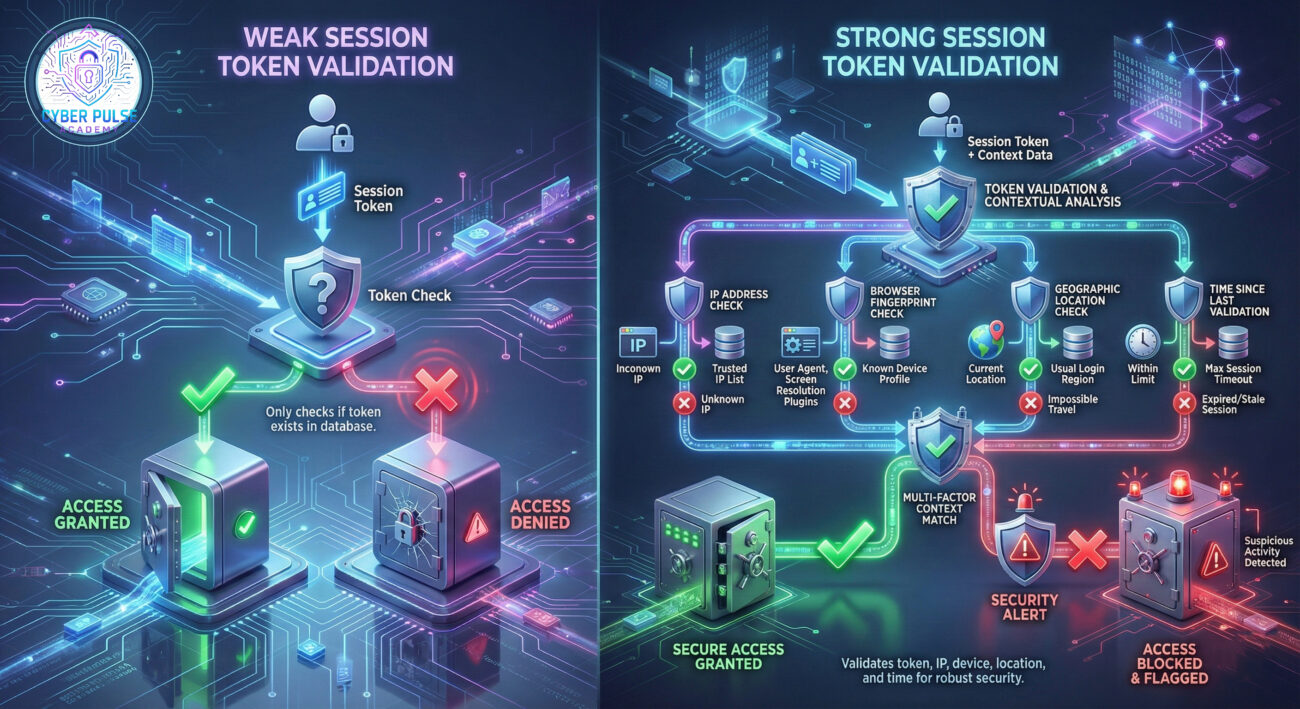
Defenders counter this by binding session tokens to additional factors beyond just possession. This includes checking if the token comes from the same IP address, browser fingerprint, or geographic location as the original login. Advanced implementations use token binding to TLS certificates, making stolen tokens useless on different devices. The mindset here is: "Don't just verify the token; verify the context around the token's use."
Session tokens are low-hanging fruit. Red teams look for any opportunity to intercept, predict, or steal these digital keys. They target weak implementations: sessions without timeouts, tokens transmitted over HTTP, or applications that don't invalidate tokens after logout. The goal is to achieve persistence, maintaining access even if passwords change. Attackers particularly love single sign-on (SSO) systems because compromising one session can grant access to multiple applications.
Blue teams treat session management as a critical control point. They implement defense in depth: HTTPS everywhere, short session timeouts, secure cookie attributes (HttpOnly, Secure, SameSite), and active session monitoring. Defenders assume tokens will be targeted, so they focus on minimizing the damage when (not if) compromise occurs. This includes rapid detection of anomalous session activity and immediate revocation capabilities. The mindset is: "Make tokens hard to steal, and make stolen tokens hard to use."
Effective session management sits at the intersection of user convenience and security. As we've explored, sessions are the persistent conversations between you and websites, and protecting these conversations requires both technical controls and user awareness.
Key takeaways from this guide:
Remember that session management isn't just a technical concern – it's a daily practice. Every time you log out of shared computers, check for HTTPS, or review active sessions, you're strengthening your security posture. The websites and applications you use also play a crucial role by implementing proper session controls on their end.
As you continue your cybersecurity journey, consider exploring related topics like web application security, identity and access management, and encryption fundamentals. Each builds upon the session management foundations covered here.
Start implementing what you've learned today:
Have questions about session management? Want to share your own experiences or tips? Leave a comment below. Your journey to better cybersecurity starts with understanding concepts like session management, and we're here to help every step of the way.
Stay curious, stay secure, and remember: good security is a habit, not an event.
Every contribution moves us closer to our goal: making world-class cybersecurity education accessible to ALL.
Choose the amount of donation by yourself.