


















































Certification Courses
Hands-On Labs
Threat Intelligence
Latest Cyber News
MITRE ATT&CK Breakdown
All Cyber Keywords
Gather Victim Host Information involves collecting technical details about software applications, versions, and configurations present on a target's systems to identify vulnerabilities and plan follow-on attacks.
ATT&CK ID: T1592.002
Tactics: Reconnaissance
Platforms: PRE
Difficulty: 🟢 Easy
Prevalence: High
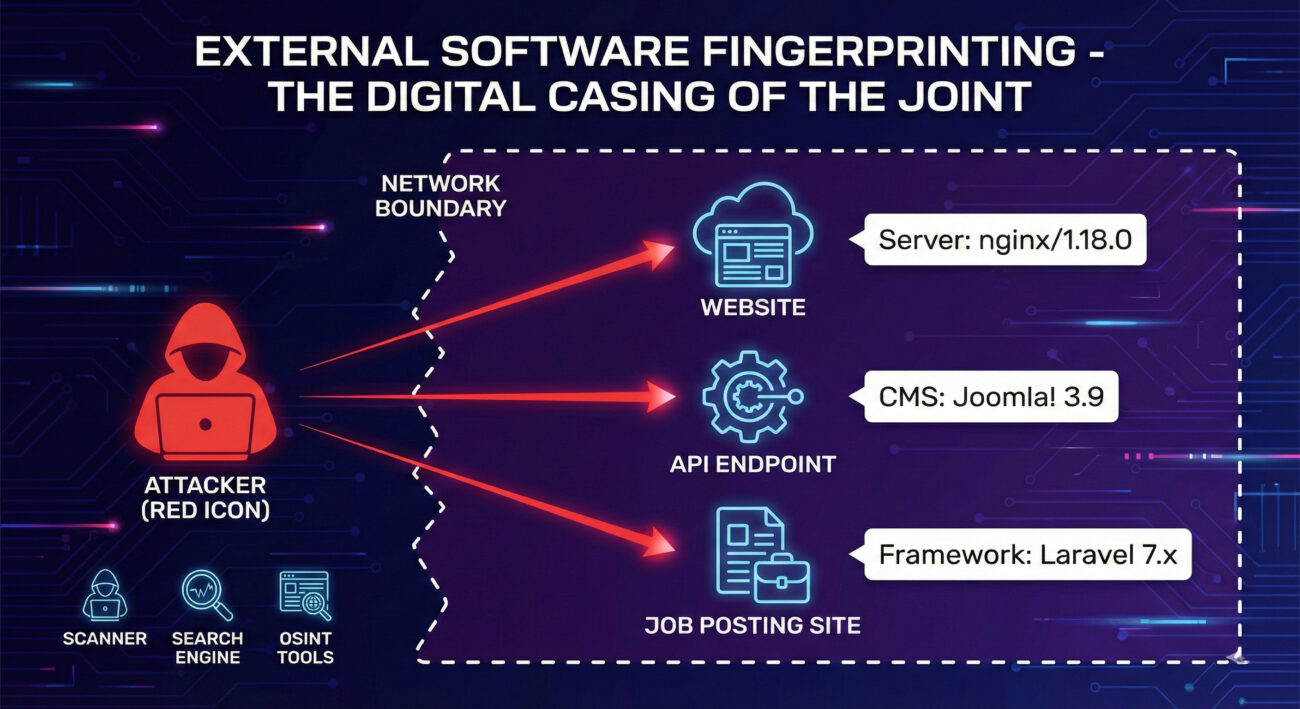
Imagine a burglar casing a neighborhood not just to find which houses look wealthy, but to read the stickers on the windows that show what security system is installed. Gather Victim Host Information is exactly that digital reconnaissance phase. Before launching any real attack, adversaries need to know what they're up against.
This technique specifically focuses on identifying the software running on a target's systems, web server versions (like Apache 2.4.49), CMS platforms (WordPress 5.7), or business applications. Knowing this allows an attacker to search for known, unpatched vulnerabilities (CVEs) in those exact versions, dramatically increasing their chance of a successful breach.
| Term | Simple Definition | Why It Matters |
|---|---|---|
| Banner Grabbing | Connecting to a network service (like web, SSH, FTP) and recording the version information it willingly announces. | The most direct way to get accurate software version data. Often the first step in this reconnaissance. |
| Fingerprinting | Deducing software/OS details by analyzing subtle differences in how systems respond to network probes. | Used when banners are hidden. Allows identification even when the target tries to hide its stack. |
| OSINT (Open-Source Intelligence) | Information gathered from publicly available sources like websites, forums, and job boards. | Adversaries use OSINT to find tech stack mentions (e.g., "Seeking Django developer") without triggering alarms. |
| Version Disclosure | When an application or server unintentionally reveals its version number in HTTP headers, error messages, or source code comments. | A common security weakness that directly enables this ATT&CK technique. |
The process is methodical and often entirely passive or semi-passive to avoid detection.
Think like a lockpicker surveying a lock brand and model. You don't try every pick at random. First, you visually inspect the lock to see if it's a Medeco, Schlage, or Kwikset. Each brand and model has known weaknesses and requires specific tools. This reconnaissance phase is that inspection. The goal is efficiency: spend minutes on reconnaissance to save hours on failed exploitation attempts later.
Example Nmap Command for Service/Version Detection:
nmap -sV --script banner,http-headers -p 80,443,22,21 target-company.com
Manual HTTP Header & Banner Check with cURL & Netcat:
# Check HTTP headers for server and framework info
curl -I https://target-company.com

# Grab banner from an SSH service manually
nc -nv target-company.com 22
APT28 (Fancy Bear), a Russian state-sponsored group, has extensively used this technique. In campaigns targeting government and military organizations, APT28 would first conduct broad reconnaissance to identify externally facing web servers and network services. They used tools to fingerprint software versions, specifically looking for outdated versions of Microsoft Exchange, WordPress plugins, and VPN appliances.
This gathered intelligence was then used to launch tailored exploits, such as the CVE-2017-11882 Microsoft Office vulnerability, against organizations running the identified vulnerable software. This precision targeting, enabled by victim host information gathering, made their attacks far more effective than shotgun-style approaches.
Reference: Mandiant Report on APT28 Exploiting Office Vulnerabilities
Your job is not to prevent all looking (that's impossible), but to remove the useful signs. Imagine a secure facility where all equipment has generic labels, not model numbers. A spy can still see the building, but they can't tell if the lock is a 2015 model with a known flaw or a 2023 model with upgraded security. The defender's philosophy here is "information hygiene": minimize the useful data leakage from your public footprint.
You won't see alerts titled "Software Information Gathering." Look for the noise that precedes an attack:
Note: This activity often blends with normal internet background noise (bots, researchers). Correlation with other suspicious events (e.g., a probe followed days later by a login attempt) is key.
Here is a Splunk SPL query to hunt for potential web software fingerprinting activity by looking for scans targeting common version disclosure paths across multiple hosts.
## Hunt: Potential Web Software Fingerprinting Scans
## Data Source: Web Server Access Logs (IIS, Apache, Nginx)
index=web_logs sourcetype=access_*
  -- Look for requests to paths that reveal software/version info
  (uri_path="/server-status" OR uri_path="/phpinfo.php" OR uri_path="/wp-admin/" OR uri_path="*CHANGELOG*" OR uri_path="*version*" OR uri_path="*.git/*")
  -- Exclude common, legitimate single requests
  NOT (src_ip IN [10.0.0.0/8, 192.168.0.0/16])
| stats
    count(uri_path) as PathHits,
    values(uri_path) as PathsRequested,
    dc(dest_host) as UniqueHostsScanned
    by src_ip, _time
  -- Flag sources hitting multiple version-disclosure paths across multiple hosts
  | where PathHits > 5 AND UniqueHostsScanned > 3
  | table _time, src_ip, UniqueHostsScanned, PathHits, PathsRequested
Convert MITRE's generic advice into concrete actions:
| Attacker's Goal (Red Team) | Defender's Action (Blue Team) |
|---|---|
| Identify specific software versions (e.g., WordPress 5.6.2). | Genericize headers and disable version disclosure in public responses. |
| Find unpatched vulnerabilities to exploit. | Implement a rigorous, accelerated patch management cycle for public-facing systems. |
| Map out the external attack surface efficiently. | Conduct regular external penetration tests and vulnerability assessments to find and shrink your own attack surface. |
| Stay undetected during the reconnaissance phase. | Monitor for scanning patterns and correlate low-severity events to build a picture of pre-attack activity. |
A single external IP making sequential requests to `/server-status`, `/phpinfo.php`, `/wp-login.php`, and `/console/` across multiple web servers in a short time window. This is a classic fingerprinting scan.
Deploy a WAF rule or server configuration to strip detailed version headers (Server, X-AspNet-Version, X-Powered-By) from all external HTTP/S responses. This is a low-effort, high-impact hardening step.
Your web server access logs are ground zero. Look for spikes in 404 errors for known technology paths, and use the Splunk hunting query provided above to find suspicious scanners.
Gather Victim Host Information: Software is the critical first domino in the attack chain. While it's a reconnaissance technique and doesn't directly cause damage, it enables every subsequent, more dangerous step. Defending against it isn't about complete prevention, but about raising the adversary's cost and uncertainty.
Your immediate next steps should be operational:
Continue building your defensive knowledge by exploring related techniques:
For authoritative guidance on managing external attack surfaces, refer to the NIST Special Publication 800-40 Revision 4: Guide to Enterprise Patch Management Technologies.
Stay vigilant, practice good information hygiene, and remember: the best fight is the one the adversary decides isn't worth starting.
Every contribution moves us closer to our goal: making world-class cybersecurity education accessible to ALL.
Choose the amount of donation by yourself.