


















































Certification Courses
Hands-On Labs
Threat Intelligence
Latest Cyber News
MITRE ATT&CK Breakdown
All Cyber Keywords
Imagine your website as a high-security office building. You control the front door, but what about the dozens of delivery people, maintenance workers, and consultants who come in every day? New 2026 research reveals a shocking reality: 64% of these digital “third-party visitors”, applications like analytics tools and social media pixels, are accessing sensitive data inside your organization without a legitimate reason. This represents a 25% year-over-year increase and creates a massive, often invisible, attack surface.
This guide breaks down this critical third-party application security threat. We’ll move beyond the alarming statistics to explain exactly how this data exposure happens, map it to real-world adversary techniques like MITRE ATT&CK T1190, and provide a clear, actionable framework for defenders to regain control. Whether you're a security leader, a developer, or just starting in cybersecurity, understanding this risk is the first step toward building a more secure digital environment.
The digital supply chain is under siege. A comprehensive 12-month study of 4,700 leading websites exposes a severe and growing governance failure. The core finding is that nearly two-thirds (64%) of all third-party applications have access to sensitive user data, like payment details, credentials, or personal information, without any clear business need for it.
This "unjustified access" crisis is accelerating, up from 51% just one year prior. Major contributors include ubiquitous tools like Google Tag Manager (implicated in 8% of violations), Shopify apps (5%), and the Facebook Pixel (4%). The sectors hit hardest are often those with budget constraints: government sites saw malicious activity spike from 2% to 12.9%, and 1 in 7 education sites now show signs of active compromise.
Perhaps the most telling statistic is the awareness-action gap. While 81% of security leaders identify web-based attacks as a top priority, only 39% have actually deployed solutions to manage third-party risk. This 42-point gap is the reason the problem is getting worse, not better. The following table summarizes the stark contrast between high-performing organizations and the average, highlighting that effective security is a matter of process, not just budget.
| Security Benchmark | Top-Performing Organizations | Average Organization | Key Insight |
|---|---|---|---|
| Number of Third-Party Apps | ≤ 8 | 15 - 25 | Quantity directly increases attack surface. |
| Unjustified Data Access | Rigorously blocked | 64% of apps have it | A governance failure, not a technical one. |
| Primary Risk Owner | Unified IT/Security oversight | 43% driven by Marketing alone | Departmental silos create risk. |
| Response to Compromise Signals | Automated monitoring & alerts | Reliance on basic WAFs (24% of orgs) | Reactive tools miss supply chain attacks. |
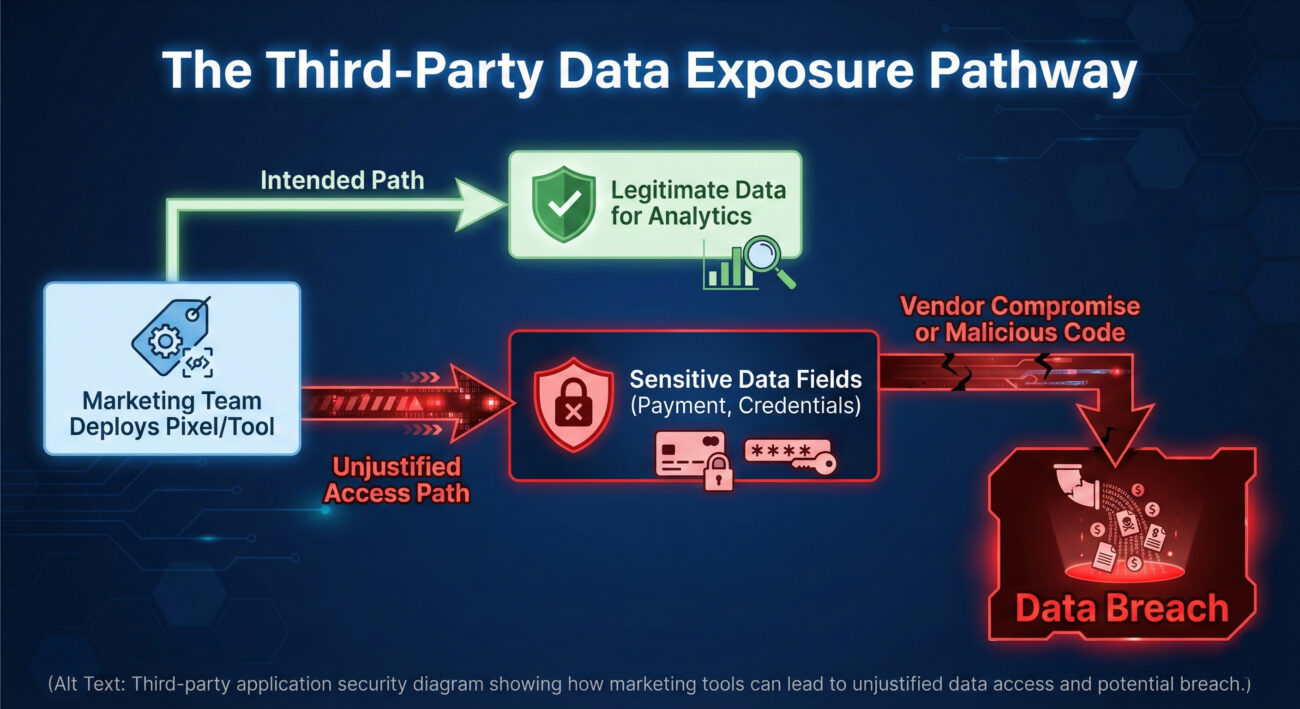
Let's translate the statistics into a narrative. Consider "SecureBuy," a fictional mid-sized e-commerce retailer. The marketing team wants to optimize ad campaigns and installs the Facebook Pixel using Google Tag Manager. To ensure they track all possible conversions, they grant the pixel "Full DOM Access" and enable "Automatic Advanced Matching." This means the script can read everything a user types on any page it's loaded on, not just the intended product views.
Months later, a threat actor exploits a vulnerability in a different, smaller analytics tool also used on SecureBuy's site. Using this foothold (a technique known as software supply chain compromise), they inject malicious JavaScript into the payment page. Because the Facebook Pixel is already there with broad permissions, the malicious code finds it easy to exfiltrate the credit card details users enter, camouflaging the traffic as normal pixel activity. SecureBuy's basic Web Application Firewall (WAF) never triggers an alert because the request originates from a "trusted" third-party domain.
The result? A data breach affecting thousands of customers, traced back not to a direct hack of SecureBuy, but to the weak governance around a marketing tool's excessive permissions. This scenario, mirrored in the real-world Polyfill.io attack, illustrates why controlling third-party application security is non-negotiable.
Understanding the mechanics is key to defense. Unjustified access isn't typically a bug; it's a misconfiguration stemming from a lack of "least privilege" principles. Here are the primary technical causes:
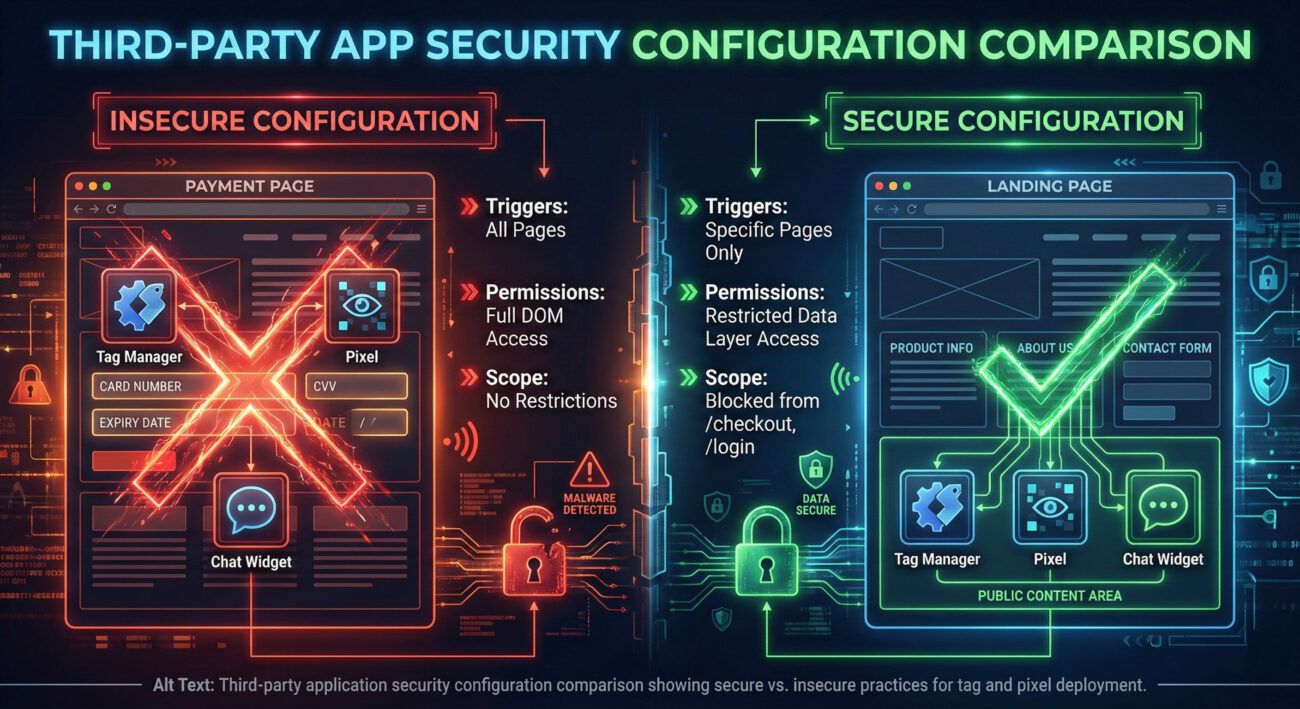
Tools like Google Tag Manager are powerful but dangerous when ungoverned. A common mistake is deploying a tag with a trigger of "All Pages" or granting it permission to read the entire Document Object Model (DOM). This allows a simple analytics script to silently harvest data from sensitive forms.
Features like Facebook Pixel's "Automatic Advanced Matching" are designed to improve ad targeting by hashing user data like email. When improperly scoped, these features actively scan input fields across the entire site, including password and credit card fields, creating a rich data harvest for a potential attacker.
Marketing or sales teams often deploy tools directly, without IT review. These "shadow" applications are never assessed for the specific data they access at runtime. A chatbot widget on a homepage doesn't need to run on the payment confirmation page, yet it often does by default, gaining access to full transaction details.
Framing this threat within the MITRE ATT&CK framework helps security professionals understand, communicate, and defend against it systematically. The unjustified access problem enables several key tactics and techniques.
Primary Tactic: Initial Access (TA0001)
Supporting Tactic: Collection (TA0009)
Supporting Tactic: Exfiltration (TA0010)
By understanding these mappings, blue teams can better prioritize controls like strict Content Security Policies (CSP), subresource integrity (SRI), and continuous third-party script monitoring to disrupt these adversary workflows.
Objective: Steal sensitive data or credentials with minimal detection.
Objective: Prevent data exfiltration and detect compromised third-party assets.
This practical framework is designed to close the 42-point awareness-action gap. You don't need to do everything at once; start with Step 1.
Action: Shine a light on what's already running. Use browser developer tools, network monitors, or dedicated tools like Blacksmith or Snyk to catalog every third-party script, pixel, library, and widget on your key pages (homepage, login, checkout).
Deliverable: A living inventory spreadsheet with: Script Name, Provider, Purpose/Justification, Pages Where It Loads, Data It Accesses, and Owner (Dept.).
Action: For each item in your inventory, ruthlessly scope its permissions.
Action: Deploy tools that provide visibility into what scripts are doing in real-time. This is your last line of defense.
Action: Create a formal cross-functional governance board. This should include Security, IT, Legal/Compliance, Marketing, and Product.
Process: Establish a mandatory security review for any new third-party tool request. The requesting team must provide a business justification and a data privacy impact assessment. The security team evaluates the vendor's security posture and defines the technical guardrails (scoping, CSP rules).
Q: We're a small team with no budget for fancy tools. What's the single most effective thing we can do?
A: Start with a manual audit and inventory (Step 1). This cost-free action alone will reveal shocking exposures. Then, spend an afternoon in your Google Tag Manager or equivalent, and remove global triggers from scripts that don't need them. These two actions can eliminate a huge portion of your risk immediately.
Q: Isn't this the vendor's responsibility to secure their own scripts?
A: It's a shared responsibility. The vendor is responsible for the security of their infrastructure and code. You are responsible for what data you choose to expose to that vendor's script on your website. Applying least-privilege scoping is your duty under data protection laws like GDPR and CCPA.
Q: How is this different from a typical software supply chain attack (like Log4j)?
A: It's a subset focused on the client-side. Traditional supply chain attacks (e.g., compromising an open-source library) affect server-side code. Client-side third-party application security risks involve scripts that run in your users' browsers. They are harder to detect with traditional tools and directly lead to data theft from your customers.
Q: Can a strong Content Security Policy (CSP) solve this?
A: A CSP is a critical and highly effective layer of defense, but not a silver bullet. It can prevent unauthorized scripts from loading and block unauthorized data exfiltration destinations. However, it cannot fully control what an authorized script (like a whitelisted Facebook Pixel) does once it loads. CSP must be combined with least-privilege scoping and runtime monitoring.
The research is clear, the threat is growing, and the adversary's playbook is well-documented. The time for passive concern is over. You have the knowledge and the framework to act.
Your mission, should you choose to accept it:
For a deeper dive into the data, including full sector breakdowns and a list of high-risk applications, you can download the original 43-page report that inspired this analysis. Continue your education with trusted resources like the OWASP Top Ten for web risks and the MITRE ATT&CK® Framework for adversary behavior.
The security of your users' data now depends as much on your digital supply chain as on your own code. Take control of it today.
© 2026 Cyber Pulse Academy. This content is provided for educational purposes only.
Always consult with security professionals for organization-specific guidance.
Every contribution moves us closer to our goal: making world-class cybersecurity education accessible to ALL.
Choose the amount of donation by yourself.