


















































Certification Courses
Hands-On Labs
Threat Intelligence
Latest Cyber News
MITRE ATT&CK Breakdown
All Cyber Keywords
Have you ever used a temporary code sent to your phone to log into your email or bank account? Congratulations – you've already used a token! In today's digital world where password breaches happen daily, understanding tokens is your first step toward true online protection.
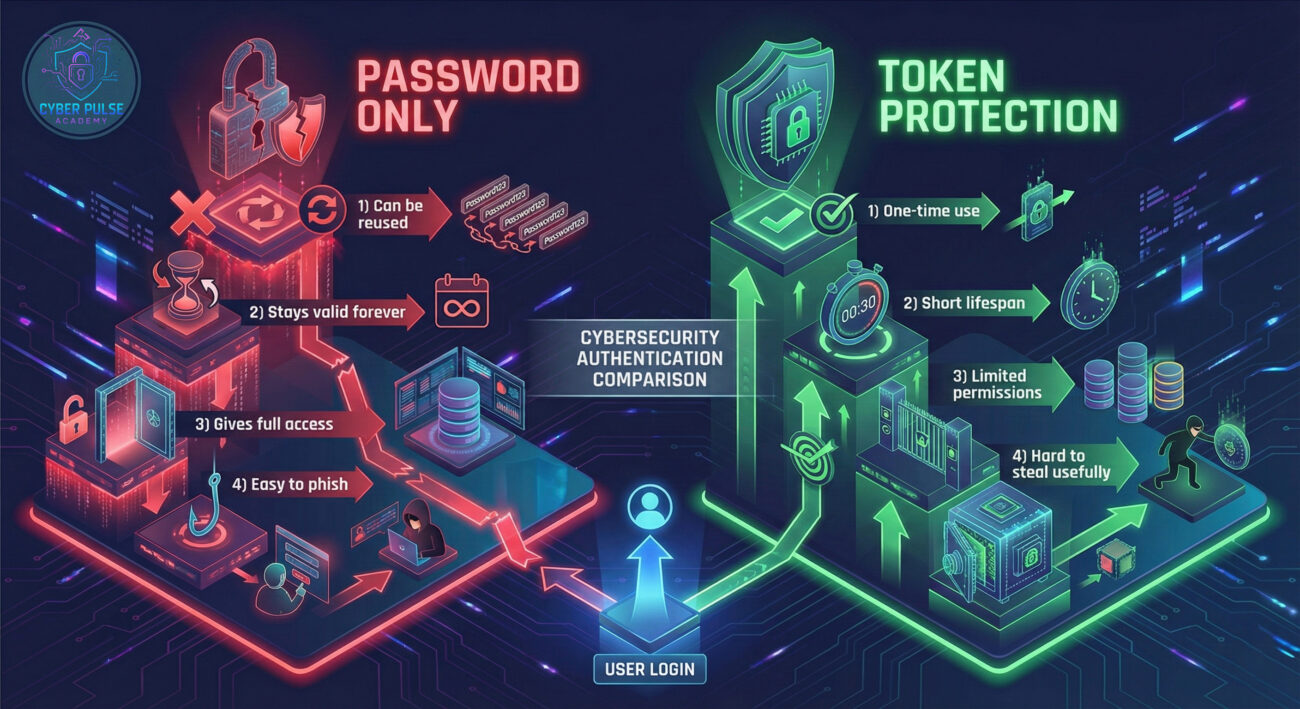
A token is a temporary, digital credential that proves your identity without exposing your actual password. Think of it like a concert ticket – it gets you in for one show (or session), but it's useless for anything else and expires quickly. Unlike passwords that stay valid forever until changed, tokens are designed to be temporary and limited in scope.
In this guide, you'll learn: what tokens really are, why they're essential for modern security, how they work in everyday applications, common mistakes people make with them, and practical steps to use tokens effectively for maximum protection.
Imagine if your house key worked for just 60 seconds after you used it, then transformed into a different key. That's essentially what a token does in cybersecurity. In our first section, we'll explore why this temporary approach to access is revolutionizing how we protect our digital lives.
Every time you log into Gmail, Facebook, or your online banking, there's a high chance tokens are working behind the scenes. According to recent data from the Cybersecurity and Infrastructure Security Agency (CISA), implementing token-based authentication can prevent over 80% of account takeover attempts. That's because even if a hacker steals your password, they can't use it without the temporary token that's constantly changing.
Think back to the last time you traveled through airport security. Your boarding pass (the token) gets you through security and onto the plane, but it doesn't give you access to the cockpit or someone else's luggage. Similarly, digital tokens provide limited, specific access rather than blanket permission to everything in your account.
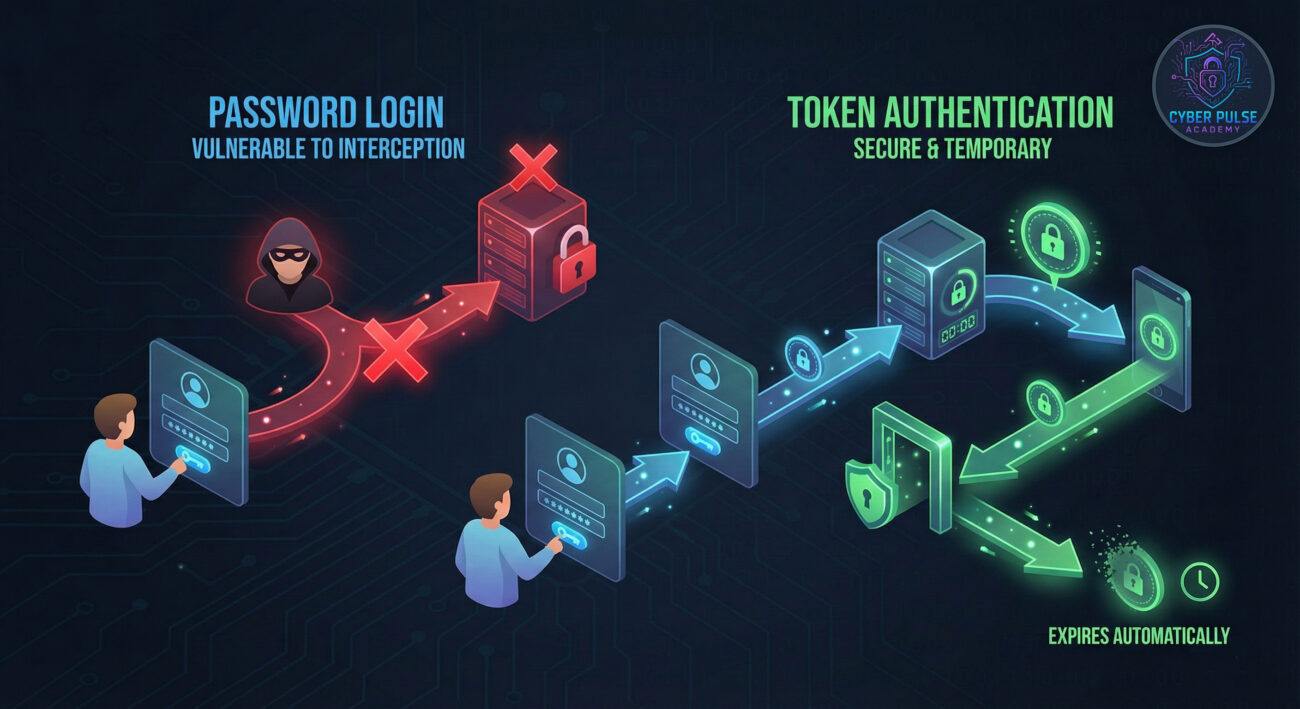
The digital landscape has changed dramatically. Passwords alone are like using a single lock on a bank vault – once someone picks it, everything is exposed. Tokens add a second, changing lock that makes unauthorized access exponentially harder.
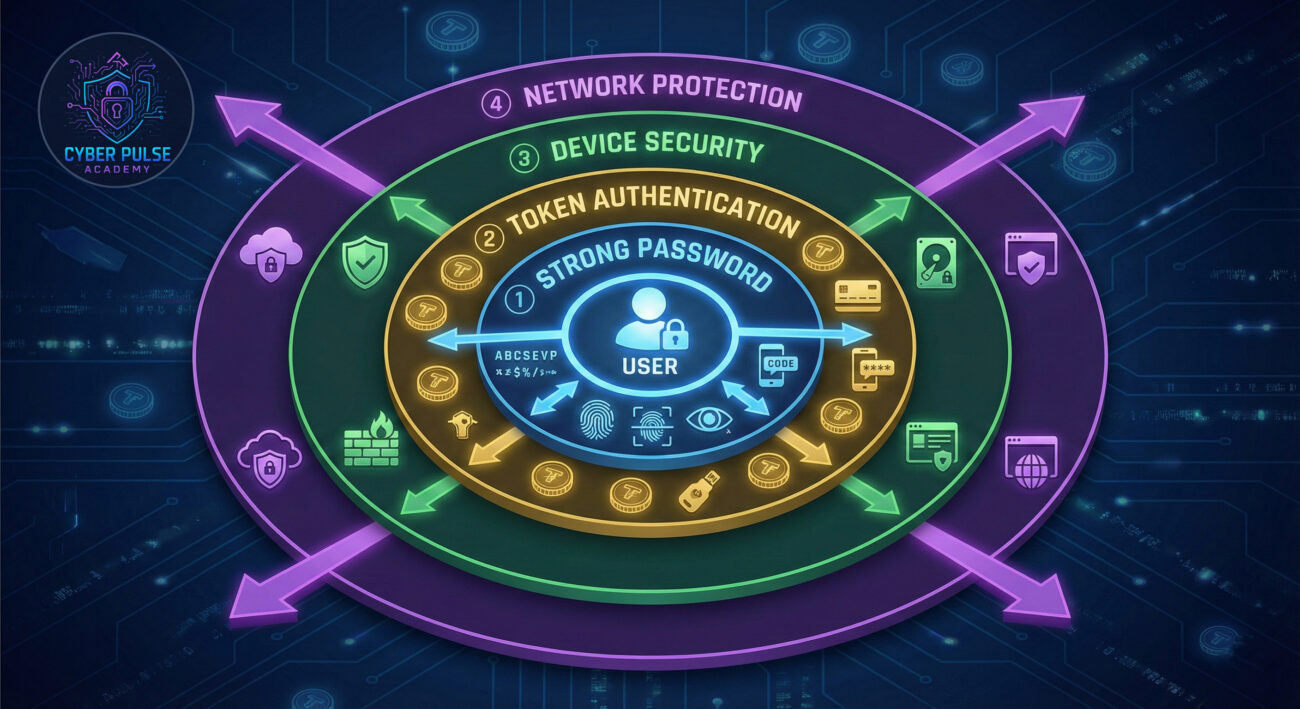
Recent statistics show alarming trends: the Verizon Data Breach Investigations Report reveals that 81% of hacking-related breaches involve stolen or weak credentials. This is where tokens become crucial. They create what security experts call "defense in depth" – multiple layers of protection that must all be breached simultaneously for an attack to succeed.
Consider your daily life: you probably access work email from your phone, check social media on your laptop, and shop online from your tablet. Each of these activities can be protected with different tokens. If your phone is stolen, you can revoke just that device's token without affecting your other devices or changing your password. This granular control is impossible with password-only systems.
| Term | Simple Definition | Everyday Analogy |
|---|---|---|
| Authentication Token | A temporary digital proof that you are who you claim to be | Like a wristband at a festival – it proves you paid and belong there, but only works for that event |
| Access Token | A key that grants specific permissions for a limited time | Like a valet key for your car – it lets someone drive but not open the glove compartment |
| Token Theft | When an attacker captures and uses your valid token | Like someone stealing your concert ticket and using it before you do |
| Multi-Factor Authentication (MFA) | Using multiple proofs of identity (like password + token) | Like needing both a key and fingerprint scan to enter a secure facility |
| Token Expiration | The automatic deactivation of a token after set time | Like milk with an expiration date – it's only good for a limited time |
Meet Sarah, a freelance graphic designer who almost became a victim of identity theft. Her story perfectly illustrates how tokens work in practice – and how they saved her financial security.
Sarah used the same password for multiple accounts (a common but dangerous practice). When a data breach at a shopping website exposed her password, attackers tried to use it on her bank account. Fortunately, her bank used token-based authentication. Here's what happened:
| Time/Stage | What Happened | Impact |
|---|---|---|
| Day 1: 2:15 PM | Sarah logs into her bank from her laptop. The bank server creates a 24-hour token for that session | Secure access granted; token stored in browser |
| Day 2: 10:30 AM | Attackers obtain Sarah's password from breached database | Credential exposure but token still required |
| Day 2: 3:45 PM | Attackers try to log in with stolen password from different device | Bank requests secondary token (SMS code); attack blocked |
| Day 2: 4:00 PM | Bank system detects suspicious activity, revokes all active tokens | Sarah's laptop session ends; she must re-authenticate |
| Day 2: 4:15 PM | Sarah receives fraud alert, changes password, new tokens issued | Security restored; attackers' access permanently blocked |
This scenario shows how tokens create safety nets. Even though Sarah's password was compromised, the attackers couldn't bypass the token requirement. The bank's system also detected the abnormal login pattern (different device, location) and triggered additional protections.
Turn on Multi-Factor Authentication (MFA) or Two-Factor Authentication (2FA) on all important accounts. These systems use tokens as the second factor.
When apps ask for permissions, they're often requesting token-based access. Be selective about what you authorize.
Tokens must reach you securely. Protect the channels through which they're delivered.
Most services let you see where your account is currently logged in (which tokens are active).
Tokens are most effective when combined with other security measures.
Understanding how attackers think helps you defend better. While technical details are complex, the mindset is simple: they look for the weakest link in the chain.
Simple Attack Path: An attacker might use a phishing email that mimics a legitimate token request. The email creates urgency ("Your account will be locked!") and includes a link to a fake login page. If you enter your credentials and the token that appears on your authenticator app, the attacker captures both and immediately uses them to access your real account before the token expires.
Defender's Counter-Move: Always initiate logins yourself by typing the website URL directly or using bookmarks. Never click login links in emails or messages. If you receive an unexpected token request, pause and ask: "Did I just try to log in?" If the answer is no, someone else is trying to access your account.
Attackers see tokens as frustrating but surmountable obstacles. Their goal is to either steal valid tokens through malware, trick users into revealing them via social engineering, or find ways to extend token lifetimes. They look for implementations where tokens don't expire quickly enough or where token validation has flaws. A red team focuses on the human element – can they convince someone to approve a malicious token request or bypass token requirements entirely?
Defenders view tokens as essential components of layered security. Their focus is on proper implementation: appropriate expiration times, secure storage, and monitoring for anomalous token usage. Blue teams establish policies for token revocation, educate users about token security, and implement systems that detect when tokens are used from unusual locations or devices. They balance security with usability – tokens should protect without making systems unusable.
Understanding tokens transforms how you approach digital security. These temporary digital keys provide a dynamic layer of protection that static passwords simply cannot match. By implementing token-based authentication and following the practices outlined in this guide, you're building a security posture that adapts to today's threats.
Key takeaways to remember:
The digital world will continue evolving, and so will authentication methods. However, the principle behind tokens – temporary, limited access – will remain foundational to cybersecurity. Start today by enabling token-based authentication on your most important accounts, and you'll immediately be more secure than the vast majority of internet users.
Ready to take action? Start by enabling Multi-Factor Authentication on your primary email account today – it's the gateway to most of your other accounts. Have questions about specific token implementations or encountered a suspicious token request? Share your experiences and questions in the comments below. Let's build a more secure digital community together.
For further reading, check the NIST guidelines on multi-factor authentication and stay updated with the latest security trends on our Cybersecurity Basics series.
Every contribution moves us closer to our goal: making world-class cybersecurity education accessible to ALL.
Choose the amount of donation by yourself.