


















































Certification Courses
Hands-On Labs
Threat Intelligence
Latest Cyber News
MITRE ATT&CK Breakdown
All Cyber Keywords
Have you ever worried that your password alone isn't enough to protect your online accounts? You're absolutely right. In today's digital world, Two-Factor Authentication (often called 2FA) is no longer optional, it's your essential shield against the growing wave of cyber attacks targeting everyone from beginners to experts.
Think of it like this: Your password is a key to your digital house. Two-Factor Authentication adds a security guard who checks your ID before letting you in. Even if someone steals your key, they can't get past the guard. In this guide, you'll learn exactly what 2FA is, why it's critical for your protection, how to set it up in minutes, and common mistakes to avoid.
Two-Factor Authentication is a security process that requires two different forms of identification before granting access to your account. It's like requiring both a key AND a fingerprint to open a safe. The fundamental principle is simple: something you know (your password) plus something you have (your phone) or something you are (your fingerprint).
In 2023 alone, over 24 billion passwords were exposed in data breaches according to security researchers. Passwords are constantly being stolen, guessed, or bought on the dark web. This makes Two-Factor Authentication your critical second layer of protection that can stop hackers in their tracks, even when they have your password.
The Cybersecurity and Infrastructure Security Agency (CISA) states that implementing Two-Factor Authentication can prevent 99.9% of automated attacks on your accounts. That's not just a small improvement, it's nearly complete protection against the most common threats you face daily.
Consider your daily digital life: banking, email, social media, work accounts. Each represents a potential vulnerability. When the Identity Theft Resource Center reported a 68% increase in data breaches in 2023, it became clear that single-password security is fundamentally broken. Two-Factor Authentication fixes this by adding what experts call "defense in depth", multiple layers of security that must all be breached simultaneously.
Google's own research confirms that simply adding a recovery phone number to your account (a basic form of 2FA) blocks 100% of automated bots, 99% of bulk phishing attacks, and 66% of targeted attacks. These numbers demonstrate why Two-Factor Authentication isn't just for tech experts, it's essential for every beginner who values their digital identity.
| Term | Simple Definition | Everyday Analogy |
|---|---|---|
| Two-Factor Authentication (2FA) | Requiring two different proofs of identity to access an account | Like needing both a key card AND a PIN to enter a secure building |
| Authentication App | A smartphone app that generates temporary security codes | Like a digital key fob that creates new codes every 30 seconds |
| Phishing Attack | Fake emails or websites designed to steal your login information | Like a con artist pretending to be your bank to get your safe combination |
| Recovery Codes | Backup codes to access your account if you lose your 2FA device | Like spare keys kept in a secure location for emergencies |
| SIM Swapping | A hacker tricks your phone carrier into transferring your number | Like someone convincing the post office to redirect all your mail to their address |
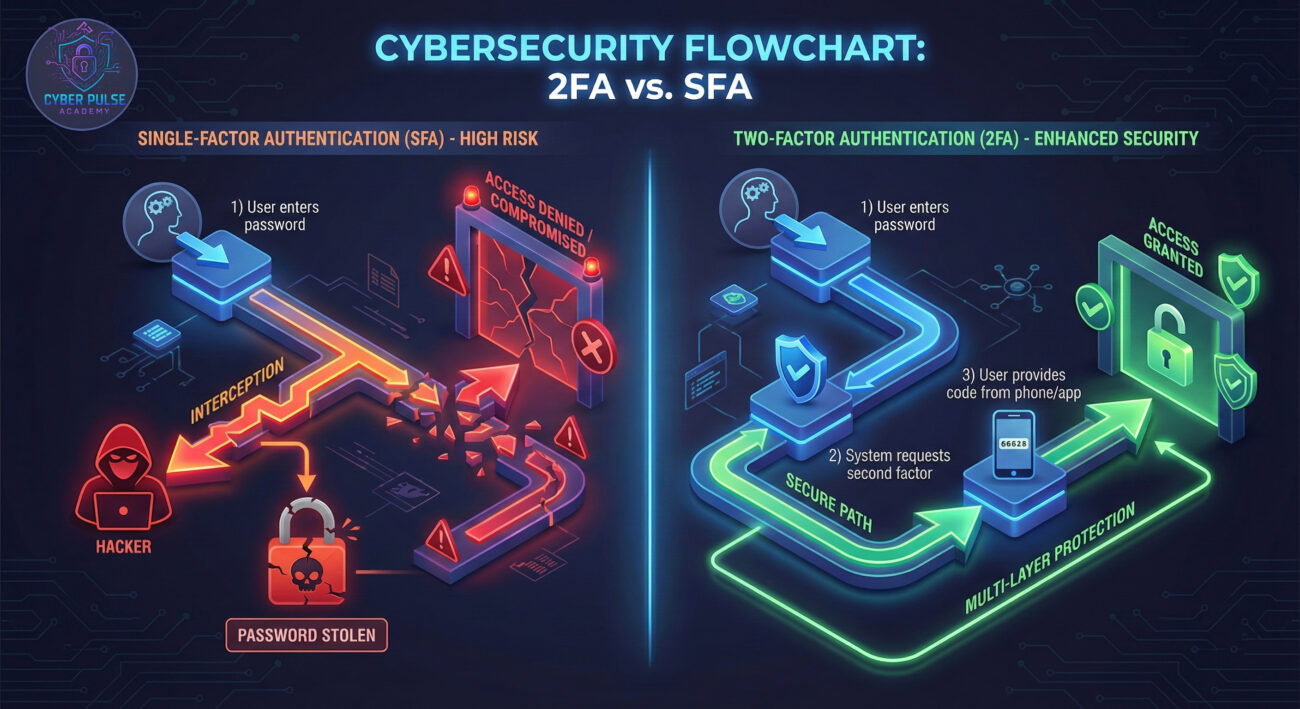
Sarah, a freelance graphic designer, thought she was careful about online security. She used different passwords for important accounts and avoided suspicious links. But everything changed on a Tuesday morning when she received a notification that someone had logged into her email from a foreign country.
Here's what happened: Sarah's password had been exposed in a data breach at a website she'd signed up for years ago. The hacker used automated tools to test that password on hundreds of popular sites, a technique called "credential stuffing." They successfully accessed her email because she hadn't enabled Two-Factor Authentication.
From her email, the attacker reset passwords on her social media, cloud storage, and even attempted to access her PayPal. The breach took Sarah weeks to fully resolve, involving customer support calls, identity verification processes, and significant stress.
| Time/Stage | What Happened | Impact |
|---|---|---|
| Day 1, 2:00 AM | Hacker obtained Sarah's password from a breached database | Initial security vulnerability exposed |
| Day 1, 2:15 AM | Automated tools tested password on email provider | Successful login attempt without Two-Factor Authentication |
| Day 1, 2:30 AM | Hacker accessed email and initiated password resets on connected accounts | Identity theft in progress; multiple accounts compromised |
| Day 1, 8:00 AM | Sarah noticed foreign login alert and began damage control | Started recovery process; enabled Two-Factor Authentication on all accounts |
| Week 2 | All accounts secured with Two-Factor Authentication | Future attacks prevented; peace of mind restored |
After this incident, Sarah enabled Two-Factor Authentication on every account that offered it. Six months later, when the same hacker tried to access her newly secured email, the attempt was blocked at the second verification step. That single security upgrade transformed her from a victim to someone with protected digital assets.
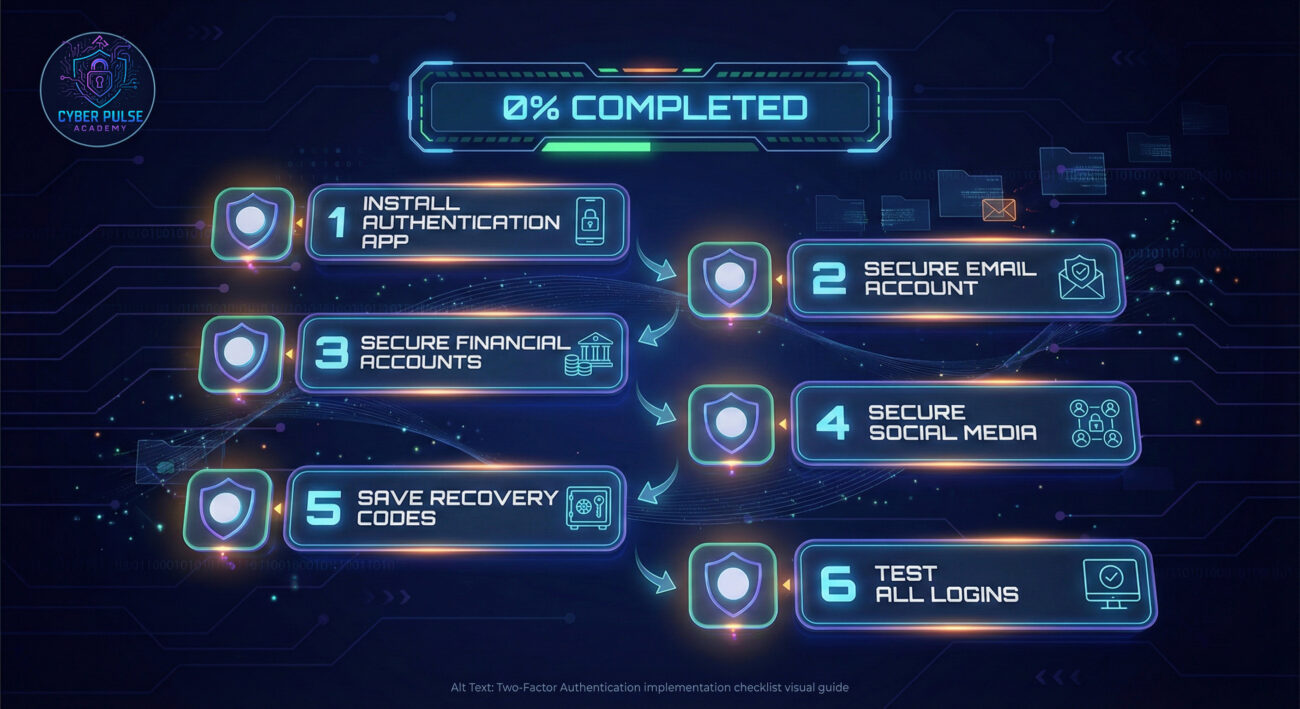
Start with accounts that would cause the most damage if compromised. These typically include:
Pro tip: Check our guide on password security basics to ensure you have strong passwords before adding 2FA.
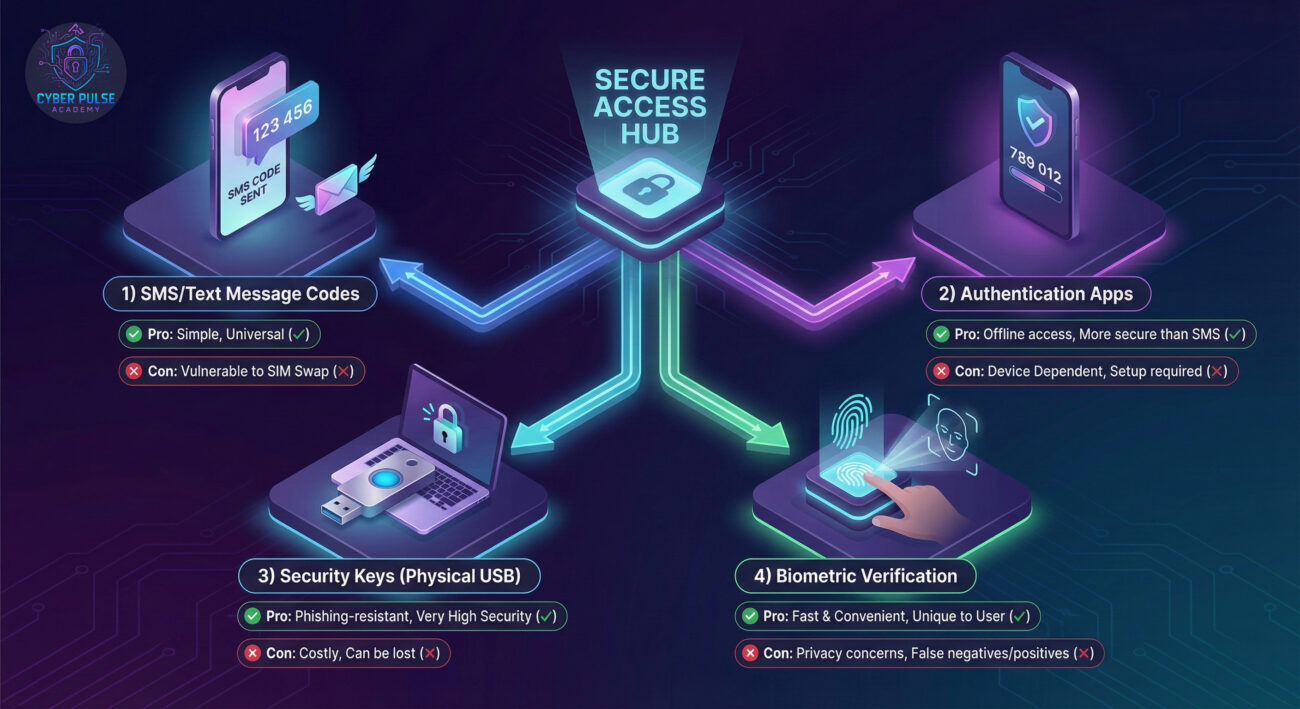
Select the most secure method available for each service. In order of security:
For most beginners, authentication apps offer the best balance of security and convenience.
Download and install one of these free apps on your smartphone:
Authy is particularly beginner-friendly because it allows you to recover codes if you lose your phone, reducing the risk of being locked out.
Your email is the most important account to secure. Here's how:
The setup wizard will guide you through scanning a QR code with your authentication app and testing the verification.
Always set up backup methods to avoid being locked out:
Pro tip: Store recovery codes in your password manager. Learn more about choosing a password manager in our detailed guide.
Systematically enable Two-Factor Authentication on remaining accounts:
Many services offer 2FA in their security or privacy settings. Look for "Two-Factor Authentication," "2FA," "Two-Step Verification," or "Login Approval."
Ensure everything works correctly and establish maintenance habits:
Remember that Two-Factor Authentication is part of a complete security strategy, not a replacement for strong passwords.
To truly appreciate why Two-Factor Authentication works, you need to understand how attackers try to bypass it. Let's examine a common attack path and the defender's counter-move.
Sophisticated attackers don't just steal passwords and try them later. They create fake login pages that capture credentials AND immediately forward them to the real website. When the real site sends a 2FA code to the victim, the attacker prompts the victim to enter that code on the fake page too. This "man-in-the-middle" approach defeats basic 2FA because the attacker gets both factors in real time.
This is where advanced forms of Two-Factor Authentication come in. Security keys (like YubiKey) and certain authentication apps use cryptographic protocols that verify you're logging into the legitimate site. The authentication happens between your device and the real website, not through what you type. Even if an attacker tricks you into visiting their fake site, the cryptographic handshake fails, and the login is blocked. This is why security experts recommend upgrading to phishing-resistant 2FA for your most valuable accounts.
Attackers see Two-Factor Authentication as an obstacle to bypass, not an impenetrable wall. Their goal is to find the weakest implementation. SMS-based 2FA is a favorite target because phone carriers can be socially engineered. Authentication apps are harder, so attackers might try to steal the backup codes or exploit account recovery processes. When facing widespread 2FA adoption, attackers shift to targeting individuals through personalized phishing rather than bulk attacks. They're constantly looking for users who've disabled 2FA or use insecure backup methods.
Defenders view Two-Factor Authentication as a fundamental control that dramatically raises the attacker's cost and complexity. It's not about making accounts unhackable, but making them not worth the effort compared to easier targets. Defenders implement 2FA knowing that some methods will fail, so they layer additional controls like device recognition, behavioral analytics, and anomaly detection. The goal is defense in depth, if one factor is compromised, others still protect the asset. For defenders, widespread 2FA adoption means they can focus resources on defending against sophisticated attacks rather than bulk credential stuffing.
Implementing Two-Factor Authentication is one of the most effective security upgrades you can make as a beginner. Let's recap what you've learned:
The journey to better security begins with a single step. Today, choose one account, your email, and enable Two-Factor Authentication. Tomorrow, add another. Within a week, you'll have transformed your digital security posture from vulnerable to protected. In a world where cyber attacks are increasingly common, this simple practice places you ahead of 90% of users and makes you a much harder target for would-be attackers.
Ready to take action? Start with these resources:
Have questions about implementing Two-Factor Authentication? Share your experiences or ask for clarification in the comments below. Your journey to better security starts today!
Every contribution moves us closer to our goal: making world-class cybersecurity education accessible to ALL.
Choose the amount of donation by yourself.