


















































Certification Courses
Hands-On Labs
Threat Intelligence
Latest Cyber News
MITRE ATT&CK Breakdown
All Cyber Keywords
In the shadowy corners of the internet, a massive cyber weapon was built not from servers in data centers, but from living rooms and bedrooms worldwide. The Kimwolf Android TV botnet, alongside its sibling Aisuru, silently conscripted over two million Android streaming devices into a formidable army. This botnet didn't just steal data, it turned everyday smart TVs and streaming boxes into proxies for distributed denial-of-service (DDoS) attacks and global malware relay networks.
Recent action by Lumen Technologies' Black Lotus Labs, which null-routed over 550 command servers, has pulled back the curtain on this operation. This deep dive explores the technical mechanics, maps the attack to the MITRE ATT&CK framework, and provides a clear defensive blueprint for cybersecurity professionals and beginners alike to understand and counter such threats.
The Kimwolf Android TV botnet represents a paradigm shift in cyber attack infrastructure. By targeting consumer Internet of Things (IoT) devices, specifically low-security Android TV boxes, threat actors assembled a massive, geographically dispersed network with clean IP reputations. This residential proxy network became a perfect launchpad for secondary attacks.
The core business model was cybercrime-as-a-service. The botnet operators, linked to proxy service resi[.]to, rented out access to these infected devices. Customers could then use this bandwidth to launch their own attacks, scan networks, or hide their tracks, all while appearing as legitimate residential traffic. The scale is staggering: at its peak, Black Lotus Labs observed an 800% surge in bots over a single month, with nearly 25% of a major cloud provider's customers querying a Kimwolf domain, indicating widespread probing activity.
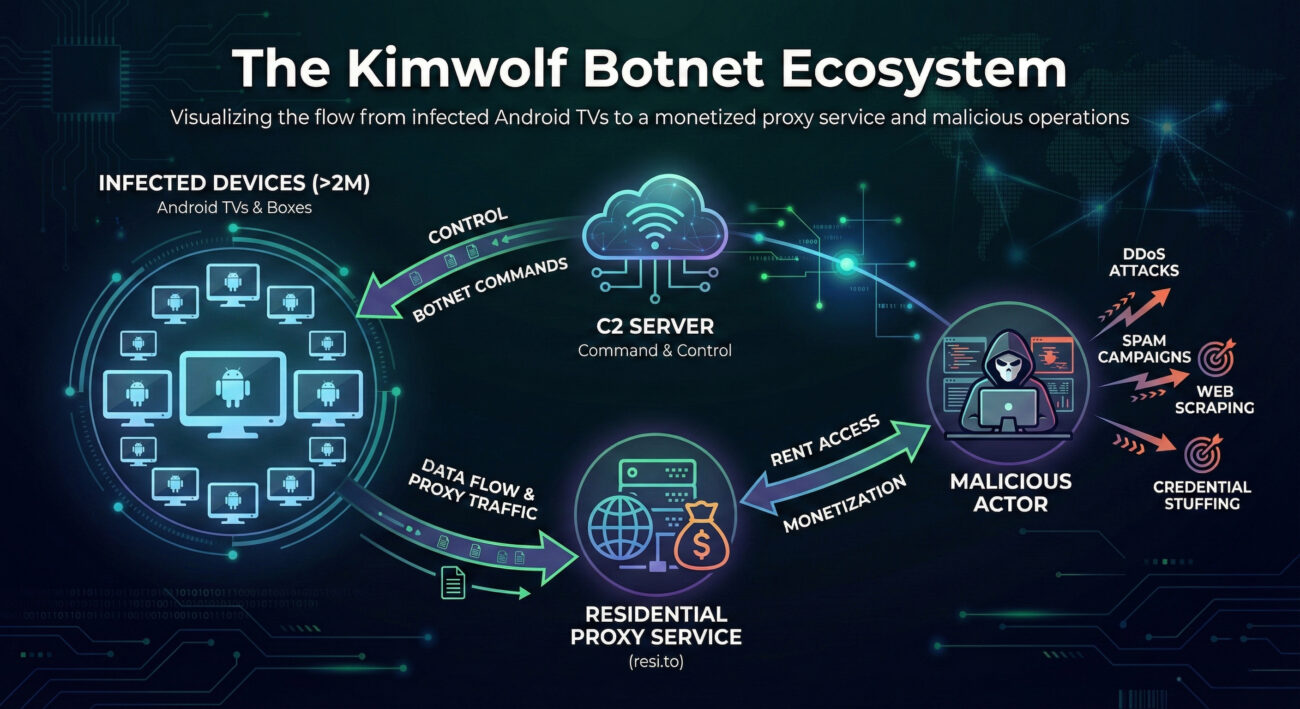
The initial compromise often occurred through supply chain attacks. Inexpensive, off-brand Android TV devices were pre-loaded with sketchy applications or an SDK called ByteConnect. When powered on, these apps would call home to a command-and-control (C2) server, enrolling the device into the botnet. The primary vulnerability exploited was the exposed Android Debug Bridge (ADB) service (TCP port 5555), often left open on these devices for "convenience."
The botnet used already-compromised devices within residential proxy networks (like IPIDEA) as hopping points. From there, it scanned the local network segment for other devices with ADB exposed. Upon finding one, it would attempt to connect and deploy the malware payload, turning the new device into a proxy node. This created a self-expanding network.
Kimwolf used a dynamic C2 infrastructure. As researchers null-routed one server (e.g., 104.171.170[.]21), it would rapidly shift to another (e.g., 104.171.170[.]201) within the same hosting provider (Resi Rack LLC). Domains used were often long, decoy-like strings such as greatfirewallisacensorshiptool.14emeliaterracewestroxburyma02132[.]su to blend in or mock security efforts.
The infected device's public IP address was listed for rent on a proxy service site. Threat actors leasing this access could then use the device to launch DDoS attacks, relay malware, or conduct credential-stuffing campaigns, all with the trusted appearance of a residential IP address.
Mapping the Kimwolf Android TV botnet's activities to the MITRE ATT&CK framework helps defenders understand and hunt for similar tactics. This is a crucial step for developing effective detections.
| MITRE Tactic | Technique (ID) | How Kimwolf Used It | Defensive Insight |
|---|---|---|---|
| Initial Access | Supply Chain Compromise (T1195.002) | Pre-installing malicious SDK/apps on TV boxes before they reached consumers. | Audit IoT devices, especially off-brands, for unknown pre-installed apps. |
| Execution | Command and Scripting Interpreter (T1059.004) | Using ADB commands to execute scripts and install the proxy SDK on target devices. | Monitor for unexpected ADB network connections or local execution. |
| Persistence | Boot or Logon Autostart Execution (T1547) | Configuring the malware to start automatically on device boot via system services or apps. | Check autostart locations on IoT devices regularly. |
| Command & Control | Dynamic Resolution (T1568) & Encrypted Channel (T1573) | Using rapidly changing decoy domains and SSH tunnels to hide C2 traffic. | Network analytics to spot beaconing to new, suspicious domains. |
| Impact | Network Denial of Service (T1498) & Resource Hijacking (T1496) | Using the botnet for DDoS and selling its bandwidth for proxy services. | Monitor for unusual outbound traffic or bandwidth consumption from IoT segments. |
Understanding both the attacker (Red Team) and defender (Blue Team) mindsets is key to building robust security.
Objective: Build a large, low-cost, resilient proxy network for monetization.
Objective: Detect, contain, and eradicate the botnet presence within the network.
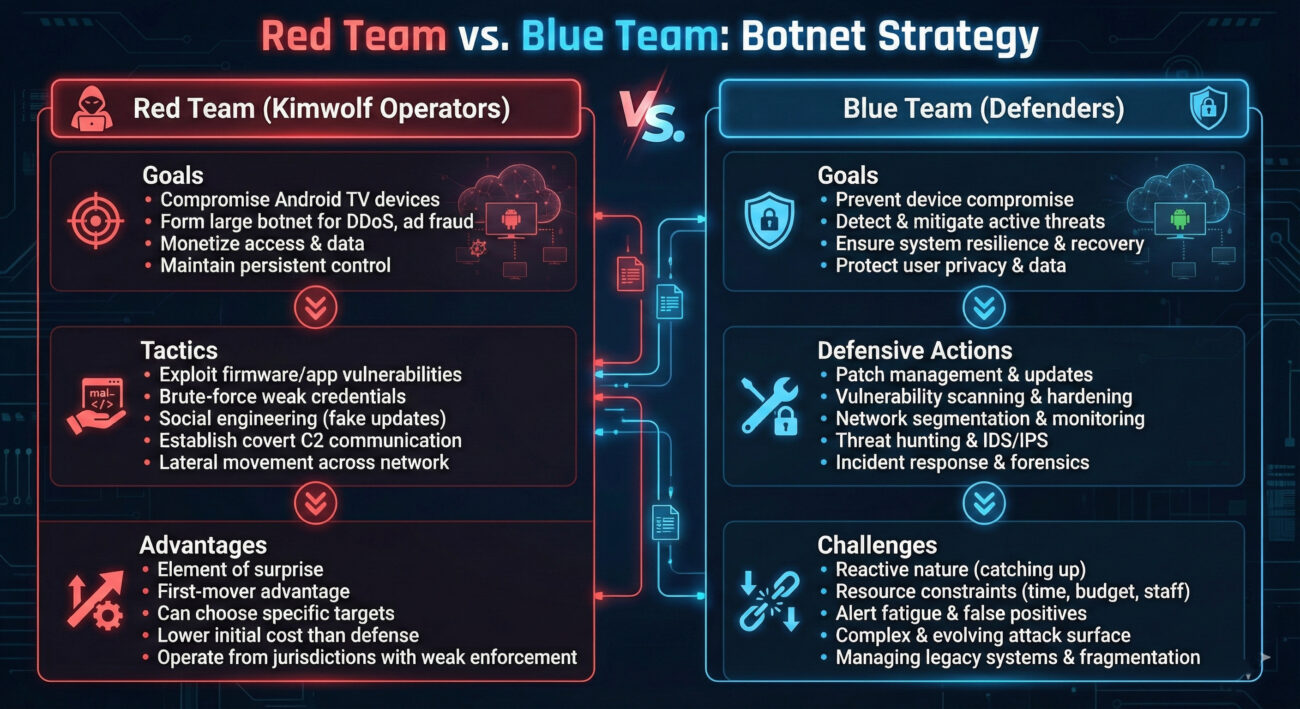
Defending against IoT-based botnets like Kimwolf requires a layered approach focused on visibility, segmentation, and strict control.
You can't defend what you don't know exists. Use network scanning tools (like Nmap) to regularly catalog all connected devices, especially on consumer/IoT segments. Look for devices responding on port 5555 (ADB) or 22 (SSH).
This is your most powerful tool. Physically or logically separate IoT devices from your main business network.
Leverage tools like Zeek (formerly Bro) or your existing SIEM to create baselines and look for anomalies.
A: Signs include: the device running noticeably slower or hotter, unusual data usage spikes in your router's statistics, or unfamiliar apps you didn't install. Technically, you can check network connections on your router for the device making constant connections to unknown IPs or domains. Using a network scanner (like Fing) on your phone can also show if port 5555 (ADB) is open on the device from your network.
A: A traditional botnet often uses infected servers or PCs in data centers. A residential proxy botnet uses infected devices in homes (like IoT gadgets), giving the attackers IP addresses that appear as regular consumer traffic. This makes the malicious activity much harder to distinguish from normal traffic and often bypasses IP reputation-based security blocks.
A: Null-routing (or sinkholing) is when an internet service provider (ISP) or network operator configures their routers to drop all traffic destined for a specific malicious IP address. This severs the connection between the infected bots and their command servers, effectively crippling the botnet's ability to receive new instructions. It doesn't remove the malware from devices but neutralizes its current control structure.
A: Start with the MITRE ATT&CK framework to understand tactics. Follow reports from labs like Black Lotus Labs and Unit 42. Set up a safe lab environment (using virtual machines) to analyze network traffic (with Wireshark) and practice basic malware analysis on isolated systems. Understanding fundamental networking and Linux is crucial.
1. The Threat is in the Living Room: The Kimwolf Android TV botnet proves that consumer IoT devices are prime targets for building massive, stealthy attack infrastructures.
2. Defense is Proactive, Not Reactive: Waiting for a breach is too late. Network segmentation, rigorous inventory, and hardening of all connected devices are non-negotiable.
3. Understand the Adversary's Playbook: Mapping campaigns to frameworks like MITRE ATT&CK transforms a confusing attack into a predictable set of tactics you can systematically defend against.
4. Collaboration is Key: The takedown of 550+ C2 servers was possible through coordinated action between researchers, ISPs, and threat intelligence sharing.
Don't let your network be an unwitting soldier in the next botnet army.
The fight against cyber threats like the Android TV botnet is ongoing. By adopting a vigilant, informed, and proactive stance, you transform from a potential victim into a resilient defender.
© 2026 Cyber Pulse Academy. This content is provided for educational purposes only.
Always consult with security professionals for organization-specific guidance.
Every contribution moves us closer to our goal: making world-class cybersecurity education accessible to ALL.
Choose the amount of donation by yourself.