


















































Certification Courses
Hands-On Labs
Threat Intelligence
Latest Cyber News
MITRE ATT&CK Breakdown
All Cyber Keywords
Have you ever started a new job and spent your first week waiting for access to email, documents, and software? That frustrating experience is exactly what proper user provisioning solves, but with critical security implications you probably haven't considered.
User provisioning is the systematic process of creating, managing, and removing digital identities and access rights across all systems and applications. Think of it as the digital equivalent of issuing office keys, security badges, and file cabinet access, except these "keys" protect your company's most valuable digital assets.
Imagine a large office building where new employees receive keys to every room they need on day one, but former employees' keys are immediately collected. Now imagine that building has hundreds of doors (applications), thousands of keys (access rights), and employees constantly changing roles (promotions, transfers). That's the complex reality user provisioning manages in today's digital workplace.
In this guide, you'll learn: exactly how user provisioning protects organizations from devastating breaches, the 7-step system for implementing it securely, real-world examples of what happens when it fails, and practical strategies you can apply immediately, even as a complete beginner.
Did you know that 80% of security breaches involve compromised credentials according to Verizon's Data Breach Investigations Report? Or that employees typically have access to 17 times more resources than they actually need for their jobs? These staggering statistics reveal why proper user provisioning isn't just an IT task, it's a fundamental security requirement.
Every time an employee joins, changes roles, or leaves an organization, their digital access must be precisely managed. Get it wrong, and you create security gaps that attackers actively exploit. In 2023 alone, the Cybersecurity and Infrastructure Security Agency (CISA) identified weak access controls as a leading cause of successful cyber incidents across critical infrastructure.
Proper user provisioning creates what security professionals call the "principle of least privilege", giving users only the access they absolutely need to perform their jobs. This dramatically reduces the attack surface and limits potential damage if credentials are stolen. When implemented correctly, it's like giving a bank teller access only to their cash drawer, not the entire vault.
Modern organizations use an average of 89 different applications, each requiring separate login credentials and permissions. Manual provisioning processes simply can't scale securely, which is why automated identity governance has become essential. Every access request, approval, and review creates an audit trail that's invaluable during security investigations and compliance audits.
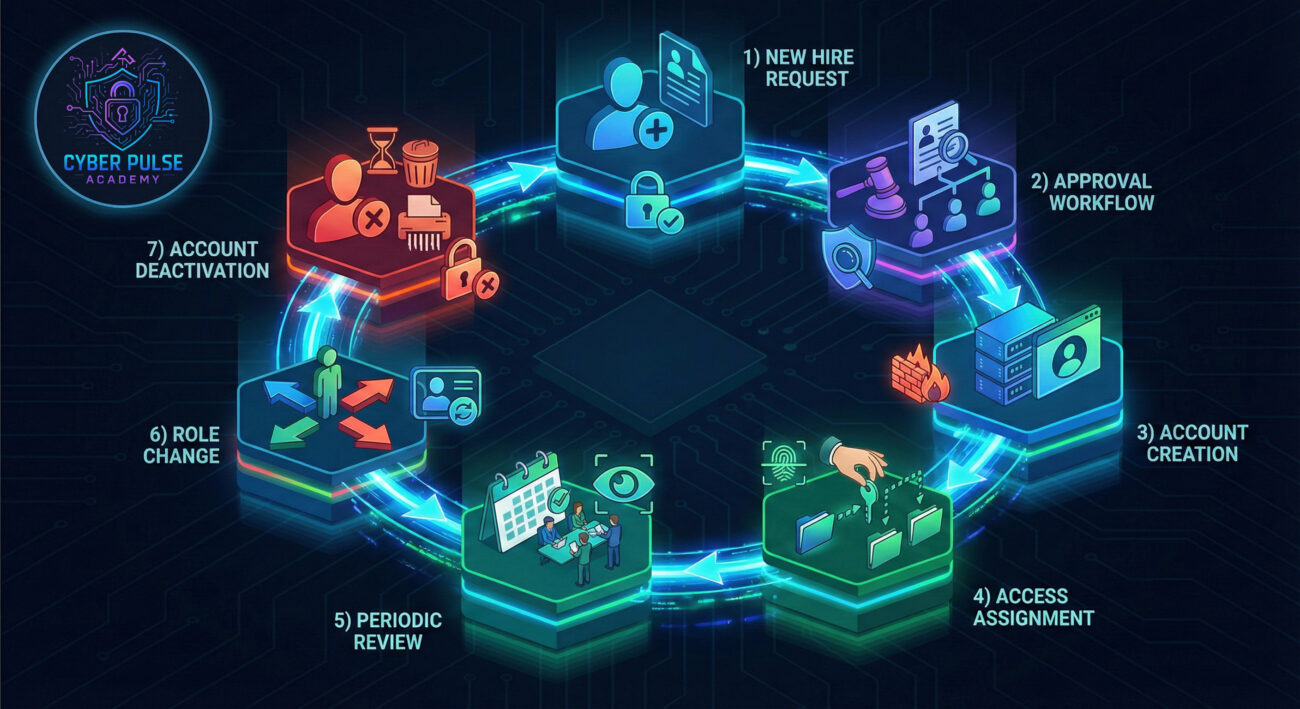
Cybersecurity jargon can be overwhelming. Let's break down the essential terms you need to understand user provisioning:
| Term | Simple Definition | Everyday Analogy |
|---|---|---|
| Identity Governance | The framework for managing digital identities and their access rights | Like a building's master security plan that determines who gets which keys |
| Least Privilege | Giving users only the minimum access needed for their job | A hotel maid gets keys to guest rooms but not the safe deposit boxes |
| Orphaned Accounts | Active accounts belonging to employees who have left the organization | Former employee's keys that were never collected, a major security risk |
| Automated Provisioning | Using software to automatically create/manage user accounts based on rules | An electronic lock system that programs keycards based on employee role |
| Access Certification | Regular reviews where managers confirm users still need their current access | Annual key audit where supervisors verify everyone still needs their access |
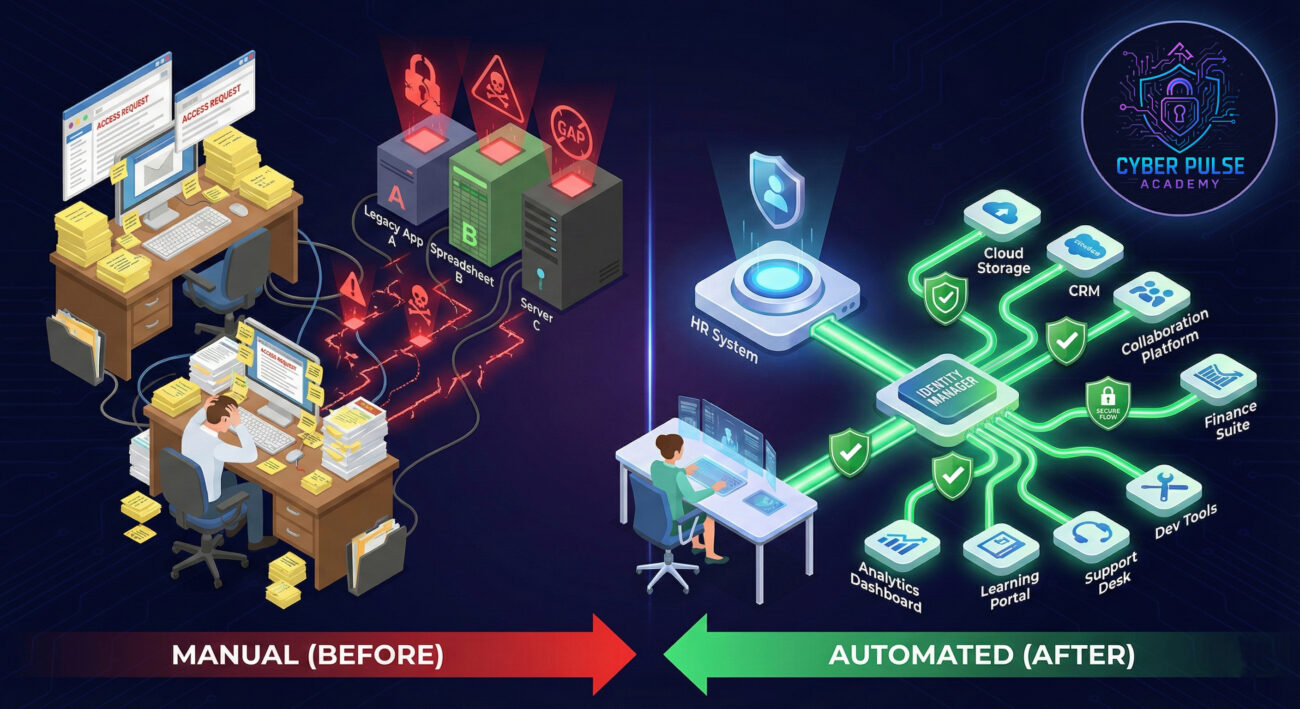
Meet Sarah, the new IT manager at TechGrowth Inc., a 200-employee software company. When she started, user provisioning was entirely manual: HR emailed IT when someone was hired, IT manually created accounts in 15 different systems, and nobody consistently removed access when employees left.
The consequences were predictable but devastating:
| Time/Stage | What Happened | Impact |
|---|---|---|
| Week 1 | New marketing hire waited 5 days for CRM access, delaying campaign launch | Lost revenue: $15,000 |
| Month 2 | Finance employee changed roles but kept access to sensitive payroll system | Compliance violation detected during audit |
| Month 4 | Former developer's account (never deactivated) was used in brute force attack | Customer data breach affecting 2,300 records |
| Month 6 | Sarah implemented automated user provisioning with role-based access | 93% faster onboarding, zero orphaned accounts |
| Year 1 | Regular access certifications and automated deprovisioning implemented | Passed compliance audit with perfect score |
Sarah's implementation followed industry standards from the National Institute of Standards and Technology (NIST), particularly their Digital Identity Guidelines. By treating user provisioning as a security requirement rather than an IT inconvenience, she transformed TechGrowth's security posture in under a year.
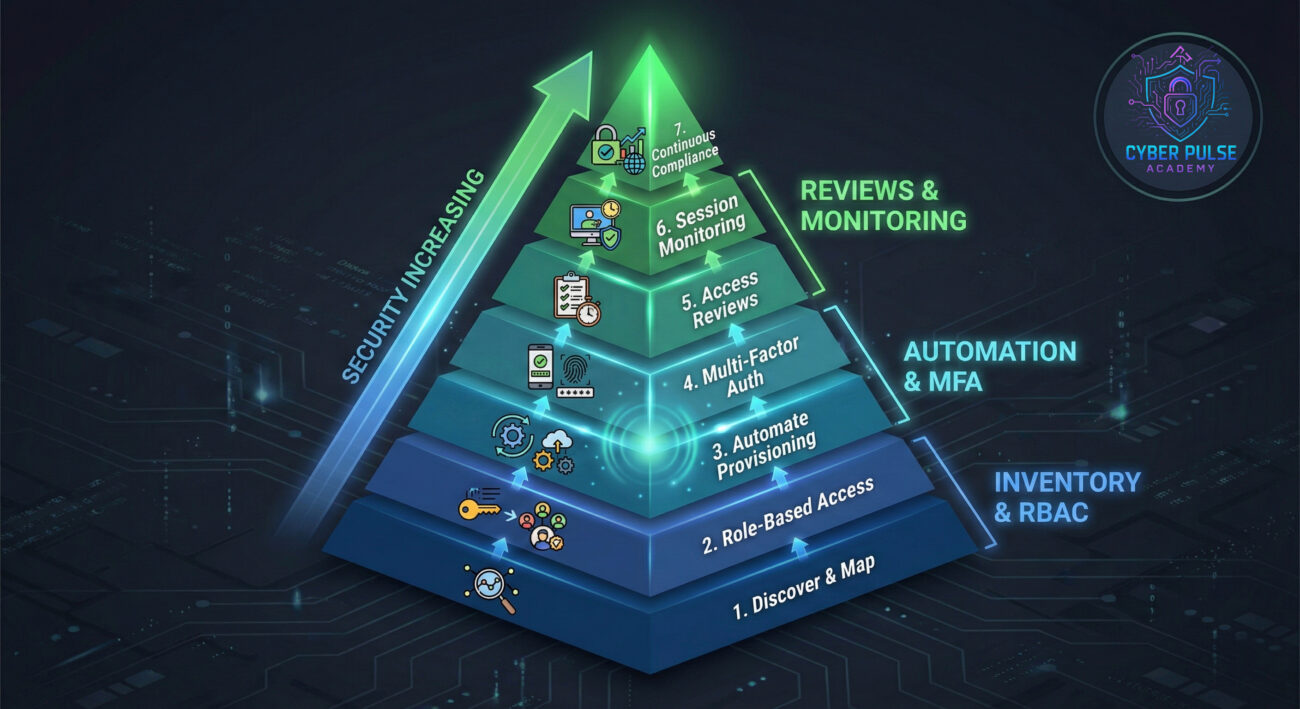
Before automating anything, document every system, application, and data repository that requires user access. This becomes your "access map."
Group permissions into roles based on job functions rather than assigning individual permissions.
Create clear rules for who must approve access requests, especially for sensitive systems.
Connect your HR system to your identity management platform to automate the lifecycle.
Add an essential security layer beyond passwords for all provisioned accounts.
Conduct periodic certifications where managers verify users still need their current access.
Implement logging and monitoring to detect provisioning anomalies and policy violations.
For more on creating secure access policies, see our guide on enterprise password security best practices.
Understanding how attackers think reveals why proper user provisioning is crucial. Attackers don't break in, they log in using legitimate credentials obtained through various means.
A sophisticated attacker begins by researching your organization on LinkedIn, identifying recently departed employees. They know that orphaned accounts often remain active for weeks or months after departure. Using previously leaked credentials (from other breaches where employees reused passwords), they attempt to access these accounts.
Once inside with basic privileges, they look for weak access controls. Can they access shared drives with sensitive information? Are there poorly secured service accounts with elevated privileges? They exploit these gaps, moving laterally through your network until they find valuable data or systems to compromise.
Security teams counter this by implementing automated deprovisioning that instantly disables all access when HR records an employee departure. They enforce MFA to prevent credential reuse attacks. Regular access certifications ensure no user accumulates unnecessary privileges over time. Most importantly, they monitor for anomalous access patterns, like a "departed employee" account suddenly accessing systems at 2 AM.
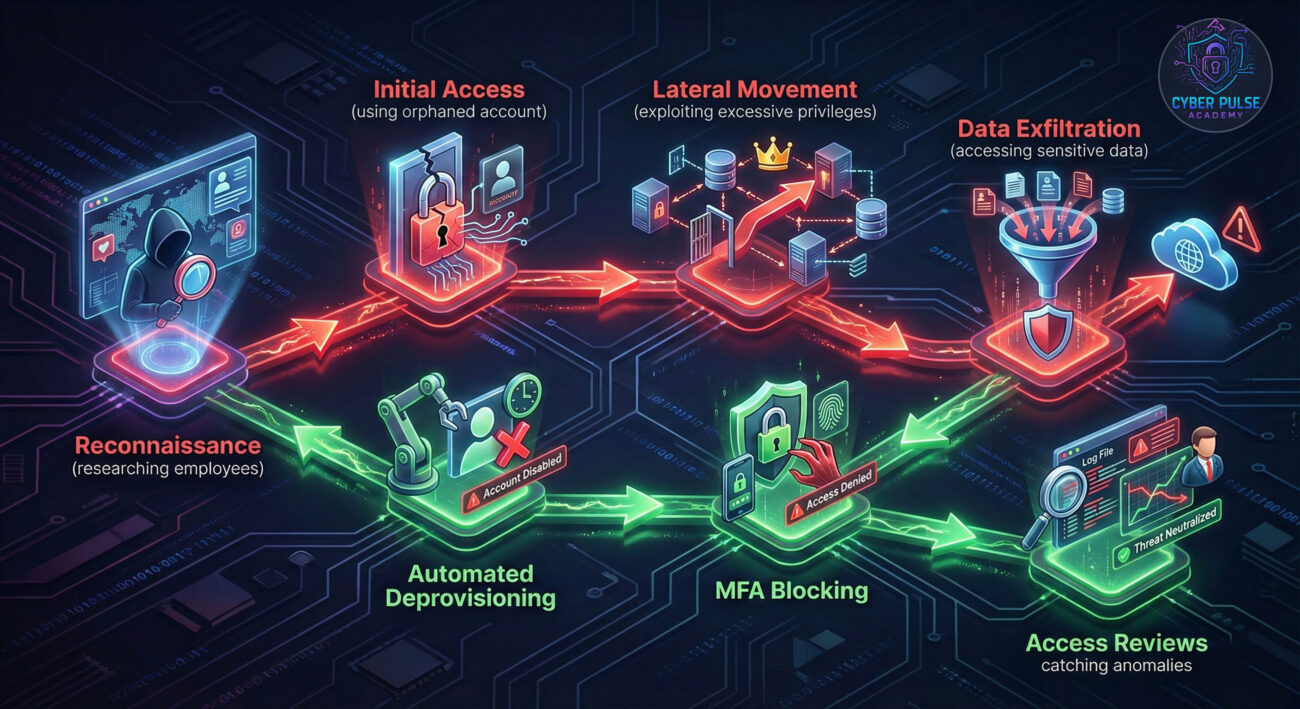
"User provisioning processes are goldmines of opportunity. We look for the gaps between systems, where HR says someone left but their accounts are still active. We love manual processes because they create inconsistencies. Excessive privileges are our favorite: once we get any access, we look for ways to escalate. The longer access reviews take, the more time we have to operate undetected. Orphaned accounts? Those are practically gift-wrapped credentials waiting for us."
"Proper user provisioning is our first line of defense. We treat identity as the new perimeter. Automated lifecycle management ensures access is always current and appropriate. Regular certifications catch privilege creep before it becomes a security risk. We implement least privilege everywhere, if credentials are compromised, damage is contained. Our provisioning system creates audit trails that let us reconstruct exactly who had access to what, and when. It's not just security, it's business enablement with safety built in."
User provisioning transforms from an IT administrative task to a critical security control when you understand its full implications. By managing digital identities systematically, organizations can significantly reduce their attack surface while improving operational efficiency.
Key takeaways from this guide:
Remember: every user account is a potential entry point. Proper user provisioning ensures those entry points are well-guarded, appropriately assigned, and promptly closed when no longer needed. In today's threat landscape, this isn't just best practice, it's business survival.
Ready to take the next step? Begin by inventorying your applications and current processes. Document who has access to what, and identify your highest-risk areas. Whether you're securing a small business or a large enterprise, the principles of systematic user provisioning apply at every scale.
What's your biggest challenge with user provisioning? Have you experienced security incidents related to weak access controls? Share your experiences and questions in the comments below, let's build our collective security knowledge together!
For further reading, explore these authoritative resources:
Every contribution moves us closer to our goal: making world-class cybersecurity education accessible to ALL.
Choose the amount of donation by yourself.