


















































Certification Courses
Hands-On Labs
Threat Intelligence
Latest Cyber News
MITRE ATT&CK Breakdown
All Cyber Keywords
Vulnerability scanning is the process of systematically probing networks, systems, or applications to identify security weaknesses that could be exploited by attackers, representing a critical phase in the cyber reconnaissance lifecycle.
ATT&CK ID: T1595.002
Tactics: Reconnaissance
Platforms: Windows, Linux, macOS, Network, Cloud, Office 365, Google Workspace, SaaS, IaaS
Difficulty: 🟢 Low
Prevalence: High - Used by virtually all sophisticated threat actors and automated botnets
Imagine a burglar systematically checking every window and door in a neighborhood, gently testing for unlocked entries or weak frames before deciding which house to target. Vulnerability scanning is the digital equivalent of this reconnaissance. Attackers don't just blindly attack; they first map the landscape, identifying which systems are online and what software they're running.
This automated probing searches for known weaknesses, unpatched software, default passwords, misconfigured services, or open network ports. Unlike a full exploitation attempt, scanning is often noisy but non-destructive, designed to gather intelligence for future attacks. It's the foundational step that turns a random cyber attack into a targeted campaign.
| Term | Simple Definition | Why It Matters |
|---|---|---|
| CVE (Common Vulnerabilities and Exposures) | A standardized identifier for a known security flaw, like "CVE-2021-44228" for Log4Shell. | Scanners check for systems vulnerable to specific CVEs. It's the universal language for discussing vulnerabilities. |
| CVSS (Common Vulnerability Scoring System) | A score from 0-10 rating a vulnerability's severity, with 10 being most critical. | Helps prioritize which vulnerabilities to patch first. A CVSS 9.8 demands immediate attention. |
| Port Scanning | Checking which network ports (like 80 for HTTP, 22 for SSH) are open on a target system. | Reveals what services are running and potentially exposed to the network. |
| Banner Grabbing | Collecting version information from services (e.g., "Apache/2.4.49") to identify outdated software. | Allows attackers to match running software against known vulnerability databases. |
| Credentialed vs. Non-Credentialed Scan | A scan with valid login credentials (deeper) vs. a scan from an external perspective (surface-level). | Defenders use credentialed scans for accuracy. Attackers start non-credentialed. |
The process is methodical. First, attackers define a target scope, which could be an IP range (e.g., 192.168.1.0/24) or a list of domain names. Using tools like Nmap or masscan, they perform an initial discovery sweep to find live hosts, filtering out non-responsive systems. Next comes port and service enumeration to build a service map: "This IP has port 443 (HTTPS) open running an old version of Apache."
With services identified, vulnerability correlation begins. The scanner matches discovered software versions against databases like the National Vulnerability Database (NVD). Finally, the attacker validates and prioritizes findings, manually checking high-value targets to reduce false positives and create a roadmap for exploitation.
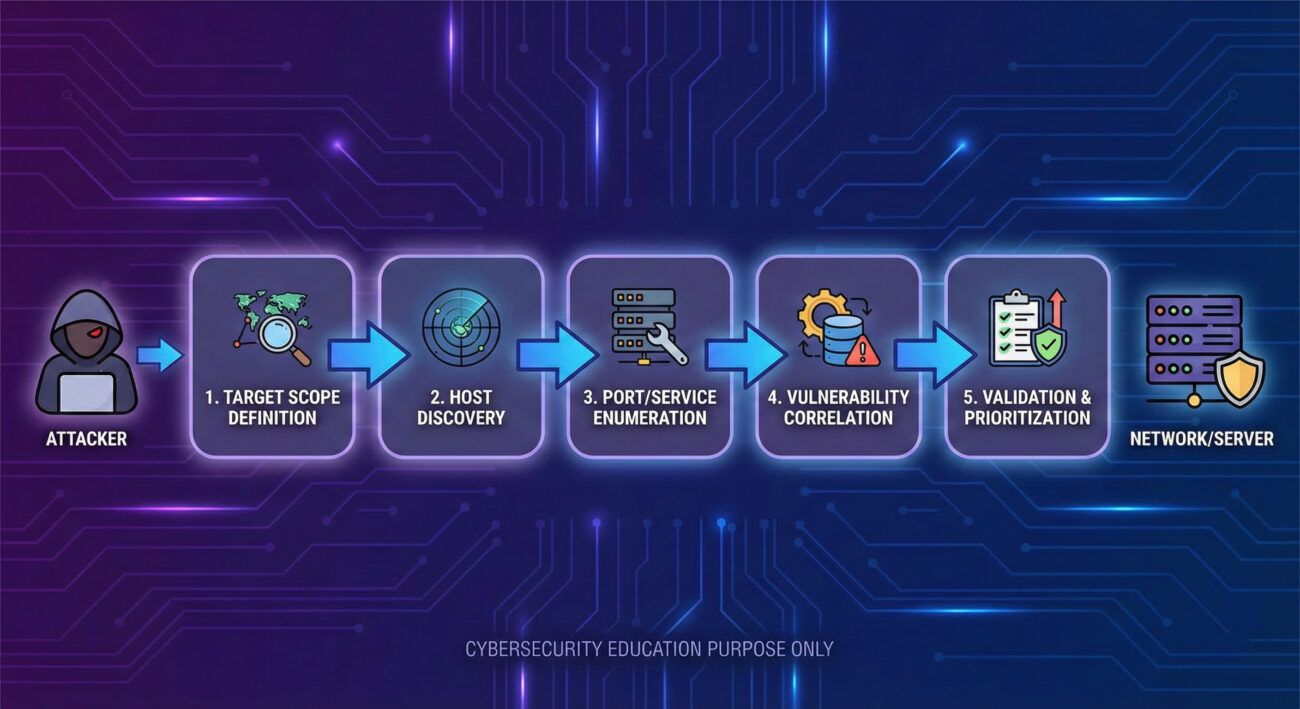
Think like a cat burglar casing a high-rise apartment building. You're not trying to break in yet, you're noting which apartments have windows slightly open (open ports), which have outdated window locks (unpatched software), and which have doormats with keys underneath (default credentials). The goal is efficiency: find the easiest point of entry with the highest reward. A red teamer uses scanning to answer: "Where is my target most vulnerable?"
Example Nmap Command for Stealthy Scanning:
nmap -sS -sV -T2 -p 22,80,443,3389,8080 --script vuln 192.168.1.0/24
# -sS: SYN stealth scan (doesn't complete TCP handshake)
# -sV: Probe open ports to determine service/version info
# -T2: Polite timing (slower, less likely to trigger alarms)
# -p: Scan specific common ports
# --script vuln: Run vulnerability detection scripts
# Target: The entire /24 subnet
Example Basic Vulnerability Check with Nikto (Web Scanner):
nikto -h https://target-company.com -output results.txt
# -h: Specify target host
# -output: Write findings to a file for later analysisThe APT41 group (a Chinese state-sponsored threat actor) extensively uses vulnerability scanning as part of their operations. In campaigns observed by security researchers, APT41 would first conduct broad internet scans for systems vulnerable to specific, recently disclosed flaws in popular platforms like Microsoft Exchange (e.g., ProxyLogon vulnerabilities).
Upon finding a vulnerable server, they would swiftly move to exploit it, deploy web shells, and establish persistence. This "scan-and-exploit" methodology allows them to rapidly compromise a large number of targets before organizations can apply patches. For an in-depth analysis, read the Mandiant report on APT41's global intrusion campaigns.
Your job is that of a building superintendent with advanced motion sensors and door monitors. You're not just looking for break-ins; you're looking for people testing door handles. The philosophy shifts from "prevent all scans" (impossible on the public internet) to "detect, log, and respond to suspicious scanning patterns." A single scan from a random IP might be background noise. But sequential scans targeting multiple systems on your network? That's a threat actor mapping your environment.
In a Security Operations Center (SOC), vulnerability scanning alerts often drown in noise. Key indicators include:
The challenge is differentiating between malicious reconnaissance and legitimate security researchers or even your own IT team's approved vulnerability scans. Context and baselining are critical.
Here is a Splunk SPL query designed to detect horizontal scanning activity, where a single source IP attempts to connect to a large number of destination IPs on the same port (a classic scanning pattern).
index=firewall earliest=-1h
| stats count(dest_ip) as unique_targets,
         values(dest_port) as ports_tried,
         earliest(_time) as first_seen,
         latest(_time) as last_seen
         by src_ip
| where unique_targets > 20
| eval scan_duration = last_seen - first_seen
| where scan_duration < 300
| table src_ip, unique_targets, ports_tried, first_seen, last_seen, scan_duration
| sort - unique_targets
# This hunts for any source IP that contacted more than 20 unique destination IPs within a 5-minute window.
# Adjust the 'unique_targets' and 'scan_duration' thresholds based on your network baseline.While you can't stop all scanning, you can reduce its effectiveness and impact:
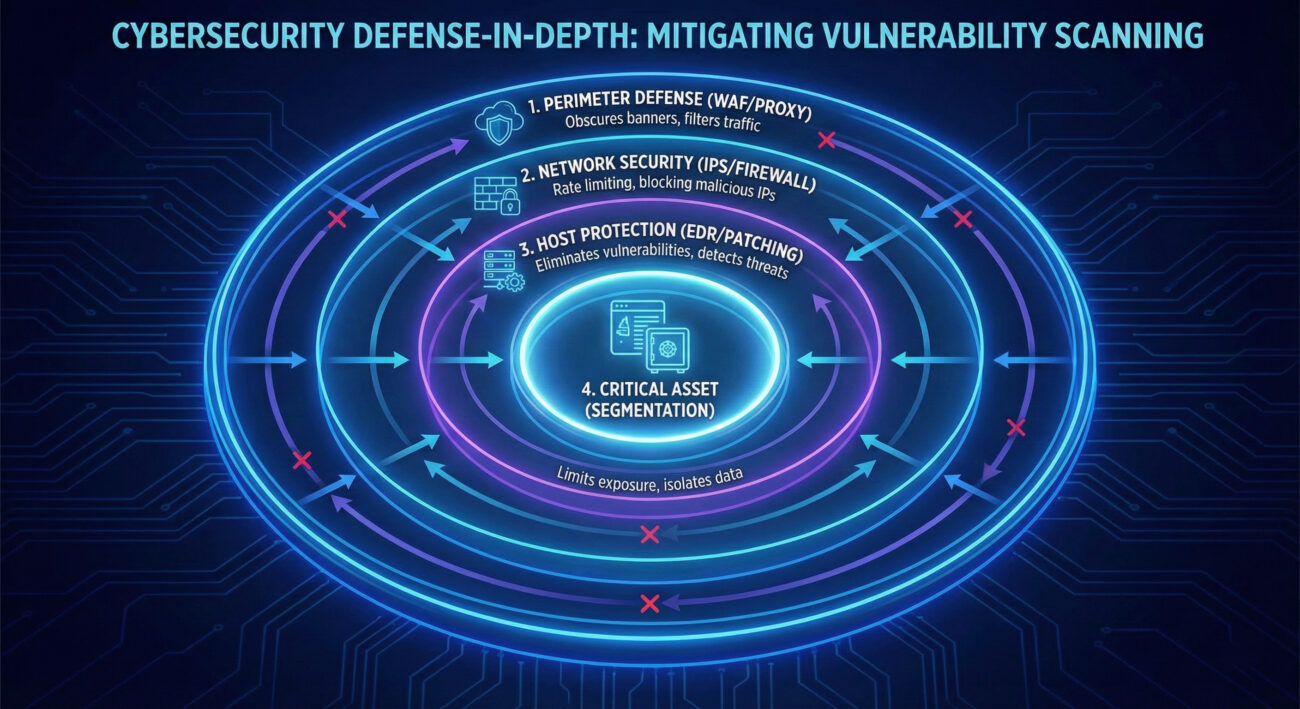
| Attacker Goal (Red Team) | Defender Action (Blue Team) |
|---|---|
| Discover live hosts and map the network. | Use network segmentation and non-routable IP space for internal systems. |
| Identify open ports and running services. | Enforce least-privilege firewall rules; close all unnecessary ports. |
| Grab version banners to find outdated software. | Obscure or modify banners (server headers) and maintain a strict patch schedule. |
| Correlate findings with known vulnerability databases. | Run credentialed internal scans more frequently than attackers do, and patch findings. |
| Avoid detection by using slow, stealthy scans. | Implement anomaly detection based on connection rates and failed attempt logs. |
A single external IP generating a high rate of TCP SYN packets to sequential IP addresses in your subnet on ports 22 (SSH), 445 (SMB), and 3389 (RDP) within a 2-minute window.
Implement network-level rate limiting and automatic temporary blocking of source IPs that exceed a threshold of connection attempts to unused ports per minute. Complement this with a robust, prioritized patch management program.
Firewall deny logs, web server logs for 400/404 errors on administrative paths, and NIDS alerts for scanning signatures. Correlate internal vulnerability scan schedules with external scan traffic to identify malicious activity.
• Official MITRE ATT&CK Page for T1595.002
• CISA Known Exploited Vulnerabilities Catalog (Prioritize these!)
Vulnerability scanning is not an attack in itself, but it is the indispensable precursor to one. By understanding its mechanics from both offensive and defensive perspectives, you transform from a passive observer of alerts to an active hunter and shaper of your security perimeter. The goal isn't to achieve the impossible, stopping all scans, but to make reconnaissance fruitless and noisy for the adversary.
Your immediate next steps:
To continue building your ATT&CK knowledge, explore related techniques like [Internal-Link: Active Scanning T1595] (the parent technique) or [Internal-Link: Exploit Public-Facing Application T1190] (what often comes after a successful scan). For authoritative guidance on building a vulnerability management program, refer to the NIST SP 800-40 Guide to Enterprise Patch Management.
Remember, in cybersecurity, visibility is a double-edged sword. By mastering how attackers see you, you take the first and most crucial step in blinding them.
Every contribution moves us closer to our goal: making world-class cybersecurity education accessible to ALL.
Choose the amount of donation by yourself.