


















































Certification Courses
Hands-On Labs
Threat Intelligence
Latest Cyber News
MITRE ATT&CK Breakdown
All Cyber Keywords
Have you ever worried that your website could be secretly controlled by a hacker? What if a single weak password could give an attacker full access to your server, your data, and your customers' information? This isn't just a plot from a movie, it happens every day using a tool called a web shell.
A web shell is a malicious script that acts as a secret backdoor, allowing attackers to control a web server through a simple browser window. Think of it like a burglar who doesn't just break your window, they install a hidden door only they can use, letting them come and go as they please, steal your valuables, and even invite their friends.
In this guide, you'll learn: what a web shell really is, how attackers install them, the devastating real-world damage they cause, and most importantly, 7 practical steps you can take right now to protect yourself.
In 2023, cybersecurity agencies like CISA and the FBI issued urgent warnings about widespread web shell attacks targeting everything from government agencies to small business websites. These aren't sophisticated attacks requiring genius-level hackers, they often exploit simple, preventable mistakes.
A web shell matters because it turns a minor vulnerability into a catastrophic breach. Once installed, it gives attackers persistent access, meaning they can return anytime, even if you fix the original weakness. They can steal data, deface your site, launch attacks on other servers, or install cryptocurrency miners that slow your server to a crawl.
For beginners managing websites (whether for a blog, small business, or portfolio), understanding web shells is crucial. You don't need to be a technical expert to implement basic protection. By the end of this guide, you'll know exactly what to look for and how to harden your defenses.

Before we dive deeper, let's demystify some essential terms. Don't worry, we'll use simple analogies, not technical jargon.
| Term | Simple Definition | Everyday Analogy |
|---|---|---|
| Web Shell | A malicious script/file uploaded to a web server that gives an attacker remote control via a web browser. | A secret spare key that a burglar hides outside your house after breaking in once, letting them return anytime. |
| Backdoor | A hidden method for bypassing normal authentication to gain access to a system. | A hidden door in a castle wall that only the attacker knows about, avoiding the heavily guarded front gate. |
| Vulnerability | A weakness in software, configuration, or human practice that can be exploited. | An unlocked window in an otherwise secure house, a single point of failure. |
| File Upload Restriction | Security rules that limit what types of files can be uploaded to a server. | A bouncer at a club checking IDs and refusing entry to anyone who doesn't meet the criteria. |
| Server Hardening | The process of securing a server by reducing its attack surface and vulnerabilities. | Reinforcing your home with better locks, alarm systems, and motion lights instead of just relying on one door lock. |
Meet Sarah, who runs a popular online boutique selling handmade jewelry. Her website is built on a common content management system (CMS). Like many small business owners, Sarah handles updates herself when she remembers.
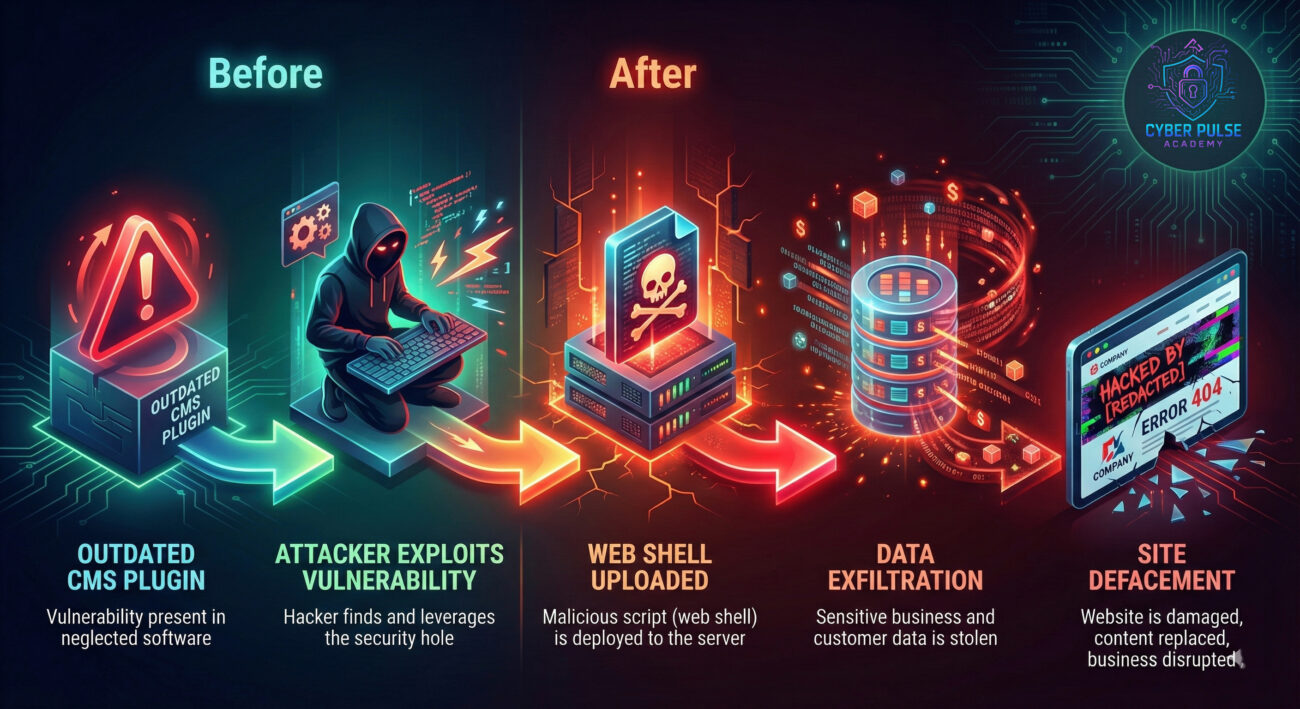
One Tuesday, Sarah notices her site is running slowly. By Thursday, customers report seeing strange pop-ups. By Saturday, her homepage is replaced with a ransom demand, and her hosting provider shuts down her site for "malicious activity." What happened?
| Time/Stage | What Happened | Impact |
|---|---|---|
| Week 1 | Sarah's CMS had an outdated plugin with a known vulnerability. She missed the update notification. | Attackers scanned the internet for sites using this old version. Sarah's site was flagged. |
| Day of Attack | An attacker used an automated tool to exploit the vulnerability and upload a small PHP file (the web shell) named "theme-helper.php" to her server's uploads folder. | The attacker now had a secret control panel accessible via browser at herdomain.com/wp-content/uploads/theme-helper.php |
| Next 48 Hours | Through the web shell, the attacker browsed her server files, stole the customer database (names, emails, addresses), and installed cryptocurrency mining software. | Server performance crashed, slowing the site. Customer data was breached. |
| Day 3 | The attacker defaced the homepage with a ransom note, demanding payment to restore it. | Site reputation destroyed. Hosting provider suspended the account. Business came to a halt. |
This scenario, based on real incidents reported by CSO Online, shows how a simple missed update can spiral into disaster via a web shell. The attacker didn't need to be a genius, they used known tools targeting known weaknesses.
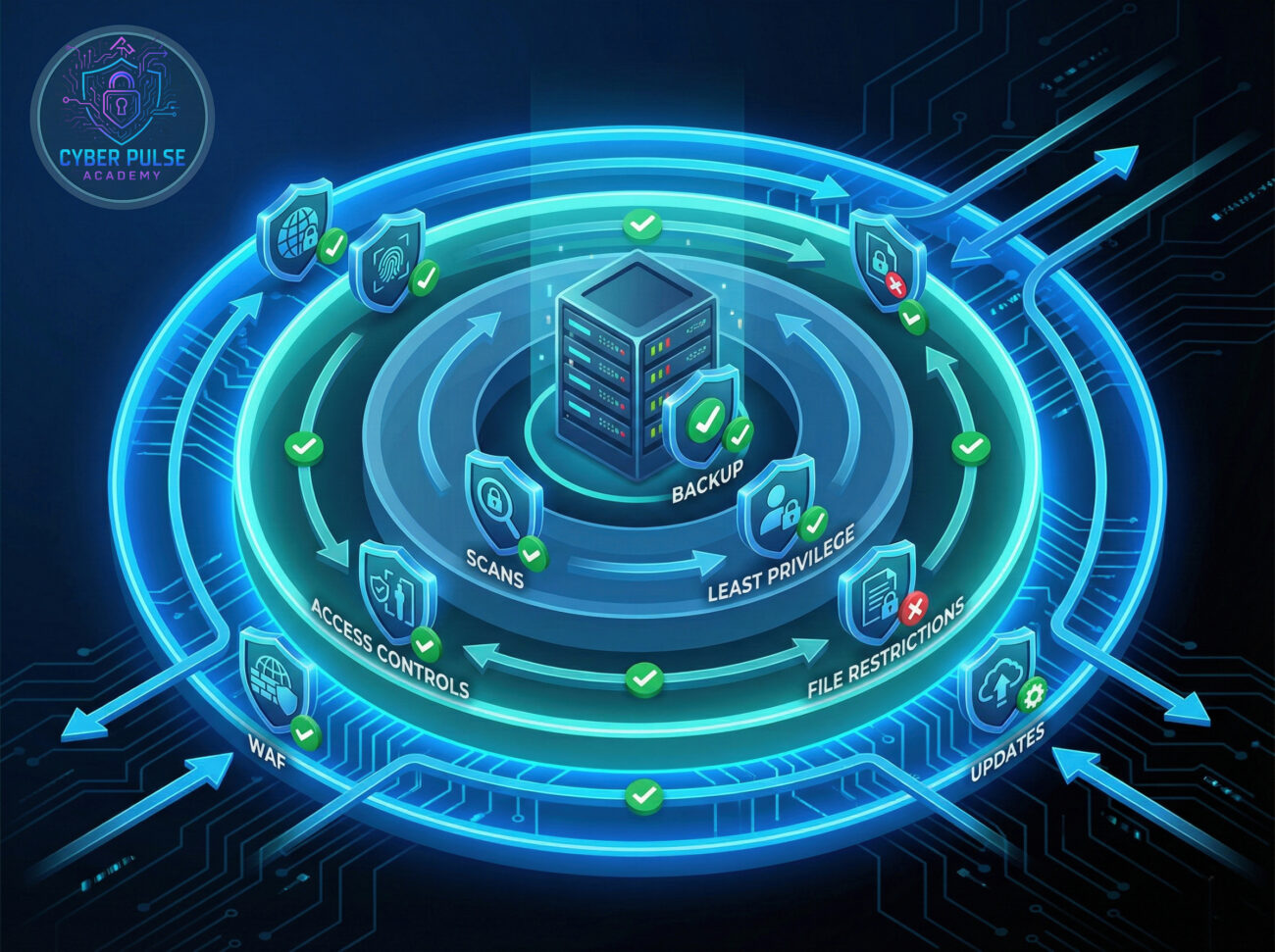
Now for the actionable part. Protecting your website isn't about becoming a cybersecurity expert overnight, it's about implementing consistent, sensible best practices. Follow these 7 steps.
This is your single most important defense. Outdated software is the #1 entry point for web shells.
Prevent unauthorized uploads in the first place.
If your site allows users to upload files, you need special rules.
A WAF acts as a shield between your website and the internet.
Don't wait for a visible problem. Actively look for threats.
Users (and software) should only have the minimum access needed.
Hope for the best, prepare for the worst.
Let's briefly look at a simple attack path through the eyes of a threat hunter. This isn't to teach you how to attack, but to understand the mindset so you can defend better.
The Simple Attack Path: An attacker doesn't start by writing complex code. They start with reconnaissance. They use bots to scan for websites running outdated versions of popular software with known exploits (like a specific plugin vulnerability). Finding one, they use a publicly available "exploit" script to automatically inject a small, obfuscated web shell file (often disguised as an image or theme file) into the vulnerable directory. Their first command via the web shell is usually to disable security logging if possible, making them harder to detect.
The Defender's Counter-Move: A defender monitoring their server would look for anomalies. This includes unexpected files in the 'uploads' folder with recent timestamps, strange processes consuming high CPU (like a crypto miner), or failed login attempts followed by a successful one from a different country. The key is proactive monitoring, checking logs, using file integrity monitoring tools, and setting up alerts for suspicious activity before the website gets defaced.
A web shell is a tool for persistence and efficiency. The goal is to gain and maintain access with minimal effort. Attackers care about: Stealth (naming the file something innocent like "logo.php"), Access (ensuring the shell remains even if the initial vulnerability is patched), and Utility (using the shell to run commands, exfiltrate data, or pivot to other systems). They love forgotten, unpatched applications because they provide an easy, low-risk entry point.
A web shell is a critical incident indicator and a failure of preventive controls. The goal is to prevent installation, detect it quickly if prevention fails, and respond effectively. Defenders care about: Hardening (closing the doors), Monitoring (watching for someone trying the doors), and Resilience (having a plan to recover). They focus on patch management, strict upload controls, and regular integrity checks to find unauthorized files.
Understanding the threat of a web shell is your first line of defense. You don't need to be a security professional to significantly reduce your risk.
Let's recap the essential points:
Cybersecurity is an ongoing process, not a one-time setup. By implementing the steps in this guide, you're not just protecting against web shells, you're building a foundation of security hygiene that will protect you from a wide range of common threats.
Start today. Pick one step from the guide above, like enabling auto-updates or setting up MFA, and implement it this week. Small actions build powerful defenses.
Have questions about web shells or website security? Share your thoughts or experiences in the comments below! Let's build a more secure web together.
Every contribution moves us closer to our goal: making world-class cybersecurity education accessible to ALL.
Choose the amount of donation by yourself.