


















































Certification Courses
Hands-On Labs
Threat Intelligence
Latest Cyber News
MITRE ATT&CK Breakdown
All Cyber Keywords
A deep dive into the social engineering and technical mechanics of a viral banking trojan campaign.
In early 2026, a sophisticated WhatsApp worm attack demonstrated a dangerous evolution in cybercrime, turning the world's most popular messaging app into a vehicle for a devastating banking trojan. This campaign, primarily targeting Brazil, leveraged human trust and automated messaging to spread the notorious Astaroth malware (also known as Guildma).
Unlike traditional malware distribution via email or malicious websites, this attack weaponized WhatsApp's contact lists. Upon infecting a single user, the malware would automatically harvest the victim's contacts and send a malicious file to each one, masquerading as a message from a known friend or family member. This worm-like propagation created a self-sustaining chain of infection, making it exceptionally virulent.
The final payload was a banking trojan designed to steal credentials and financial data, causing significant risk to individuals and businesses. This case is a stark reminder that our most trusted communication platforms can become our greatest vulnerabilities if proper secure habits are not followed.
Let's break down the step-by-step lifecycle of this WhatsApp worm attack, from the initial lure to the final data theft. Understanding this flow is crucial for both recognition and defense.
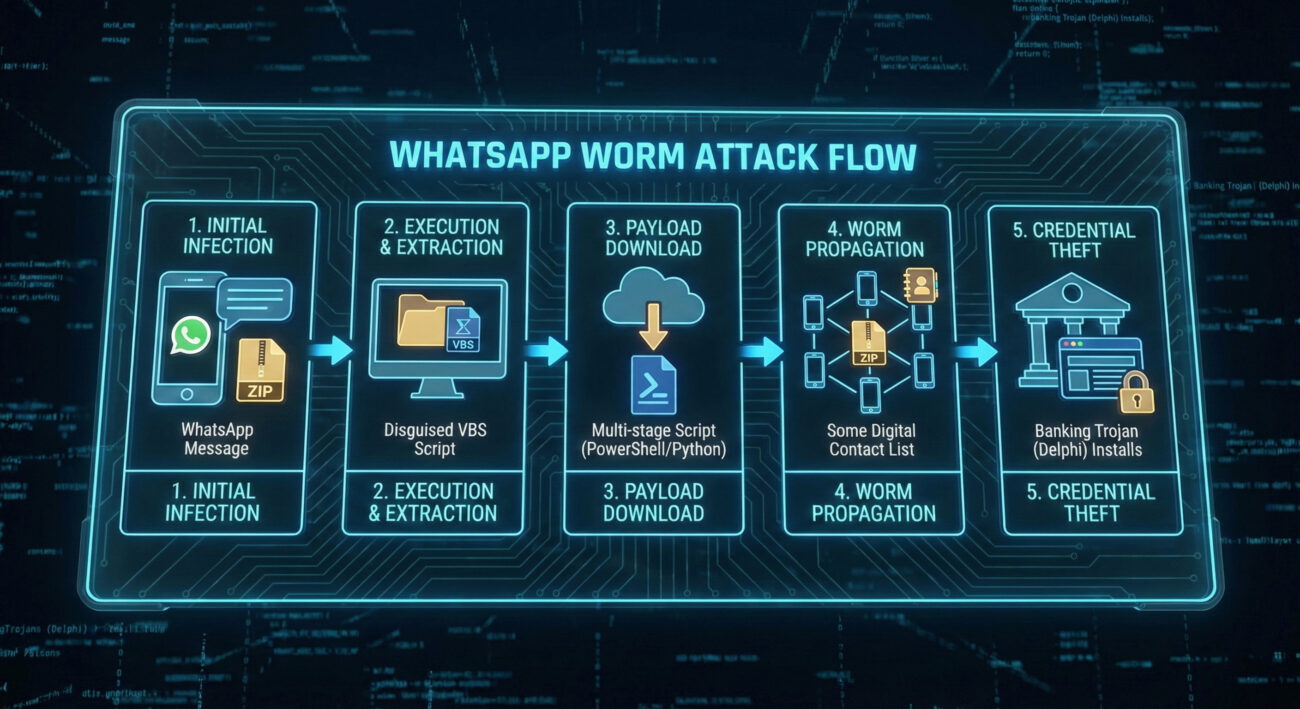
The attack began with a simple WhatsApp message. Users received a message, appearing to come from someone in their contact list, containing a compressed ZIP archive. The message often used urgent or curious language (e.g., "Is this you in this video?" or "Important invoice for you") to prompt immediate action. Because it came from a known number, the likelihood of the victim opening the file was significantly higher than with a random email, a classic and effective social engineering trick.
Once the curious victim downloaded and extracted the ZIP file, they found a file with a double extension (e.g., invoice.pdf.vbs). Windows, by default, often hides known file extensions, so the user might only see invoice.pdf. Believing it to be a harmless document, they would double-click it. This action executed a Visual Basic Script (VBS) that served as the initial malware downloader.
The initial VBS script was light and unobtrusive. Its sole purpose was to contact a hacker-controlled server and download the next stages of the malware. These stages were typically implemented in PowerShell or Python, allowing the attackers to use powerful, built-in system tools and scripting languages to perform complex tasks while potentially evading basic signature-based antivirus detection.
Here’s where the WhatsApp worm attack truly distinguished itself. One of the downloaded modules was a Python script designed specifically for propagation. It would:
This automated messaging turned every infected device into a new attack platform, enabling exponential spread without further action from the threat actors.
Simultaneously, the core Astaroth banking trojan (written in Delphi) was installed via an MSI package. This module operated stealthily in the background, monitoring the victim's web browser. When it detected a visit to a banking or financial website (often targeting Brazilian banks), it would activate a web inject or overlay to harvest login credentials, session cookies, and other sensitive data, leading directly to financial fraud.
The technical sophistication of this campaign lay in its modular, multi-language architecture. By separating functionalities into different components written in different languages, the attackers achieved both flexibility and evasion.
| Module | Language | Primary Function | Evasion Benefit |
|---|---|---|---|
| Downloader / Dropper | Visual Basic Script (VBS) | Initial execution, fetches next-stage payloads from C2 server. | Small, simple, and can leverage trusted Windows scripting hosts. |
| Propagation (Worm) Module | Python | Harvests WhatsApp contacts and auto-sends malicious messages. | Cross-platform potential, powerful libraries for automation. |
| Persistence / Installer | MSI (Windows Installer) / PowerShell | Installs the core banking trojan and establishes persistence on the system. | Uses legitimate system tools (PS, MSI) that blend in with admin activity. |
| Core Banking Trojan (Astaroth) | Delphi | Monitors browsers, injects code, and steals financial data. | Compiled binary, mature codebase with a long history of evading detection. |
The Python worm module's ability to report propagation metrics (messages sent, success rate) back to the attackers is particularly noteworthy. It shows a professional, data-driven approach to criminal campaigns, allowing them to measure the breach effectiveness and tweak their lures for maximum impact.
The MITRE ATT&CK framework is a globally accessible knowledge base of adversary tactics and techniques based on real-world observations. Mapping this WhatsApp worm attack to ATT&CK helps defenders understand the tools and methods used, enabling better detection and hardening.
Below are the key tactics and techniques employed in this campaign:
| MITRE ATT&CK Tactic | Technique Code & Name | How It Was Used in This Attack |
|---|---|---|
| Initial Access | T1566.001: Phishing - Spearphishing Attachment | The malicious ZIP file was delivered via WhatsApp messages tailored to appear from trusted contacts. |
| Execution | T1059.005: Command and Scripting Interpreter - Visual Basic | The initial dropper was a VBS script executed by the victim. |
| Persistence | T1547.001: Boot or Logon Autostart Execution - Registry Run Keys | The Astaroth payload likely used registry run keys to survive reboots. |
| Defense Evasion | T1036.005: Masquerading - Match Legitimate Name or Location | Files used double extensions (e.g., .pdf.vbs) to appear as legitimate documents. |
| Discovery | T1217: Browser Information Discovery | The malware enumerated browser data and WhatsApp contact lists. |
| Lateral Movement / Propagation | T1534: Internal Spearphishing (simulated) | The worm module used the victim's own account to spearphish their contacts internally on WhatsApp. |
| Collection | T1539: Steal Web Session Cookie & T1555.003: Credentials from Web Browsers | The banking module harvested cookies and credentials from banking site sessions. |
| Command and Control (C2) | T1071.001: Application Layer Protocol - Web Protocols | Used HTTP/HTTPS to communicate with attacker servers for payload delivery and data exfiltration. |
For a complete understanding of these techniques, the official MITRE ATT&CK® website is an invaluable resource for cybersecurity professionals.
Understanding an attack requires seeing it from both sides: the offensive (Red Team) mindset that exploits weak points, and the defensive (Blue Team) mindset that works to defend and secure. Here’s how each would view this WhatsApp worm campaign.
Objective: Mass distribution of a banking trojan for financial gain.
Objective: Detect, contain, and prevent infection and data loss.
This attack succeeded by exploiting common user and organizational oversights. Here’s what to avoid and what to embrace.
No, not directly. This particular malware campaign targeted Windows computers. The infection chain required the victim to download and execute a Windows executable/script (.vbs, .msi). The attackers abused WhatsApp's desktop platform or web interface to propagate the malicious link/file. Your smartphone's operating system (iOS or Android) was not the target for the Astaroth payload. However, your contact list could have been scraped if you were infected on a desktop, leading to your contacts receiving malicious messages from your account.
In File Explorer, go to the "View" tab in the ribbon. In the "Show/hide" section, ensure the checkbox for "File name extensions" is checked. You should immediately see the full name of files, like "document.pdf" or "setup.exe.vbs". For a visual guide, you can refer to this Microsoft support article on file extensions.
Trojan (Astaroth): Malicious software disguised as legitimate software. It tricks users into installing it. Its primary goal here was stealing banking data.
Worm (WhatsApp Module): A self-replicating program that spreads automatically to other systems. The Python component that auto-messaged contacts fits this definition perfectly.
Virus: A program that attaches itself to a legitimate file and spreads when that file is executed. This campaign didn't primarily use this method.
This attack was a blended threat, combining a worm's spreading mechanism with a trojan's data-stealing payload.
Start with frameworks from leading cybersecurity authorities. The CISA Cybersecurity Framework (CSF) provides a great structure to Identify, Protect, Detect, Respond, and Recover. Additionally, the UK NCSC's 10 Steps to Cyber Security offers practical, high-level guidance.
The WhatsApp worm attack distributing Astaroth is more than just another malware campaign. It is a blueprint for the future of social engineering, leveraging hyper-personalized trust on closed platforms to achieve exponential, automated growth.
Don't just read and forget. Take one step today to dramatically improve your security posture:
Go to your Windows File Explorer settings and enable the viewing of file extensions. This simple, 30-second change will make malicious files like "photo.jpg.exe" instantly obvious.
Review and test your organization's application control policies. Can you block unsigned VBS, PowerShell, and Python scripts from running from user download folders? If not, start planning to implement this critical mitigation.
Visit your critical financial, email, and social media accounts and enable Multi-Factor Authentication (MFA) using an authenticator app (like Google Authenticator or Authy). This is the single most effective way to neutralize the threat of stolen passwords from attacks like Astaroth. For a guide, see CISA's guidance on MFA.
Cybersecurity is a continuous process. By understanding the tactics used in real-world attacks like this WhatsApp worm attack, and taking proactive, measured steps to defend, we can collectively build a more secure digital environment.
© 2026 Cyber Pulse Academy. This content is provided for educational purposes only.
Always consult with security professionals for organization-specific guidance.
Every contribution moves us closer to our goal: making world-class cybersecurity education accessible to ALL.
Choose the amount of donation by yourself.