


















































Certification Courses
Hands-On Labs
Threat Intelligence
Latest Cyber News
MITRE ATT&CK Breakdown
All Cyber Keywords
Have you ever typed a password to unlock your computer and wondered what really happens behind the scenes? That simple daily action is powered by Windows Authentication – the silent digital bouncer that decides who gets into your computer, your work network, and your most sensitive files. It's the foundation of your entire digital security.
Think of Windows Authentication like the lock and key system for your digital house. Just as a physical key proves you're allowed inside, authentication verifies your digital identity before granting access. But what happens when criminals make fake keys or pick the lock?
In this beginner-friendly guide, you'll learn: exactly how Windows Authentication works in simple terms, the real threats targeting it every day, and 7 practical steps to protect yourself. By the end, you'll understand this critical security layer that protects everything from your personal photos to corporate databases.
Every 39 seconds, a hacker attack occurs somewhere on the internet, with compromised credentials being the #1 entry point according to the IBM Cost of a Data Breach Report. Windows Authentication is the first line of defense against these attacks for over 1.4 billion Windows devices worldwide.
When Windows Authentication fails, the consequences are severe. In 2023, the Storm-0558 cyber espionage campaign breached Microsoft's authentication systems, accessing government email accounts. This wasn't just a technical failure – it was a national security incident that started with authentication weaknesses.
For you personally, weak Windows Authentication means someone could access your banking information, private messages, or work documents. For businesses, it can mean losing millions in ransom payments, regulatory fines, and damaged reputation. Proper authentication isn't just about logging in – it's about verifying that "you" are actually you before granting access to your digital life.
Before we dive deeper, let's decode the technical jargon. This table breaks down essential Windows Authentication concepts into everyday language.
| Term | Simple Definition | Everyday Analogy |
|---|---|---|
| Authentication | Proving you are who you claim to be | Showing your ID card to enter a secure building |
| Credentials | Your digital proof of identity (username/password) | Your house key - only you should have it |
| Active Directory | Microsoft's system that manages user identities and permissions | A school's main office that keeps all student records and hall passes |
| Multi-Factor Authentication (MFA) | Requiring two or more proofs of identity | Needing both a key AND a fingerprint scan to enter a vault |
| Kerberos Ticket | A time-limited digital pass that proves you're authenticated | A concert wristband that gets you in/out without showing your ticket each time |
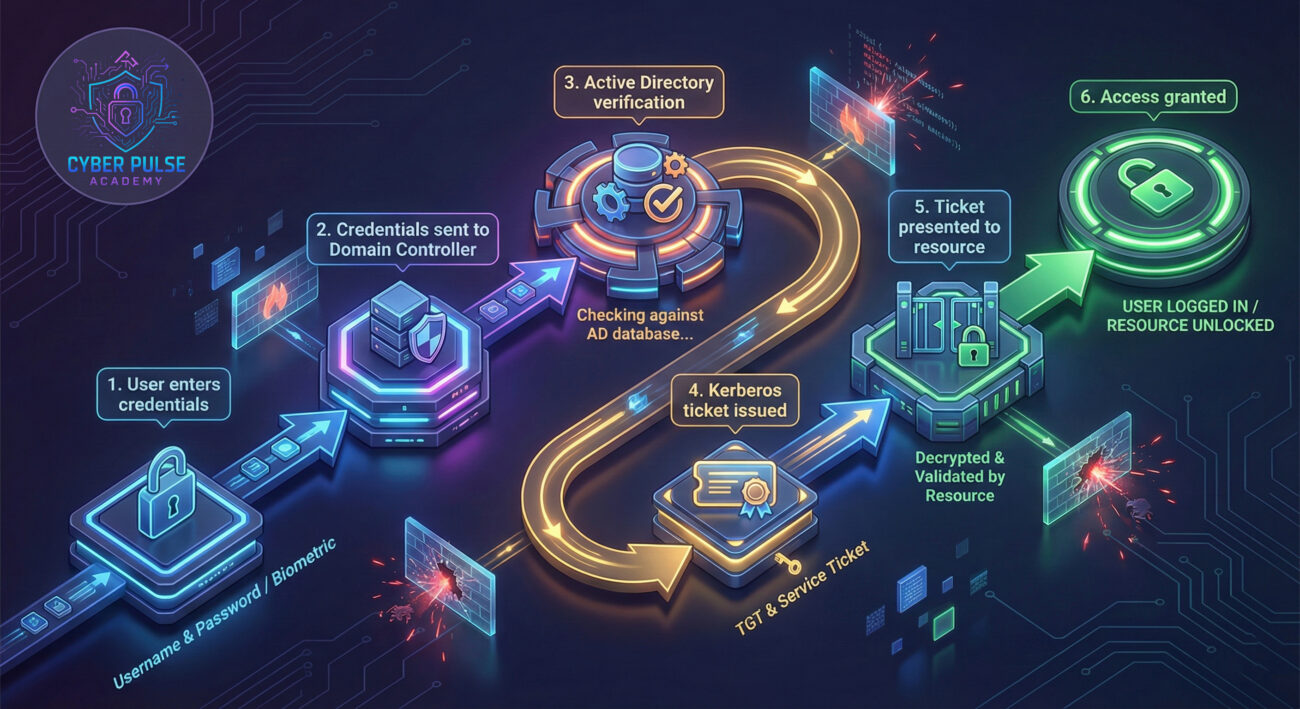
Sarah, a marketing manager at TechForward Inc., almost became a cybersecurity statistic. Like many employees, she used the same password for her work account and several personal sites. Here's how a breach nearly happened – and how proper Windows Authentication practices saved her company.
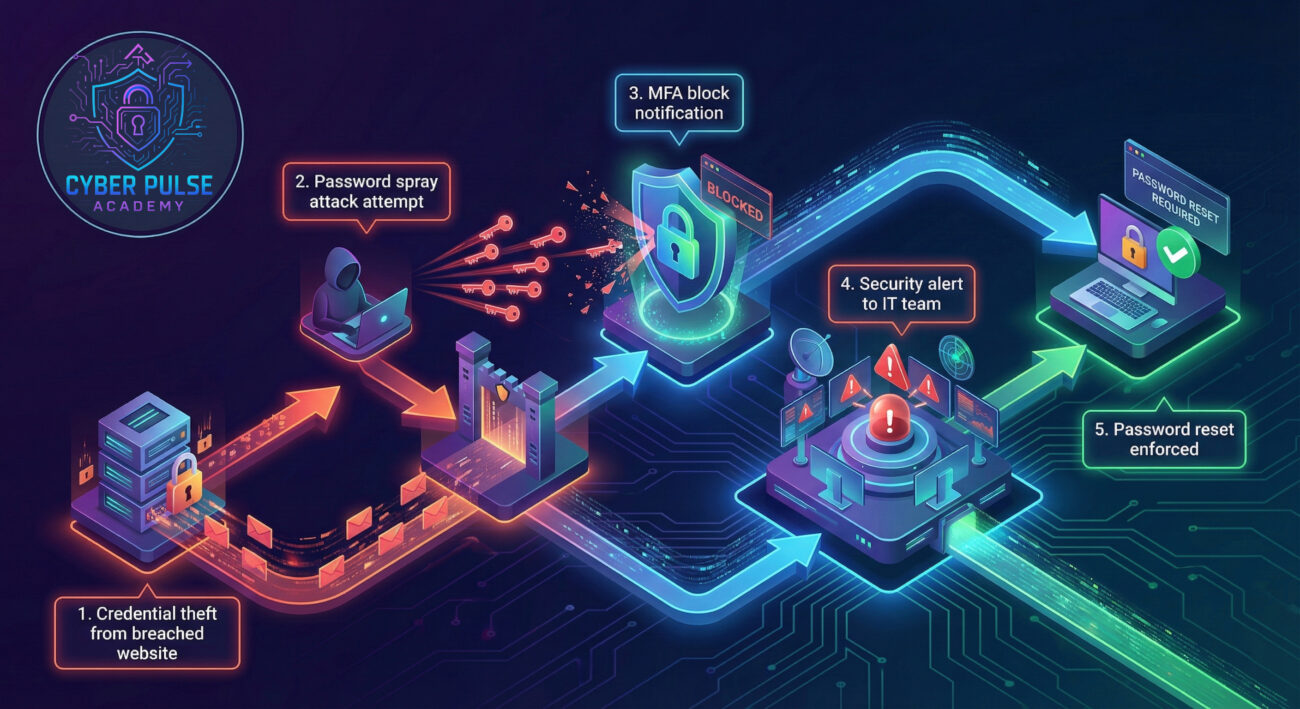
A gaming forum Sarah registered on years ago was hacked in March. The attackers obtained her email and password combination. Using automated tools, they tried this same combination on thousands of corporate login portals – including TechForward's Windows network.
| Time/Stage | What Happened | Impact |
|---|---|---|
| Day 1: 2:14 AM | Attackers attempt Sarah's credentials on the company VPN portal | Username/password combination was correct (same as breached gaming site) |
| Day 1: 2:15 AM | Windows Authentication requires MFA approval via Microsoft Authenticator app | Attack blocked – Sarah's phone shows login attempt while she sleeps |
| Day 1: 7:30 AM | Sarah sees MFA notification, reports suspicious activity to IT | Early detection – Security team investigates immediately |
| Day 1: 8:00 AM | IT forces password reset for Sarah's account | Compromised credentials neutralized |
| Day 1: 10:00 AM | Company-wide security alert about password reuse risks | Proactive protection – All employees reminded of authentication best practices |
This scenario shows how Windows Authentication isn't just about passwords anymore. The multi-factor authentication layer – which seemed annoying to Sarah when first set up – became her digital shield. According to Microsoft, MFA blocks 99.9% of account compromise attacks, transforming a potential disaster into a security training opportunity.
This single action provides the most significant security improvement. MFA requires something you know (password) AND something you have (phone) or are (fingerprint).
Learn more about MFA implementation in our guide: Two-Factor Authentication: Complete Setup Guide
Your password is the first authentication factor. Make it count by following these guidelines.
For detailed password strategies: Password Security: Beyond the Basics
Microsoft regularly patches authentication vulnerabilities that attackers exploit.
Windows Hello provides password-less authentication using facial recognition, fingerprint, or PIN.
Regular checks help detect unauthorized access attempts early.
Physical security is part of authentication – someone at your keyboard bypasses all digital controls.
The strongest authentication fails if you willingly give credentials to attackers.
Learn to spot threats: Phishing Detection: Modern Attack Patterns
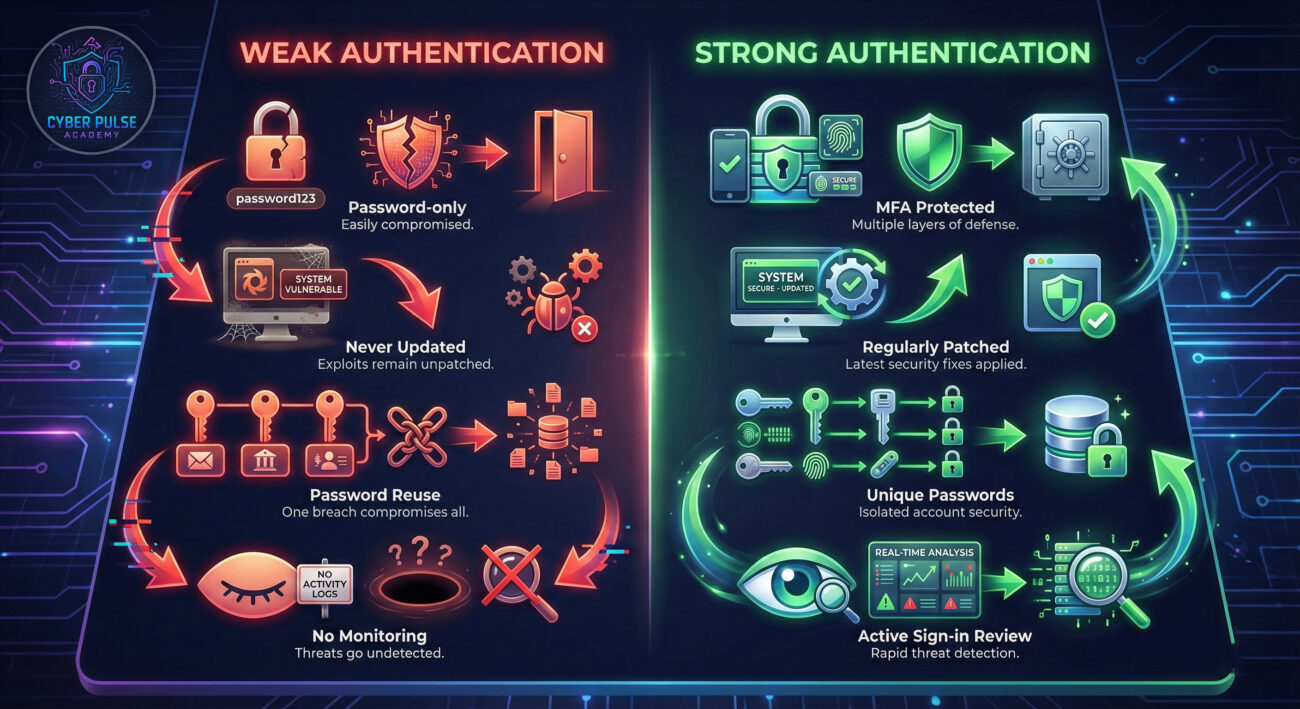
Understanding how attackers think helps you defend better. Here's a simplified view of one common attack path targeting Windows Authentication:
The Attack Path: An attacker doesn't try to break encryption mathematically. Instead, they might use "password spraying" – trying a few common passwords (like "CompanyName2024" or "SeasonYear") against many accounts. They look for employees who haven't changed default passwords or use predictable patterns. Once they get a single valid credential, they move laterally through the network, searching for higher-privilege accounts.
The Defender's Counter-Move: Security teams implement "account lockout policies" after a few failed attempts, but not so strict that they help attackers conduct denial-of-service attacks. They monitor for authentication anomalies – like login attempts at 3 AM from a country where the company has no employees. The key is balancing security with usability while maintaining constant vigilance for unusual patterns that human behavior wouldn't explain.
Attackers see Windows Authentication as a puzzle to solve. They're looking for the weakest link – maybe an executive who reused a password from a breached social media site, or a service account with a never-changed password. They don't need to break the latest encryption; they just need one person to click a phishing link or one administrator to delay a critical security patch. Their goal is to obtain valid credentials, then use them to move through the network undetected, often for months before launching their final attack.
Defenders see Windows Authentication as a layered shield. They know perfect security doesn't exist, so they build multiple barriers: strong passwords plus MFA plus behavioral monitoring. Their goal is to make attacks so difficult and expensive that attackers move to easier targets. They focus on detecting anomalies in authentication patterns, ensuring patches are applied promptly, and educating users to recognize social engineering. For them, every failed authentication attempt is data, and every successful one needs verification.
Windows Authentication is your digital front door – and in today's threat landscape, a simple lock isn't enough. Throughout this guide, you've learned that authentication is about proving identity through multiple verification methods, not just passwords.
Key takeaways:
The most sophisticated Windows Authentication systems in the world can be compromised by one reused password or one clicked phishing link. Your security is only as strong as your daily habits combined with proper technical controls.
Start today: Enable MFA on your primary accounts, check your sign-in activity, and commit to unique passwords for every service. These simple actions place you ahead of 99% of users and make you a much harder target for automated attacks.
What's your biggest challenge with Windows Authentication security? Have you experienced a suspicious login attempt? Share your experiences or questions below – let's build our collective security knowledge together.
Need personalized advice? Check our related guides on Enterprise Security Fundamentals and Modern Identity Management.
Every contribution moves us closer to our goal: making world-class cybersecurity education accessible to ALL.
Choose the amount of donation by yourself.