- All Posts
- News










Network Security Appliances (T1590.006)
Ultimate Guide to Gather Victim Network Information - Network Security Appliances: Attack & Defense
Network Security Appliances involves identifying and fingerprinting security devices like firewalls, VPN gateways, and intrusion detection systems to map defensive perimeters and find potential weaknesses before launching an attack.
Table of Contents
- Understanding Network Security Appliances in Simple Terms
- Decoding the Jargon: Key Terms for Network Security Appliances
- The Attacker's Playbook: Executing Network Security Appliances
- The Defender's Handbook: Stopping Network Security Appliances
- Building Resilience: Mitigation Strategies for Network Security Appliances
- Network Security Appliances Cheat Sheet
- Conclusion and Next Steps
Understanding Network Security Appliances in Simple Terms
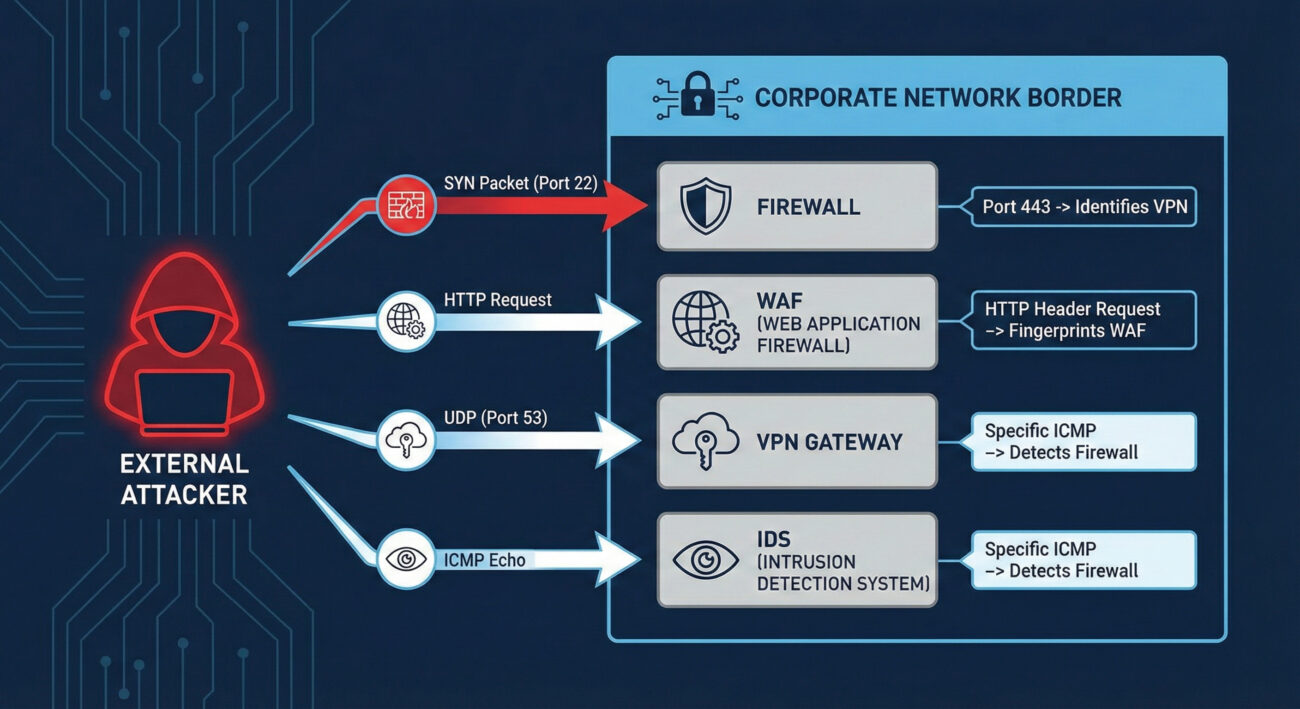
Imagine you're a burglar casing a neighborhood. You wouldn't just look at houses, you'd note which homes have alarm company signs, security cameras, guard dogs, or particularly strong doors. Network Security Appliances reconnaissance is the digital equivalent. Before launching an attack, adversaries scan your digital perimeter to identify what security devices you have deployed, firewalls, VPN gateways, web application firewalls (WAFs), and intrusion detection systems.
This isn't about breaking in yet; it's about understanding your defenses. By fingerprinting these appliances, attackers can determine make, model, version, and sometimes even configuration details. This intelligence is gold: it tells them what vulnerabilities might exist (based on known flaws for that version), what evasion techniques to use, and where the weakest link in your security chain might be located.
Decoding the Jargon: Key Terms for Network Security Appliances
| Term | Definition | Why It Matters |
|---|---|---|
| Banner Grabbing | Connecting to a network service (like SSH, HTTP, FTP) and recording the "banner" or identification string it sends back. | A primary method for fingerprinting appliances. A banner might reveal "Cisco ASA 9.16" or "Fortinet FortiGate". |
| Fingerprinting | The process of determining the type and version of a networked device or software based on its responses to crafted probes. | Allows attackers to map your security stack and research version-specific exploits or misconfigurations. |
| Attack Surface | The sum of all possible points (attack vectors) where an unauthorized user can try to enter or extract data from your environment. | Every exposed security appliance expands your attack surface. Knowing what's exposed is the first step to reducing it. |
| Next-Generation Firewall (NGFW) | A firewall that integrates additional capabilities like intrusion prevention, deep packet inspection, and application awareness. | A common target for reconnaissance. Identifying an NGFW model helps an attacker understand what deep inspection they need to evade. |
| VPN Concentrator/Gateway | A hardware device or software that creates secure remote access tunnels for many simultaneous users. | A high-value target. Fingerprinting can reveal vulnerabilities (e.g., CVE-2019-19781 in Citrix VPN) that provide a direct entry point. |
The Attacker's Playbook: Executing Network Security Appliances Reconnaissance
Step-by-Step Breakdown
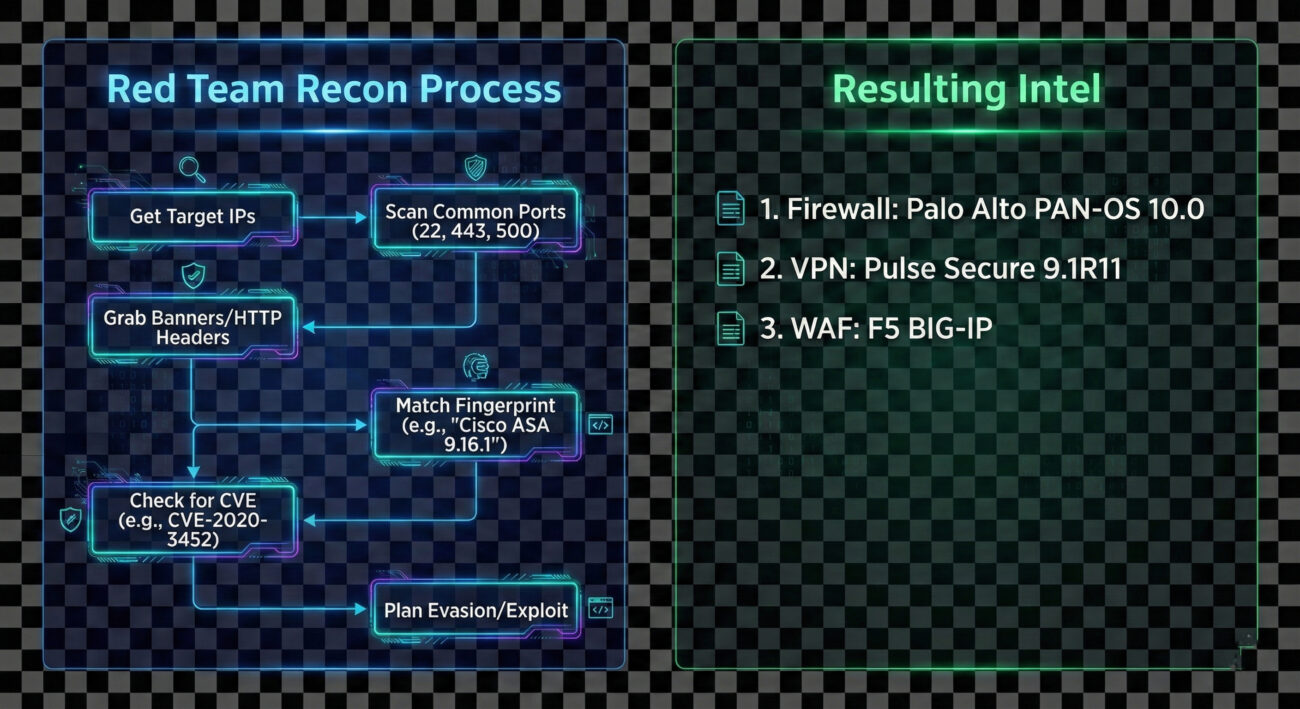
The process is methodical and often automated. An adversary begins with a broad net and progressively refines their focus.
- Initial Target Scope: The attacker identifies the target organization's IP ranges (from T1590.001 - IP Addresses) or domain names.
- Port Scanning & Service Discovery: They perform a port scan (using tools like Nmap or Masscan) against the target ranges, focusing on common security appliance ports:
- TCP/443 (HTTPS/SSL VPNs)
- TCP/22 (SSH management)
- TCP/80 (HTTP management interfaces)
- UDP/500 (IPSec VPN)
- TCP/4443-4445 (Common alternative management ports)
- Banner Grabbing & Protocol Interaction: For each open port, they attempt to connect and retrieve a banner or elicit a unique response. For web interfaces (port 443/80), they may fetch the default login page or examine HTTP headers for server identifiers.
- Fingerprint Analysis: Collected data is compared against databases of known device fingerprints (like those in Nmap's
nmap-service-probesfile) to identify the exact appliance and version. - Vulnerability Correlation: The identified versions are cross-referenced with public exploit databases (Exploit-DB, NVD) and vendor advisories to find unpatched vulnerabilities.
- Evasion Planning: Knowledge of the specific security stack informs the next steps. For example, knowing a specific WAF is in place might lead the attacker to craft payloads designed to bypass it.
Red Team Analogy & Mindset
Think of yourself as a penetration tester on a physical security assessment. You don't run at the main vault first. You walk the perimeter, take photos of locks, alarm sensors, and guard patrol patterns. You note the brand of the security cameras to see if they have known weaknesses. Your goal in this phase isn't theft, it's building a detailed blueprint of the defense system. The mindset is one of patience and curiosity: "What do they have protecting them, and what does that tell me about how to get in later?"
Tools & Command-Line Examples
This reconnaissance is heavily tool-driven. Here are the common ones:
- Nmap: The king of network discovery. Its vast scripting engine (
-sC) and service/version detection (-sV) are perfect for this. - Masscan: For incredibly fast scans of large IP ranges to find open ports.
- httprint, WAFW00F: Specialized tools for fingerprinting web servers and Web Application Firewalls based on response characteristics.
- Shodan, Censys: Search engines for Internet-connected devices. Attackers can often find exposed security appliances without scanning directly.
Example Nmap Commands:
# Basic service and version detection on common security appliance ports
nmap -sV -p 22,80,443,4443,8443,9000 203.0.113.0/24 -oA security_scan

# Aggressive banner grabbing with NSE scripts
nmap -sV --script=banner,http-title,ssh-auth-methods -p 22,443,8443 target.corporate.com

# Specific script to detect and fingerprint VPN services
nmap -sU -p 500,4500 --script=ike-version target_gateway.company.com
# The comments above show how an attacker uses Nmap to probe for and fingerprint services on standard management and VPN ports.
Real-World Campaign Example
The Chinese state-sponsored group APT29 (Cozy Bear) is a master of meticulous reconnaissance. In campaigns leading up to the 2020 SolarWinds compromise, and in other operations, APT29 has been observed conducting extensive network security appliance mapping. They would scan for and fingerprint VPN appliances (like Pulse Secure and Fortinet) and firewalls to identify potential vulnerabilities or misconfigured devices that could provide initial access or be used as command-and-control (C2) infrastructure.
This reconnaissance was not a one-off event but a persistent, low-and-slow effort integrated into their broader intelligence-gathering mission. By understanding the target's security perimeter in detail, they could tailor their intrusion methods with high precision.
External Reference: Mandiant's detailed report on UNC2452 (related to SolarWinds) discusses the group's sophisticated tradecraft, including victim environment reconnaissance.
The Defender's Handbook: Stopping Network Security Appliances Reconnaissance
Blue Team Analogy & Detection Philosophy
You're the security manager for a high-security facility. Your job isn't to stop people from looking at the building, that's impossible. Your job is to notice when someone is taking an unusual amount of interest, photographing details, or testing door handles. For Network Security Appliances, the blue team philosophy is: "Assume you will be scanned. Detect the scan. Obscure the useful details." You shift from trying to prevent all reconnaissance (impossible) to making the reconnaissance data unreliable or raising alarms when it occurs.
SOC Reality Check: What to Look For
In your SIEM, you'll see noise. The key is separating benign internet background radiation from targeted reconnaissance.
- Alert Fatigue: Your perimeter IPS/IDS may fire alerts for "Web Application Fingerprint Attempt" or "SSL VPN Scan." Tune these to reduce false positives from legitimate security researchers or automated bots.
- Correlation is Key: A single connection to port 443 is normal. 500 sequential connections to ports 22, 80, 443, 8443 across your entire subnet from a single IP in 2 minutes is a scan.
- Source Context: Scans from known bulletproof hosting providers, cloud VPS regions with no business ties, or Tor exit nodes carry higher severity.
- Logging Gaps: The biggest challenge is often getting the right logs. Ensure your perimeter firewalls, VPN concentrators, and WAFs are sending their connection/audit logs to your central SIEM.
Threat Hunter's Eye: Practical Query
Here is a Splunk SPL query designed to hunt for horizontal scanning activity targeting common security appliance management ports. This looks for a single source IP hitting multiple distinct internal IPs on a specific set of ports within a short time window.
index=firewall OR index=vpn
    dest_port IN (22, 80, 443, 4443, 8443, 9000, 500, 4500)
    action="allowed" OR action="denied"
| bucket _time span=5m
| stats
    values(dest_ip) as targeted_hosts,
    values(dest_port) as ports_probed,
    count as total_events
    by src_ip, _time
| where mvcount(targeted_hosts) > 5
| where mvcount(ports_probed) >= 3
| table _time, src_ip, targeted_hosts, ports_probed, total_events
| sort - total_events
# This query identifies potential scanners by looking for sources that have connected to more than 5 different internal hosts on at least 3 of the listed security appliance ports within a 5-minute window.
Key Data Sources for Detection
- Perimeter Firewall Logs: Connection attempts (allowed and denied) to management interfaces.
- VPN Gateway Logs: Authentication attempts (especially failed) and connection logs to the VPN service port.
- Network Intrusion Detection System (NIDS) Alerts: Alerts for scanning patterns or specific fingerprinting attempts.
- Web Server/Proxy Logs: For appliances with web management interfaces (common on port 443/8443). Look for GET requests to default paths like
/admin,/login, or specific vendor paths. - Asset Management Database: Knowing what you should have exposed helps identify unexpected devices responding to probes.
Building Resilience: Mitigation Strategies for Network Security Appliances
Actionable Mitigation Controls
Convert MITRE's high-level mitigations into concrete actions your team can implement this quarter.
- Network Segmentation: Place management interfaces for firewalls, VPNs, and other security appliances on a dedicated, isolated management network (out-of-band if possible). Never expose them directly to the internet.
- Banner/Header Obfuscation: Where supported, modify default banners and HTTP headers to remove or genericize vendor and version information. (Note: This is security through obscurity and should not be your only control).
- Aggressive Patch Management: Since reconnaissance aims to find vulnerable versions, a rigorous and fast patching cycle for all security appliances is your best defense. Prioritize patches for internet-facing devices.
- Access Control Lists (ACLs): If internet access is necessary, restrict source IPs to known, trusted ranges (e.g., your corporate IPs, approved partner IPs, or your managed security service provider).
- Regular External Attack Surface Scans: Use tools like CISA's Cyber Hygiene service or commercial solutions to scan your own external IPs. See what an attacker sees and remediate unexpected exposures.
Red vs. Blue: A Quick Comparison
| Attacker Goal (Red Team) | Defender Action (Blue Team) |
|---|---|
| Identify all exposed security appliances. | Minimize exposed appliances; use jump hosts/VPNs for management. |
| Fingerprint exact make, model, and version. | Obfuscate banners and keep software patched to negate the value of version data. |
| Find unpatched vulnerabilities in identified versions. | Implement a rigorous patch management program with SLAs for critical external devices. |
| Use intelligence to plan evasion and initial access. | Use detection queries to alert on reconnaissance activity, gaining early warning of impending attacks. |
Network Security Appliances Cheat Sheet
Red Flag
A single external IP making sequential TCP/SYN connections to ports 22, 80, 443, 8443 across multiple internal IPs within minutes. This is a classic horizontal scan for management interfaces.
Blue's Best Move
Take management interfaces offline. Use a VPN (itself non-publicly managed) to access a management network. If public access is unavoidable, enforce strict source IP whitelisting.
Hunt Here
Correlate logs from your perimeter firewall, VPN concentrator, and WAF. Look for the same source IP appearing across these logs in a short timeframe, probing different services.
Conclusion and Next Steps
Network Security Appliances reconnaissance (T1590.006) is a foundational step in the adversary lifecycle. While simple in execution, its value to an attacker is immense. As defenders, we cannot stop the internet from knocking at our door, but we can control what it sees, how we watch those knocks, and how quickly we fix the flaws it might discover.
Your action plan:
- Conduct an external scan of your own organization to see what security appliances are visible.
- Review and tighten access controls on any management interfaces that must remain accessible.
- Implement or tune the detection query provided in this guide within your SIEM to catch scanners.
- Validate your patch cycles for perimeter security devices, these should be among your fastest patched assets.
Continue Your Learning:
- Explore T1590.001: Gathering Victim IP Addresses, another key reconnaissance technique.
- Dive into T1595: Active Scanning, the parent category for this type of activity.
- Read the NIST SP 800-40r4: Guide to Enterprise Patch Management for a framework on securing all systems, including appliances.
- Watch the MITRE ATT&CK® Defender™ Defending against Reconnaissance webinar for broader defensive strategies.
Stay vigilant, measure your attack surface, and remember: the best time to detect an intrusion is before it happens, during the reconnaissance phase.
IP Addresses (T1590.005)
Ultimate Guide to Gather Victim Network Information - IP Addresses: Attack & Defense
Gather Victim IP Addresses involves collecting the public IP addresses associated with a target organization to map their external network presence, identify potential entry points, and plan subsequent attacks.
Table of Contents
- Understanding Gather Victim IP Addresses in Simple Terms
- Decoding the Jargon: Key Terms for Gather Victim IP Addresses
- The Attacker's Playbook: Executing Gather Victim IP Addresses
- The Defender's Handbook: Stopping Gather Victim IP Addresses
- Building Resilience: Mitigation Strategies for Gather Victim IP Addresses
- Gather Victim IP Addresses Cheat Sheet
- Conclusion and Next Steps
Understanding Gather Victim IP Addresses in Simple Terms
Imagine you're planning a heist on a secure corporate building. Before you even think about picking a lock, you'd spend days observing. You'd note the guard patrol schedules, the delivery truck routes, which doors are used by employees, and where the security cameras are blind spots. This is passive, legal observation from a distance.
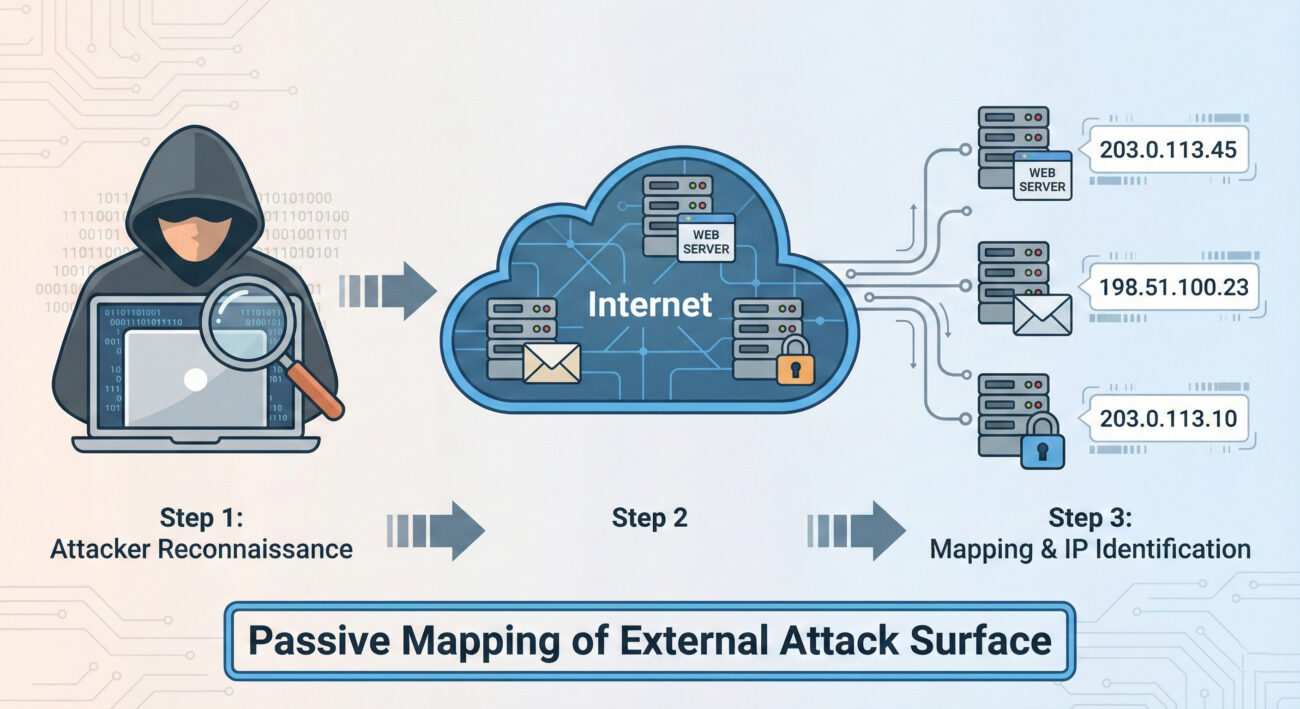
Gather Victim IP Addresses is the digital equivalent of this initial surveillance. Before any malware is sent or any exploit is attempted, an attacker needs to map out your organization's digital "building." They need to find all the public-facing doors and windows, your web servers, email servers, VPN gateways, and any other internet-connected assets, each identified by its unique IP address. This step is foundational, cheap, and often goes completely unnoticed by the target.
Decoding the Jargon: Key Terms for Gather Victim IP Addresses
| Term | Simple Definition | Why It Matters Here |
|---|---|---|
| IP Address (Internet Protocol Address) | A unique numerical label assigned to every device connected to a network (like the internet). It's the digital equivalent of a street address. | This is the primary data point the adversary is collecting. It's the identifier for your organization's online assets. |
| Passive Reconnaissance | Gathering information without directly interacting with the target's systems. Think: reading public records, not knocking on the door. | Gather Victim IP Addresses is almost exclusively passive. It uses publicly available data, making it hard to detect and completely legal. |
| Autonomous System Number (ASN) | A unique number assigned to a large network or ISP (like a "neighborhood" on the internet). Blocks of IP addresses belong to specific ASNs. | Attackers can query an organization's ASN to find ALL IP ranges registered to them, massively speeding up the discovery process. |
| BGP (Border Gateway Protocol) | The "postal system" of the internet that determines how data packets are routed between large networks. | Public BGP routing tables are a goldmine for discovering which IP ranges are announced (owned) by a specific organization. |
| Attack Surface | The total sum of all possible points (like IPs, domains, apps) where an unauthorized user can try to enter your digital environment. | Each discovered public IP address represents a potential entry point, thus expanding the known attack surface. |
The Attacker's Playbook: Executing Gather Victim IP Addresses
Step-by-Step Breakdown
A systematic attacker doesn't just guess IPs. They follow a logical, layered process to build a comprehensive map.
- Start with the Obvious: Use the organization's known website domain. Simple DNS lookups (like `nslookup` or `dig`) reveal the primary web server IPs.
- Find the Network "Neighborhood" (ASN): Use tools like
whoisor online databases to find the ASN(s) registered to the target company or their ISP. - Enumerate the IP Range: Query public BGP databases (e.g., BGPView, Hurricane Electric BGP Toolkit) to list ALL IP address blocks associated with the discovered ASN. This often reveals forgotten or shadow IT infrastructure.
- Expand via Passive DNS: Services like SecurityTrails or VirusTotal Passive DNS show historical and current DNS records, linking more domains and subdomains to the discovered IPs, which may lead to discovering more IPs.
- Scan & Fingerprint: With a target list of IPs, perform light, non-intrusive scans (e.g., TCP SYN to port 443) to verify which IPs are live and what service might be running, without triggering aggressive alarms.
Red Team Analogy & Mindset
Think like a real estate developer scouting a city block. You don't just look at the building you're interested in. You pull all the public property records (ASN/BGP), you note every structure on the block (IP range), you see which ones have lights on at night (live hosts), and you observe traffic patterns to and from each building (passive DNS). Your goal isn't to break in yet, it's to create the most accurate map possible so you can plan the most effective entry point later. Every piece of data is a potential vulnerability: an old, unmaintained building (legacy server) is a more attractive target than a new, secure skyscraper (modern, patched web server).
Tools & Command-Line Examples
- AMass / Subfinder: Passive enumeration tools that aggregate data from dozens of public sources to find subdomains and their associated IPs.
- Shodan / Censys: Search engines for internet-connected devices. An attacker can search by organization name, ASN, or netblock to find devices, open ports, and service banners.
- BGP Tools (bgp.he.net): Web-based interfaces to query which IP prefixes are announced by an ASN.
Command-Line Snippet (Example - Passive Discovery):
# Step 1: Get ASN for target company (using whois)
whois -h whois.radb.net ' -i origin ACME-CORP' | grep -E "route:|route6:"

# Step 2: Use the ASN (e.g., AS12345) to get all IP ranges via a BGP tool (curl example)
curl -s "https://api.bgpview.io/asn/12345/prefixes" | jq '.data.ipv4_prefixes[].prefix'

# Step 3: Passive subdomain enumeration linked to IPs (using amass)
amass enum -passive -d acme-corp.com -o subdomains.txt
Real-World Campaign Example
The APT29 (Cozy Bear, associated with Russian intelligence) is a master of extensive reconnaissance. In campaigns targeting government and think-tank networks, their initial activity heavily involves gathering victim IP addresses and network information. They use this data to identify targets for later spear-phishing campaigns and to tailor their malware infrastructure to blend in with the victim's environment.
Source: For detailed analysis, see the joint advisory from CISA and partners: "Advanced Persistent Threat Compromise of Government Agencies, Critical Infrastructure, and Private Sector Organizations" which details APT29's reconnaissance tradecraft.
The Defender's Handbook: Stopping Gather Victim IP Addresses
Blue Team Analogy & Detection Philosophy
You can't stop someone from looking at your public property records. The defense isn't about preventing the reconnaissance; it's about managing your attack surface. Think like a security-conscious property manager. Your job is to ensure that every public-facing door (IP address) is documented, necessary, and as secure as possible. You regularly audit your property portfolio (IP inventory) to find and decommission forgotten sheds in the back (unused public IPs). You assume the adversary has your map, so you focus on fortifying the doors they'll find.
SOC Reality Check: What to Look For
Direct detection of passive IP gathering is nearly impossible, no logs are generated on your end. The blue team's focus shifts to the next steps and managing exposure.
- Noise vs. Signal: You won't get an alert titled "Attacker Looked Up Your IP." The signal comes later: an increase in scanning activity from new sources against your IP ranges, or targeted phishing using the discovered infrastructure details.
- Actionable Intelligence: Correlate external threat intelligence feeds that might report your organization's IPs being queried in malware C2 infrastructure or discussed on underground forums.
Threat Hunter's Eye: Practical Query
While you can't see the IP lookup, you can hunt for the initial active probing that almost always follows. Here is a Sigma rule to detect scanning activity that maps to the Gather Victim IP Addresses and subsequent discovery phase.
# Sigma Rule: Reconnaissance - Mass Port Scan from Single Source
# Maps to ATT&CK: T1590.005 (Gather Victim IP Addresses) -> T1595 (Active Scanning)
# This rule looks for a single source IP hitting many different destination IPs on a common port (like 443) in a short time.
title: Mass Port Scan from Single Source
id: 7a8b9c0d-1e2f-4a3b-5c6d-7e8f9a0b1c2d
status: experimental
description: Detects a potential reconnaissance scan where one source connects to many distinct internal IPs on a specific port.
references:
    - https://attack.mitre.org/techniques/T1590/005/
author: Blue Team Field Manual
date: 2024-05-17
logsource:
    category: firewall
    product: paloalto
detection:
    selection:
        action: allow
        dst_port: 443
    timeframe: 5m
    condition: selection | count(dst_ip) by src_ip > 50
falsepositives:
    - Legitimate security scanners
    - CDN or cloud service traffic
level: low
Key Data Sources for Detection
- Firewall/Network Perimeter Logs: To detect the active scanning that follows IP gathering.
- DNS Query Logs: While passive DNS lookups can't be seen, monitoring for unusual internal DNS queries to your own domains might indicate an insider or compromised asset performing reconnaissance.
- External Threat Intelligence Feeds: Services that alert you if your company's IPs or ASN appear in suspicious contexts.
- Asset & Inventory Management Systems: Your authoritative source of truth for what public IPs you should have.
Building Resilience: Mitigation Strategies for Gather Victim IP Addresses
Actionable Mitigation Controls
Convert MITRE's general guidance into concrete actions your team can take.
- M1053: Data Minimization
- Action: Conduct quarterly attack surface discovery audits. Use tools like Shodan or Censys on your own organization. Compare the results with your CMDB. Decommission any public-facing asset (IP, server, service) that is unauthorized or no longer needed.
- M1056: Pre-compromise
- Action: Implement a rigorous change control process for public IP space. No new public IPs can be provisioned (in cloud or on-prem) without a ticket that auto-updates the central asset inventory.
- M1056: Vulnerability Scanning (Proactive Defense)
- Action: Run credentialed, non-intrusive vulnerability scans against your known public IP range weekly. Patch critical findings within SLA. This assumes the attacker has your map and is looking for the same vulnerabilities.
Red vs. Blue: A Quick Comparison
| Attacker Goal (Red Team) | Defender Action (Blue Team) |
|---|---|
| Find all public IPs belonging to the target. | Maintain a complete and accurate inventory of authorized public IPs. |
| Identify forgotten, unpatched servers in the IP range. | Perform regular attack surface audits to find and secure or decommission unknown assets. |
| Use IP info to tailor phishing lures or identify VPN endpoints. | Implement strong MFA on all external access points and conduct user awareness training. |
| Map the network to plan the next attack phase (Initial Access). | Assume the map is known; focus on hardening and monitoring all public-facing assets. |
Gather Victim IP Addresses Cheat Sheet
Red Flag
Your organization's IP ranges appearing in uncategorized or malicious threat intelligence reports. Sudden spikes in scanning traffic from diverse sources against your IP space, especially on common service ports (22, 443, 3389).
Blue's Best Move
Conduct a monthly "Google yourself" exercise. Use Shodan, Censys, and whois on your own company name and ASN. Any asset you find that isn't in your CMDB is a risk and must be addressed immediately. Encrypt and update relentlessly.
Hunt Here
Firewall logs for sources connecting to a high number (>50) of your internal IPs on the same port within a short timeframe (5-10 minutes). This is the active verification scan that follows passive IP gathering.
Learn More
• Official MITRE Page: T1590.005 - Gather Victim IP Addresses
• External Deep Dive: SANS Blog: Attack Surface Mapping Before the Attack
Conclusion and Next Steps
Gather Victim IP Addresses (T1590.005) is the quiet, foundational step of a modern cyber attack. You cannot stop it, but you can render it far less useful to the adversary. The defender's power lies in rigorous attack surface management, comprehensive asset inventory, and the assumption that your public IP map is already in the hands of threat actors.
Your Action Plan:
- Audit: This week, spend 30 minutes using a public tool like Shodan.io to search for your organization. Document any surprises.
- Inventory: Ensure your CMDB or asset management system is the single source of truth for public IPs.
- Hunt: Implement the Sigma rule or a similar query in your SIEM to baseline and then monitor for mass scanning patterns.
Network Topology (T1590.004)
Ultimate Guide to Gather Victim Network Information - Network Topography: Attack & Defense
Network Topography is a critical reconnaissance technique where adversaries map your network structure to identify key assets, trust relationships, and potential attack paths before launching their main assault.
📋 Table of Contents
- Understanding Network Topography in Simple Terms
- Decoding the Jargon: Key Terms for Network Topography
- The Attacker's Playbook: Executing Network Topography
- The Defender's Handbook: Stopping Network Topography
- Building Resilience: Mitigation Strategies for Network Topography
- Network Topography Cheat Sheet
- Conclusion and Next Steps
Understanding Network Topography in Simple Terms
Imagine you're a burglar planning to rob a museum. You wouldn't just walk in blind. First, you'd study blueprints, note guard patrol routes, identify alarm sensor locations, and find the back door behind the gift shop. Network Topography is the digital equivalent of this planning phase.
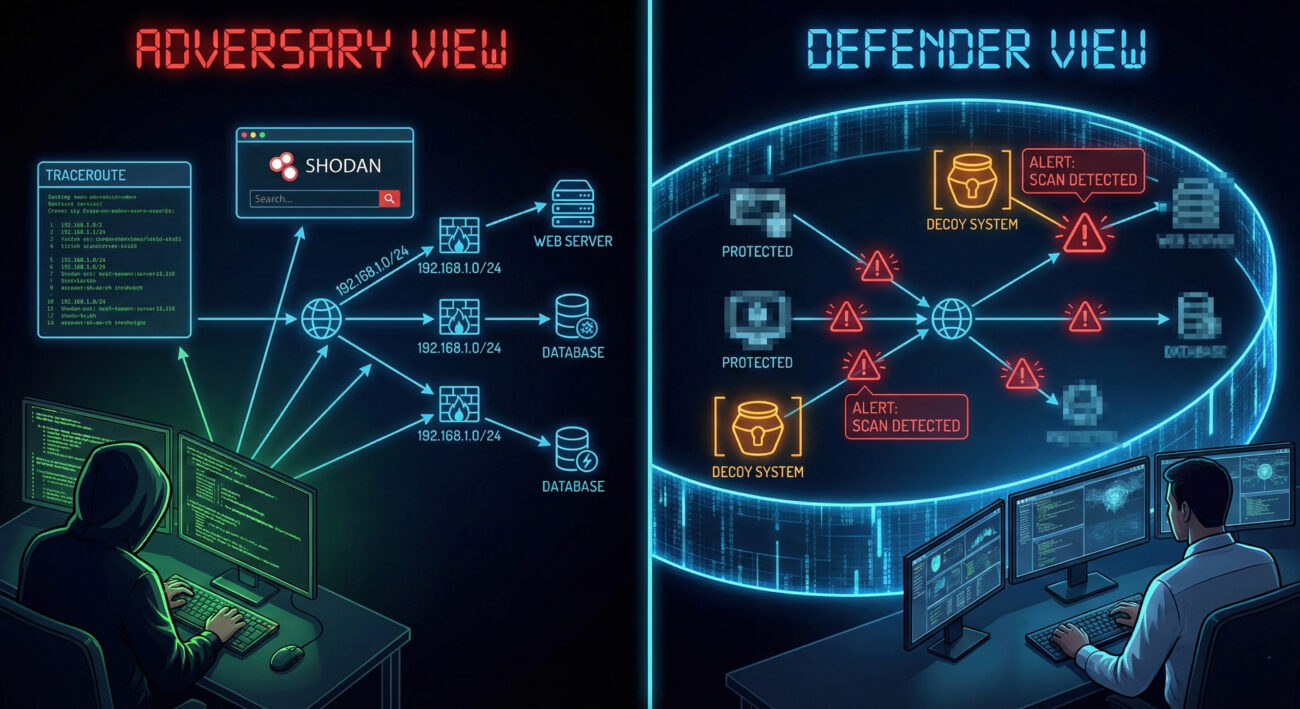
Adversaries, from script kiddies to advanced nation-state groups, start by drawing a map of your digital territory. They want to answer questions like: Where are the servers? How are network segments connected? What security devices (firewalls, IDS) are in place? Which systems talk to each other? This map becomes their attack playbook, allowing them to move stealthily and target the most valuable assets efficiently.
This technique is passive and often goes unnoticed because it uses information that is publicly available or gleaned from routine, allowed network traffic. The goal isn't to break in yet, it's to learn how to break in with the highest chance of success and the lowest risk of detection.
Decoding the Jargon: Key Terms for Network Topography
| Term | Simple Definition | Why It Matters |
|---|---|---|
| Network Mapping | The process of discovering and visualizing devices, their connections, and the structure of a network. | This is the core activity of T1590.004. Attackers use it to create their target blueprint. |
| Autonomous System (AS) | A large network or group of networks under a single organization's control, identified by a unique AS Number (ASN). | Attackers can identify all IP ranges belonging to your company, revealing your digital perimeter's true size. |
| Tracerouting | A technique to map the path network packets take from source to destination, revealing intermediate hops (routers). | It exposes internal network architecture, trust paths, and potential chokepoints or security devices. |
| Passive Reconnaissance | Gathering information without directly interacting with the target systems (e.g., searching public databases). | Makes Network Topography extremely stealthy and hard to attribute or detect. |
| BGP (Border Gateway Protocol) | The protocol that manages how packets are routed across the internet via ASNs. | BGP public records are a goldmine for attackers to map an organization's internet-facing infrastructure. |
The Attacker's Playbook: Executing Network Topography
Step-by-Step Breakdown
The process is methodical, often blending automated tools with manual analysis:
- Target Identification: The attacker starts with a company name. Using tools like WHOIS, they find registered domains (e.g., acme.com, dev.acme.com, vpn.acme.com).
- IP Range Enumeration: They query BGP databases (e.g., BGPView, Hurricane Electric BGP Toolkit) to find all IP address blocks (CIDR ranges) owned by the company's ASN.
- Live Host Discovery: Within those IP ranges, they perform ping sweeps or use masscan to identify which IPs are actually active and responding.
- Service & Port Mapping: For live hosts, they scan for open ports (nmap) to identify running services (web server on 443, database on 1433, RDP on 3389).
- Path Analysis: Using traceroute from multiple vantage points, they map network paths to key assets, identifying firewalls, load balancers, and network segments.
- Diagram Synthesis: All data is fed into tools like draw.io or Maltego to create a visual network map, highlighting critical assets, trust relationships, and potential entry points.
Red Team Analogy & Mindset
Think like a military cartographer before D-Day. Your job isn't to fight yet, but to create the most accurate possible map of the enemy's coastline, defenses, supply lines, and command centers. Every piece of information reduces uncertainty. The red team mindset here is one of patient, thorough observation. They rely on the fact that most organizations don't monitor for low-and-slow information gathering from disparate public sources.
Tools & Command-Line Examples
Attackers have a vast arsenal for this phase:
- Nmap: The Swiss Army knife.
nmap -sS -sV -O 192.168.1.0/24scans a subnet, discovering hosts, services, and OS. - Masscan: For blistering speed:
masscan 10.0.0.0/8 -p1-65535 --rate=10000. - Shodan/Censys: Search engines for internet-connected devices. Query:
org:"Acme Corp" port:22finds all their exposed SSH servers. - traceroute/tracert:
traceroute -I 10.10.10.5(Unix) ortracert 10.10.10.5(Windows) maps the route. - Maltego: Graphical tool for link analysis and data aggregation from OSINT.
Real-World Campaign Example
APT29 (Cozy Bear / The Dukes), associated with Russian intelligence, is notorious for extensive, patient reconnaissance. In campaigns targeting government and think-tank networks, they have been observed conducting detailed Network Topography mapping over weeks or months.
They use this intelligence to craft highly targeted spear-phishing emails and to identify the perfect initial access point, such as a vulnerable, internet-facing server in a less-secure network segment. Their success is built on this foundational understanding of the victim's digital landscape.
Further Reading: Mandiant's report on APT29 details their reconnaissance-heavy tradecraft.
The Defender's Handbook: Stopping Network Topography
Blue Team Analogy & Detection Philosophy
Your job is to be the counter-intelligence unit. You must assume that adversaries are constantly mapping you. The goal isn't to prevent all mapping (that's nearly impossible) but to distort their map, detect their cartographers, and hide your true treasures. Shift from thinking "we've been scanned" to "what did they learn, and how can we make that information useless or misleading?"
SOC Reality Check: What to Look For
Direct detection of passive reconnaissance (BGP lookups, Shodan scans) from your internal logs is impossible. Focus on detecting the active probing that usually follows or complements it:
- Port Scans: High volume of connection attempts to multiple ports across sequential IPs from a single source.
- Suspicious Traceroutes: ICMP Time Exceeded or UDP packets from external IPs traversing your border.
- DNS Recon: Bursts of AXFR requests, DNS zone transfers, or queries for non-existent hosts (NXDOMAIN storms).
- Noise vs. Signal: These activities blend with normal traffic. Correlation over time and geolocation of source IPs (e.g., traffic from a non-business country) is key.
Threat Hunter's Eye: Practical Query
Here is a Sigma rule to detect horizontal port scanning behavior, a common tactic used to validate network maps:
# Simple Sigma rule for detecting horizontal port scans
title: Horizontal Network Port Scan
id: 5a4215a7-58a5-4b2b-8c0a-9d3e1f7a2c6b
status: experimental
description: Detects a single source IP attempting to connect to multiple destination ports across multiple hosts in a short timeframe.
author: ATT&CK Field Guide
references:
    - https://attack.mitre.org/techniques/T1590/004/
logsource:
    category: firewall
    product: windows
detection:
    selection:
        action: allowed # Focus on allowed traffic that evades simple blocks
    timeframe: 5m
    condition: selection | count(dst_ip) by src_ip > 50 and count(dst_port) by src_ip > 20
    # Thresholds (50 unique hosts, 20 unique ports) are tunable
falsepositives:
    - Legitimate network scanners
    - Vulnerability assessment tools
level: medium
Key Data Sources for Detection
- Firewall/Network Device Logs: The primary source for connection attempts, denied probes, and traceroute packets.
- NetFlow/IPFIX Data: Essential for analyzing traffic patterns and identifying scanning behavior across broad IP ranges.
- DNS Server Logs: Critical for detecting reconnaissance through DNS enumeration and zone transfer attempts.
- IDS/IPS Alerts: Rules specifically tuned for scanning patterns (e.g., SURICATA ET SCAN rules).
- Endpoint Logs (EDR): While less common for external mapping, they can detect internal reconnaissance tools like Advanced IP Scanner if an attacker gains a foothold.
Building Resilience: Mitigation Strategies for Network Topography
Actionable Mitigation Controls
- Network Segmentation: Divide your network into isolated segments. A successful map of your DMZ should reveal nothing about your internal PCI or R&D networks. This limits the utility of any single map.
- Obscure Architecture: Use non-standard ports for critical services where feasible (though not security by obscurity). More importantly, ensure external DNS doesn't leak internal hostnames (split-horizon DNS).
- Rate Limiting & Egress Filtering: Configure border firewalls to rate-limit ICMP/UDP packets used in traceroutes and block outgoing packets with internal source IPs (anti-spoofing).
- Honeypots/Deception: Deploy fake systems with enticing names ("HR_DB_SERVER," "CEO_FILES") in your IP ranges. Any interaction with them is a high-fidelity alert for reconnaissance or attack.
- Vulnerability Management: Since mapping reveals services, ensure all internet-facing services are patched and unnecessary ones are disabled. Shrink your attack surface.
- Third-Party Monitoring: Regularly search for your own assets on Shodan/Censys. See what the attacker sees and take corrective action.
Red vs. Blue: A Quick Comparison
| Attacker Goal (Red) | Defender Action (Blue) |
|---|---|
| Map all IP ranges belonging to the target. | Consolidate and minimize public IP ranges where possible. Use IP reputation to block scanning IPs. |
| Identify all live hosts and services. | Implement strict egress filtering and deploy honeypots to detect probing. |
| Understand network paths and trust relationships. | Enforce network segmentation and encrypt internal traffic to obscure trust paths. |
| Remain stealthy and avoid detection. | Monitor for low-and-slow scanning patterns with NetFlow analytics and behavioral baselining. |
Network Topography Cheat Sheet
Red Flag
External IPs performing sequential connections to blocks of your IP space on multiple ports, especially if followed by traceroute patterns. A sudden spike in DNS queries for internal hostnames or NXDOMAIN responses.
Blue's Best Move
Implement Network Segmentation & Deception. Limit what can be learned from any single point of observation. Deploy high-interaction honeypots in your external IP ranges to generate high-fidelity alerts on contact.
Hunt Here
Firewall/NetFlow logs for "one-to-many" connections. DNS logs for anomalous query volumes or AXFR requests. Correlate events over longer time windows (hours/days) to catch slow, distributed reconnaissance.
Conclusion and Next Steps
Network Topography (T1590.004) is the quiet, patient foundation of nearly every successful cyber attack. By understanding the attacker's methodology, turning your public information into a tactical map, you can develop more effective defenses. The key is shifting from a reactive to a proactive and deceptive posture.
Your Action Plan:
- Conduct a self-assessment: Use Shodan and tools like nmap against your own external IP ranges. See what an attacker sees.
- Review detection capabilities: Can your SIEM/NDR detect the scanning patterns described? Test the Sigma rule provided.
- Plan one mitigation improvement: This could be implementing a simple honeypot or tightening egress filtering rules.
Continue Your ATT&CK Journey:
- Related-Technique-Name - Active Scanning (T1595): The logical next step after topography mapping.
- Related-Technique-Name - Gather Victim Network Information (T1590): The parent technique covering all network recon.
External Authority Links:
- NIST SP 800-160 Vol. 2: Developing Cyber-Resilient Systems - Guidance on engineering systems to withstand attacks, including those informed by reconnaissance.
- CISA Security Tip: Understanding Denial-of-Service Attacks - While about DoS, it includes relevant info on network architecture resilience.
Stay vigilant, think like your adversary, and build a network that's harder to map and even harder to breach.
Network Trust Dependencies (T1590.003)
Ultimate Guide to Gather Victim Network Information - Network Trust Dependencies: Attack & Defense
Network Trust Dependencies involve mapping relationships between organizations, domains, and third-party services to identify valuable attack paths that bypass direct security controls. Think of it as drawing a map of who trusts whom in the digital world to find the weakest link in the chain.
Table of Contents
- Understanding Network Trust Dependencies in Simple Terms
- Decoding the Jargon: Key Terms for Network Trust Dependencies
- The Attacker's Playbook: Executing Network Trust Dependencies
- The Defender's Handbook: Stopping Network Trust Dependencies
- Building Resilience: Mitigation Strategies for Network Trust Dependencies
- Network Trust Dependencies Cheat Sheet
- Conclusion and Next Steps
Understanding Network Trust Dependencies in Simple Terms
Imagine you're trying to get into a highly secure office building. The front door has multiple guards, biometric scanners, and reinforced locks, it's practically impenetrable. But what if the building shares a ventilation system with the coffee shop next door? Or what if the CEO's personal assistant uses the same dry cleaner as you?
Network Trust Dependencies work on the same principle. Instead of attacking your main network directly, attackers look for the digital equivalent of shared ventilation systems, trust relationships between your organization and others that could provide a backdoor entry.
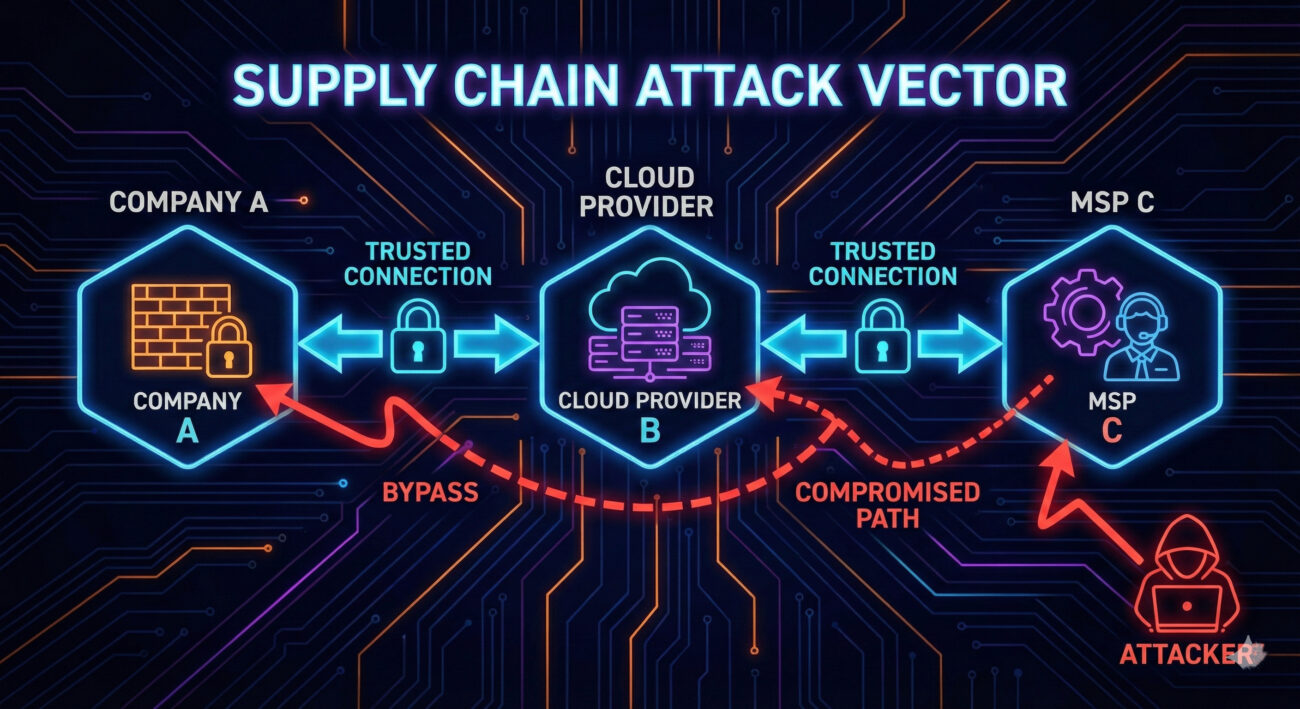
These dependencies come in many forms: cloud service providers that sync with your directory, managed security providers with remote access, subsidiaries with domain trusts, or even vendors with VPN connections to your billing systems. Each represents a potential attack vector that might be less defended than your primary perimeter.
Decoding the Jargon: Key Terms for Network Trust Dependencies
Before diving deeper, let's clarify essential terminology. Understanding these terms will help you grasp both the attack and defense aspects of this technique.
| Term | Definition | Why It Matters |
|---|---|---|
| Domain Trust | A relationship between two Active Directory domains that allows users in one domain to access resources in another | Attackers can move laterally between trusted domains once they compromise one |
| Federation Trust | An authentication agreement between organizations using protocols like SAML or OAuth | Compromising a federated partner can lead to access in your environment |
| Third-Party Risk | The security risk introduced to your organization by vendors, suppliers, or partners | Your security is only as strong as your weakest trusted partner |
| Attack Surface | All possible points where an unauthorized user can try to enter your systems | Trust dependencies dramatically expand your attack surface beyond your control |
| Supply Chain Attack | An attack that targets a less-secure element in the supply chain to reach the primary target | Network trust dependencies are the reconnaissance phase for supply chain attacks |
The Attacker's Playbook: Executing Network Trust Dependencies
Step-by-Step Breakdown
A sophisticated attacker doesn't start by trying to breach your firewall. They begin by understanding your ecosystem. Here's their typical playbook:
- Initial Reconnaissance: Using OSINT (Open Source Intelligence) tools to identify your organization's public relationships, cloud providers, subsidiaries, known vendors.
- Trust Mapping: Enumerating domain trusts (using tools like
nltestor BloodHound) and federation relationships from publicly accessible endpoints. - Target Selection: Identifying the weakest link in your trust chain, often a smaller company with fewer security resources.
- Initial Compromise: Breaching the selected third party using conventional methods (phishing, exploiting vulnerabilities).
- Trust Exploitation: Using the established trust relationship to pivot into your environment, often with valid credentials.
Red Team Analogy & Mindset
Think like a burglar casing a neighborhood. You don't just look at the target house; you observe who delivers packages, which houses share fences, who has alarm signs and who doesn't. The goal is to find the easiest path, not the most direct one.
From a red team perspective, Network Trust Dependencies represent low-hanging fruit. Why spend months trying to breach a Fortune 500 company's defenses when you can breach their small marketing agency that has VPN access to their internal networks?
Tools & Command-Line Examples
Attackers use a combination of public and custom tools to map trust relationships:
- BloodHound: The gold standard for mapping Active Directory trust relationships and attack paths
- Adalanche: Alternative to BloodHound with different visualization capabilities
- PowerView: Part of the PowerSploit suite for enumerating domain trusts
- nltest: Built-in Windows tool for querying domain trust information
Example Commands:
# Enumerate domain trusts using nltest (Windows native)
nltest /domain_trusts /all_trusts

# PowerView command to get domain trusts
Get-DomainTrust -API

# Using BloodHound Collector (SharpHound)
SharpHound.exe --CollectionMethods All --Domain corp.example.com

# Checking for federated domains via Office 365 (recon)
Get-MsolDomain -TenantId <tenant_id>
Real-World Campaign Example
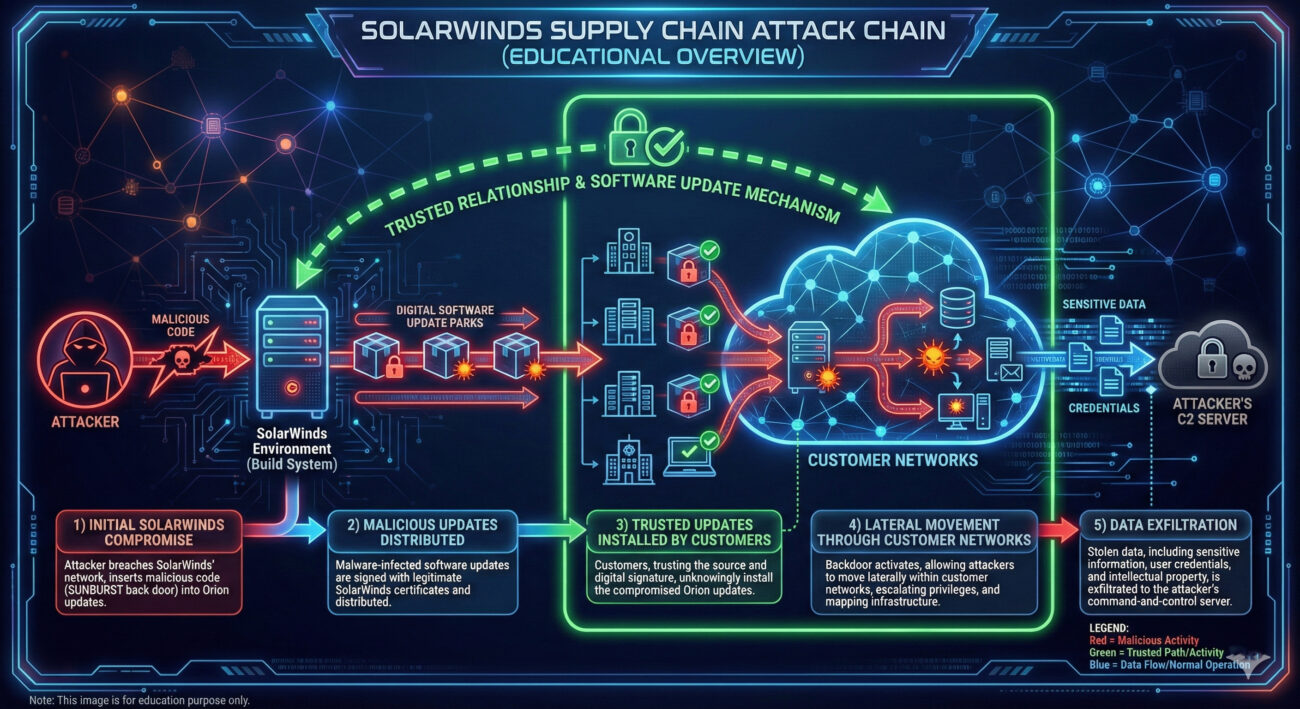
The SolarWinds SUNBURST attack is perhaps the most famous example of trust dependency exploitation. Attackers didn't breach Microsoft, Cisco, or government agencies directly. Instead, they compromised SolarWinds' software build system and distributed trojanized updates to 18,000+ customers.
This campaign demonstrated how a single trusted vendor with widespread network access could become the perfect attack vector. The attackers performed extensive reconnaissance to understand SolarWinds' position in various trust networks before executing their compromise.
Another notable example is the APT29 (Cozy Bear) campaign against multiple governments, where they exploited trust relationships between government agencies and think tanks to gain initial access.
External Report: For a detailed analysis of supply chain attacks leveraging trust dependencies, see the Mandiant SUNBURST technical analysis.
The Defender's Handbook: Stopping Network Trust Dependencies
Blue Team Analogy & Detection Philosophy
As a defender, you need to think like a building security manager who doesn't just secure their own building, but also knows which contractors have keys, which adjacent buildings share infrastructure, and who has after-hours access privileges.
Your detection philosophy should shift from "protect our perimeter" to "understand and monitor all trust relationships." This means implementing controls that can detect abnormal use of legitimate trust relationships.
SOC Reality Check: What to Look For
In a typical Security Operations Center, trust dependency attacks often manifest as:
- Legitimate account anomalies: A vendor account accessing resources at unusual times or from unexpected locations
- Cross-domain authentication spikes: Sudden increases in authentication requests between trusted domains
- Third-party tool misuse: Legitimate remote management tools being used for lateral movement
- Impossible travel scenarios: User authenticating from a vendor network and your network in unrealistic timeframes
The challenge is separating malicious activity from legitimate business use. This requires establishing baselines for normal trust relationship usage.
Threat Hunter's Eye: Practical Query
Here's a Sigma rule to detect suspicious cross-domain authentication patterns that could indicate trust relationship exploitation:
# Sigma Rule: Suspicious Cross-Domain Authentication Pattern
# Identifies authentication attempts between domains that rarely communicate
# Useful for detecting trust relationship exploitation
title: Suspicious Cross-Domain Authentication
id: a7b3c9d2-4e5f-6a7b-8c9d-0e1f2a3b4c5d
status: experimental
description: Detects unusual authentication patterns between trusted domains
author: MITRE ATT&CK Field Guide
date: 2024/03/15
logsource:
    product: windows
    service: security
detection:
    selection:
        EventID: 4769  # Kerberos Service Ticket Operations
        TicketEncryptionType: '0x17'  # RC4 (often used in attacks)
        ServiceName: '*$@*'  # Service account
        ClientAddress: '192.168.*'  # Internal IP range
    filter:
        ServiceName:
            - '*DC$@*'  # Exclude domain controller communication
            - '*SQL$@*'  # Exclude common service accounts
    condition: selection and not filter
fields:
    - ClientUserName
    - ServiceName
    - ClientAddress
    - TicketEncryptionType
falsepositives:
    - Legitimate cross-domain service accounts
    - Domain migration activities
level: medium
For Azure/Microsoft 365 environments, use this KQL query to detect unusual federation trust usage:
// Azure Sentinel KQL: Unusual Federation Trust Usage
// Monitors authentication from federated domains for anomalies
SigninLogs
| where ResourceId contains "office365"
| where Identity contains "@"  // Ensure we have UPN format
| where UserType == "Guest" or Identity has "@partnerdomain.com"  // External identities
| where ResultType == "0"  // Successful logins
| summarize LoginCount = count(), DistinctIPs = dcount(IPAddress),
    LastLogin = max(TimeGenerated) by Identity, AppDisplayName
| where LoginCount > 10 and DistinctIPs > 3  // Thresholds may vary
| order by LoginCount desc
Key Data Sources for Detection
- Active Directory Security Logs (Event ID 4769): Kerberos service ticket requests between domains
- Azure AD Sign-in Logs: Federation and cross-tenant authentication events
- VPN/Remote Access Logs: Third-party vendor access patterns
- DNS Query Logs: Lookups for partner domains and services
- CloudTrail/Azure Activity Logs: Cross-account API calls in cloud environments
- Network Flow Data: Communication patterns between your network and third parties
Building Resilience: Mitigation Strategies for Network Trust Dependencies
Actionable Mitigation Controls
Mitigating Network Trust Dependencies requires a combination of technical controls and process improvements:
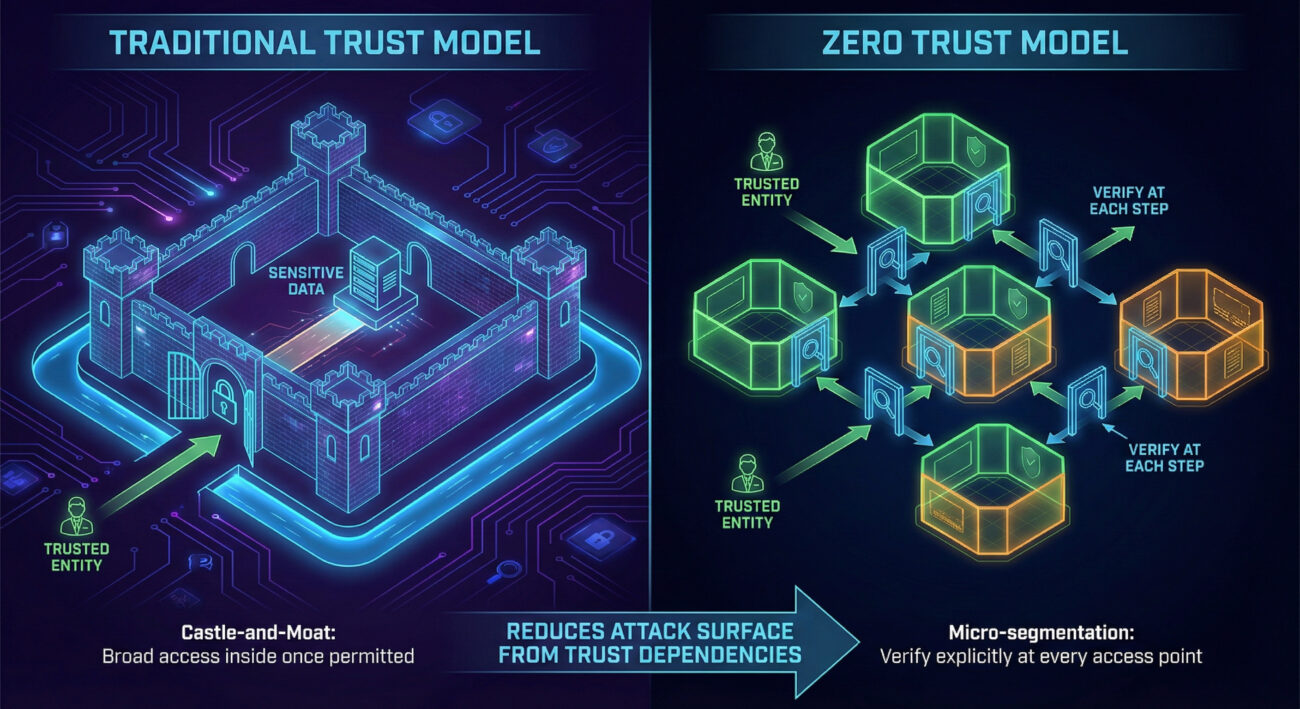
- Implement Zero Trust Architecture: Replace implicit trust with explicit, verified access for every request regardless of source.
- Conduct Regular Trust Relationship Audits: Document and review all domain trusts, federation relationships, and third-party access quarterly.
- Apply the Principle of Least Privilege: Third parties should only have access to what they absolutely need, for the minimum time necessary.
- Segment Network Based on Trust Levels: Isolate third-party access zones from critical internal systems.
- Monitor Trust Relationship Usage: Implement alerts for unusual cross-domain authentication patterns.
- Include Third Parties in Security Testing: Require security assessments for vendors with network access and include them in red team exercises.
Red vs. Blue: A Quick Comparison
| Attacker's Goal (Red Team) | Defender's Action (Blue Team) |
|---|---|
| Map all trust relationships to identify attack paths | Maintain an authoritative inventory of all trust relationships |
| Find the weakest link in the trust chain | Apply consistent security requirements across all trusted entities |
| Use legitimate trust to bypass security controls | Implement conditional access and anomaly detection on trust usage |
| Move laterally through trusted domains | Segment networks and enforce inter-domain boundary controls |
| Maintain persistence through trusted third parties | Regularly review and recertify all third-party access |
Network Trust Dependencies Cheat Sheet
Sudden spike in authentication requests between domains that normally have minimal communication, especially using older encryption types like RC4.
Implement a Zero Trust architecture with micro-segmentation and continuous verification of all access requests, regardless of source.
Azure AD sign-in logs for guest/external user anomalies, Windows Security Event ID 4769 for cross-domain Kerberos tickets, and VPN logs for third-party access patterns.
Conclusion and Next Steps
Network Trust Dependencies represent one of the most insidious reconnaissance techniques because they exploit legitimate business relationships. As organizations become more interconnected, our attack surface expands beyond our direct control.
The key takeaway is that trust is a vulnerability that must be managed. You can't eliminate trust relationships, business requires them, but you can make them visible, monitor their usage, and apply consistent security controls across all trust boundaries.
Your Action Plan:
- Conduct a trust relationship inventory this quarter. Document all domain trusts, federation relationships, and third-party network access.
- Implement the detection queries provided in this guide to establish baseline monitoring.
- Review and tighten third-party access controls using the principle of least privilege.
- Begin your Zero Trust journey by implementing conditional access policies for cross-domain authentication.
Continue Learning:
- Explore related techniques like Domains - T1590.001 and DNS - T1590.002 for comprehensive reconnaissance defense.
- Read the NIST Cybersecurity Supply Chain Risk Management Practices for comprehensive third-party risk guidance.
- Watch the MITRE ATT&CK YouTube walkthrough on Reconnaissance techniques for visual learning.
Remember: In cybersecurity, you're only as strong as your weakest trust relationship. By understanding and securing these dependencies, you're building a more resilient defense that extends beyond your organizational boundaries.
DNS (T1590.002)
Ultimate Guide to Gather Victim Network Information - DNS: Attack & Defense
Gather Victim Host Information via DNS is a critical reconnaissance step where attackers map your digital infrastructure by querying public domain records, identifying key servers, and planning their intrusion.
Table of Contents
- Understanding Gather Victim Host Information in Simple Terms
- Decoding the Jargon: Key Terms for Gather Victim Host Information
- The Attacker's Playbook: Executing Gather Victim Host Information
- The Defender's Handbook: Stopping Gather Victim Host Information
- Building Resilience: Mitigation Strategies for Gather Victim Host Information
- Gather Victim Host Information Cheat Sheet
- Conclusion and Next Steps
Understanding Gather Victim Host Information in Simple Terms
Imagine a burglar casing a neighborhood before a robbery. They don't just pick a random house. They note which homes have security systems (alarm company stickers), dogs (beware of dog signs), and predictable routines (when lights turn off). Gather Victim Host Information via DNS is the digital equivalent of this reconnaissance phase.
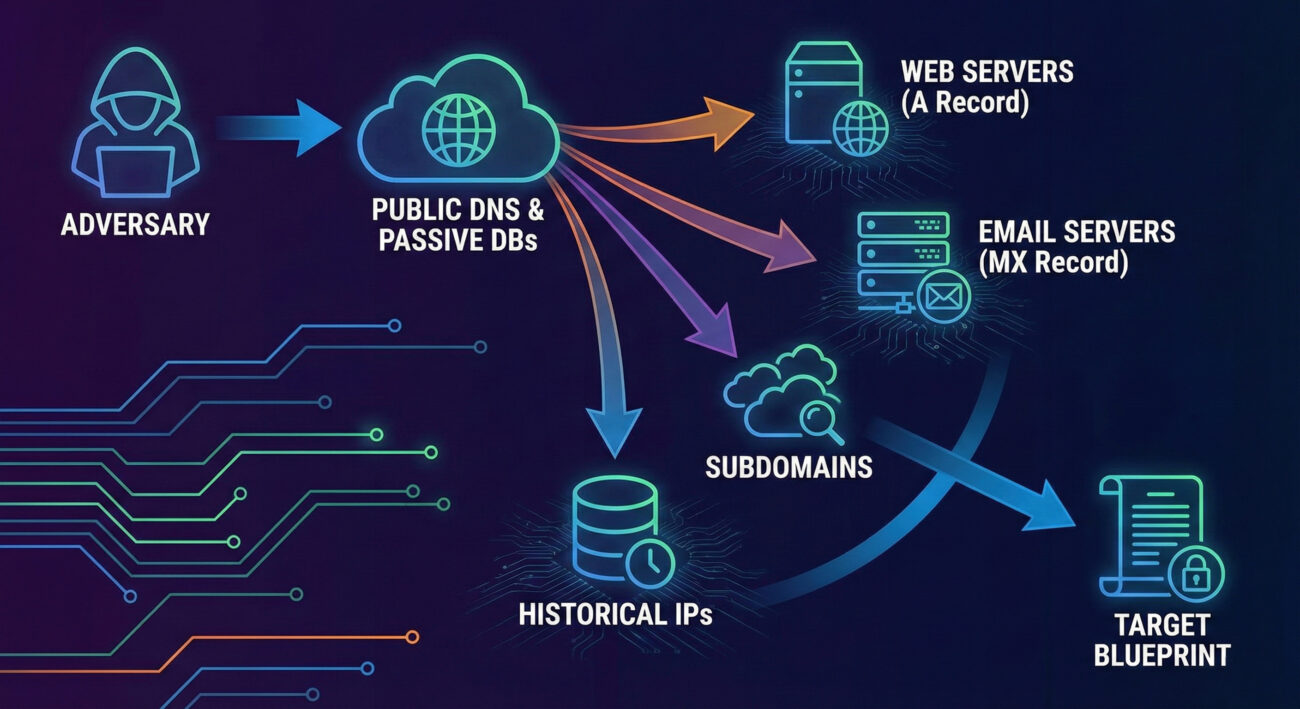
Before launching any attack, adversaries need a map. They turn to the internet's public phone book, the Domain Name System (DNS). By querying DNS records for your company's domain, they can list your public-facing web servers (mail.company.com), identify your email provider (MX records), and even find subdomains for development or staging environments that might be less secure. This technique is low-risk, entirely legal from public infrastructure, and provides the essential blueprint for subsequent intrusions.
Decoding the Jargon: Key Terms for Gather Victim Host Information
| Term | Definition | Why It Matters |
|---|---|---|
| DNS (Domain Name System) | The internet's directory service that translates human-readable domain names (like google.com) into machine-readable IP addresses (like 142.250.185.78). | It's the primary public database attackers query to discover your organization's internet-facing assets. |
| DNS Record | A specific entry in a DNS zone file that provides information about a domain. Common types include A, AAAA, MX, TXT, NS, and CNAME records. | Each record type reveals different pieces of your infrastructure (e.g., A records for web servers, MX for mail servers). |
| Passive DNS | A collection of historical DNS query/response data gathered from various points on the internet, not directly from the authoritative name servers. | Attackers use passive DNS databases to see historical associations between domains and IPs, revealing infrastructure changes and related assets. |
| Subdomain Enumeration | The process of finding all subdomains associated with a primary domain (e.g., dev.example.com, vpn.example.com). | Discovers less-monitored, potentially vulnerable entry points that aren't listed on the main corporate website. |
| Zone Transfer (AXFR) | A DNS transaction where a secondary DNS server requests a full copy of all records from a primary DNS server. | If misconfigured, an attacker can request a zone transfer and get a complete list of all internal hosts, a reconnaissance jackpot. |
The Attacker's Playbook: Executing Gather Victim Host Information
The process of Gather Victim Host Information is methodical and automated. Attackers blend basic commands with powerful open-source intelligence (OSINT) tools to build a comprehensive profile without triggering a single internal alert.
Step-by-Step Breakdown
- Target Selection: The attacker identifies the target organization's primary domain (e.g., `acme-corp.com`).
- Initial DNS Recon: Using command-line tools like `nslookup` or `dig`, they retrieve basic records (A, MX, NS) to identify primary servers and service providers.
- Subdomain Discovery: They employ brute-force tools (like `gobuster` or `amass`) with extensive wordlists to guess and validate subdomains (`dev.acme-corp.com`, `vpn.acme-corp.com`, `test.acme-corp.com`).
- Historical Analysis: They query passive DNS databases (like SecurityTrails, VirusTotal) to find IP addresses the domain has historically resolved to, revealing old or forgotten infrastructure.
- Service Mapping: For each discovered host and IP, they perform port scans to identify running services (web servers, databases, remote access).
- Target Prioritization: The compiled list is analyzed. Less secure-looking targets (e.g., a subdomain running an outdated web server) are flagged for the next phase of the attack.
Red Team Analogy & Mindset
Think like a documentary filmmaker planning to shoot in a remote location. You wouldn't just show up. You'd study maps (DNS), read travel blogs about the area (passive DNS), identify potential campsites (subdomains), and note the weather patterns (service banners). Your goal isn't to interact yet, just to observe and plan. The red teamer's mindset here is one of patient curiosity. Every piece of public data is a clue. A subdomain called `legacy-api` suggests a possibly deprecated, less-patched system. An MX record pointing to a specific cloud provider reveals a potential phishing target or a known vulnerability in that platform.
Tools & Command-Line Examples
- dig (Domain Information Groper): The Swiss Army knife for DNS queries.
- Amass: An in-depth attack surface mapping and asset discovery tool.
- dnsrecon: A Python script for comprehensive DNS enumeration.
Example Commands:
# Basic lookup for A and MX records
$ dig acme-corp.com A +short
$ dig acme-corp.com MX +short

# Attempt a zone transfer (often fails, but worth trying)
$ dig @ns1.acme-corp.com acme-corp.com AXFR

# Using dnsrecon for comprehensive enumeration
$ dnsrecon -d acme-corp.com -t std,axfr,brt -D /usr/share/wordlists/subdomains.txt
Real-World Campaign Example
The APT29 group (also known as Cozy Bear or Midnight Blizzard), associated with Russian intelligence, is renowned for its meticulous reconnaissance. In campaigns targeting government and think-tank networks, APT29 extensively used DNS probing and subdomain enumeration to identify specific individuals and departments.
They would harvest email addresses from public sources, then use DNS to find the associated organization's mail server configuration (MX records). This information was then used to craft highly targeted phishing emails that appeared to come from legitimate internal or partner addresses, dramatically increasing their success rate. This demonstrates how Gather Victim Host Information directly enables more effective social engineering and initial access attacks.
Reference: For an in-depth analysis of APT29's tactics, including reconnaissance, read the joint advisory by the UK's NCSC and the US's CISA, FBI, and NSA: CISA Alert (AA20-106A) on APT29.
The Defender's Handbook: Stopping Gather Victim Host Information
You can't stop someone from looking up your public DNS records. Detection of this specific phase is nearly impossible on your own network. Therefore, the defender's focus must shift from detecting the reconnaissance to managing the exposure it creates and detecting the follow-on actions that inevitably come next.
Blue Team Analogy & Detection Philosophy
Think of your public DNS information as the company's listing in a phone book. You can't stop people from reading it. But you can ensure the listed numbers are only for the main switchboard (a secure front-end proxy) and not the direct line to the CEO's desk (an internal server). Your philosophy is exposure management. Assume an attacker has your DNS map. Your job is to ensure that map doesn't lead them to a vulnerable, directly accessible system.
SOC Reality Check: What to Look For
Since you won't see the attacker's DNS lookups, look for the next step. Correlate these signals:
- Internal Logs: A sudden spike in scanning activity from a single external IP against multiple hosts discovered via DNS (e.g., hitting `web1`, `mail`, `dev` subdomains in quick succession).
- Edge Device Alerts: IDS/IPS or WAF alerts for vulnerability scanning tools (Nikto, Nessus) or exploit attempts targeting services identified during the recon phase.
- Cloud Logs: Unusual spikes in out-of-band DNS queries from your infrastructure to external resolvers could indicate malware callbacks, but this is a later stage.
Threat Hunter's Eye: Practical Query
Hunt for internal systems conducting suspicious, high-volume scans that mirror a target list built from public DNS data. The following Sigma rule looks for patterns of horizontal scanning.
# Sigma Rule: Horizontal Scanning Pattern Post-DNS Recon
# This rule detects a single source rapidly connecting to multiple different hosts on a specific port,
# mimicking post-reconnaissance service validation.
title: Possible Post-DNS Reconnaissance Horizontal Scan
id: a1b2c3d4-1234-5678-abcd-0123456789ab
status: experimental
description: Detects a source IP making successful connections to many distinct destination IPs on a common port (e.g., 443, 22) within a short time.
author: Your SOC
logsource:
    product: firewall
    category: firewall
detection:
    selection:
        event_type: "connection_allowed"
        dst_port: (443, 22, 3389, 445)
    timeframe: 5m
    condition: selection | count(dst_ip) by src_ip > 20
falsepositives:
    - Legitimate network scanners
    - Load balancer health checks
level: medium
tags:
    - attack.reconnaissance
    - attack.t1590.002
Key Data Sources for Detection
- Firewall/Network Edge Logs: Source of truth for inbound connection attempts to your public IP space.
- Web Application Firewall (WAF) Logs: Can show targeted scanning against specific subdomains or paths.
- IDS/IPS Alerts: Signatures for known scanning tools and vulnerability probes.
- Cloud Provider Logs (AWS CloudTrail, Azure Activity Log): For cloud-hosted assets, look for unauthorized Describe/List API calls that could mirror reconnaissance.
Building Resilience: Mitigation Strategies for Gather Victim Host Information
Mitigation is your primary weapon. Make the information gleaned from DNS as useless or misleading as possible to the attacker.
Actionable Mitigation Controls
- Minimize Public Footprint: Only expose essential services to the internet. Use a secure VPN or Zero Trust network access for employees, rather than exposing RDP, SSH, or database ports directly.
- Regular DNS Audits: Quarterly, audit your public DNS records. Remove stale A, CNAME, or MX records pointing to decommissioned systems. Ask, "Do we still need this subdomain publicly resolvable?"
- Secure Zone Transfers: Configure your authoritative DNS servers to only allow zone transfers (AXFR) from explicitly authorized secondary servers, not from any IP.
- Use Generic Names: Avoid revealing software or function in subdomain names (e.g., use `gateway.company.com` instead of `fortigate-vpn.company.com`).
- Deploy a Robust WAF/CDN: Place all public-facing web assets behind a Web Application Firewall or Content Delivery Network. This obscures the true origin server IP and provides an additional layer of defense.
Red vs. Blue: A Quick Comparison
| Attacker's Goal (Red Team) | Defender's Action (Blue Team) |
|---|---|
| Discover all internet-facing assets. | Minimize and actively manage the public attack surface. |
| Identify vulnerable, less-monitored subdomains. | Apply consistent security standards (patching, WAF) to ALL public assets, not just "www". |
| Map the network to plan initial access. | Implement network segmentation so that compromising one public server doesn't grant access to the internal network. |
| Gather info silently and passively. | Assume the info is gathered, and focus on making it obsolete or misleading through architectural controls. |
Gather Victim Host Information Cheat Sheet
🔴 Red Flag
External IPs conducting rapid, sequential connections to multiple hosts/subdomains on standard ports (22, 443, 3389) shortly after a new subdomain goes live or a DNS record changes.
🛡️ Blue's Best Move
Conduct quarterly external attack surface assessments. Use tools like yourself to see what an attacker sees. Find and decommission forgotten assets before they do.
🔍 Hunt Here
Firewall and WAF logs for sources that sequentially hit a list of your known public IPs/subdomains. Correlate with vulnerability scanner signature alerts from your IDS/IPS.
Conclusion and Next Steps
Gather Victim Host Information (DNS) is the unavoidable starting pistol of many cyber campaigns. As defenders, we cannot win the race by trying to stop the starting shot. Instead, we must build a track that is confusing, well-guarded, and full of dead ends.
Your immediate next steps should be operational:
- Conduct a Self-Recon: Use tools like Amass or OWASP Amass (passively) against your own primary domain. Document every discovery.
- Initiate a Cleanup: Work with your network and application teams to remove unnecessary public DNS records and ensure all remaining public hosts are patched and behind a WAF.
- Implement Proactive Hunting: Integrate the Sigma rule or its logic into your SIEM to hunt for horizontal scanning patterns.
To deepen your understanding of the attack chain, explore related techniques: Phishing for Initial Access (T1566) and External Remote Services for Persistence (T1133).
For further strategic guidance, refer to the NIST SP 800-53 Security and Privacy Controls, specifically the CA-8 (Penetration Testing) and RA-3 (Risk Assessment) families, which formalize the need for understanding and managing your attack surface.
Stay vigilant, manage your exposure, and assume the adversary already has your map.
Domain Properties (T1590.001)
Ultimate Guide to Gather Victim Network Information - Domain Properties: Attack & Defense
Gathering victim domain properties is a reconnaissance technique where attackers collect technical and administrative information about an organization's internet domains before launching an attack. Think of it as a burglar casing a neighborhood by checking property records, security company signs, and daily routines before breaking in.
Table of Contents
- Understanding Domain Properties in Simple Terms
- Decoding the Jargon: Key Terms for Domain Properties
- The Attacker's Playbook: Executing Domain Properties
- The Defender's Handbook: Stopping Domain Properties
- Building Resilience: Mitigation Strategies for Domain Properties
- Domain Properties Cheat Sheet
- Conclusion and Next Steps
Understanding Domain Properties in Simple Terms
Imagine you're planning a sophisticated heist on a corporate headquarters. You wouldn't just show up and try the doors. You'd first gather public information: when does security change shifts? What's the company's official name? What vehicles are typically in the parking lot? Which doors are for deliveries? This is exactly what gathering domain properties entails in the digital world.
Attackers collect publicly available information about your organization's internet presence, domain names, registration details, mail server configurations, and associated subdomains. This information is all legally obtainable but becomes dangerous when used to map out attack vectors, craft convincing phishing emails, or identify outdated and vulnerable systems.
This technique is often the very first step in the cyber kill chain, occurring long before any malware is deployed or credentials are stolen. It's a low-risk, high-reward activity for threat actors that directly enables more dangerous follow-on actions like spear-phishing, credential stuffing, and brute-force attacks.
Decoding the Jargon: Key Terms for Domain Properties
Before we dive deeper, let's demystify some common terms you'll encounter when discussing this reconnaissance technique.
| Term | Definition | Why It Matters |
|---|---|---|
| WHOIS | A query and response protocol used for querying databases that store registered users or assignees of an internet resource, like a domain name. | Reveals domain registrar, creation/expiry dates, and registrant contact information (often abused for social engineering). |
| DNS Records | Text instructions living in authoritative DNS servers that provide information about a domain (e.g., where email should be sent, which server hosts the website). | Exposes mail server (MX), name server (NS), and subdomain (A, AAAA, CNAME) information, mapping the target's digital infrastructure. |
| SPF/DKIM/DMARC | Email authentication protocols (Sender Policy Framework, DomainKeys Identified Mail, Domain-based Message Authentication Reporting & Conformance). | Reveals an organization's email security posture. Misconfigurations can be exploited for email spoofing and phishing campaigns. |
| Subdomain Enumeration | The process of finding subdomains for a target domain (e.g., dev.corp.com, vpn.company.com). | Uncovers hidden, development, or misconfigured web applications that are often less secure than the main website. |
| Passive DNS | Historical DNS record data collected from various points across the internet over time. | Allows attackers to see old, forgotten subdomains and IP associations that may still be active and vulnerable. |
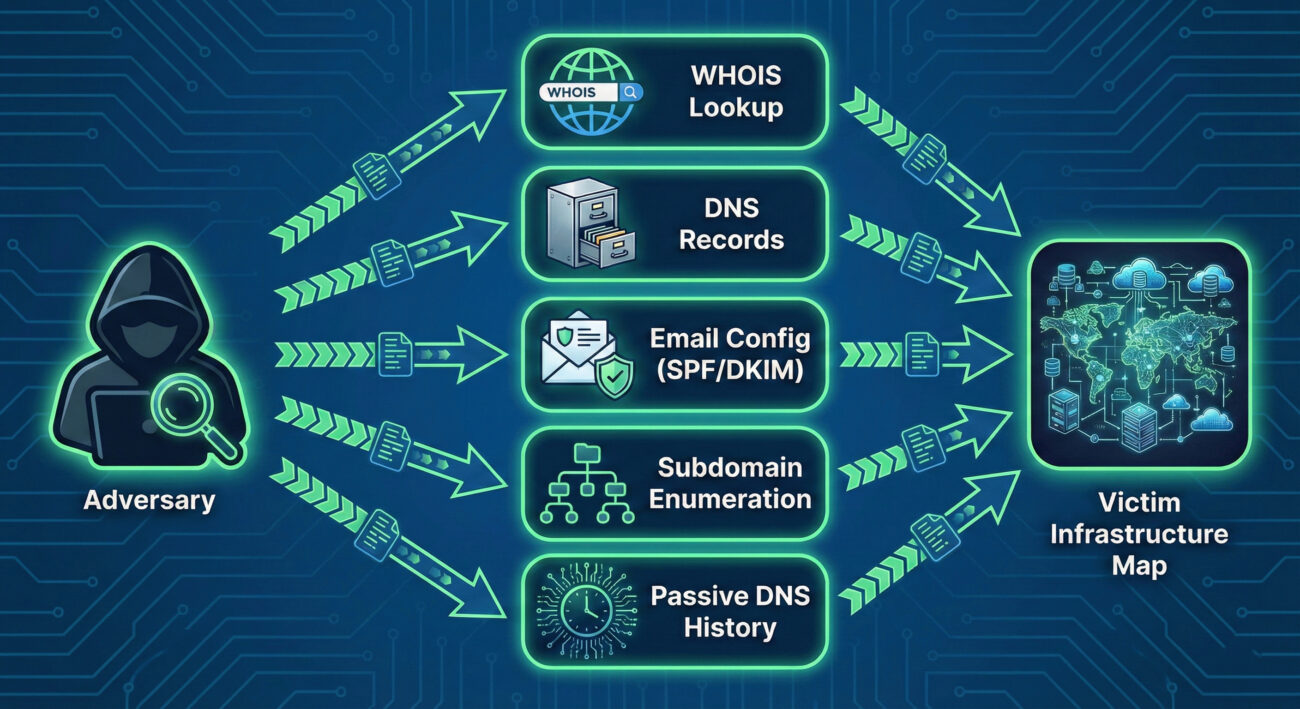
The Attacker's Playbook: Executing Domain Properties
Step-by-Step Breakdown
A threat actor conducting domain property reconnaissance follows a logical, layered process:
- Step 1: Foundation (WHOIS & Basic DNS): The attacker starts with the primary target domain (e.g., targetcorp.com). They perform a WHOIS lookup to get registration details, admin email (often abused for phishing), and name servers. Concurrently, they query basic DNS records (A, MX, NS, TXT) to find the main web server IP, mail servers, and any revealing TXT records.
- Step 2: Expansion (Subdomain Discovery): Using tools and public databases, they aggressively hunt for subdomains (vpn.targetcorp.com, dev.targetcorp.com, owa.targetcorp.com). These often point to external-facing applications and are prime targets for further vulnerability scanning.
- Step 3: Analysis (Service & Configuration Mapping): For each discovered IP and subdomain, the attacker identifies running services (HTTP, FTP, RDP) and examines configurations, especially email (SPF, DKIM, DMARC records) to assess the strength of anti-spoofing controls.
- Step 4: Historical Research (Passive DNS): They search historical DNS data to find "ghost" assets, old subdomains or IPs that may have been forgotten by IT but never decommissioned, representing a potential weak point in the digital armor.
- Step 5: Target Selection & Weaponization: The compiled data is analyzed to select the most promising initial access vectors. For example, a misconfigured SPF record might enable convincing spoofed emails, or an outdated "test.server.targetcorp.com" might be running vulnerable software.
Red Team Analogy & Mindset
Think like a private investigator hired to gather dirt on a public figure, using only legal, open-source methods. Your goal isn't to break in (yet), but to build a comprehensive dossier. You scour property records (WHOIS), follow the subject's daily commute patterns (DNS traffic patterns), photograph all their known residences and offices (subdomains), and dig through old newspaper archives (Passive DNS) for forgotten addresses. Every piece of data is a potential lever for future manipulation or intrusion.
The mindset is one of patience and thoroughness. A red teamer knows that the time invested here pays exponential dividends later in the operation, reducing noise, increasing success rates for phishing, and revealing paths of least resistance.
Tools & Command-Line Examples
Attackers use a blend of simple command-line utilities and powerful automated frameworks.
Common Tools:
- dig / nslookup: The bread and butter for manual DNS queries.
- WHOIS clients: Built into most Linux distros for registration lookups.
- Sublist3r / Amass / Subfinder: Specialized tools for aggressive subdomain enumeration by scraping search engines, certificates, and DNS records.
- theHarvester: A classic reconnaissance tool for gathering emails, subdomains, hosts, and open ports from public sources.
Illustrative Commands:
# 1. Basic WHOIS lookup for registration info
whois example.com

# 2. Querying MX records to find mail servers
dig MX example.com +short
# Output might be: 10 mail.example.com

# 3. Using dig to get all DNS records (zone transfer attempt - often blocked)
dig ANY example.com @ns1.example.com

# 4. Checking SPF record to see authorized email senders
dig TXT example.com | grep spf
# Output might show: "v=spf1 include:_spf.google.com ~all"
Real-World Campaign Example
The sophisticated Russian APT group known as APT29 (Cozy Bear, The Dukes), famously associated with the SolarWinds campaign, is a master of patient, thorough reconnaissance. In operations documented by cybersecurity firms, the group has been observed conducting extensive domain property reconnaissance long before launching their primary attacks.
They meticulously map target organizations' digital footprints, identifying not just primary domains but also subsidiary companies, acquired business units, and associated domain names. This intelligence allows them to craft highly convincing phishing lures and establish legitimate-looking but attacker-controlled infrastructure that blends in with the target's normal network patterns. This foundational work was critical to the success of their supply chain compromise against SolarWinds.
Reference: For an in-depth analysis of APT29's tactics, see the Mandiant Intelligence Profile on APT29.
The Defender's Handbook: Stopping Domain Properties
Blue Team Analogy & Detection Philosophy
Your job as a defender isn't to stop the reconnaissance, that's happening constantly in the public domain. Your job is to minimize its value and maximize its cost to the attacker. Think of yourself as the head of security for a celebrity. You can't stop paparazzi from taking public photos, but you can:
- Control what information is in public records (use WHOIS privacy).
- Ensure all entrances to properties are secure, even the rarely used ones (harden all subdomains).
- Monitor for people visibly casing your properties (detect reconnaissance activity).
- Regularly audit your own public footprint to see what an attacker sees.
The detection philosophy shifts from "block the recon" to "understand the recon to predict the attack." A surge in DNS queries for your SPF record from a new region might precede a phishing campaign.
SOC Reality Check: What to Look For
In a typical SOC, you won't see alerts titled "Domain Reconnaissance in Progress." Instead, you'll see subtle anomalies that require correlation.
- Log Noise: A slight but sustained increase in DNS query volume from external IPs, especially for TXT, MX, and ANY record types.
- EDR/SIEM Clues: Outbound connections from internal systems to known DNS brute-forcing or subdomain enumeration services (though most recon is done from attacker-controlled infrastructure).
- The True Signal: The actionable intelligence comes when you correlate this low-level recon data with a subsequent event, like a spear-phishing email that perfectly uses a discovered subdomain name in its lure.
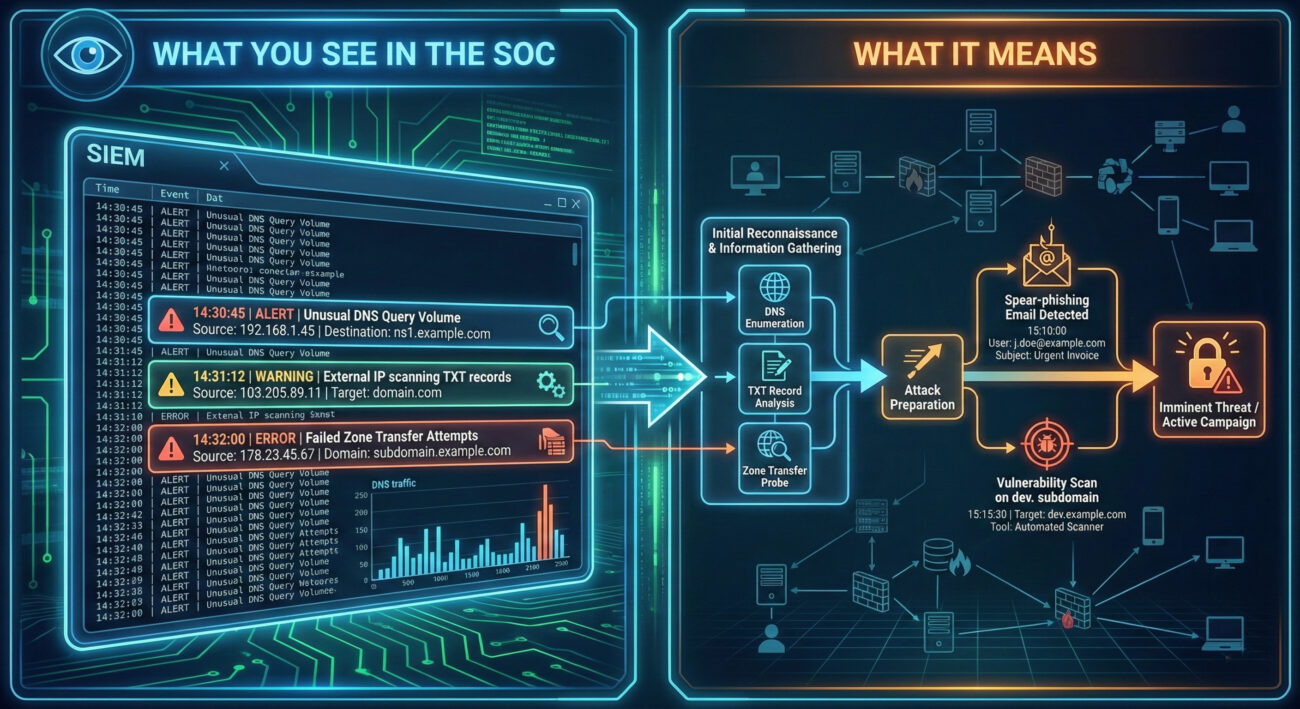
Threat Hunter's Eye: Practical Query
Here is a Sigma rule designed to detect potential subdomain enumeration activity. This rule looks for a high volume of unique DNS queries for a single target domain from a single source within a short timeframe, which is indicative of automated tools like Sublist3r or Amass.
# Sigma Rule: Potential DNS Subdomain Enumeration Activity
# Author: MITRE ATT&CK Field Guide
# Reference: T1590.001 - Gather Victim Identity Information: Domain Properties
# Log Source: DNS Server Logs (e.g., Windows DNS, Bind)
title: Potential DNS Subdomain Enumeration
id: a1b2c3d4-1234-5678-abcd-123456789012
status: experimental
description: Detects a high number of failed or unique NXDOMAIN responses for subdomains of a single parent domain, suggesting automated subdomain brute-forcing.
author: Blue Team
date: 2023/10/27
logsource:
    category: dns
detection:
    selection:
        rcode: NXDOMAIN  # Query returned non-existent domain
    aggregation:
        group_by:
            - src_ip
            - query  # The domain being queried
        count: query
        condition: count > 50  # Threshold: adjust based on baseline
        timeframe: 5m
    filter:
        - query|endswith: '.com'  # Focus on relevant TLDs, adjust as needed
        - '*/_tcp.*' not in query  # Filter out common SRV query noise
        - '*/_udp.*' not in query
    condition: selection and aggregation and filter
falsepositives:
    - Legitimate security scanners
    - Misconfigured applications
level: low
tags:
    - attack.reconnaissance
    - attack.t1590.001
Key Data Sources for Detection
- DNS Server Logs (Authoritative & Recursive): The primary source. Look for patterns in query types (ANY, AXFR, TXT), volumes, and sources.
- Network Traffic (NetFlow, PCAP): External IPs making sustained, high-volume DNS requests to your servers.
- Firewall & Proxy Logs: Outbound connections from your network to domain research tools or websites (e.g., crt.sh, dnsdumpster.com) could indicate an insider threat or compromised host conducting reconnaissance.
- Cloud Provider Logs (AWS CloudTrail, Azure Activity Log): For domains hosted in the cloud, API calls to list domain-related resources can be a recon signal.
Building Resilience: Mitigation Strategies for Domain Properties
Actionable Mitigation Controls
You can't hide your domain, but you can control the information exposed and manage your assets proactively.
- Enable WHOIS Privacy/Redaction: Most domain registrars offer a privacy service that replaces your personal/company details in the public WHOIS database with the registrar's proxy information. This is a critical first step.
- Harden DNS Configuration:
- Restrict zone transfers (AXFR) to only authorized secondary name servers.
- Implement DNS Response Rate Limiting (RRL) to hinder brute-force enumeration tools.
- Use generic, non-revealing names for public-facing hostnames where possible (e.g., use mail.contoso.com instead of exchange01.contoso.com).
- Implement & Maintain Strong Email Authentication: Properly configure SPF, DKIM, and DMARC with a policy of `reject` (`p=reject`). This doesn't hide the records but makes email spoofing significantly harder, reducing the ROI of the attacker's reconnaissance.
- Conduct Regular Asset Discovery & Hygiene: Proactively discover your own subdomains and external assets more often than the attackers do. Use the same tools (Amass, etc.) in a controlled manner. Decommission forgotten "ghost" assets.
- Segment Public vs. Internal Information: Ensure development, staging, and internal-use subdomains are not publicly resolvable or are protected behind authentication gateways.
Red vs. Blue: A Quick Comparison
| Attacker Goal (Red Team) | Defender Action (Blue Team) |
|---|---|
| Find all subdomains to discover attack surfaces. | Maintain an accurate asset inventory and decommission unused subdomains. |
| Obtain admin contact info for social engineering. | Use WHOIS privacy services to obfuscate real contact details. |
| Identify mail server IPs and weak SPF/DMARC for spoofing. | Implement and enforce strict DMARC policies (p=reject) and monitor for failures. |
| Map the organization's digital infrastructure for planning. | Conduct regular external penetration tests to see what attackers see and remediate findings. |
| Find old/forgotten assets with lower security. | Perform quarterly external footprint audits using attacker tools (ethically). |
Domain Properties Cheat Sheet
Red Flag
Sustained, high-volume DNS queries for TXT, MX, or ANY records, or a high rate of NXDOMAIN responses for subdomains from a single external IP address.
Blue's Best Move
Enable WHOIS privacy, enforce a strict DMARC `reject` policy, and perform quarterly external footprint audits to find and secure assets before attackers do.
Hunt Here
DNS server logs for NXDOMAIN spikes and ANY/TXT query patterns. Correlate recon activity with subsequent spear-phishing or vulnerability scan events.
Conclusion and Next Steps
Gathering domain properties is a pervasive, low-skill entry point into the cyber kill chain that enables almost every subsequent attack stage. While you cannot prevent it, you can drastically reduce its utility to adversaries through diligent security hygiene, proactive monitoring, and robust configurations.
Your next steps should be practical:
- Audit Your Domain: Run a tool like Amass or theHarvester against your own primary domain (ethically) to see exactly what an attacker sees.
- Check Your Configurations: Verify your WHOIS privacy is on and your SPF/DKIM/DMARC records are correct and strict. Use a free tool like MXToolbox.
- Deploy Detection: Work with your SIEM team to implement a version of the Sigma rule provided in this guide, tailored to your DNS environment.
Reconnaissance sets the stage for all cyber attacks. By mastering the defense of this initial phase, you force attackers to work harder, make more noise, and increase their chances of being detected before they can cause real harm.
Gather Victim Network Information (T1590)
Ultimate Guide to Gather Victim Network Information: Attack & Defense
Gather Victim Network Information is the process of collecting data about a target's network infrastructure, like IP ranges, domain names, and service details, to plan and enable further attacks.
Table of Contents
- Understanding Gather Victim Network Information in Simple Terms
- Decoding the Jargon: Key Terms for Gather Victim Network Information
- The Attacker's Playbook: Executing Gather Victim Network Information
- The Defender's Handbook: Stopping Gather Victim Network Information
- Building Resilience: Mitigation Strategies for Gather Victim Network Information
- Gather Victim Network Information Cheat Sheet
- Conclusion and Next Steps
Understanding Gather Victim Network Information in Simple Terms
Imagine you're planning to rob a bank. You wouldn't just walk in blind. First, you'd case the joint: note the security cameras, count the guards, map the exits, and observe cash delivery schedules. Gather Victim Network Information is the digital equivalent of this reconnaissance phase.
Attackers are performing digital "drive-bys" of your organization. They use public tools and data to passively and actively probe your external digital footprint. The goal isn't to break in yet, but to draw a detailed map of your network's borders, weak points, and valuable assets. This map makes their eventual attack faster, quieter, and more likely to succeed.
Decoding the Jargon: Key Terms for Gather Victim Network Information
| Term | Simple Definition |
|---|---|
| ASN (Autonomous System Number) | A unique identifier for a network or group of IP addresses controlled by a single organization (e.g., an ISP or large company). Think of it as a postal code for a chunk of the internet. |
| DNS Reconnaissance | The process of querying Domain Name System (DNS) records to discover subdomains, mail servers, and other network hosts associated with a target domain. |
| IP Block / Netblock | A contiguous range of IP addresses assigned to an organization. Finding this tells an attacker the "neighborhood" of your digital assets. |
| Passive Reconnaissance | Collecting information without directly interacting with the target's systems (e.g., using search engines, public databases). It's silent and often undetectable. |
| Banner Grabbing | Connecting to a network service (like a web or mail server) to read its welcome message, which often reveals software names and versions. |
The Attacker's Playbook: Executing Gather Victim Network Information
Step-by-Step Breakdown
A structured approach to Gather Victim Network Information often follows this path:
- Define the Target: Identify the organization's primary domain names (e.g., `company.com`).
- Passive Enumeration: Use open-source intelligence (OSINT) tools and websites (like SecurityTrails, Shodan, Censys) to find associated IP blocks, ASNs, and historical DNS data without touching the target's network.
- Active DNS Discovery: Use tools to actively query DNS for subdomains (`dev.company.com`, `vpn.company.com`) and record types (MX for mail, TXT for SPF/DKIM settings).
- Network Mapping: Perform a light scan on discovered IP ranges to identify live hosts and common open ports (e.g., 443 for HTTPS, 25 for SMTP).
- Service Fingerprinting: Connect to open services to grab banners and determine running software (e.g., `nginx 1.18.0`, `Exchange Server 2019`).
- Compile the Intelligence: Document all findings into a target dossier for use in later attack phases like vulnerability scanning or spear-phishing.
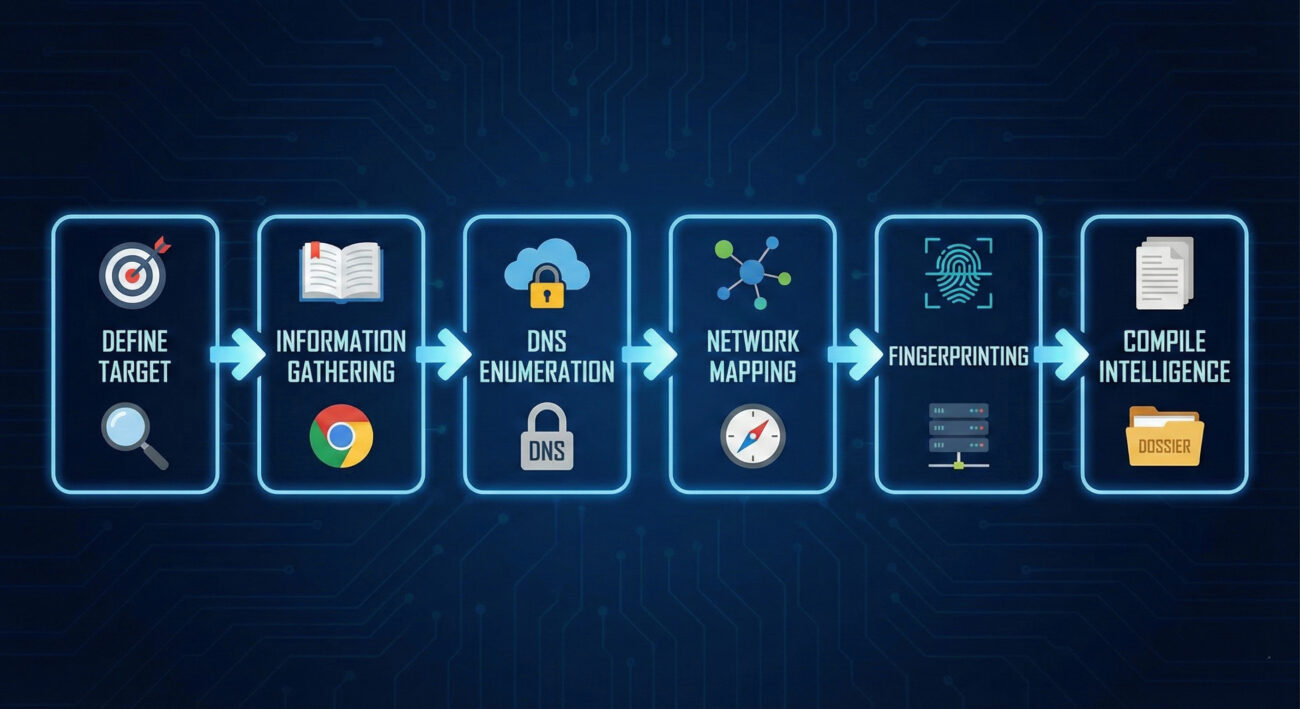
Red Team Analogy & Mindset
Think like a burglar researching a neighborhood from public records and a few daytime walks. You're looking for answers to key questions: Which houses have alarm company signs? Who has a tall, climbable fence? Which driveway has the expensive car? In the digital world, the Red Team asks: What's their public IP range? Where is their email hosted? Do they have any exposed development or test servers (often less secure)? This mindset is about patiently building a profile from scattered, public clues.
Tools & Command-Line Examples
Attackers have a vast, often free, toolkit for this phase.
- nmap: The quintessential network scanner for discovering hosts and services.
- dnsrecon / dnsenum: Specialized tools for comprehensive DNS enumeration.
- Amass / Subfinder: Passive and active subdomain enumeration tools.
- Shodan CLI / Censys: Command-line interfaces to search internet-wide scan data for exposed devices and services belonging to the target.
Example Command Snippets:
# Using nslookup to find mail servers (MX records) for a domain
nslookup -type=MX example.com

# Using nmap for a light, "stealthy" ping sweep of a discovered netblock
nmap -sn 203.0.113.0/24 -oG ping_sweep.txt

# Using dnsrecon for a standard enumeration
dnsrecon -d example.com -t std -j dns_results.json
Real-World Campaign Example
The APT29 group (also known as Cozy Bear or Midnight Blizzard), associated with Russian intelligence, is known for conducting extensive and patient reconnaissance. Prior to their compromise of the SolarWinds build environment in the SUNSPOT campaign, they undoubtedly performed deep Gather Victim Network Information operations. This would have included mapping SolarWinds' external network, understanding its software supply chain partners, and identifying key development and update infrastructure to surgically insert their malicious code.
For a detailed analysis, see the CrowdStrike report on SUNSPOT: SUNSPOT Malware Analysis.
The Defender's Handbook: Stopping Gather Victim Network Information
Blue Team Analogy & Detection Philosophy
Your job is to be the neighborhood watch that notices the suspicious car driving slowly down the street every day. You can't stop someone from looking at your house from the public street, but you can notice if they're taking pictures, testing the gate, or casing multiple houses in a pattern. The Blue Team philosophy here is awareness and attribution. We must assume reconnaissance is happening constantly. The goal is to detect it, understand the adversary's focus, and use that intelligence to strengthen our defenses before they strike.
SOC Reality Check: What to Look For
Pure passive recon is invisible. The moment an attacker switches to active scanning, they generate logs. The challenge is separating malicious scanning from legitimate security tools, researchers, and benign internet background noise.
- Log Noise: Your firewalls, WAFs, and DNS servers will log countless connection attempts and queries daily.
- Alert Tuning: Standard "port scan" alerts are notoriously noisy. You need to look for context and patterns: scanning from a single source across your entire netblock, sequential port scanning, or DNS queries for hundreds of random subdomains.
Threat Hunter's Eye: Practical Query
Here is a Sigma rule to detect potential DNS reconnaissance tools (like dnsrecon) making high-volume TXT or AXFR record queries, which are uncommon in normal user traffic.
title: High Volume of DNS TXT or AXFR Queries
id: a1b2c3d4-1234-5678-abcd-ef1234567890
status: experimental
description: Detects a source IP making an unusually high number of DNS TXT or AXFR queries, which can indicate reconnaissance activity.
references:
    - https://attack.mitre.org/techniques/T1590/
author: Your SOC
date: 2023-10-27
logsource:
    category: dns
detection:
    selection:
        query_type:
            - 'TXT'
            - 'AXFR'
    condition: selection | count() by src_ip > 25
falsepositives:
    - Legitimate security assessment tools
    - Misconfigured internal systems
level: medium
tags:
    - attack.t1590
    - attack.reconnaissance
Key Data Sources for Detection
- DNS Server Query Logs: The primary source for detecting subdomain enumeration and unusual record type requests.
- Network Firewall/IPS Logs: Source for detecting systematic port scans across multiple IP addresses.
- Web Server/Application Firewall (WAF) Logs: Can reveal probing for non-existent subdomains or paths.
- Border/Edge Router Netflow Data: Useful for identifying traffic patterns from a single source to many internal destinations.
Building Resilience: Mitigation Strategies for Gather Victim Network Information
Actionable Mitigation Controls
Since you can't hide all public information, focus on reducing its usefulness to an attacker.
- Network Segmentation: Ensure internal network details discovered from one exposed host don't provide a roadmap to critical assets.
- Minimize Exposed Services: Audit your public IP space monthly. Shut down any internet-facing service that isn't strictly necessary for business. Use a cloud access security broker (CASB) or similar to find shadow IT.
- Banner Obfuscation: Remove or genericize service banners on public-facing systems (e.g., change "Apache/2.4.41 (Ubuntu)" to just "Apache").
- DNS Hygiene: Implement rate limiting on your public DNS servers to slow down brute-force enumeration. Regularly review and clean up old, unused DNS records (especially for decommissioned systems).
- OSINT Self-Audit: Regularly search for your own company on Shodan, Censys, and SecurityTrails. See what the attacker sees and remediate surprises.
Red vs. Blue: A Quick Comparison
| Attacker's Goal (Red) | Defender's Action (Blue) |
|---|---|
| Discover all public IP blocks and domains. | Maintain an accurate, minimal inventory of public assets; remove orphaned IPs. |
| Enumerate all subdomains to find hidden or test systems. | Practice strict DNS hygiene; use generic names for public services; monitor for anomalous DNS query patterns. |
| Fingerprint software versions to find known vulnerabilities. | Obfuscate banners; maintain a rigorous patch management program for all public-facing software. |
| Map network trust relationships from exposed data. | Implement strong network segmentation; assume discovered hosts will be targeted. |
Gather Victim Network Information Cheat Sheet
Red Flag
A single external IP address making sequential DNS queries for hundreds of potential subdomains (`a1.company.com`, `a2.company.com`, ...) or conducting a TCP port scan across your entire public IP range within minutes.
Blue's Best Move
Conduct monthly OSINT self-assessments. Use the same free tools attackers use to find and secure forgotten assets. Implement and tune DNS query logging and rate limiting.
Hunt Here
Your DNS server logs (look for spikes in TXT, AXFR, or ANY record queries) and firewall deny logs (for connection attempts to non-existent hosts across your IP block).
Learn More
• Official MITRE ATT&CK Page: T1590 - Gather Victim Network Information
• External Deep Dive: SANS Blog on OSINT Fundamentals
Conclusion and Next Steps
Gather Victim Network Information is the foundational, often overlooked, first chapter of any major cyber attack. Defenders must shift their mindset: assume it's happening to your organization right now. Your goal is not to prevent all information leakage, that's impossible, but to manage your digital footprint, detect active probing, and use that early warning to fortify your defenses.
Your Action Plan:
- Run the Tools Yourself: Use `nmap`, `dnsrecon`, and search Shodan for your company name. See your network through the attacker's lens.
- Enable and Centralize Key Logs: Ensure DNS query logs and firewall/IPS denied connection logs are flowing into your SIEM.
- Practice Proactive Hygiene: Schedule quarterly reviews to decommission unused public-facing assets and clean DNS records.
Continue Your Learning:
- Internal Link: [Internal-Link: Phishing for Information T1598] – The next step after network recon is often social engineering.
- Internal Link: [Internal-Link: Active Scanning T1595] – Learn how attackers move from passive info gathering to active probing.
- External Resource: Read the NIST SP 800-53 Security Controls for formal guidance on assessment and authorization.
Remember, in cybersecurity, the battle often begins long before the first malware is dropped. By mastering the reconnaissance phase, you build a stronger, more aware defensive posture from the ground up.
Employee Names (T1589.003)
Ultimate Guide to Gather Victim Identity Information - Employee Names: Attack & Defense
Employee names are a foundational piece of data collected by adversaries to craft targeted social engineering attacks, personalize phishing lures, and map organizational structure for initial access.
Table of Contents
Understanding Employee Names in Simple Terms
Think of an organization as a high-security castle. Before an attacker tries to scale the walls or blast the gate, they first study the people who live and work there. They want to know: Who are the guards? Who delivers supplies? Who is the lord of the manor? Employee names are the first identifiers an adversary collects to answer these questions.
This isn't a high-tech hack. It's the digital equivalent of watching the castle from a nearby hill, talking to townsfolk in the local tavern, or picking up a discarded roster. The goal is simple: transform a faceless corporation into a list of real people who can be researched, manipulated, or impersonated in a future attack.
Decoding the Jargon: Key Terms for Employee Names
| Term | Simple Definition | Why It Matters |
|---|---|---|
| Reconnaissance (RECON) | The information-gathering phase of an attack, where the adversary learns about the target before taking any direct action. | Collecting employee names is a core RECON activity. It's passive and often undetectable by the target. |
| OSINT (Open-Source Intelligence) | Information collected from publicly available sources like websites, social media, and public records. | 95% of employee name collection uses OSINT. LinkedIn, company "About Us" pages, and press releases are goldmines. |
| Spearphishing | A highly targeted phishing email sent to a specific individual or group, often using personal details to seem legitimate. | Employee names are the critical ingredient that turns a generic spam email into a convincing, dangerous spearphishing lure. |
| Identity Sprawl | The widespread, often uncontrolled, distribution of employee information (like names and roles) across public and semi-public platforms. | It's the root cause that makes this technique so effective. The more sprawl, the easier the reconnaissance. |
| Social Engineering | Manipulating people into divulging confidential information or performing actions that compromise security. | Names are used to build trust and authority, making social engineering attempts much more likely to succeed. |
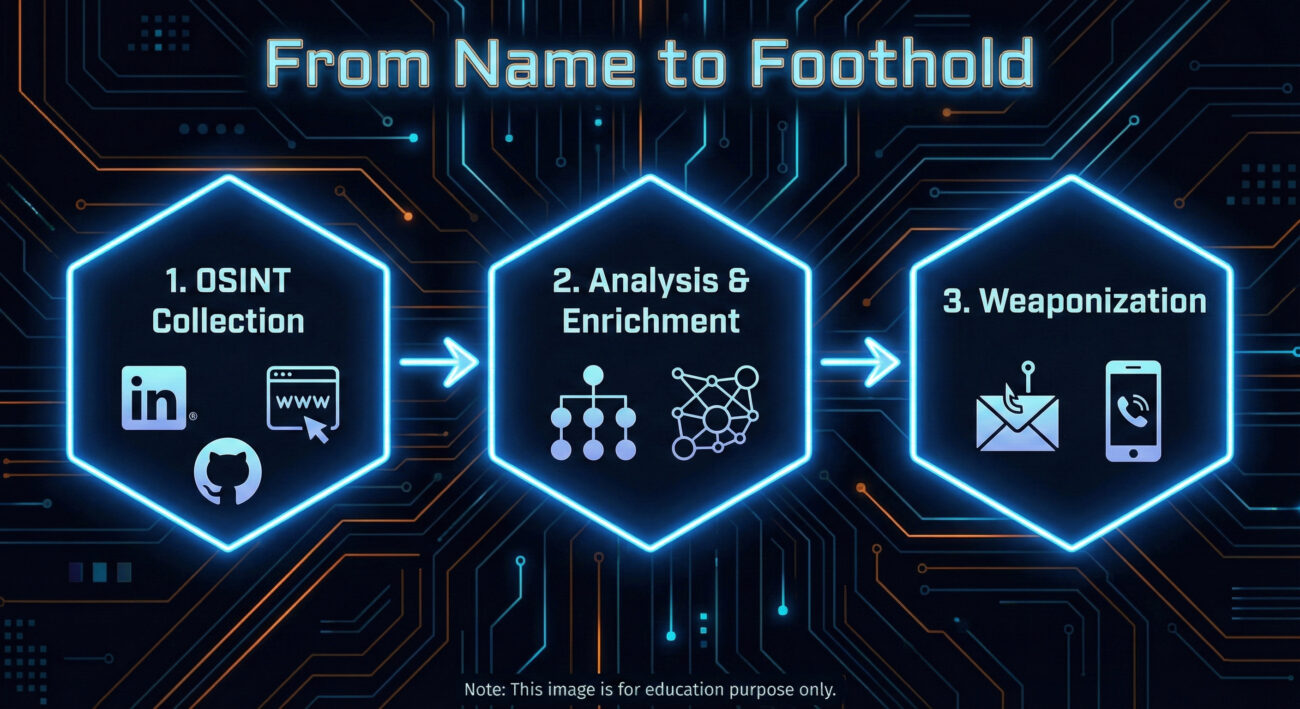
The Attacker's Playbook: Executing Employee Names Reconnaissance
This is the adversary's research phase. There's no malware deployed yet, no systems directly probed. The work is quiet, methodical, and leverages the information your organization freely provides.
Step-by-Step Breakdown
- Primary Source Harvesting: Start with the corporate website, especially "Leadership," "Team," "About Us," and "News/Press Release" sections. Extract full names, titles, and departments.
- Social Media Expansion: Use names to find employees on LinkedIn, Twitter (X), and even GitHub. LinkedIn is paramount for understanding reporting structures, skills, and tenure.
- Pattern Analysis: Determine email address formats (e.g., [email protected], [email protected]). Verify guesses using tools like Hunter.io or email verification services.
- Org Chart Reconstruction: Piece together a rudimentary organizational chart. Identify key personnel in IT, Finance, and Executive roles, high-value targets for follow-on attacks.
- Target Prioritization: Select individuals for the next phase (like spearphishing). Ideal targets may have public technical interests (from GitHub), are new to the company, or hold positions of authority with likely system access.
Red Team Analogy & Mindset
Imagine you're a private investigator hired to get information on a company. You wouldn't start by breaking in. You'd sit in a cafe across the street, note who comes and goes, check public records, and maybe sift through the company's trash. The mindset is one of patience and inference. Every public mention of an employee is a puzzle piece. A "Happy 5th work anniversary!" post on LinkedIn tells you they've been there five years. A GitHub commit tells you what technology stack they use. It's all about building a profile from fragments.
Tools & Command-Line Examples
- LinkedIn & Advanced Search Operators: The premier tool. Use "current company" filters and Boolean searches (e.g., "IT manager AT TargetCompany"). Sales Navigator is a red team's best friend.
- theHarvester: A classic OSINT CLI tool for gathering emails, names, subdomains, and more from public sources.
- Hunter.io / Phonebook.cz: Web-based services to discover email addresses associated with a domain and verify their format.
- LinkedIn2Username (or similar scripts): Tools to generate potential usernames from scraped LinkedIn data based on common patterns.
Example theHarvester Command:
theharvester -d "example.com" -b google,linkedin -l 100
# -d: target domain
# -b: data sources (google, linkedin, etc.)
# -l: limit results
# This command scrapes Google and LinkedIn for information related to example.com, potentially revealing employee names in bios or posts.
Real-World Campaign Example: APT29 (Cozy Bear)
The Russian-affiliated APT29 group is a master of patient, reconnaissance-heavy operations. In campaigns targeting government and diplomatic entities, they extensively profile their targets.
Before launching their infamous spearphishing campaigns (often using lure documents related to current events), they conduct deep OSINT research. This includes harvesting employee names and professional details from official websites, social media, and professional networking sites. This intelligence allows them to craft incredibly believable emails, sometimes impersonating real colleagues or contacts mentioned in the target's public profiles, significantly increasing their chance of success.
Reference: For a detailed analysis of APT29's tradecraft, see the advisory from the UK's NCSC and the US's CISA: Joint Advisory on APT29 (DoFollow).
The Defender's Handbook: Stopping Employee Names Exploitation
You can't prevent the world from seeing public information. The defense strategy isn't about making data invisible; it's about managing risk, training people, and detecting the misuse of that data in later attack stages.
Blue Team Analogy & Detection Philosophy
Think of yourself as a counter-intelligence officer. You know foreign agents are reading your public newspapers and watching your military parades. You can't stop that. But you can control what's in the newspaper, train your personnel to spot suspicious contact attempts, and have excellent surveillance (logging/detection) for when someone acts on that intelligence. Your goal is to make the adversary's recon data stale, misleading, or useless, and to catch them when they try to use it.
SOC Reality Check: What to Look For
You will not get an alert saying "Adversary viewed John Doe's LinkedIn profile." The attack surface here is largely invisible. Your detection opportunities come in the next phase.
- Surge in Failed Logins: An attacker testing email address formats (e.g., jdoe@, john.doe@) will generate failed authentication events.
- Spearphishing Email Delivery: An email that uses an internal employee's name correctly is a direct indicator that this recon occurred. This is your primary detection signal.
- Unusual External Website Visits: A corporate IP showing up in logs for many OSINT tool websites or performing suspicious scraping patterns might indicate internal recon (less common).
Threat Hunter's Eye: Practical Query
Hunt for the enumeration activity that often follows name collection. Here is a Sigma rule to detect patterns of username enumeration via failed logons, which can indicate an adversary validating harvested employee names/emails.
title: Potential Username Enumeration via Failed Logons
id: a1b2c3d4-5e6f-7890-abcd-ef1234567890
status: experimental
description: Detects multiple failed logon attempts for distinct usernames from a single source, which may indicate reconnaissance to validate harvested employee identities.
author: Your DFIR Team
logsource:
    product: windows
    service: security
    definition: 'Requirements: Audit Logon Events (Failure) must be enabled'
detection:
    selection:
        EventID: 4625
    filter:
        AccountType: 'User'
    timeframe: 5m
    condition: selection and not filter | count() by SourceIpAddress, WorkstationName > 10 distinct TargetUsernames
fields:
    - SourceIpAddress
    - WorkstationName
    - TargetUserName
falsepositives:
    - Legitimate authentication service issues
    - Misconfigured applications
level: medium
tags:
    - attack.reconnaissance
    - attack.t1589.003
Key Data Sources for Detection
- Authentication Logs (Azure AD, Okta, On-prem AD): For failed login patterns and unusual geographic attempts.
- Email Security Gateway Logs: To analyze spearphishing attempts that get blocked or delivered, noting the use of internal names.
- Web Proxy/Cloud Access Security Broker (CASB) Logs: To spot internal IPs potentially conducting OSINT scraping (though this is noisy).
- Endpoint Detection & Response (EDR): For post-breach activity that originated from a successful spearphish using a gathered name.
Building Resilience: Mitigation Strategies for Employee Names Recon
Actionable Mitigation Controls
- Implement a Public Information Policy: Define what employee information is appropriate for public websites and social media. Limit detailed titles and full team rosters on the corporate site. Encourage employees to use professional but vague titles on public LinkedIn profiles (e.g., "Infrastructure Engineer" vs. "Senior VMware and Azure Cloud Admin").
- Conduct Regular OSINT Audits: Periodically (quarterly/bi-annually), have a team member or hired red team simulate this recon against your company. Report on what they find and work with HR/Comms to reduce the sensitivity of the exposed data.
- Enhanced Security Awareness Training: Move beyond "don't click links." Train employees that their public information is used by attackers. Teach them to be suspicious of emails that use personal details sourced from LinkedIn, and to verify unusual requests via a secondary channel.
- Deploy Multi-Factor Authentication (MFA) Universally: MFA is your single best defense against credential-based attacks that follow successful spearphishing. Even if an attacker gets a password using a personalized lure, MFA will likely block access.
- Use Generic Contact Addresses: For public-facing functions (e.g., support, press, info), use role-based emails ([email protected]) instead of individual employee emails on the website.
Red vs. Blue: A Quick Comparison
| Attacker's Goal (Red Team) | Defender's Action (Blue Team) |
|---|---|
| Build a comprehensive, accurate list of employee names, roles, and contact info. | Reduce the accuracy and usefulness of public data through policy and training (secure by obscurity, applied wisely). |
| Use names to craft credible spearphishing lures and establish false trust. | Train users to recognize and report sophisticated lures, regardless of personalization. Implement strong email filtering. |
| Validate email address formats to enable password spraying or targeted credential attacks. | Monitor for and alert on username enumeration patterns. Enforce strong password policies and universal MFA. |
| Map the organization to identify high-value targets (IT admins, executives). | Implement strict access controls and privileged access management (PAM) so that compromising a high-value account is harder, even if they are identified. |
Employee Names Cheat Sheet
Conclusion and Next Steps
Employee names reconnaissance (T1589.003) is not a flashy exploit, but it is the bedrock of nearly all targeted cyber attacks. Defending against it requires a shift from purely technical controls to a blend of policy, awareness, and proactive hunting.
Your next steps:
- Conduct a Self-OSINT Assessment: Spend 30 minutes trying to find employee names and reconstruct an org chart for your own company. You'll be surprised at what you find.
- Review Your Public Information Policy: Work with HR and Corporate Communications. Is the data you're sharing necessary, or is it a risk?
- Tune Your Detections: Implement or refine a detection for username enumeration in your environment using the Sigma rule provided.
Email Addresses (T1589.002)
Ultimate Guide to Gather Victim Identity Information - Email Addresses: Attack & Defense
Gathering Email Addresses is the quiet, methodical first step in virtually every targeted cyber attack. This guide breaks down how adversaries harvest this foundational intelligence and how defenders can spot and disrupt their efforts.
Table of Contents
- Understanding Email Addresses in Simple Terms
- Decoding the Jargon: Key Terms for Email Addresses
- The Attacker's Playbook: Executing Email Addresses
- The Defender's Handbook: Stopping Email Addresses
- Building Resilience: Mitigation Strategies for Email Addresses
- Email Addresses Cheat Sheet
- Conclusion and Next Steps
Understanding Email Addresses in Simple Terms
Before a hacker sends a malicious email, they need a target list. Gathering Email Addresses is the process of building that list. Think of it like a burglar casing a neighborhood. They don't just randomly try doorknobs on the first house they see. Instead, they might look for mailboxes with names, check social media for people posting about being on vacation, or note which houses have newspapers piled up. They're gathering intelligence to plan a more effective break-in.
In the cyber world, email addresses are the digital equivalent of those mailbox names. They are public identifiers, often tied to a person's role (e.g., [email protected]), that an adversary can find without ever touching the target's network. This information is then used to launch precise, believable phishing or spearphishing attacks, credential stuffing, or even to map out an organization's structure for a larger campaign.
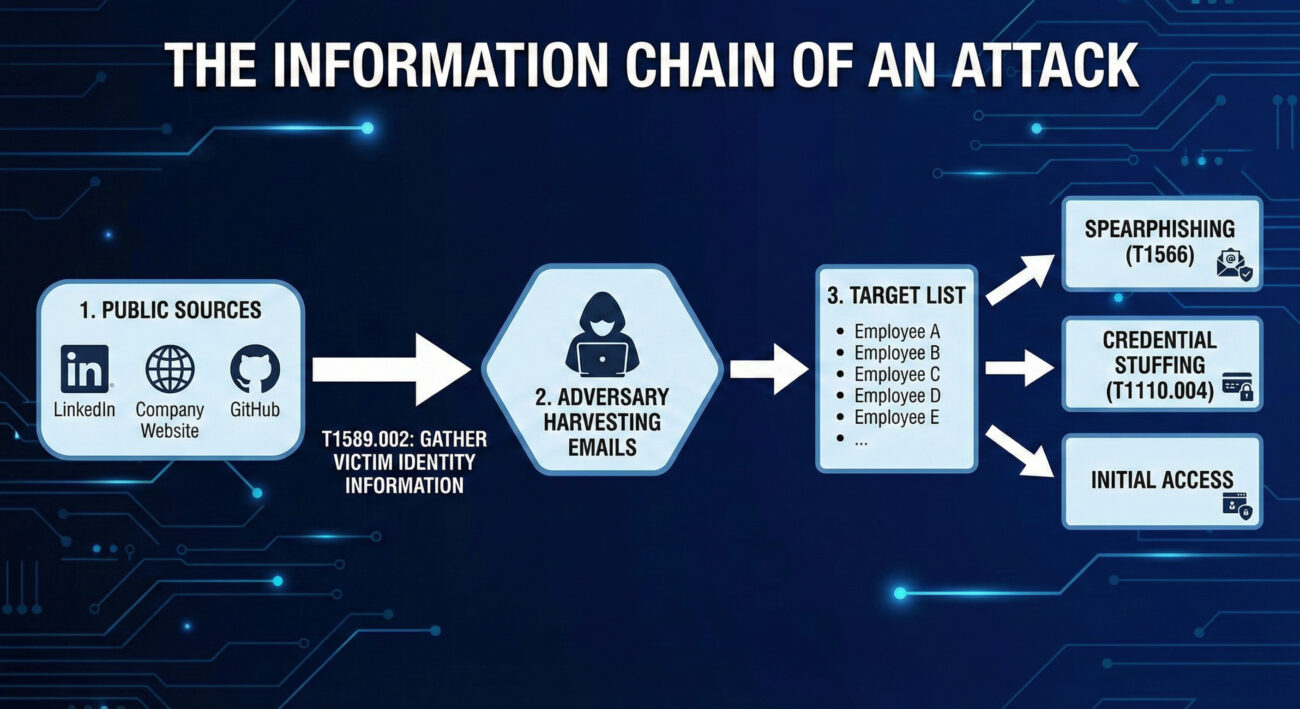
Decoding the Jargon: Key Terms for Email Addresses
| Term | Plain English Meaning |
|---|---|
| Reconnaissance (TA0043) | The overall tactic of gathering information to plan future operations. Think of it as the "planning and scouting" phase before any action is taken. |
| Open Source Intelligence (OSINT) | The practice of collecting information from publicly available sources. This includes search engines, social media, public code repositories, and business registries. |
| Victim Identity Information (T1589) | The parent technique for gathering data about people within a target organization, including email addresses, social media profiles, and job titles. |
| Email Enumeration | The systematic process of discovering valid email addresses, often by guessing common formats (e.g., [email protected]) and checking them against public services. |
| Spearphishing | The highly targeted form of phishing that uses gathered information (like specific email addresses and job roles) to trick a particular individual. |
The Attacker's Playbook: Executing Email Addresses
Step-by-Step Breakdown
A professional adversary doesn't just Google a company name and hope for the best. Their process is methodical:
- Define the Target: Identify the target organization or industry sector.
- Initial Harvest: Scrape the company's official website, press releases, and "Our Team" pages for publicly listed emails.
- Expand via Social Media: Use LinkedIn, X (Twitter), and other platforms to find employees, their roles, and sometimes their email formats in bios or posts.
- Leverage Technical Leaks: Search code repositories (GitHub, GitLab) for commits containing company email addresses, often accidentally pushed by developers.
- Email Format Discovery & Enumeration: Deduce the corporate email format (e.g.,
[email protected],[email protected]). Use tools to generate lists and verify them against the company's email server or third-party services. - Enrichment & Organization: Correlate emails with job titles, departments, and project mentions to build a detailed target profile for the next attack phase.
Red Team Analogy & Mindset
A Red Teamer performing this technique is like a corporate headhunter building a "dream team" roster. They need to know who the key decision-makers are, who has access to valuable systems (IT, Finance), and who might be more susceptible to social pressure. The mindset is one of patience and thoroughness.
The goal isn't just to get a list of emails; it's to understand the human landscape of the target. Which executive just got promoted? Which system administrator is active on technical forums? This context makes the subsequent social engineering attack exponentially more effective.
Tools & Command-Line Examples
Adversaries use a mix of custom scripts, OSINT frameworks, and simple command-line tools.
- theHarvester: A classic OSINT tool for gathering emails, subdomains, and hosts.
- LinkedIn (and scrapers like linkedin2username): The primary social source for employee names and roles.
- Hunter.io & Phonebook.cz: Public APIs and websites that aggregate email addresses and verify formats.
- Simple Email Verification Scripts: Adversaries write scripts to check if generated emails exist by interacting with mail servers (via SMTP probes).
Example Command Snippet (theHarvester):
# Basic search for a domain using multiple data sources
theHarvester -d target-corp.com -b all -l 500

# -d: target domain
# -b: data source (google, linkedin, bing, etc. 'all' for all)
# -l: limit results

# Output will include discovered emails, hosts, and IPs.
# Adversaries then clean and filter this data for valid corporate emails.
# Example of a simple format enumeration idea (conceptual Python snippet)
import itertools
first_names = ["john", "jane"]
last_names = ["smith", "doe"]
domain = "@target-corp.com"
for fname, lname in itertools.product(first_names, last_names):
# Generate common formats
print(f"{fname}.{lname}{domain}")
print(f"{fname[0]}{lname}{domain}")
print(f"{fname}{lname[0]}{domain}")Real-World Campaign Example
APT29 (Cozy Bear / Midnight Blizzard), a Russian state-sponsored group, is a master of patient, reconnaissance-heavy campaigns. In operations targeting government and diplomatic entities, they extensively profile their targets. This includes gathering employee email addresses from public sources like professional networking sites and conference attendee lists.
They use this intelligence to craft highly believable spearphishing emails. For example, they might impersonate a colleague from another department or a trusted external partner, using a gathered email address as a reference point to build credibility before sending a malicious link or attachment. This initial information gathering is a cornerstone of their long-term, stealthy compromise strategy.
Further Reading: Microsoft's report on Midnight Blizzard's social engineering details their use of gathered intelligence.
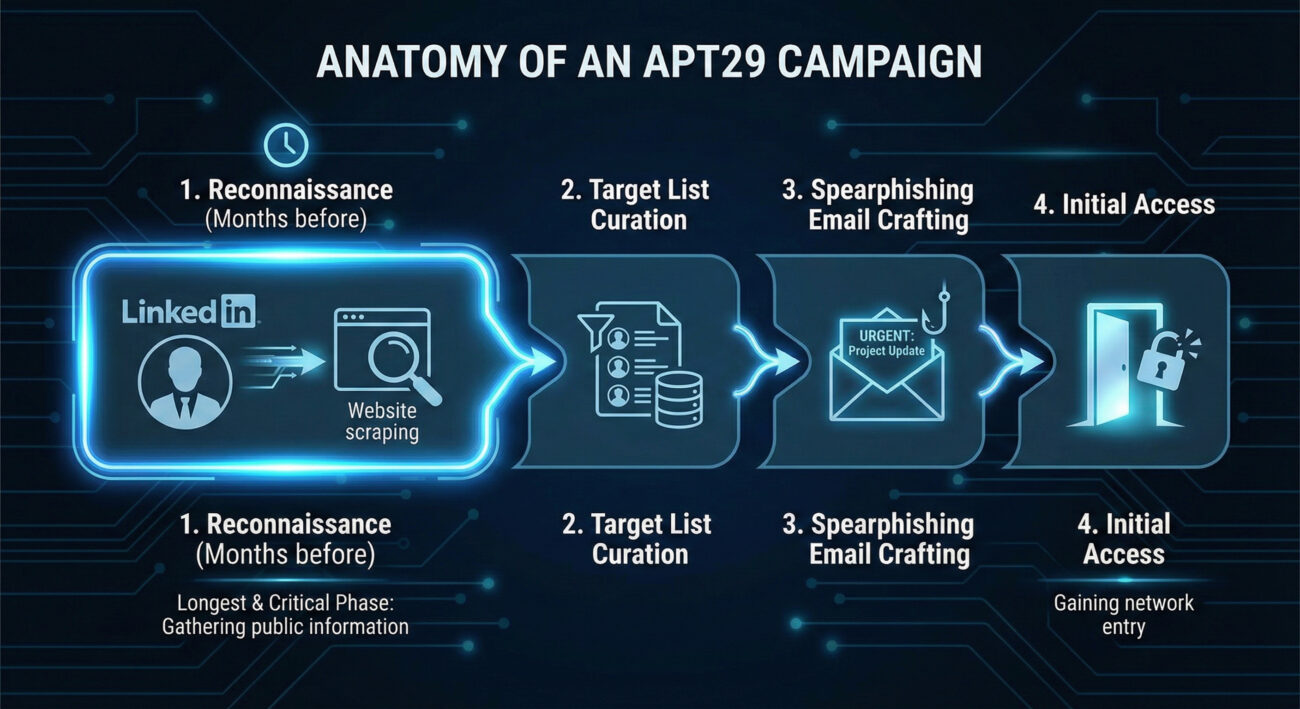
The Defender's Handbook: Stopping Email Addresses
Blue Team Analogy & Detection Philosophy
As a defender, you can't stop someone from looking at your public website. The philosophy here is awareness and adaptation. Think of yourself as a public figure's security detail. You know paparazzi (adversaries) will be taking pictures (gathering data). Your job isn't to stop all photography; it's to be aware of what information is in the public eye, understand how it could be used against your principal, and adjust your protective measures accordingly.
The goal is to reduce the attack surface and increase the cost for the adversary by making email gathering harder and less fruitful, thereby disrupting the kill chain before it even reaches your perimeter.
SOC Reality Check: What to Look For
Direct detection of T1589.002 is challenging because it happens outside your network. The "alert" is often indirect:
- Anomalous Web Server Logs: A spike in automated scans or bots scraping your "team.html" or "contact.php" pages from unfamiliar IPs or user-agents.
- Email Server Logs: An unusual volume of SMTP "VRFY" or "RCPT TO" commands from a single IP, indicating email enumeration attempts.
- Security Awareness Reports: An increase in employees reporting suspicious LinkedIn connection requests or targeted phishing reconnaissance.
The key is to treat these not as noise, but as early warning indicators of a impending spearphishing campaign.
Threat Hunter's Eye: Practical Query
This Sigma rule is designed to hunt for potential email enumeration activity against your Microsoft 365/O365 environment by detecting rapid-fire SMTP address validation attempts.
title: Potential O365 Email Address Enumeration
id: 9a5c1a7d-3a2f-4b8c-9e2a-1b3c4d5e6f7a
status: experimental
description: Detects multiple unique "User Not Found" responses from O365 within a short timeframe from a single source, indicative of email address guessing/enumeration.
author: Your Blue Team
date: 2023-10-26
tags:
    - attack.reconnaissance
    - attack.t1589.002
logsource:
    product: o365
    service: exchange
detection:
    selection:
        Workload: 'Exchange'
        Operation: 'UserLoginFailed'  # May vary; look for failed recipient validation events
        ResultStatus: 'UserNotFound'  # Look for status indicating invalid email
    timeframe: 5m
    condition: selection | count() by SourceIPAddress > 25
falsepositives:
    - Legitimate mail servers with misconfigured recipient validation
    - Some scanning services
level: medium
Key Data Sources for Detection
- Web Server Access Logs: For detecting scraping of contact pages.
- Mail Server (SMTP) Logs: For detecting "RCPT TO" failures and VRFY commands.
- O365/Azure AD Sign-in Logs: Filter for failed logins with error codes like "50126" (invalid username).
- DNS Query Logs: Unusual volumes of MX record queries for your domain from a single source.
- Threat Intelligence Feeds: Reports of your company's employee emails being found in credential dump lists or discussed on hacker forums.
Building Resilience: Mitigation Strategies for Email Addresses
Actionable Mitigation Controls
- Audit & Limit Public Information: Regularly review what employee information is on your public website and social media. Does your "Team" page need to list direct emails, or can it use a contact form? Encourage employees to review their LinkedIn privacy settings.
- Implement Non-Standard Email Formats: While not always practical, moving away from predictable formats (e.g.,
first.last@) to more random formats increases the guesswork for adversaries. - Disable Unnecessary SMTP Commands: On your public-facing mail servers, disable the "VRFY" and "EXPN" SMTP commands, which are explicitly designed to verify email addresses.
- Deploy Anti-Scraping Measures: Use web application firewalls (WAFs) and tools like CAPTCHAs or rate-limiting to deter automated bots from scraping your public sites.
- Security Awareness Training: Train employees, especially executives and IT staff, on operational security (OPSEC). They should understand that their public online presence is a source of intelligence for attackers.
Red vs. Blue: A Quick Comparison
| Attacker's Goal (Red Team) | Defender's Action (Blue Team) |
|---|---|
| Build a comprehensive, accurate list of target emails. | Reduce the accuracy and usefulness of publicly available emails. |
| Map organizational structure through names/roles. | Limit role-specific details in public employee profiles. |
| Verify emails are valid before launching a campaign. | Disable email verification protocols and monitor for enumeration attempts. |
| Use gathered intel to craft believable spearphishing lures. | Train staff to be skeptical of overly personalized or context-rich emails, even from seemingly known contacts. |
Email Addresses Cheat Sheet
Red Flag
A sudden spike in visits to your company's "About Us" or "Leadership" pages from unknown IPs, or an increase in failed "user not found" logins to your O365 tenant from a single source.
Blue's Best Move
Conduct a quarterly "self-OSINT" exercise. Google your company and key employees. See what an attacker sees, and systematically work to remove unnecessary personal data.
Hunt Here
Your mail server (SMTP) logs and O365/Azure AD sign-in logs are goldmines. Look for patterns of failed recipient validation (550 5.1.1 User unknown) clustered in time.
Conclusion and Next Steps
T1589.002 Gathering Email Addresses is a foundational, pervasive, and often underestimated technique. It represents the shift from untargeted attacks to precision operations. By understanding the attacker's methodology, defenders can move from a purely reactive posture to a proactive one.
Your next steps should be practical:
- Run a Self-Assessment: Use a tool like theHarvester against your own domain (with permission) to see what's easily available.
- Review Log Sources: Ensure you are ingesting and can query mail server and O365 authentication logs.
- Update Training: Incorporate OPSEC and awareness of information gathering into your security awareness program.
Remember, defense starts long before the first malware payload is delivered. It starts when someone first looks up your company's email format.
Further Reading & Internal Links:
- [Internal-Link: Phishing Initial Access Vectors] - See how gathered emails lead to T1566 Spearphishing.
- [Internal-Link: Mitigating Credential Stuffing Attacks] - Learn how exposed emails fuel password attacks.
- External Authority: The NIST Glossary entry on Reconnaissance provides a formal framework for this phase.
- External Resource: CISA Insights: Mitigating Spearphishing covers the full kill chain, including reconnaissance.